IAHP87 - Headphones iLive - Free user manual and instructions
Find the device manual for free IAHP87 iLive in PDF.


Pick your language and provide your email: we'll send you a specifically translated version.
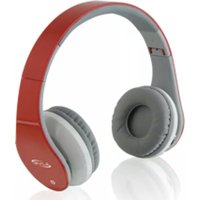
| Product Type | Over-Ear Stereo Headphones |
| Brand | iLive |
| Model | IAHP87 |
| Driver Size | 40 mm |
| Impedance | 32 Ω |
| Frequency Response | 20 Hz – 20 kHz |
| Sensitivity | 105 dB ± 3 dB |
| Connectivity | Wired 3.5 mm audio jack |
| Cable Length | 1.2 m (approx.) |
| Weight | 150 g (0.33 lb) |
| Power Source | Passive (no battery required) |
| Ear Cushion Material | Foam with leatherette covering |
| Adjustable Headband | Yes |
| Foldable Design | Yes (for portability) |
| In-Line Microphone | No |
| Volume Control | On cable (inline remote) |
| Cleaning Instructions | Wipe with soft, dry cloth. Do not use liquids. |
| Safety Instructions | Do not use at high volume for extended periods to prevent hearing damage. |
| Spare Parts Availability | Replacement ear pads available separately |
| Repairability | Ear pads and cable can be replaced by user |
| Warranty | Limited 1-year warranty |
| Compatibility | Smartphones, tablets, PCs, MP3 players with 3.5 mm jack |
| Color Options | Black (typically) |
| Package Contents | Headphones, audio cable, user manual |
Frequently Asked Questions - IAHP87 iLive
How do I connect the iLive IAHP87 headphones to my device?
Plug the 3.5 mm audio jack into your device's headphone port. No additional setup is needed.
The sound is only coming from one side. What should I do?
Check that the audio jack is fully inserted. If the issue persists, test with another device to isolate the problem. The cable may be damaged and require replacement.
Can I use these headphones for gaming?
Yes, they work with any device that has a 3.5 mm audio output, including gaming consoles, PCs, and mobile devices. Note that they do not have a built-in microphone.
How do I clean the ear cushions?
Gently wipe the ear cushions with a soft, dry cloth. Avoid using water or cleaning agents as they may damage the material.
Are these headphones compatible with iPhones without a headphone jack?
You will need a Lightning to 3.5 mm adapter to use these headphones with an iPhone that lacks a headphone jack.
What is the warranty period?
The iLive IAHP87 comes with a limited 1-year warranty. Please contact iLive support for warranty claims.
Can I replace the ear pads if they wear out?
Yes, replacement ear pads are available separately. They can be removed by gently pulling them off and replaced with compatible pads.
The inline remote is not working. What can I do?
Ensure your device supports inline remotes. Some devices may not be compatible. Try the headphones on a different device to test the remote functionality.
Are these headphones suitable for travel?
Yes, they are lightweight and foldable, making them easy to pack in a bag or carry-on.
What should I do if the headphones produce distorted sound?
Lower the volume on your device. Distortion often occurs at high volumes. If the issue persists, check the audio source or try a different cable.
User questions about IAHP87 iLive
0 question about this device. Answer the ones you know or ask your own.
Ask a new question about this device
No questions yet. Be the first to ask one.
Download the instructions for your Headphones in PDF format for free! Find your manual IAHP87 - iLive and take your electronic device back in hand. On this page are published all the documents necessary for the use of your device. IAHP87 by iLive.
USER MANUAL IAHP87 iLive
Manual assistant
Powered by Anthropic
Waiting for your message
Product information
Brand : iLive
Model : IAHP87
Category : Headphones