
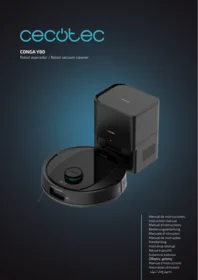
Conga M10 X Treme - Robot vacuum CECOTEC - Free user manual and instructions
Find the device manual for free Conga M10 X Treme CECOTEC in PDF.


| Product type | Robot vacuum and mop |
| Brand | Cecotec |
| Model | Conga M10 X Treme |
| Dimensions (diameter x height) | 33 cm x 9.7 cm |
| Weight | 3.5 kg |
| Dust tank capacity | 600 ml |
| Water tank capacity | 300 ml |
| Battery life | 120 minutes |
| Charging time | 4 hours |
| Battery type | Lithium-ion 5200 mAh |
| Suction power | 5000 Pa |
| Noise level | 55 dB |
| Main features | Laser mapping, vacuuming, mopping, scheduling, app and voice assistant control |
| Filtration | High efficiency HEPA filter |
| Power supply | AC adapter 100-240V, 50/60Hz |
| Maintenance and cleaning | Empty the tank after each use, clean the brushes and filter once a week |
| Safety | Anti-drop sensors, bumper, automatic return to base |
| Spare parts and repairability | Brushes, filters, tanks, batteries available on the Cecotec website |
| Warranty | 2 years |
| Box contents | Robot, charging base, adapter, water tank, side brush, replacement filter, user manual |
Frequently Asked Questions - Conga M10 X Treme CECOTEC
User questions about Conga M10 X Treme CECOTEC
0 question about this device. Answer the ones you know or ask your own.
Ask a new question about this device
Download the instructions for your Robot vacuum in PDF format for free! Find your manual Conga M10 X Treme - CECOTEC and take your electronic device back in hand. On this page are published all the documents necessary for the use of your device. Conga M10 X Treme by CECOTEC.
USER MANUAL Conga M10 X Treme CECOTEC
Safety instructions 9
- Parts and components 79
- Before use 79
- Installation 80
- Operation 81
- Cleaning and maintenance 84
- Troubleshooting 86
- Technical specifications 87
- Recycling of electrical and electronic equipment 87
- Technical support and warranty 87
- Copyright 88
- Declaration of Conformity 88
SOMMAIRE
EU01_114725 CONGA M10
EN • The coding in this manual is generic and applies to all code variants of the appliance.
Please read the following instructions carefully before using the appliance. Keep this instruction manual for future reference or new users.
- All safety instructions must be closely followed when using the appliance.
- This appliance is designed for domestic use only and is not intended for use in bars, restaurants, farmhouses, hotels, motels, and offices.
- Check the power cord regularly for visible damage. If the
cord is damaged, it must be repaired by Cecotec's Official Technical Support Service to avoid any danger.
- Do not attempt to repair the appliance yourself. Contact Cecotec's Official Technical Support Service for any query or repair.
- Do not use the appliance to vacuum liquids, lit matches, cigarette ends, hot ash, or on wet surfaces.
- Do not use this appliance on concrete, asphalt, or other rough surfaces.
- Stop using the appliance if you notice an abnormal sound or sense a temperature higher than usual.
- Do not block the appliance openings or airflow. Keep openings free of any objects, and do not block them with clothes or your fingers.
- Turn off and unplug the appliance from the mains supply when it is not going to be used for a long period of time, before cleaning or repairing, before attaching components, and before removing the battery. To unplug the appliance, pull the plug, not the cord.
- The appliance must be powered at a low safety voltage as stated on the marking.
- This appliance can be used by children aged 8 years and above and people with reduced physical, sensory, or mental capabilities or lack of experience and knowledge if they have been given supervision or instruction concerning the use of the appliance in a safe way and understand the hazards involved.
- Children must not play with the appliance.
- Cleaning and user maintenance must not be carried out by children without supervision.
- Do not use the appliance with non-rechargeable batteries.
- Unplug the appliance from the mains before removing the
battery.
- Unplug the power cord of the charging base before cleaning or maintenance.
- Before turning the appliance on, make sure to remove objects and cords that may get in the way and affect proper operation of the appliance.
- This icon means: do not use the power cord if the plug is damaged.
- CAUTION: hazards may occur if the appliance runs over the power cord.
- WARNING: the appliance has rotating parts which may pose a risk of entrapment. Exercise extreme caution.
- Supervise children to ensure they do not play with the product. Close supervision is necessary when the appliance is being used by or near children.
- This appliance must be used in accordance with this instruction manual. Cecotec will not be held liable or responsible for any damages or injuries caused by improper use.
- Make sure that the mains voltage matches the voltage specified on the appliance rating label and that the wall outlet is earthed.
- This appliance can only be disassembled by qualified personnel.
- Do not touch the cord, the socket, or the charging base with wet hands.
- Keep the robot vacuum cleaner away from clothing, curtains, and any other similar materials.
- Do not expose the robot to direct sunlight, open fire, or wet environments.
- Do not sit or place heavy or sharp objects on top of the appliance.
- Always place the appliance on a flat and stable surface. Avoid placing it on unstable surfaces it could fall from (such as tables or chairs).
- Turn off the robot vacuum cleaner if it's not going to be used for an extended period of time.
- Before turning the robot vacuum cleaner on, check that all connections, both on the robot and on the charging base, are in good condition.
- Avoid operating the robot vacuum cleaner under extremely high or low temperatures.
- The appliance can only be used with the supply unit provided with it.
- The appliance must only be used with the battery supplied with the appliance or with compatible charging units approved by Cecotec.
- Do not use accessories that are not compatible and/or not approved by Cecotec.
- Disconnect the appliance from the power socket before removing the battery or carrying out any maintenance tasks.
- Remove the battery from the appliance interior before disposing of the robot vacuum cleaner.
- The charging base must not be plugged to the mains socket when cleaning or maintenance tasks are to be carried out.
Battery instructions
- The appliance includes a Li-ion battery. Do not incinerate or expose it to high temperatures, as it may explode.
- Batteries may leak under extreme conditions. Do not touch any liquid that leaks from the battery. If the liquid comes into contact with skin, wash immediately with soap and water. If the liquid gets into the eyes, wash them
immediately with clean water for a minimum of 10 minutes and seek medical attention. Wear gloves to handle the battery and dispose of it immediately in accordance with local regulations.
- Avoid contact between the battery and small metallic objects such as paper clips, coins, keys, nails, or screws.
- Before a new battery is used or the battery is used for the first time after long-term storage, fully charge the battery.
- After long periods of storage, it may be necessary to charge and discharge the battery several times to obtain maximum performance.
- Keep batteries out of the reach of children when there is a risk of ingestion.
- Battery ingestion can cause burns, soft tissue perforation and death. Severe burns may occur within two hours of ingestion.
- In case of battery ingestion, please seek medical help immediately.
- Keep the original instruction manual for future reference.
- Use the battery only for its intended purpose.
- Never modify the battery in any way.
- Batteries must be removed from the appliance for safe disposal.
- The batteries' power supply terminals must not be short-circuited.
- If the appliance is to be stored for a long period of time, it is advisable to remove the batteries.
- Batteries must be inserted in the correct position. Pay attention to polarity when inserting it.
- WARNING: to recharge the battery, use only the power supply unit provided with the appliance.
INSTRUCTIONS DE SÉCURITÉ
Rated Input: 19 V 0.6 A
https://cecotec.es/es/information/declaration-of-conformity
1. PARTS AND COMPONENTS
Robot vacuum cleaner. Fig. 1.1:
- Back Home
- Start/Pause button
- Top cover
- Anti-collision sensor
- Water-tank release button
- Dust container
- Free-detection sensor
- Side brushes
- Drive wheels
- Charging terminals
- Omnidirectional wheel
- Battery
- Suction nozzle
Robot vacuum cleaner light indicators
- Steady blue light: the robot is cleaning or fully charged
- Steady blue light: robot in standby mode
- Fast flashing blue light: looking for charging base
- Slow flashing blue light: charging
- Fast flashing red light: error
Self-emptying base. Fig. 1.2:
- Operation light indicator
- Charging connector
- Charging terminals
Note:
The graphics in this manual are schematic representations and may not exactly match the product.
2. BEFORE USE
- This robot vacuum cleaner comes in packaging designed to protect it during transport. Take the robot vacuum cleaner out of its box. You can keep the original box and other packaging materials in a safe place to prevent damage to the robot vacuum cleaner if you
ENGLISH
need to transport it in the future. If you wish to dispose of the original packaging, make sure all items are recycled properly.
- Check that all parts and components are included and in good condition. If any of them are missing or damaged, please contact Cecotec's Official Technical Support Service immediately.
Box content. Fig. 1.3:
- Robot vacuum cleaner
- Charging base
- Charger
- Mop and mop holder
- Water tank
- Dust container
- Self-cleaning brush
- 2 side brushes
- Instruction manual
- Do not remove the product's serial number in order to keep proper traceability if technical assistance is required.
WARNINGS:
- Remove all objects around the robot vacuum cleaner such as clothing, papers, cables, curtains, or other fragile objects which may block or slow down the operation of the robot vacuum cleaner. Fig. 2
- If the room to be cleaned is near a balcony or stairs, a physical barrier must be placed to prevent product damage and ensure safe operation. Fig. 3
- Direct exposure to sunlight or heavy light contrasts may affect the correct operation of the sensors. If this happens, the robot vacuum cleaner will cease operation. Move it to a new location for it to start operating again.
- Do not use the robot vacuum cleaner to vacuum up liquids.
3. INSTALLATION
- Place the charging base against a wall and leave a minimum free space of 1.5 metres to the front and 0.5 metre to each side. Fig. 4
- Connect the charging base to a power socket.
-
Install both side brushes in their corresponding slots, located on the bottom part of the robot vacuum cleaner. Press until they click well into place. Fig. 5.
-
Place the robot vacuum cleaner in the charging base and make sure the charging terminals on the robot match those of the base. Once the robot vacuum cleaner is properly placed, it will beep once, and the indicator light will come on. If the light is flashing, it means the battery is not completely charged. To ensure the maximum cleaning time, wait until the light turns steady, as this will indicate the battery is fully charged and the robot vacuum cleaner is ready to clean. Fig. 6.
4. OPERATION
Mobile App
- To use all available functions, it is recommended to control the robot vacuum cleaner via the dedicated app. Scan the QR code below for more information:

- Make sure the robot vacuum cleaner is plugged to the electric circuit.
- Before starting, make sure your smartphone is connected to a working Wi-Fi network.
- Enter the Wi-Fi password on the smartphone app, tap on "Next", and follow the instructions shown on the app.
Note:
- Due to the improvement and update of the app, operation may differ slightly from the above description. Follow the instructions shown on the app.
- The robot vacuum cleaner supports only 2.4 GHz Wi-Fi networks, and the Wi-Fi name cannot contain double quotes.
Starting the cleaning
- Hold down the Start/Pause button on the robot vacuum cleaner to turn it on.
- Press the Start/Pause button on the robot vacuum cleaner or on the app to start cleaning.
Note
- If the robot vacuum cleaner runs out of battery while cleaning, it will automatically return to the charging base. Once the battery is fully charged, the robot can start a new cleaning
ENGLISH
cycle.
- If there is no good access to the charging base, the robot vacuum cleaner will not be able to return to it. If this happens, place it manually on the charging base.
Pause cleaning
- Press the Start/Pause button on the robot vacuum cleaner or on the app to pause the cleaning process.
- Press the Start/Pause button on the robot vacuum cleaner or on the app to resume the cleaning process.
Return to the charging base
Press the Back home button on the robot or on the app (with a house icon) to send the robot vacuum cleaner to the charging base. The robot vacuum cleaner will stop vacuuming until it reaches the base.
Switching off the lawn mower
Hold down the Start/Pause button on the robot vacuum cleaner to turn it off.
Warning
If you are not going to use the robot vacuum cleaner for an extended period of time, it is advisable to leave it switched off until new use.
Cleaning modes
The robot vacuum cleaner includes different modes and functions that can be toggled from the app.
Auto Mode
- Press the Start/Pause button or select the auto cleaning mode on the app, then the robot vacuum cleaner will start the automatic cleaning.
- The robot vacuum cleaner will clean the whole surface, edges, around objects such as tables, chairs etc., until the battery is low, then it will return to the charging base.
Random mode
- The robot vacuum cleaner will clean randomly until the battery percentage is low and it will return to the charge base.
- To activate this mode, press the random cleaning button on the app.
Spiral mode
- When you select this mode, the robot vacuum cleaner will intensively clean a specific spot at maximum power. It will start cleaning at a specific spot and will move outwards in a spiral motion (1 metre). Then, it will return to the starting spot in an inwards spiral motion again.
- Before using this mode, place it in the spot you wish to clean.
- When it finishes and returns to the starting point, the robot vacuum cleaner will stop at the same point where it started cleaning and will start to return to the base.
- To activate this mode, press the spiral cleaning button on the app.
Square Spiral mode
- When you select this mode, the robot vacuum cleaner will intensively clean a specific spot at maximum power. It will start cleaning at a specific spot and will move outwards in a square-spiral motion (1 metre), and it will return to the starting spot in an inwards square-spiral motion.
- Before using this mode, place it in the spot you wish to clean.
- When it finishes and returns to the starting point, the robot vacuum cleaner will stop at the same point where it started cleaning and will start to return to the base.
- To activate this mode, press the spiral cleaning button on the app.
Edge Mode
- When you select this mode, the robot vacuum cleaner will clean along the wall and around furniture (table legs, chair legs, etc.) until it goes back to the charging base.
- Press the edge cleaning button on the app.
Mopping mode. Fig. 7
- Remove the water tank.
- Lift the tank silicone lid and fill it with water.
- Refit the water tank.
- Attach the mop to the mop holder and the latter to the robot vacuum cleaner.
- Select the mopping level through the app. There are three mopping levels: low, medium and high.
- Once the desired mopping level has been selected, the robot vacuum cleaner will enter All in One mode to simultaneously vacuum, scrub, sweep, mop, and dry.
Note
- If you only wish to mop, do not fill the water tank.
- If the tank is full, the robot vacuum cleaner will rotate on its own to moisten the mop as it leaves the base.
ENGLISH
- To ensure perfect mopping right from the start, it is recommended to evenly dampen the mop before fixing it in place. It is also recommended to wash the mop after every use.
- It is recommended to be present when the robot vacuum cleaner is scrubbing.
- When the robot vacuum cleaner returns to the charging base, you must remove the mop. Do not leave the robot vacuum cleaner charging with the mop assembled.
Back Home mode
Press the Back home button on the robot vacuum cleaner or on the app (with a house icon) to send the robot to the charging base. The robot vacuum cleaner will stop vacuuming until it reaches the base.
Manual mode
Select the manual cleaning mode on the app to steer your robot vacuum cleaner manually.
Power Level function
Select the power level on the app to control the robot vacuum cleaner's suction power during cleaning. There are four suction power levels: Off, light, normal and strong.
Cleaning schedule
To make cleaning easier, the robot vacuum cleaner has a function that allows it to be programmed daily from the app. According to the setting, the robot vacuum cleaner will automatically start cleaning in the selected days at the desired time.
5. CLEANING AND MAINTENANCE
Dirt tank. Fig. 8
- Lift the top cover of the robot vacuum cleaner and remove the dust tank.
- Open the tank by unlocking the side flap and empty it.
- Once you have finished, put the dirt tank back into the robot vacuum cleaner.
High-efficiency filter. Fig. 9
- The high-efficiency filter is designed with fibres that help trap dust particles, dust mites, pollen, etc. It is very important to periodically clean the filter, to prevent these particles from building up in the filter, causing efficiency loss. It is convenient to carry out this maintenance once a week.
- It is recommended to replace the high-efficiency filter with a new one without exceeding 160 cleaning hours.
Tip
You can remove dirt from the high-efficiency filter with a small brush or gently shake the filter on a hard surface to remove the dust. The high-efficiency filter cannot be washed.
Primary mesh filter and sponge filter. Fig. 9
The filtering system is featured with a primary mesh filter and a sponge filter, located next to the high-efficiency filter. It is suggested to replace them either after a maximum of 160 hours of use or when they are worn out due to operation.
Tip
Dirt can be removed with a small brush or by shaking carefully against a hard surface for dust to fall off. You can also use warm water without detergents to obtain better results. Always make sure they are completely dry before installing them again; otherwise, moisture can reach the robot vacuum cleaner's motor and damage it.
Cleaning the fall-detection sensors. Fig. 10
Use a clean, dry and soft cloth to wipe off any dust from the fall-detection sensors located on the robot vacuum cleaner's lower part.
Warning
Do not apply cleaning products directly on the sensors.
Side brushes.
Side brushes are designed with multiple bristles and are used to push dirt towards the suction mouth and to thoroughly clean edges and corners. These brushes can wear out over time, negatively affecting cleaning efficiency. For this reason, it is suggested to replace each side brush after a maximum of 220 hours or less.
Tip
It is recommended to clean the side brushes once a week with the help of the self-cleaning brush.
Sensors
- The robot vacuum cleaner has different types of sensors, for example, proximity sensors that allow the robot to move around while detecting obstacles or fall-detection sensors that help the robot detect slopes or possible gaps/unevenness such as staircases. These sensors are always in contact with dust particles, and therefore can deteriorate over time, causing possible navigation errors.
ENGLISH
- It is suggested to clean all the robot sensors with a dry and soft cloth after a maximum of 35 hours of operation or less.
Cleaning the drive wheels and the omnidirectional wheel Fig. 11
Use a clean, dry, soft cloth to wipe dust off the drive wheels and the omnidirectional wheel located on the bottom of the robot vacuum cleaner.
Self-emptying base. Fig. 12
Use a clean, dry, soft cloth to wipe dust off the infrared lens and charging terminals. It is recommended to clean them once a month.
Charging and replacing the battery.
- To lengthen the battery shelf life, leave the robot vacuum cleaner to charge in the charging base when not in use.
- Remove the battery and store it in a safe, dry place if the robot vacuum cleaner will not be used for a long period of time.
To replace the battery, follow the instructions below:
- Unscrew the screws on the battery compartment, remove the battery cover, and the battery itself.
- Insert the new battery with the battery label facing up.
- Put the battery and the battery-compartment cover back in place and properly fix the screws again.
6. TROUBLESHOOTING
| Beeps | Error | Solution |
| 1 | Low battery | Place the robot in the charging base. |
| Bumper error. | Carefully clean the sensors with a clean, dry cloth.Restart the robot vacuum cleaner. To do this, switch the robot off and on. | |
| 2 | Fall-detection sensor error. | Carefully clean the sensors with a clean, dry cloth.Restart the robot vacuum cleaner. To do this, switch the robot off and on. |
| 4 | Drive wheel fault. | Check if the drive wheel is blocked. |
| 0 | Charging error. | Check if the charging base indicators are on. Otherwise, contact the official Technical Support Service of Cecotec. Clean the charging terminals with a clean, dry cloth. Check if the robot vacuum cleaner beeps when it gets to the charging base. Contact the official Technical Support Service of Cecotec. |
7. TECHNICAL SPECIFICATIONS
Product: Conga M10
Product reference: EU01_114725
Adapter voltage: 100 - 240 V
Adapter frequency: 50 / 60 Hz
Battery: 14.4 V, 2000 mAh
Rated Input: 19 V 0.6 A
Frequency bands: 2.4 GHz + Bluetooth
Technical specifications may change without prior notice to improve product quality.
Made in China | Designed in Spain
8. RECYCLING OF ELECTRICAL AND ELECTRONIC EQUIPMENT

This symbol indicates that, according to the applicable regulations, the product and/or battery must be disposed of separately from household waste. When this product reaches the end of its shelf life, you should dispose of the batteries/accumulators and take them to a collection point designated by the local authorities.
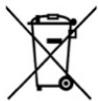
Consumers must contact their local authorities or retailer for information concerning the correct disposal of old electrical and electronic appliances and/or their batteries.
Compliance with the above guidelines will help protecting the environment.
9. TECHNICAL SUPPORT AND WARRANTY
Cecotec shall be liable to the end user or consumer for any lack of conformity that exists at the time of product delivery under the terms, conditions and deadlines established by applicable regulations.
ENGLISH
Repairs should be carried out by qualified personnel.
If at any moment you detect any problem with your product or have any doubt, do not hesitate to contact the official Cecotec Technical Support Service at +34 96 321 07 28.
10. COPYRIGHT
The intellectual property rights over the texts in this manual belong to CECOTEC
INNOVACIONES, S.L. All rights reserved. The content of this publication may not, either in part or in its entirety, be reproduced, stored in a retrieval system, transmitted or distributed by any means (electronic, mechanical, photocopying, recording or similar) without prior authorisation from CECOTEC INNOVACIONES, S.L.
11. DECLARATION OF CONFORMITY
CE Cecotec Innovaciones hereby declares that this robot vacuum cleaner, model EU01_114725 - Conga M10, is in conformity with the Radio Equipment Directive 2014/53/EU.
The full text of the EU Declaration of Conformity can be found on the following website: https://cecotec.es/es/information/declaration-of-conformity
1. PIÈCES ET COMPOSANTS
Rated Input: 19 V 0.6 A
https://cecotec.pt/pt/information/declaration-of-conformity
1. ONDERDELEN EN COMPONENTEN
6. PROBLEEMOPLOSSING
https://cecotec.es/es/information/declaration-of-conformity
1. CZĘŚCI I KOMPONENTY
https://cecotec.es/es/information/declaration-of-conformity
CATALÀ
1. PECES I COMPONENTS
Robot aspirador. Fig. 1.1:
https://cecotec.es/ca/information/declaration-of-conformity
MAGYAR
https://cecotec.es/es/information/declaration-of-conformity

Fig./Img./Abb./Afb./Rys. 1.1
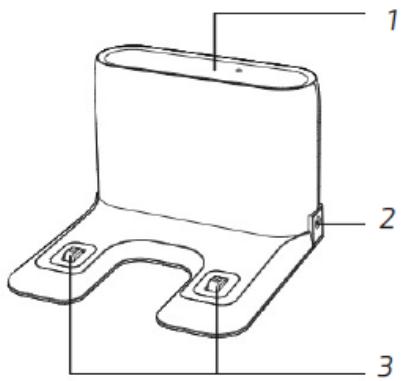
Fig./Img./Abb./Afb./Rys. 1.2

Fig./Img./Abb./Afb./ Rys. 1.3


Fig./Img./Abb./Afb./Rys. 2

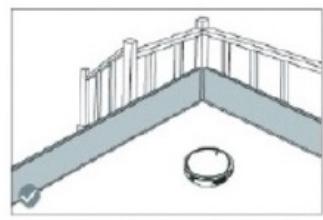
Fig./Img./Abb./Afb./Rys. 3
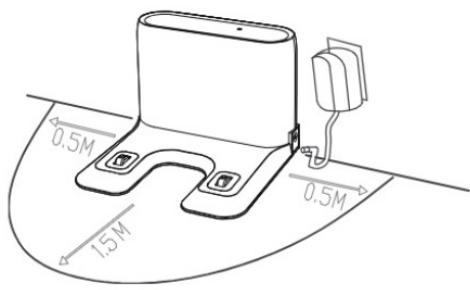
Fig./Img./Abb./Afb./Rys. 4

Fig./Img./Abb./Afb./Rys. 5

Fig./Img./Abb./Afb./Rys. 6
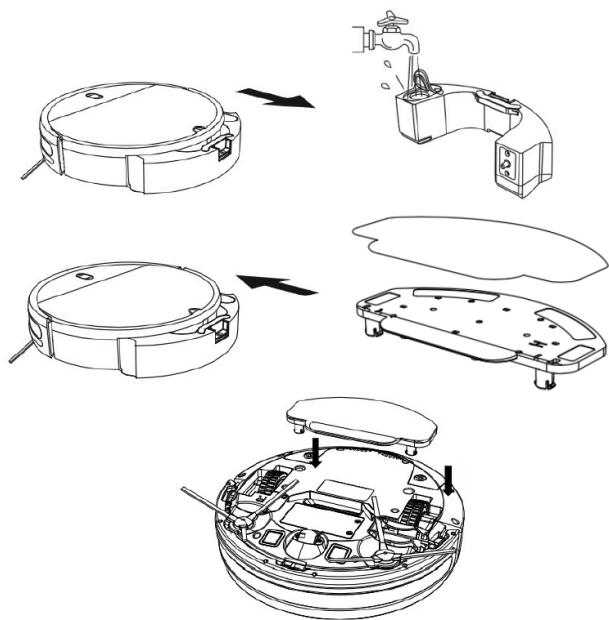
Fig./Img./Abb./Afb./Rys. 7
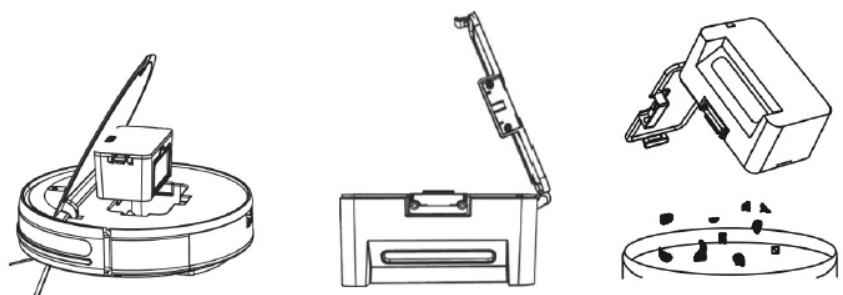
Fig./Img./Abb./Afb./Rys. 8


Fig./Img./Abb./Afb./Rys. 9
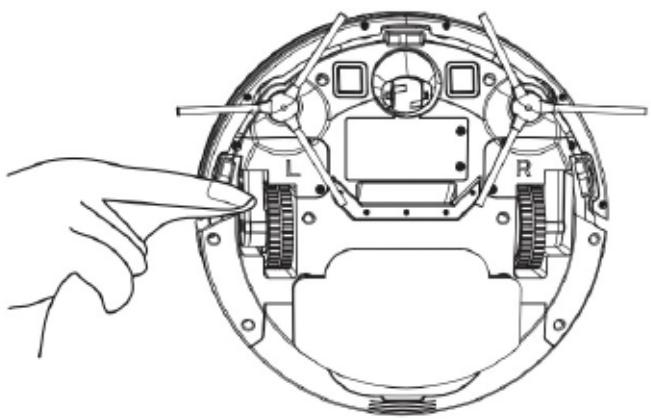
Fig./Img./Abb./Afb./Rys. 10
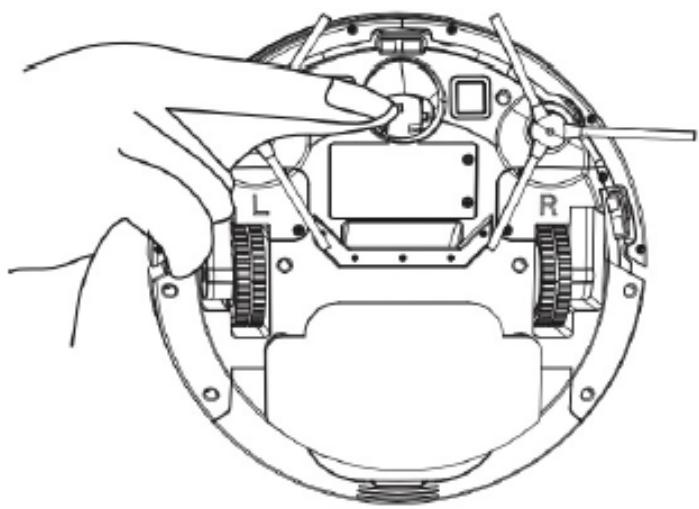
Fig./Img./Abb./Afb./Rys. 11

Fig./Img./Abb./Afb./Rys. 12
www.cecotec.es
- SOMMAIRE
- Battery instructions
- INSTRUCTIONS DE SÉCURITÉ
- PARTS AND COMPONENTS
- Robot vacuum cleaner. Fig. 1.1:
- Robot vacuum cleaner light indicators
- Self-emptying base. Fig. 1.2:
- BEFORE USE
- ENGLISH
- Box content. Fig. 1.3:
- WARNINGS:
- INSTALLATION
- OPERATION
- Mobile App
- Note:
- Starting the cleaning
- Note
- Pause cleaning
- Return to the charging base
- Switching off the lawn mower
- Warning
- Cleaning modes
- Auto Mode
- Random mode
- Spiral mode
- Square Spiral mode
- Edge Mode
- Mopping mode. Fig. 7
- Back Home mode
- Manual mode
- Power Level function
- Cleaning schedule
- CLEANING AND MAINTENANCE
- Dirt tank. Fig. 8
- High-efficiency filter. Fig. 9
- Primary mesh filter and sponge filter. Fig. 9
- Cleaning the fall-detection sensors. Fig. 10
- Side brushes.
- Sensors
- Cleaning the drive wheels and the omnidirectional wheel Fig. 11
- Self-emptying base. Fig. 12
- Charging and replacing the battery.
- TROUBLESHOOTING
- TECHNICAL SPECIFICATIONS
- RECYCLING OF ELECTRICAL AND ELECTRONIC EQUIPMENT
- TECHNICAL SUPPORT AND WARRANTY
- COPYRIGHT
- DECLARATION OF CONFORMITY
- PIÈCES ET COMPOSANTS
- ONDERDELEN EN COMPONENTEN
- PROBLEEMOPLOSSING
- CZĘŚCI I KOMPONENTY
- CATALÀ
- PECES I COMPONENTS
- Robot aspirador. Fig. 1.1:
- MAGYAR
Brand : CECOTEC
Model : Conga M10 X Treme
Category : Robot vacuum