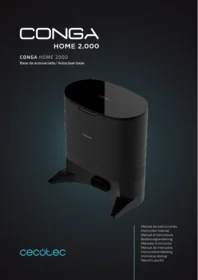
Conga Home 2000 - Robot vacuum CECOTEC - Free user manual and instructions
Find the device manual for free Conga Home 2000 CECOTEC in PDF.


| Brand | Cecotec |
| Model | Conga Home 2000 |
| Product type | Robot vacuum |
| Dimensions (diameter x height) | 33 cm x 8.5 cm |
| Weight | 2.8 kg |
| Power supply | Li-ion battery 14.8 V / 2600 mAh |
| Battery life | About 90 minutes in standard mode |
| Dustbin capacity | 0.6 L |
| Filtration system | Washable HEPA filter |
| Suction power | 2500 Pa |
| Main functions | Automatic vacuuming, brushing, programming, obstacle detection, return to base |
| Sensors | Infrared and drop sensors |
| Cleaning mode | Random, spiral, edge |
| Noise level | Less than 60 dB |
| Maintenance | Empty the bin after each cycle, clean the brushes and filter regularly |
| Safety | Automatic shutdown in case of overheating or blockage, cliff detection |
| Spare parts | Main brush, side brushes, HEPA filter, battery, wheels |
| Included accessories | Charging station, power adapter, replacement brushes |
| Warranty | 2 years |
Frequently Asked Questions - Conga Home 2000 CECOTEC
User questions about Conga Home 2000 CECOTEC
0 question about this device. Answer the ones you know or ask your own.
Ask a new question about this device
Download the instructions for your Robot vacuum in PDF format for free! Find your manual Conga Home 2000 - CECOTEC and take your electronic device back in hand. On this page are published all the documents necessary for the use of your device. Conga Home 2000 by CECOTEC.
USER MANUAL Conga Home 2000 CECOTEC
Safety instructions 6
- Parts and components 26
- Before use 26
- Operation 26
- Cleaning and Maintenance 27
- Troubleshooting 28
- Technical specifications 28
- Disposal of old electrical appliances 29
- Technical support and warranty 29
SOMMAIRE
- Keep this product out of the reach of children and persons with reduced physical, sensory or mental capabilities.
- Avoid contact of the suction inlet with animal hair, fingers or other parts when the device is in operation.
- Do not use this unit to clean lighted objects, such as cigarettes.
- Switch off or unplug the unit before cleaning.
- Do not use a damp cloth or any liquid to clean any part of the product.
- Use the product as specified in this manual. Any loss or damage due to improper use of the product will be the sole responsibility of the user.
- This product is not a toy. Keep children and pets away from this product while it is in operation.
- Avoid sitting or standing on the product.
- The product comes with a regionally approved power cord, which can only be used in standard AC outlets. Do not use any other type of power cord. If you need to replace the power cord, please contact our Customer Service to ensure that you choose the correct product.
- Do not disassemble the device unless permitted by this manual. This unit does not include spare parts. If you need to disassemble the product, contact qualified service personnel.
- Use this product only in dry indoor spaces to avoid electric shock.
- Do not use this product with wet or damp hands.
- Store or use this product at room temperature.
- Unplug the unit before cleaning to reduce the risk of electric shock.
-
Do not put any liquid into this unit or immerse it in water.
-
Do not use this unit outdoors or in damp environments.
- Do not use this unit if the cord or plug is damaged. In case of malfunction, send the product to our Customer Service.
INSTRUCTIONS DE SÉCURITÉ
- Cover sealing ring
- Fan filter holder
Back
- Air outlet
Base - Transparent dust tube cover
2. BEFORE USE
- Take the product out of the box and remove all packaging materials.
- Check carefully if there is any damage. If any is observed, contact as soon as possible the Technical Support Service of Cecotec for advice or reparation.
3. OPERATION
Installation
- Place the unit on a flat surface, 6 cm from the wall. Fig. 2
- Maintain a separation of at least 1.2 m in front and 0.5 m on both sides of the unit. Fig. 3
Information on the autoclean base
The autoclean base includes a charging and emptying function and a new dust bag. After cleaning, the robot will automatically return to the autoclean base. If the robot does not have a water tank installed, the sautoclean base will empty the dust tank and charge it. If the water tank is installed on the robot, it will be charged automatically. When the robot is on the autoclean base, remove the water tank and the autoclean base will empty the dust tank and charge the robot.
4. CLEANING AND MAINTENANCE
Changing of the bag:
The flashing orange indicator light indicates that the dust bag is full, or that you should change the dust bag as specified by the APP. It is recommended to change the dust bag every 6-8 weeks. Fig. 4
Opening
- Pull on the handle to remove the dust bag.
- Discard the removed dust bag.
- Insert a new one.
- Replace the cover.
Dust tube cleaning
If the indicator light flashes orange when the dust bag is not full, unplug and rotate the unit to check if there is a blockage in the transparent cover. If so, remove the screws with a screwdriver as shown in the picture on the right. Then open the transparent cover and remove the lock.
Fig. 5 (Transparent dust tube cover)
Remove the screws with a screwdriver and avoid violent removal. Replace the transparent cover.
Maintenance
Cleaning of the infrared lens and the charging/autoclean indicator
Check if the infrared lens and the charging/emptying indicator are dirty. If so, remove the dirt with a clean, dry cloth and make sure they are completely clean. It is recommended to clean them once a month. Fig. 6
Fan filter holder cleaning
Check the fan filter holder for lint or dirt. If so, remove them with a clean, dry cloth. It is recommended to clean them once a month. Fig. 7
5. TROUBLESHOOTING
The LED indicator shows the product status on the front of the unit or on the APP:
| LED indicator | Common problem | Solution |
| Orange oscillating indicator light | Dirt bag missing, fan does not start or other faults | 1. Check if the dirt bag is missing. If so, insert one.2. Check that the dirt bag is installed correctly. 3. Frequent emptying may cause overheating or fan failure. Wait 30 minutes before starting a new emptying. |
| Dirt bag full or blocked | 1. Replace the dirt bag with a new one.2. Make sure that the cover of the unit is properly closed and sealed. If the robot vacuum cleaner is charging in the unit, you can try turning the unit on to perform an autoclean. Follow these steps to initiate an autoclean manually: Press the power button on the robot to start it. Then press any button to pause the robot after it has left the auto empty base. Press "Recharge" on the robot to return it to the autoclean base. Automatic charging will start when auto emptying is finished.3. Remove dirt from the suction inlet at the bottom of the robot and on the autoclean base.4. Switch off the autoclean base. Rotate the unit to check if there is a blockage in the transparent cover. If so, remove the screws with a screwdriver. Then open the transparent cover and remove the lock. |
6. TECHNICAL SPECIFICATIONS
Product reference: 05662
Product: Conga Home 2000
Size: 321 X 270. X 174 mm
Rated power: 650 W
Nominal input: 220-240 V\~ 50/60 Hz
Nominal output: 19V DC, 1A
Made in China | Designed in Spain
7. DISPOSAL OF OLD ELECTRICAL APPLIANCES

The European directive 2012/19/EU on Waste Electrical and Electronic Equipment (WEEE) specifies that old household electrical appliances must not be disposed of with the normal unsorted municipal waste. Old appliances must be collected separately, in order to optimise the recovery and recycling of the materials they contain and reduce the impact on human health and the environment.
The crossed out "wheeled bin" symbol on the product reminds you of your
obligation to dispose of the appliance correctly.
Consumers must contact their local authorities or retailer for information concerning the correct disposal of old appliances and/or their batteries.
8. TECHNICAL SUPPORT AND WARRANTY
This product is under warranty for 2 years from the date of purchase, as long as the proof of purchase is submitted, the product is in perfect physical condition, and it has been given proper use, as explained in this instruction manual.
The warranty will not cover the following situations:
The product has been used for purposes other than those intended for it, misused, beaten, exposed to moisture, immersed in liquid or corrosive substances, as well as any other fault attributable to the customer.
The product has been disassembled, modified, or repaired by persons, not authorised by the Cecotec official Technical Support Service.
Faults deriving from the normal wear and tear of its parts, due to use.
The warranty service covers every manufacturing defect of your appliance for 2 years, based on current legislation, except consumable parts. In the event of misuse, the warranty will not apply.
If at any moment you detect any problem with your product or have any doubt, do not hesitate to contact Cecotec official Technical Support Service at +34 963 210 728.
COPYRIGHT
The intellectual property rights over the texts, designs, photographs and illustrations in this manual belong to CECOTEC INNOVACIONES, S.L. All rights reserved. The contents of this publication may not, in whole or in part, be reproduced, stored in a retrieval system, transmitted or distributed by any means (electronic, mechanical, photocopying, recording or similar) without the prior authorization of CECOTEC INNOVACIONES, S.L.
1. PIÈCES ET COMPOSANTS
Img. 1
Partie avant
5. PROBLEEMOPLOSSING
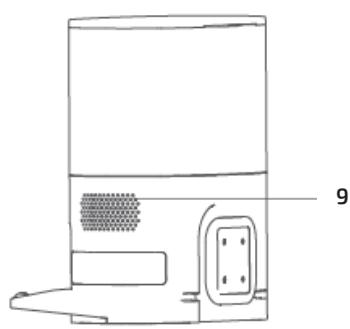
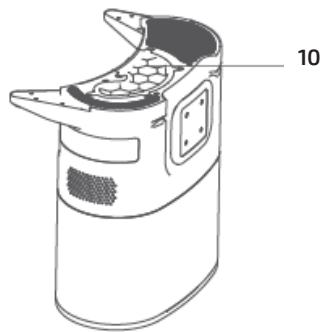
Fig./Img./Abb./Afb./Rys./Obr. 1

Fig./Img./Abb./Afb./Rys./Obr. 2

Fig./Img./Abb./Afb./Rys./Obr. 3

Fig./Img./Abb./Afb./Rys./Obr. 4

Fig./Img./Abb./Afb./Rys./Obr. 5
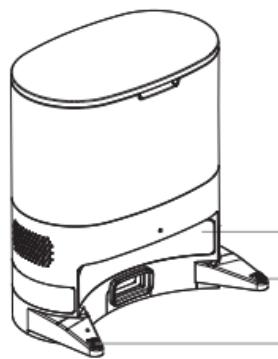
Fig./Img./Abb./Afb./Rys./Obr. 6
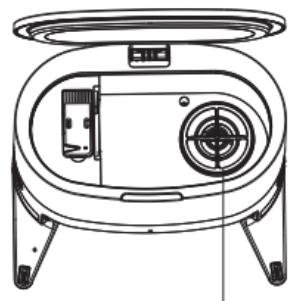
Fig./Img./Abb./Afb./Rys./Obr. 7
www.cecotec.es
Quart de Poblet, Valencia (Spain)
PE01210809
- SOMMAIRE
- INSTRUCTIONS DE SÉCURITÉ
- BEFORE USE
- OPERATION
- Installation
- Information on the autoclean base
- CLEANING AND MAINTENANCE
- Changing of the bag:
- Opening
- Dust tube cleaning
- Maintenance
- Cleaning of the infrared lens and the charging/autoclean indicator
- Fan filter holder cleaning
- TROUBLESHOOTING
- TECHNICAL SPECIFICATIONS
- DISPOSAL OF OLD ELECTRICAL APPLIANCES
- TECHNICAL SUPPORT AND WARRANTY
- COPYRIGHT
- PIÈCES ET COMPOSANTS
- PROBLEEMOPLOSSING
Brand : CECOTEC
Model : Conga Home 2000
Category : Robot vacuum