
RC-2 - Looper BOSS - Free user manual and instructions
Find the device manual for free RC-2 BOSS in PDF.


| Brand | BOSS |
| Model | RC-2 |
| Category | Looper (effect pedal) |
| Product type | Digital loop pedal |
| Dimensions (L x D x H) | 73 x 129 x 59 mm |
| Weight | 400 g |
| Power supply | 9 V DC adapter (center negative) or 9 V battery (6F22) |
| Power consumption | 70 mA (typical) |
| Recording memory | Up to 16 minutes (stereo) |
| Number of phrases | 49 (presets + 1 demo phrase) |
| Main functions | Recording, overdub, playback, stop, erase, rhythm guide, phrase training |
| Connectivity | Instrument input (1/4" jack), L/MONO output, R output, headphone jack (stereo), external footswitch jack (CTL 1, 2/EXP) |
| Controls | Control pedal (record/play/overdub/stop), level knob, phrase selector, tempo button, rhythm guide button |
| Indicators | Status LED (record, play, overdub), 7-segment display for phrase number |
| Care and cleaning | Wipe with a dry, soft cloth. Do not use solvents or abrasive cleaners. |
| Safety | Do not expose to moisture, extreme temperatures or shocks. Use the adapter recommended by BOSS. |
| Spare parts and repairability | Repair by a BOSS authorized service center. Parts available through the after-sales service network. |
| Included accessories | Power adapter (PSA series), storage pouch (optional depending on market) |
| General information | Robust compact pedal, compatible with the BOSS pedal series. |
Frequently Asked Questions - RC-2 BOSS
User questions about RC-2 BOSS
0 question about this device. Answer the ones you know or ask your own.
Ask a new question about this device
Download the instructions for your Looper in PDF format for free! Find your manual RC-2 - BOSS and take your electronic device back in hand. On this page are published all the documents necessary for the use of your device. RC-2 by BOSS.
USER MANUAL RC-2 BOSS
Thank you, and congratulations on your choice of the BOSS RC-2 Loop Station.
Before using this unit, carefully read the sections entitled: "USING THE UNIT SAFELY" and "IMPORTANT NOTES" (supplied on a separate sheet). These sections provide important information concerning the proper operation of the unit.
Additionally, in order to feel assured that you have gained a good grasp of every feature provided by your new unit, this manual should be read in its entirety. The manual should be saved and kept on hand as a convenient reference.
A battery is supplied with the unit. The life of this battery may be limited, however, since its primary purpose was to enable testing.
Copyright © 2006 BOSS CORPORATION
All rights reserved. No part of this publication may be reproduced in any form without the written permission of BOSS CORPORATION.
Main Features 4
Panel Descriptions 5
Connections 10
Turning the Power On/Off 12
Creating Loop Phrases by Recording Guitar or Bass Performances 13
Using AUTO Mode to Automatically Start Phrase Recording with Audio Input AUTO 16
Recording After Setting the Tempo with the Pedal 18
Creating Loop Phrases by Recording Phrases from a CD/Digital audio player AUTO .. 20
Playing/Over dubbing Along with a Saved Phrase 1, AUTO 23
Recording and Performing Along with the Guide 25
Using the RC-2 for Practicing—Phrase Trainer 26
Playing a Phrase Only Once (One-Shot Playback) 27
Operating the RC-2 with an External Footswitch 28
Saving and Deleting Phrases 31
About the Tempo and Time Signature 34
Changing the Battery 38
Troubleshooting 39
Specifications 41
Main Features
- The RC-2 is a compact performance tool that enables anyone to create loop phrases of exact lengths—simply and easily.
- Up to 11 different loop phrases can be saved, with a maximum total length of 16 minutes.
- Phrase playback tempo can be controlled in real time without changing the phrase's pitch.
- Undo and Redo functions allow the last overdub to be cancelled or restored, great for fixing performance mistakes made during overdubbing.
- Loop Quantize automatically adjusts the phrase length after recording, making it easy to create loop phrases that match the current tempo setting.
- The AUX IN jack allows for easy recording of audio signals from CDs and other digital audio players.
- A built-in guide—with a variety of patterns suitable for a broad range of musical genres—provides a rhythmic accompaniment to play along with while creating and playing phrases.
- You can use footswitches (optional FS-5U or FS-6) to stop performances, set tempos, and switch phrases.
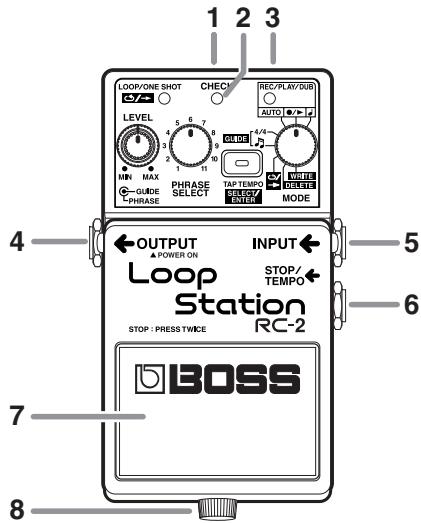
1. AC Adaptor Jack
Accepts connection of an AC Adaptor (optionally available BOSS PSA-series). By using an AC Adaptor, you can play without being concerned about how much battery power you have left.
- Use only the specified AC adaptor (PSA-series).
- If there is a battery in the unit while an AC adaptor is being used, the RC-2 will switch over to battery-powered operation should the line voltage be interrupted (i.e., power blackout or power cord disconnection).
2. CHECK Indicator
Use this indicator to check the battery.
- If the indicator dims or fails to light, it means that the battery is depleted and needs to be replaced. For instructions, refer to "Changing the Battery"; p. 38.
3. AUX IN Jack
Connect a cable from here to the headphone jack of your CD player or other digital audio player.
- The input to AUX IN is muted whenever a cable is connected to the INPUT jack.
- With the factory settings, the RC-2 applies compensation to the AUX IN signal so that it sounds appropriate when played through a typical guitar amplifier. If you're using the RC-2 with a full-range speaker system, you can defeat this compensation if desired ("Defeating AUX IN Compensation"; p. 22).
4. OUTPUT Jack
Connect a guitar amp or monitor speaker here.
- The OUTPUT jack also doubles as a power switch. Inserting a plug into the OUTPUT jack switches on the power; pull out the plug to switch the power off. To avoid unnecessary depletion of the battery, pull out the plug connected to the OUTPUT jack when you're not using the RC-2.
- Do not connect headphones to the OUTPUT jack. Doing so may damage the headphones.
5. INPUT Jack
Connect your guitar, bass, or other instrument here.
- The input to AUX IN is muted whenever a cable is connected to the INPUT jack.
6. STOP/TEMPO Jack
Connect an optional footswitch (FS-5U or FS-6) to this jack. The footswitch can be used to stop performances, set tempos, and switch phrases (p. 28).
Using a special Roland PCS-31 connection cable (optional), you can connect two FS-5Us or an FS-6.
7. Pedal Switch
- Pressing the pedal twice in quick succession stops the RC-2 during any of its operations (recording, playback, or overdubbing).
| Empty phrase tracks | Recording →Playback →Overdubbing |
| Tempo Input →Recording →Playback →Overdubbing(When MODE knob is set to “”) |
Phrase tracks containing recorded phrases
Playback Overdubbing
- Pressing the pedal twice in succession stops the recording, playback, or overdubbing.
With loop phrases:
Press the pedal twice within one second.
With one-shot phrases:
Press the pedal twice within 0.5 seconds.
TIP
Technique for Stopping Operation
Example: When you want to stop at the end of a measure with a 4/4 time signature
Press the pedal one time at the beginning of the fourth beat, then press it once again at the beginning of the first beat of the next measure.

- With loop phrases, press the pedal twice within an interval of one second; with One Shot phrases, press the pedal within an interval of 0.5 seconds.
8. Thumbscrew
Loosen this thumbscrew to open the pedal and facilitate battery replacement.
- For instructions on replacing the battery, refer to "Changing the Battery"; p. 38.
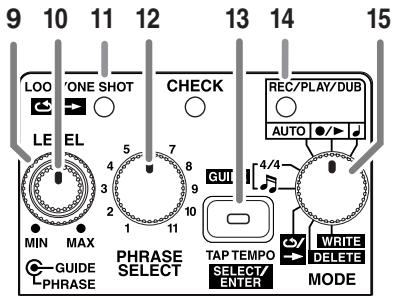
9. PHRASE LEVEL Knob
This adjusts the volume level of the phrase being played back.
- This knob does not adjust the input level of the INPUT and AUXIN IN jacks or the volume of the guide sound.
10. GUIDE LEVEL Knob
This adjusts the volume level of the guide sound.
11. LOOP/ONE SHOT Indicator
This lights up when a phrase is saved to the selected phrase track.
Green: loop phrase
Red: one-shot phrase
- A flashing light indicates that there is insufficient memory for recording or overabutting (Temporary Memory; p. 31).
- When the RC-2 lacks the memory required to save a phrase, the indicator flashes rapidly.
- The indicator flashes rapidly while phrases are read from memory. Take care to prevent the power from being cut or turned off while the indicator is flashing rapidly.
- The indicator flashes rapidly when a phrase is deleted from temporary memory (p. 31). (During this operation, the indicator's color is yellow if there is no data stored in the currently selected phrase track.)
12. PHRASE SELECT KNOB
Use this to select the phrase track for saving or playback.
13. TAP TEMPO/SELECT/ENTER Button
Use this when setting tempos, changing parameter values, and deleting and writing data.
The function changes according to the position of the MODE knob.
| MODE Knob Position | Description |
| J, ⋃→, AUTO | Set the tempo by repeatedly pressing the button at the desired speed ("Setting the tempo"; p. 35). The indicator flashes at the same rate as the tempo. |
| 4/4 | Switches the time signature each time the button is pressed (p. 36). (The time signature must be set before recording.) |
| S | Switches the guide pattern each time the button is pressed (p. 36). |
| ←/→ | Switches between loop and one-shot playback for the selected phrase track each time the button is pressed (p. 27). (This function is available only when data is stored in the selected phrase track.) |
| DELETE | Use the button to delete the selected phrase track (p. 33). (When the MODE knob is set to DELETE, the button's indicator flashes or lights in yellow.) |
| WRITE | Use the button to save a recorded phrase to the selected phrase track (p. 32). (When the MODE knob is set to WRITE, the button's indicator flashes or lights in red.) |
14. REC/PLAY/DUB Indicator
This lights or flashes during recording, playback, and overdubbing.
| Lights | Flashes Rapidly | |
| Red | During recording | During recording standby |
| Green | During playback | When phrases are switched with Phrase Shift (p. 29) |
| Yellow | During overdubbing | During UNDO and REDO (p. 15) |
15. MODE Knob
Use this knob to switch between the RC-2's operating modes.
| MODE Knob Position | Description |
| \(\triangleright\) | The pedal switch can be used to set the tempo as well as control recording, playback, and overdubbing (p. 18). |
| \(\triangleright\) / \(\triangleright\) | The pedal switch is used to control recording, playback, and overdubbing (p. 13). (This is the RC-2's normal operating mode.) |
| AUTO | After the pedal switch is used to put the RC-2 in recording standby, recording begins automat-ically when audio is received at the INPUT or AUX IN jack (p. 16). |
| 4/4 | Allows you to use the TAP TEMPO/SELECT/ENTER button to set the time signature for the guide (p. 36). |
| \(\triangleright\) | Allows you to use the TAP TEMPO/SELECT/ENTER button to select the guide sound pattern (p. 36). |
| \(\triangleright\) / \(\triangleright\) | Allows you to use the TAP TEMPO/SELECT/ENTER button to toggle between loop and one-shot playback for the selected phrase track (p. 27). |
| DELETE | Allows you to use the TAP TEMPO/SELECT/ENTER button to save a phrase to the selected phrase track the selected phrase track (p. 33). |
| WRITE | Allows you to use the TAP TEMPO/SELECT/ENTER button to save a phrase to the selected phrase track (p. 32). |
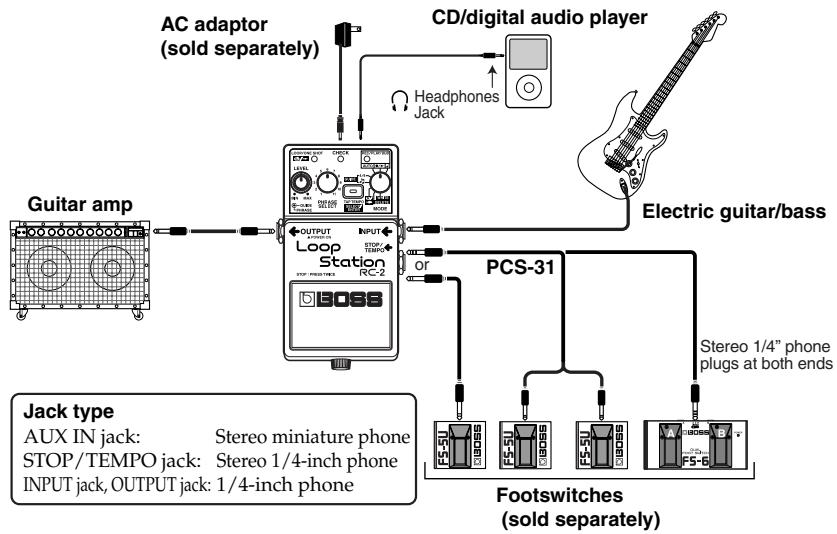
- Inserting a connecting plug into the OUTPUT jack turns on the power to the unit.
- Raise the amp volume only after turning on the power to all connected devices.
- The use of an AC adaptor is recommended as the unit's power consumption is relatively high. Should you prefer to use batteries, please use the alkaline type.
- To prevent malfunction and/or damage to speakers or other devices, always turn down the volume, and turn off the power on all devices before making any connections.
- Always make sure to have the volume level turned down before switching on power. Even with the volume all the way down, you may still hear some sound when the power is switched on, but this is normal, and does not indicate a malfunction.
-
Use a cable from Roland to make the connection. If using some other make of connection cable, please note the following precautions.
-
Some connection cables contain resistors. Do not use cables that incorporate resistors for connecting to this unit. The use of such cables can cause the sound level to be extremely low, or impossible to hear. For information on cable specifications, contact the manufacturer of the cable.
-
Once the connections have been completed, turn on power to your various devices in the order specified. By turning on devices in the wrong order, you risk causing malfunction and/or damage to speakers and other devices.
When powering up:
Turn on the power to your guitar amp last.
When powering down:
Turn off the power to your guitar amp first.
- When operating on battery power only, the CHECK indicator will become dim when battery power gets too low. Replace the battery as soon as possible.
- For detailed information about footswitches to connect to the STOP/TEMPO jack, refer to p. 28.
- Do not connect headphones to the OUTPUT jack. Doing so may damage the headphones.
NOTE (Placement)
Depending on the material and temperature of the surface on which you place the unit, its bottom cover (rubber) may discolor or mar the surface. You can place a piece of felt or cloth under the bottom cover to prevent this from happening. If you do so, please make sure that the unit will not slip or move accidentally.
Turning the Power On/Off
Turning On the Power
Insert the plug of the connection cable into the OUTPUT jack.
- This unit is equipped with a protection circuit. A brief interval (a few seconds) after power up is required before the unit will operate normally.
Turning Off the Power
Remove the plug of the connection cable from the OUTPUT jack.
Important
When turning on the power while a recorded track is being selected (the LOOP/ONE SHOT indicator is lit), the indicators on the front panel flash in a sequential order, and the LOOP/ONE SHOT indicator flashes rapidly for a few seconds.
Turning off the power while the LOOP/ONE SHOT indicator is still flashing rapidly may result in the loss of all saved data.
Never turn off the power while the LOOP/ONE SHOT indicator is flashing rapidly.
To avoid problems, select an empty phrase track whenever possible before turning the power on/off.
Caution when turning off the power
Before you turn off the power (disconnect the plug from the OUTPUT jack), make sure that all of the following conditions are satisfied.
All saved data may be lost if the power is turned off inappropriately.
- You must not be recording/playing/overdubbing a phrase (The REC/PLAY/DUB indicators must not be lit)
The MODE knob is set to either AUTO, / , or - The LOOP/ONE SHOT indicator is not flashing rapidly
Creating Loop Phrases by Recording Guitar or Bass Performances
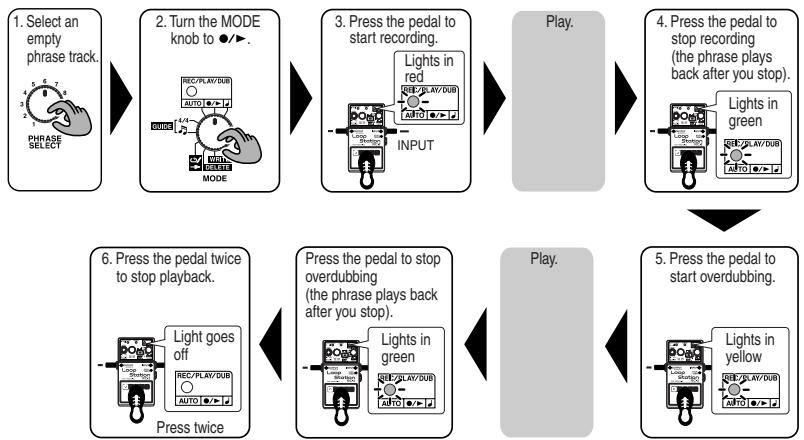
* For instructions on how to stop playback or overdubbing, refer to "Technique for Stopping Operation" (p. 6).
MEMO
On the RC-2, the process of recording an additional performance while a recorded performance plays back is called overdubbing.
1. Turn the PHRASE SELECT knob to select an empty phrase track (1-11).
The LOOP/ONE SHOT indicator remains off when a phrase track is empty.
If there are no empty phrase tracks, or when the LOOP/ ONE SHOT indicator flashes to indicate that the memory is full, delete any unnecessary phrases to free up some memory (p. 33).
2. Set the MODE knob to / .
If you are recording in time with the tempo, you can press the TAP TEMPO button several times to set the tempo. (Loop Quantize (p. 34) is enabled after the tempo is set.)
When the tempo is set, the guide starts playing; adjust the volume level of this sound with the GUIDE knob.
- For detailed information about setting the tempo, refer to "Setting the Tempo" (p. 35).
- You can also set the tempo using the STOP/TEMPO jack. Refer to "Operating the RC-2 with an External Footswitch" (p. 28).
- If you are recording a phrase with a time signature other than 4/4, set the time signature now (p. 36).
3. Press the pedal to start recording.
If the tempo has not been set, recording begins simultaneously with the press of the pedal. If the tempo has been set, recording begins one measure after the pedal is pressed.
- Recording is stopped if the pedal is pressed once while this one measure is playing back.
4. Press the pedal to stop recording.
Playback of the recorded phrase begins simultaneously.
-
If the tempo has been set, Loop Quantize automatically adjusts the phrase length to the nearest measure unit at the time the pedal is pressed. ("Loop Quantize"; p. 34). Because of this, a certain amount of time may be required from when you press the pedal until recording stops.
-
The minimum length of time required for a loop phrase is approximately 1.5 seconds. If the phrase you've recorded is shorter than that, the length of the phrase will be adjusted automatically, and then recording will stop.
5. If you want to overdub onto the phrase, press the pedal.
Pressing the pedal toggles between playback and overdubbing modes.
-
You can undo and redo the most recently recorded overdub (Undo/Redo: p. 15).
-
Recording or overabutting may stop before you are finished if the RC-2's memory runs out. If this occurs, delete any unnecessary phrases (p. 33) and try the operation again.
6. When you are finished with playback or overdubbing, press the pedal twice.
- Be sure to press the pedal two times within an interval of one second.
7. To save the recorded phrase, use the following procedure.
1) Set the MODE knob to WRITE.
2) Press the SELECT/ENTER button.
The indicator flashes in yellow.
To save the data to a phrase track other than the one currently selected, use the PHRASE SELECT knob to choose the desired save destination.
To cancel the save procedure, switch the MODE knob to a setting other than WRITE while the indicator is still flashing.
3) Press the SELECT/ENTER button.
When the save is complete, the indicator light flashes at the same rate as the tempo.
- For more details on saving, refer to "Saving Phrases (WRITE)" (p. 32).
Undoing Overdubs (UNDO/REDO)
The RC-2's Undo function allows you to cancel the most recent overdub operation. This is convenient if you make a mistake during overdubbing. If desired, you can restore the cancelled overdub with the Redo function.
To cancel (undo) the most recently recorded overhub, hold down the pedal for at least two seconds.
When you undo an overdub, the REC/PLAY/DUB indicator flashes rapidly in yellow.
- With overdubbed phrases, hold down the pedal for at least two seconds during recording or overdubbing to carry out the undo.
If the phrase has not been overdubbed, holding the pedal down for two seconds or longer during playback or overdubbing deletes the phrase in the temporary memory (p. 31).
- You cannot use undo if the RC-2 has only a small amount of memory left. (In this instance, the REC/PLAY/DUB indicator won't flash rapidly when the pedal is held down for two seconds or more, and the undo operation won't be carried out.) For more information, refer to "Unable to undo" (p. 40).
To restore (redo) a cancelled overdub, hold down the pedal again for at least two seconds. When you redo an overdub, the REC/PLAY/DUB indicator flashes rapidly.
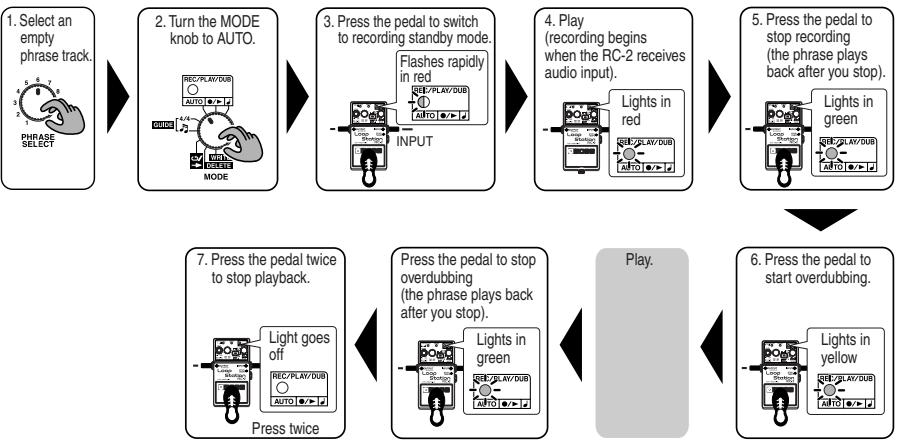
* For instructions on how to stop playback or overdubbing, refer to "Technique for Stopping Operation" (p. 6).
- Turn the PHRASE SELECT knob to select an empty phrase track (1-11).
- Set the MODE knob to AUTO.
If recording in time with the tempo, you can press the TAP TEMPO button several times to set the tempo. (Loop Quantize (p. 34) is enabled after the tempo is set.) When the tempo is set, the guide starts playing; adjust the volume level of this sound with the GUIDE knob.
- Press the pedal to put the RC-2 into recording standby.
The REC/PLAY/DUB indicator flashes rapidly in red. Pressing the pedal once while the unit is in recording standby cancels recording.
- Begin your performance.
The RC-2 starts recording as soon as it receives audio input.
- Press the pedal to stop recording.
Playback of the recorded phrase begins simultaneously.
- If you want to overdub onto the phrase, press the pedal.
Each subsequent pedal press toggles between playback and overdubbing modes.
-
You can undo and redo the most recently recorded overdub (Undo/Redo; p. 15).
-
When you are finished with playback or overdubbing, press the pedal twice.
-
Be sure to press the pedal two times within an interval of one second.
- For more details on saving, refer to "Saving Phrases (WRITE)" (p. 32).
Recording After Setting the Tempo with the Pedal
- Select an empty phrase track.

PHRASE SELECT

- Turn the MODE knob to
MODE
- Press the pedal several times in time with the tempo.
Press several times

- Hold down the pedal for two seconds to set the tempo.
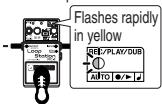
Hold down two seconds

- Press the pedal to start recording.
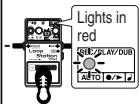

Play.
- Press the pedal twice to stop playback.
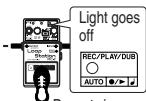
Press twice
Press the pedal to stop overdubbing (the phrase plays back after you stop).
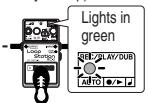
Play.


- Press the pedal to start over dubbling.
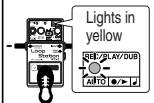

- Press the pedal to stop recording (the phrase plays back after you stop).
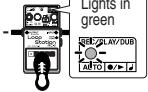
- Turn the PHRASE SELECT knob to select an empty phrase track (1-11).
- Set the MODE knob to ±b
You are now ready to set the tempo with the pedal.
- Press the pedal several times in time with the tempo.
Loop Quantize (p. 34) is enabled after the tempo is set. The guide starts playing in time with the tempo; adjust the volume level of this sound with the GUIDE knob.
- To use the current tempo setting, hold down the pedal for at least two seconds.
The REC/PLAY/DUB indicator flashes rapidly, and the tempo setting is programmed.
- Recording starts one measure after the pedal is pressed.
The recording is stopped if the pedal is pressed once while this one measure is playing back.
- Press the pedal to stop recording.
Playback of the recorded phrase begins simultaneously.
- If you want to overdub onto the phrase, press the pedal.
Pressing the pedal toggles you between playback and overdubbing modes.
-
You can undo and redo the overdubs (Undo/Redo; p. 15).
-
When you are finished with playback or overdubbing, press the pedal twice.
-
Be sure to press the pedal two times within an interval of one second.
-
For more details on saving, refer to "Saving Phrases (WRITE)" (p. 32).
-
Select an empty phrase track.

PHRASE SELECT

- Turn the MODE knob to AUTO.
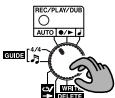
MODE

- Play back the CD or digital audio player, and adjust the volume.
- Cue up the CD/digital audio player to the desired location and pause playback.

- Press the pedal to switch to recording standby mode.
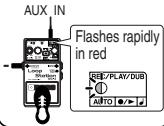

- Play back the CD or Digital audio player (recording begins).
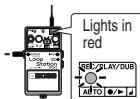
- Press the pedal twice to stop playback.
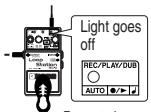
Press twice

- Press the pedal to stop recording (the phrase plays back after you stop).
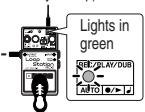
1. Turn the PHRASE SELECT knob to select an empty phrase track (1-11).
The LOOP/ONE SHOT indicator remains off when a phrase track is empty. If there are no empty phrase tracks, or when the LOOP/ONE SHOT indicator flashes to indicate that the memory is full, delete any unnecessary phrases to free up some memory (p. 33).
2. Set the MODE knob to AUTO.
3. While playing the desired audio from the CD/digital audio player, adjust its volume so the sound is not distorted.
If you wish to set the tempo before recording, press the TAP TEMPO button several times in time with the tempo of the phrase you are going to record.
- For more details on setting the tempo, refer to "Setting the Tempo" (p. 35).
- If you are recording a phrase with a time signature other than 4/4, set the time signature now (p. 36).
4. Cue up the CD/digital audio player to the desired start location and pause playback.
This puts the CD/digital audio player into playback standby mode.
5. Press the pedal to put the RC-2 in recording standby mode.
The REC/PLAY/DUB indicator flashes rapidly in red.
Pressing the pedal once while the unit is in recording standby cancels recording.
6. Start playback of the CD/digital audio player.
The RC-2 starts recording as soon as it receives audio input.
- Recording may stop before you are finished if the RC-2's memory runs out. If this occurs, delete any unnecessary phrases (p. 33) and try the operation again.
7. Press the pedal to stop recording.
Playback of the recorded phrase begins simultaneously.
- If the tempo has been set, Loop Quantize automatically adjusts the phrase length to the nearest measure unit at the time the pedal is pressed. ("Loop Quantize"; p. 34). Because of this, a certain amount of time may be required from when you press the pedal until recording stops.
- The minimum length of time required for a loop phrase is approximately 1.5 seconds. If the phrase you've recorded is shorter than that, the length of the phrase will be adjusted automatically, and then recording will stop.
- The procedures described here use the RC-2's AUTO mode to begin recording automatically when audio input is received. As an alternative, you can apply the principles described in "Creating Loop Phrases by Recording Guitar or Bass Performances" (p. 13) to recording a signal connected to the AUX IN jack.
8. When you are finished with playback, press the pedal twice.
- Be sure to press the pedal two times within an interval of one second.
- For more details on saving, refer to "Saving Phrases (WRITE)" (p. 32).
NOTE
Be sure to connect the CD or digital audio player to the AUX IN jack. If anything is connected to the INPUT jack, no signals from AUX IN will be recorded.
With the factory settings, the RC-2 applies compensation to the AUX IN signal so that it sounds appropriate when played through a typical guitar amp.
When sound that's been recorded from a CD, digital audio player, or similar source is played through a guitar amp, the midrange and high-frequency range of the sound tend to be emphasized.
If you wish to record the AUX IN signal without the compensation applied, you can defeat it using the following procedure.
Defeating AUX IN Compensation
- Set the MODE knob to / .
- Hold down the SELECT/ENTER button and turn on the power to the RC-2.
- Confirm that the LOOP/ONE SHOT indicator is lit (green), the CHECK indicator is lit (red), the REC/PLAY/DUB indicator is lit (green), then release the pedal.
After the pedal is released, only the CHECK indicator will remain lit (red).
- This status is cancelled when the power is turned off; the next time the power is switched on, AUX IN compensation is enabled.
- Unauthorized recording, distribution, sale, lending, public performance, broadcasting, or the like, in whole or in part, of a work (musical composition, video, broadcast, public performance, or the like) whose copyright is held by a third party is prohibited by law.
- Do not use this unit for purposes that could infringe on a copyright held by a third party. We assume no responsibility whatsoever with regard to any infringements of third-party copyrights arising through your use of this unit.
Playing/Over dubbing Along with a Saved Phrase
- Select the phrase track containing the saved phrase you want to play along with.

- Turn the MODE knob to
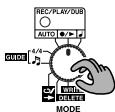
- Press the pedal to start playback.
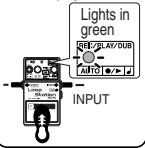
Play.


- Press the pedal to start over dubbling.
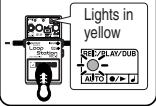
- Press the pedal twice to stop playback.
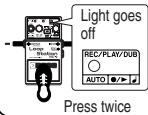
Press the pedal to stop overdubbing (the phrase plays back after you stop).
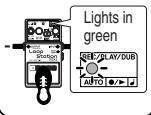

Play.
1. Turn the PHRASE SELECT knob to select the phrase track in which the desired phrase is saved.
The LOOP/ONE SHOT indicator flashes rapidly while the phrase is read from memory.
- You cannot overdub while the LOOP/ONE SHOT indicator is flashing rapidly.
2. Set the knob to / .
If you want to change the tempo, press the TAP TEMPO button several times to set the tempo.
- For more details on setting the tempo, refer to "Setting the Tempo" (p. 35).
- The tempo of a saved phrase can only be adjusted over a limited range.
3. Press the pedal to begin playback.
4. When you wish to overdub along with the phrase, press the pedal.
Each subsequent pedal press toggles between playback and overdubbing modes.
- You can undo and redo the most recently recorded overdub (Undo/Redo; p. 15).
- Recording or overdubbing may stop before you are finished if the RC-2's memory runs out.
If this occurs, delete any unnecessary phrases (p. 33) and try the operation again.
5. When you are finished with playback or overdubbing, press the pedal twice.
- Be sure to press the pedal two times within an interval of one second.
- For more details on saving, refer to "Saving Phrases (WRITE)" (p. 32).
- When you select a different phrase track while playback is inprogress, Phrase Shift does not switch to an empty phrasetrack, but instead the phrase being played back continues to play back.
If you stop with the RC-2 in this state, the PHRASESELECT knob number and phrase track containing thephrasesyouwereplayingbackwillbe different, so theindicator will flash rapidly, then flash the number of timescorresponding to the phrase track you were playing, andthen this pattern will repeat.
Recording and Performing Along with the Guide
The RC-2 has a built-in guide that can be used as a rhythmic accompaniment during recording, playback, and overdubbing. A variety of guide patterns are provided, covering many different musical styles.
- The guide does not play during phrase recording if the tempo is not set ahead of time.
However, since the tempo is set automatically once the recording is finished, the guide is then played during playback.
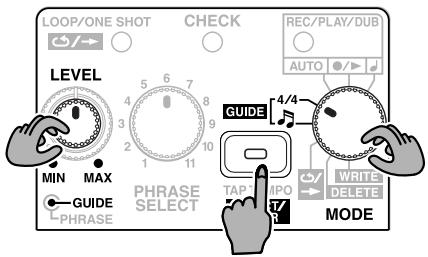
- The guide begins to play when the MODE knob is set to GUIDE 4/4 or GUIDE
- You can adjust the volume level of the guide sound with the GUIDE LEVEL knob.
If you don't want to hear the guide sound, set the GUIDE LEVEL knob to MIN.
- To change the guide pattern, set the MODE knob to
and press the SELECT/ENTER button.
The guide pattern switches each time you press the SE-LECT/ENTER button ("Guide Pattern List"; p. 37).
- When the pedal is pressed while the MODE knob is set to the GUIDE 4/4 or , the RC-2 switches back to the immediately preceding beat or pattern in the sequence.
- When the guide pattern is changed on an empty phrase track (for which no tempo has been set), the tempo changes to the default stored with the pattern.
- The guide sound stops when the MODE knob is turned to any position other than GUIDE while playback or recording is stopped.
- When the MODE knob is turned to the GUIDE 4/4 or during playback or over dubbing, the performance stops and only the guide sound plays.
- When a phrase is saved (p. 32), the currently selected guide pattern is saved along with the recorded phrase.
Using the RC-2 for Practicing—Phrase Trainer
While a saved phrase is playing back, its tempo can be adjusted without changing its pitch. This functionality is great for slowing down musical phrases—such as fast guitar solos recorded from a CD/ digital audio player—making them easier to learn and practice with.
Changing the Tempo for Practice
To adjust the tempo during phrase playback, repeatedly press the TAP TEMPO button at the desired tempo.
- You cannot alter the tempo during playback of phrases that have not been saved.
- For more details on changing the tempo, refer to "Setting the Tempo" (p. 35).
- It is not possible to adjust the tempo beyond a certain limit. If you wish to keep the modified tempo, save the phrase (p. 32).
Playing a Phrase Only Once (One-Shot Playback)

When a phrase is saved to a phrase track (1-11), it's initially set to loop playback. After it has been saved, turning the MODE knob to allows you to use the TAP TEMPo/SELECT/ENTER button to toggle between loop playback (LOOP/ONE SHOT indicator: green) and One-Shot playback (LOOP/ONE SHOT indicator: red).
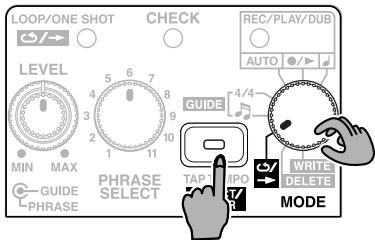
MEMO
In live performances, One-Shot playback is useful for saved phrase tracks containing twin guitar solos, special effects sounds, or any other sounds you wish to trigger "sampler style."
- When you want One-Shot playback enabled every time a desired phrase track is selected, save the phrase after switching it to One-Shot playback ("Saving Phrases (WRITE)" p. 32).
LoopPlayback
When the pedal is pressed, the phrase is played repeatedly from beginning to end.
One-Shot Playback
The phrase plays one time from beginning to end and then stops automatically.
- Overdubbing is disabled when one-shot playback is in effect. If the pedal is pressed during playback of the phrase, the phrase starts playing from the beginning again (retrigger playback). If you want to overdub, first switch to loop playback.
- You cannot switch to One-Shot playback with phrases that have not been saved after recording.
- If you want to stop a One-Shot phrase while it is playing back, press the pedal twice within a period of 0.5 seconds.
Operating the RC-2 with an External Footswitch
You can use FS-5U or FS-6 footswitches (optional) to stop recording, playback, and overdubbing, set tempos, clear the temporary memory, and switch phrases (Phrase Shift).
When Connecting an FS-5U
Connect the FS-5U to the STOP/TEMPO jack.
- Some switches manufactured by other companies may operate in the opposite way. Such footswitches cannot be used.
- If you are using the FS-5U, move the polarity switch toward the jack.
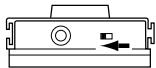
- The FS-5L cannot be used.
Press the footswitch during recording, playback, or overdubbing to stop the RC-2.
While the RC-2 is stopped, you can set the tempo by repeatedly pressing the footswitch at the desired speed. - You can clear the temporary memory by holding down the pedal for at least two seconds.
When Connecting Two FS-5Us or an FS-6
Using a special Roland PCS-31 connection cable (optional), you can connect two FS-5Us or an FS-6.
Connect the two FS-5Us or the FS-6 to the STOP/TEMPO jack.
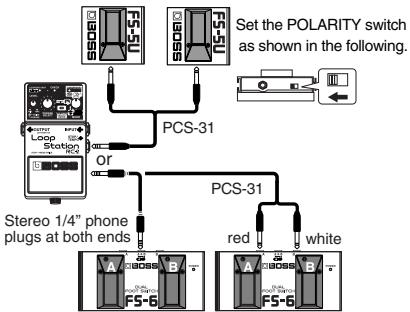
If using a FS-6 switch, set the MODE and

POLARITY switches as shown below.
- When the FS-5U connected using the plug with the white stripe or the FS-6's B pedal is pressed
- Pressing the footswitch during recording, playback, or overdubbing stops the RC-2.
- While the RC-2 is stopped, you can set the tempo by repeatedly pressing the footswitch at the desired speed.
- You can clear the temporary memory by holding down the pedal for at least two seconds.
- When the FS-5U connected using the plug with the red stripe or the FS-6's A pedal is pressed (Phrase Shift)
Each press of the footswitch selects the next saved phrase track in sequential order.
This is convenient with phrase tracks stored in the sequence the phrases are to be performed.
By storing phrase tracks in order—first an intro, then repeating sections (verse, chorus, solo), and finally an ending—you can achieve extremely polished and sophisticated loop performances.
-
Turn the PHRASE SELECT knob to select the phrase that you wish to play first.
-
If the phrase has not been saved, it will be deleted when you switch to a different phrase. For more on saving phrases, refer to "Saving Phrases (WRITE)" (p. 32).
-
Press the RC-2's pedal to begin playing the phrase.
- When you reach the point at which you want to switch phrases, press the footswitch.
The REC/PLAY/DUB indicator flashes the same count as the number for the phrase to be played next, then flashes rapidly, and repeats this pattern.
The unit switches to the phrase with the next number (or, if that is empty, the phrase after that) at the timing used in returning to the start of the loop.
When the phrase is switched, the REC/PLAY/DUB indicator flashes the same count as the number for the phrase currently being played, then remains lit, and repeats this pattern.
-
When the number of the next phrase to be played back matches the phrase number indicated by the PHRASE SELECT knob, the REC/PLAY/DUB indicator flashes rapidly, then remains lit when the phrases are switched.
-
You can advance to any phrase while the current phrase is playing by pressing the pedal switch the corresponding number of times.
- Empty phrase tracks are disregarded. For example, when you press the pedal switch one time while Phrase Track 1 is playing, if Phrase Track 2 is empty, the RC-2 will switch to Phrase Track 3.
- When you switch to a phrase set to One-Shot Playback, the phrase is played to the end, and then playback stops.
- If you use Phrase Shift during One-Shot Playback, the phrase is played to the end, then the RC-2 switches to the selected phrase track.
MEMO
Playback may not shift to the selected phrase track if Phrase Shift is used too close to the ending of the currently playing phrase. Use Phrase Shift with ample time for the RC-2 to carry out the phrase track selection.
4. Press the other footswitch or the RC-2's pedal twice in succession to end playback.
When you start playback again, the phrase played back last is replayed. If you want to play the sequence over again, use the PHRASE SELECT knob or footswitch to return to the start of the sequence.
MEMO
- You can also use the PHRASE SELECT knob to carry out Phrase Shift.
If you turn the PHRASE SELECT knob while a phrase is playing back, the newly selected phrase track will begin playing when the current phrase returns to the loop start. - You can use the footswitch while playback is stopped to select the next phrase you want to play.
- When using Phrase Shift, its possible that the current phrase track will differ from that indicated by the position of the PHRASE SELECT knob. In this case, REC/PLAY/DUB slowly flashes to indicate the current phrase track number (for example, four flashes would indicate that Phrase Track 4 is currently selected), then flashes rapidly, and then the pattern repeats.
- When you select a phrase that differs from the one indicated with the PHRASE SELECT knob, you will be unable to save or delete the phrase.
You will also be unable to save the results of any overrubbing.
Saving and Deleting Phrases
About Memory
The memory of the RC-2 is divided into two areas: Phrase tracks 1-11 and the temporary memory.
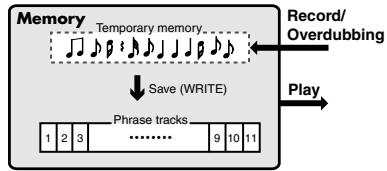
A phrase that you record or overdub is first stored in temporary memory.
The phrase stored in temporary memory is temporary, and is erased when the following operations occur:
- When you turn off the power
- When you select a different phrase track
If your recording/overdubbing produces a phrase that you wish to keep, be sure to save it to a phrase track (p. 32) before performing either of the above operations.
What is a phrase track?
A phrase track is an area of the RC-2's internal memory in which phrases are stored.
Phrases that are saved here are not deleted when the power is turned off. In addition, phrases that are saved here can be selected at any time by using the PHRASE SELECT knob.
MEMO
The maximum total length of phrases that can be saved in Phrase Tracks 1-11 is 16 minutes.
You can only change the playback tempo (p. 35) of phrases saved to the phrase tracks.
If you wish to change the playback tempo of a newly recorded or overdubbed phrase, save it to a phrase track first.
Deleting a Phrase from Temporary Memory
Hold down the pedal for at least two seconds while playback is stopped or while a phrase is being played back (during playback without over dubbing).
The LOOP/ONE SHOT indicator flashes rapidly, and the phrase in the temporary memory is deleted.
Saving Phrases (WRITE)
When you have finished recording or overdubbing, or after you have edited the tempo or other settings of a phrase, you can then save the phrase.
When you save a phrase, the tempo and beat settings current at that time are stored in the selected guide pattern.
NOTE
A phrase that has not been saved will be lost when you turn off the power or select a different phrase track.
- Set the MODE knob to WRITE.
- Press the SELECT/ENTER button.
The indicator flashes in red, and the RC-2 switches to save standby.
-
You cannot save the phrase if it differs from the phrase indicated with the PHRASE SELECT knob.
-
Use the PHRASE SELECT knob to select the save-destination phrase track.
-
You cannot save to a phrase track that already contains a phrase (when LOOP/ONE SHOT indicator is lit).
-
The LOOP/ONE SHOT indicator flashes when there is not enough memory to save the phrase.
-
To save the phrase, press the SELECT/ENTER button (to cancel the save, set the MODE knob to any setting other than WRITE).
While the save is in progress, the SELECT/ENTER indicator lights; when the save is completed, the SELECT/ENTER indicator flashes at the same rate as the tempo.
- Depending on the length of the phrase, it may take some time for the save to be completed.
When this occurs, the SELECT/ENTER indicator stays lit for a length of time and then flashes twice, and this pattern is repeated. - If you turn the MODE knob to a position other than WRITE while a different phrase track is selected as a save destination (see Step 3), the RC-2 switches phrase tracks and the recorded phrase is lost.
- Never turn off the RC-2's power while the SELECT/ENTER indicator is lit. Doing so will cause all data saved in the phrase tracks to be lost.
- Please be aware that the contents of memory can be irretrievably lost as a result of a malfunction or improper operation of the unit. To protect yourself against the risk of losing important data, save backup copies of important data you have stored in the RC-2's memory to an external recorder or other device.
- All due care is taken during repairs to avoid the loss of data. However, in certain cases, such as when there is damage to the memory, it may not be possible to restore the data.
It may be impossible to restore the contents of data that was stored in the unit's memory once it has been lost. Roland Corporation assumes no liability concerning such loss of data.
Erasing a Saved Phrase (DELETE)
- Turn the MODE knob to DELETE.
- Turn the PHRASE SELECT knob to select the phrase track that you wish to delete.
When you turn the PHRASE SELECT knob, any recorded data that has not been saved is deleted.
- Press the SELECT/ENTER button.
The indicator flashes in yellow, and the RC-2 switches to delete standby. - You cannot delete the phrase if it is different than the phrase indicated with the PHRASE SELECT knob.
- To delete the phrase, press the SELECT/ENTER button to delete the data (to cancel the deletion, set the MODE knob to any setting other than DELETE).
NOTE
While the data is being deleted, the SELECT/ENTER indicator remains lit; when the deletion is complete, the indicator goes out.
Never turn off the RC-2's power while the SELECT/ENTER indicator is lit. Doing so will cause all data saved in the phrase tracks to be lost.
- You cannot delete all phrase tracks in one operation.
Write Protect Mode
You can temporarily prevent all phrase tracks from being saved or deleted.
This condition is called "Write Protect mode."
You can select Write Protect mode with the following procedure.
- If the RC-2 is turned on, switch the power off.
- A phrase that has not been saved will be lost when you turn off the power.
- Turn the MODE knob to WRITE.
- Hold down the SELECT/ENTER button and turn on the power to the unit.
- Confirm that the LOOP/ONE SHOT indicator is lit (red), the CHECK indicator is lit (red), the REC/PLAY/DUB indicator is lit (red), then release the button.
Only the CHECK indicator will remain lit (red).
- This status is cancelled when the power is turned off; the next time the power is switched on, saving and deleting will be enabled.
About the Tempo and Time Signature
The RC-2 allows you to set the tempo and time signature separately for each phrase track. These settings also determine how the guide tone will play, and how loop quantization will occur. This means that setting the tempo and time signature before recording makes it easy to create a correct, accurate loop phrase.
- The default time signature is 4/4. If you are recording a phrase with a 4/4 time signature, it is not necessary to set the time signature.
What is Loop Quantize?
The timing at which you stop recording a phrase is very important in creating a loop that plays backs accurately. In the past, extensive practice was necessary to become skilled at operating the pedal for this purpose.
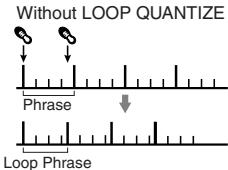
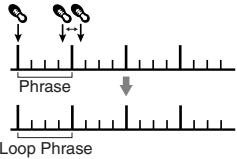
The RC-2's Loop Quantize function automatically adjusts the length of a newly recorded phrase to the measure unit defined by the tempo and time signature, even when the timing at which recording is stopped is slightly off. This allows you to easily create loop phrases with uniform measure lengths that play at a consistent, steady tempo.
LOOP QUANTIZE
- Loop Quantize is enabled only when you have set the tempo before recording. If the tempo is not set before recording, Loop Quantize will not be enabled.
About Automatic Tempo Settings
When a phrase is recorded without a specific tempo setting, the tempo is then set automatically after the recording is finished.
- The automatic tempo setting calculates the tempo premised on phrases being recorded "with a guide beat and 1, 2, 4, 8, 16, ... (or other power of two) measures."
If you are recording phrases with other beats, set the time signature using the procedure on p. 36 before recording.
Setting the Tempo
When you wish to record to an empty phrase track, you can set the tempo before recording.
You can also change the playback tempo when playing back saved phrase tracks.
- If you save a phrase after changing the playback tempo, the phrase is then saved with the modified tempo. If you do not save it, the tempo change will be lost.
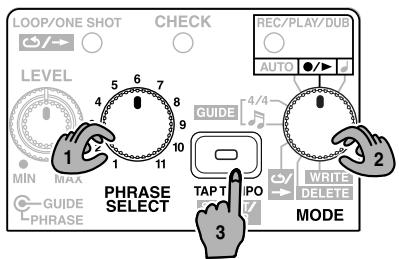
- Turn the PHRASE SELECT knob to select the phrase track you wish to use.
- Set the MODE knob to / .
- Press the TAP TEMPO button several times at the desired tempo.
The tempo will be set according to the intervals at which you press the button.
- The tempo can be changed only within a limited ratio.
- You cannot set the tempo for phrases that are looped over an interval shorter than the minimum recording time (approximately 1.5 seconds).
- If you wish to record a new phrase at the same tempo as the previously selected phrase, press the TAP TEMPO button once.
- You can create a loop phrase with the Loop Quantize function disabled by starting recording without setting the tempo.
NOTE
You can only change the playback tempo of phrases saved to the phrase tracks. To change the playback tempo of a phrase stored in temporary memory immediately following overdubbing or recording, save it to a phrase track (p. 32).
Setting the Time Signature (4/4) for the Guide
In addition to 4 / 4 the RC-2 allows you to set a 3 / 4 time signature. If you want to record a phrase with a time signature of 3 / 4 set this time signature before you start recording.
- It is not possible to change the time signature after recording.
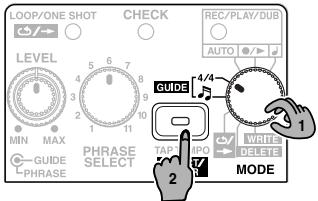
- Set the MODE knob to 4/4.
- Press the SELECT/ENTER button.The time signature switches each time you press the button.
MEMO
You can also switch the time signature by pressing the RC-2's pedal.
You cannot switch the time signature of recorded and saved phrases.
Setting the Guide Pattern (J)
- Set the MODE knob to 日
- Press the SELECT/ENTER button.
The guide pattern switches each time you press the button.
MEMO
You can also switch to the immediately preceding guide pattern by pressing the RC-2's pedal.
Guide Pattern List
| BEAT | No. | PATTERN |
| 3/4 | 1 | Beat1 |
| 2 | Beat2 |
| BEAT | No. | PATTERN |
| 4/4 | 1 | 8Beat1 |
| 2 | 8Beat2 | |
| 3 | 8Beat3 | |
| 4 | 16Beat | |
| 5 | Triple | |
| 6 | Shuffle1 | |
| 7 | Shuffle2 | |
| 8 | Rock1 | |
| 9 | Rock2 | |
| 10 | Rock3 | |
| 11 | Rock4 | |
| 12 | Metal1 | |
| 13 | Metal2 | |
| 14 | Blues1 | |
| 15 | Blues2 | |
| 16 | Blues3 | |
| 17 | Pop |
| BEAT | No. | PATTERN |
| 4/4 | 18 | Surf Beat |
| 19 | Down Beat | |
| 20 | Funk1 | |
| 21 | Funk2 | |
| 22 | Groove | |
| 23 | R&B | |
| 24 | Bossa Nova | |
| 25 | Samba | |
| 26 | Latin1 | |
| 27 | Latin2 | |
| 28 | Latin Rock | |
| 29 | HH Beat1 | |
| 30 | HH Beat2 | |
| 31 | HH Beat3 | |
| 32 | Kick&HH | |
| 33 | Count |
Changing the Battery
When the indicator goes dim or no longer lights, it means that the battery is nearly dead and must be replaced. Replace the battery following the steps below.
- The use of an AC adaptor is recommended as the unit's power consumption is relatively high. Should you prefer to use batteries, please use the alkaline type.
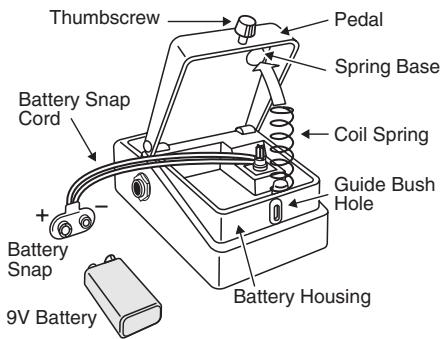
- Loosen the thumbscrew at the front of the pedal, then lift the pedal upwards to open the unit.
- The thumbscrew can be left in the pedal while changing the battery.
- Remove the old battery from the battery housing, and remove the snap cord connected to it.
- Connect the snap cord to the new battery, and place the battery inside the battery housing.
- Be sure to carefully observe the battery's polarity (+ versus -).
- Slip the coil spring onto the spring base on the back of the pedal, then close the pedal.
- Carefully avoid getting the snap cord caught in the pedal, coil spring, and battery housing.
- Finally, insert the thumbscrew into the guide bush hole and fasten it securely.
Power does not turn on/CHECK indicator does not light
- Is the correct AC adaptor (PSA-series; sold separately) properly connected?
Check once more to confirm the adaptor is connected (p. 10).
- Never use any AC adaptor other than the adaptor specified.
- Has the battery run down?
Replace with a new battery (p. 38).
- The battery included with the RC-2 is intended only for confirming that the unit is functional.
- This unit consumes a large amount of current, so the use of an AC adaptor is recommended. If using a battery, use an alkaline type battery.
- To reduce battery consumption, be sure to disconnect the plug connected to the OUTPUT jack whenever the unit is not in use (p. 10).
- Is the plug properly connected to the OUTPUT jack? Check the connection once again (p. 10).
- The power will not turn on without a plug connected to the OUTPUT jack.
No sound/not loud enough
- The recorded or overdubbed sound cannot be heard or is too quiet
Use the PHRASE LEVEL knob to adjust the volume.
- Could you be using a connection cable that contains a resistor?
Use a connection cable that does not contain a resistor.
Guide sound cannot be heard/is not loud enough
- Use the GUIDE LEVEL knob to adjust the volume.
-
The guide tone plays under the following circumstances:
-
When the tempo is set before recording
- During playback of a phrase
Recording/overdebbing ends while still in progress
- There is insufficient memory. Delete unneeded phrases (p. 33), then perform the recording or overdebbing once again.
Recording does not end immediately when you press the pedal
- Since the phrase length is adjusted automatically when you record with Loop Quantize or record a phrase that is shorter than the minimum recording time (approximately 1.5 seconds), recording may not stop immediately after you press the pedal.
Recording begins immediately even though MODE is set to AUTO
- If due to distortion or other causes there is a significant amount of noise, that noise may be enough to trigger the beginning of recording. Reduce the noise, for example by lowering the distortion level.
The LOOP/ONE SHOT indicator flashes even though there should be time remaining for recording
- In the situations listed below, temporary memory for over dubbing (p. 31) is allocated separately from the phrase.
As the maximum available recording time also includes time used in temporary memory, the LOOP/ONE SHOT indicator may flash in the following situations:
- When a phrase is selected
- When the playback tempo is changed
- When a phrase is saved
Cannot change the playback tempo
-
You cannot change the playback tempo in the following situations:
-
If the phrase has not been saved
- If the phrase has been recorded or overdubbed but not saved
While phrases are being switched (while the REC/ PLAY/DUB indicator is flashing) - When you attempt to set the tempo for a phrase that is looped over an interval shorter than the minimum recording time (approximately 1.5 seconds)
The REC/PLAY/DUB indicator is flashing even though playback is stopped
- When you use a footswitch connected to the STOP/TEMPO jack to select a phrase (Phrase Shift function, p. 29) that differs from the one indicated with the PHRASE SELECT knob, the phrase number is indicated by the REC/PLAY/DUB indicator flashing the same number of times as the selected phrase number. In this case, you can overdub, but you will be unable to save or delete the phrase.
When you want to save or delete a phrase, select the phrase with the PHRASE SELECT knob.
Unable to undo
Performing an undo requires free recording time twice the length of the phrase.
Phrases for which you have not carried out the write procedure after recording (when the LOOP/ONE SHOT indicator is not lit) require free recording time equivalent to the length of the phrase.
If the phrase tempo has been slowed down, you may be unable to undo the phrase due to the increased amount of memory that is needed.
When using undo and redo in overdubbing, confirm beforehand that you have sufficient recording time available.
RC-2: Loop Station
Nominal Input Level..... INPUT: -20 dBu AUX IN: -10 dBu
Input Impedance INPUT: 1 MΩ AUX IN: 47k
Nominal Output Level. -20 dBu
Output Impedance 1 kΩ
Recommended Load Impedance .... 10 kΩ or greater
Internal Memory......... Maximum recording time: 16 minutes
(combined total for all phrases) Maximum number of saved phrases: 11 phrases (max.) Controls. Pedal switch, GUIDE LEVEL knob, PHRASE LEVEL knob, PHRASE SELECT knob, MODE knob, TAP TEMPO/SE- LECT/ENTER button
Indicators CHECK indicator
LOOP/ONE SHOT indicator, REC/PLAY/DUB indicator, TAP TEMPO/SELECT/ENTER indicator
Connectors....... INPUT jack, OUTPUT jack, STOP/TEMPO jack, AUX IN jack, AC adaptor jack (DC 9 V)
Power Supply. DC 9 V: Dry battery/9 V type (6F22 (carbon), 6LR61 (alkaline)), AC Adaptor (PSA-series: optional)
Current Draw. 50 mA (DC 9 V)
- Expected battery life under continuous use: Carbon: 2 hours, Alkaline: 6 hours These figures will vary depending on the actual conditions of use.
Dimensions. 73 (W) x 129 (D) x 59 (H) mm
2-7/8 (W) x 5-1/8 (D) x 2-3/8 (H) inches
Weight 420 g /15 oz (including battery)
Accessories.... Owner's Manual, Leaflet ("USING THE UNIT SAFELY,"
"IMPORTANT NOTES," and "Information"),
Dry battery/9 V type (6LR61)
- The battery that was supplied with the unit is for temporary use intended primarily for testing its operation. We also suggest replacing this with an alkaline dry cell.
Option AC Adaptor (PSA-series)
Footswitch FS-5U, FS-6
Footswitch Cable PCS-31 (Roland)
-
0 dBu = 0.775 Vrms
-
In the interest of product improvement, the specifications and/or appearance of this unit are subject to change without prior notice.
For the USA
FEDERAL COMMUNICATIONS COMMISSION RADIO FREQUENCY INTERFERENCE STATEMENT
This equipment has been tested and found to comply with the limits for a Class B digital device, pursuant to Part 15 of the FCC Rules. These limits are designed to provide reasonable protection against harmful interference in a residential installation. This equipment generates, uses, and can radiate radio frequency energy and, if not installed and used in accordance with the instructions, may cause harmful interference to radio communications. However, there is no guarantee that interference will not occur in a particular installation. If this equipment does cause harmful interference to radio or television reception, which can be determined by turning the equipment off and on, the user is encouraged to try to correct the interference by one or more of the following measures:
- Reorient or relocate the receiving antenna.
- Increase the separation between the equipment and receiver.
- Connect the equipment into an outlet on a circuit different from that to which the receiver is connected.
- Consult the dealer or an experienced radio/TV technician for help.
This device complies with Part 15 of the FCC Rules. Operation is subject to the following two conditions:
(1) This device may not cause harmful interference, and
(2) This device must accept any interference received, including interference that may cause undesired operation.
Unauthorized changes or modification to this system can void the users authority to operate this equipment.
This equipment requires shielded interface cables in order to meet FCC class B Limit.
For Canada
NOTICE
This Class B digital apparatus meets all requirements of the Canadian Interference-Causing Equipment Regulations.
AVIS
This product must be disposed of separately at your local waste recycling centre.
Do not dispose of in household waste bin.
G6027115R1
- Copyright © 2006 BOSS CORPORATION
- Main Features
- AC Adaptor Jack
- CHECK Indicator
- AUX IN Jack
- OUTPUT Jack
- INPUT Jack
- STOP/TEMPO Jack
- Pedal Switch
- Phrase tracks containing recorded phrases
- TIP
- Technique for Stopping Operation
- Thumbscrew
- PHRASE LEVEL Knob
- GUIDE LEVEL Knob
- LOOP/ONE SHOT Indicator
- PHRASE SELECT KNOB
- TAP TEMPO/SELECT/ENTER Button
- REC/PLAY/DUB Indicator
- MODE Knob
- NOTE (Placement)
- Turning the Power On/Off
- Turning On the Power
- Turning Off the Power
- Important
- Caution when turning off the power
- Creating Loop Phrases by Recording Guitar or Bass Performances
- MEMO
- Turn the PHRASE SELECT knob to select an empty phrase track (1-11).
- Set the MODE knob to / .
- Press the pedal to start recording.
- Press the pedal to stop recording.
- If you want to overdub onto the phrase, press the pedal.
- When you are finished with playback or overdubbing, press the pedal twice.
- To save the recorded phrase, use the following procedure.
- Undoing Overdubs (UNDO/REDO)
- Recording After Setting the Tempo with the Pedal
- Set the MODE knob to AUTO.
- While playing the desired audio from the CD/digital audio player, adjust its volume so the sound is not distorted.
- Cue up the CD/digital audio player to the desired start location and pause playback.
- Press the pedal to put the RC-2 in recording standby mode.
- Start playback of the CD/digital audio player.
- Press the pedal to stop recording.
- When you are finished with playback, press the pedal twice.
- NOTE
- Defeating AUX IN Compensation
- Playing/Over dubbing Along with a Saved Phrase
- Turn the PHRASE SELECT knob to select the phrase track in which the desired phrase is saved.
- Set the knob to / .
- Press the pedal to begin playback.
- When you wish to overdub along with the phrase, press the pedal.
- When you are finished with playback or overdubbing, press the pedal twice.
- Recording and Performing Along with the Guide
- Using the RC-2 for Practicing—Phrase Trainer
- Changing the Tempo for Practice
- Playing a Phrase Only Once (One-Shot Playback)
- LoopPlayback
- One-Shot Playback
- Operating the RC-2 with an External Footswitch
- When Connecting an FS-5U
- Connect the FS-5U to the STOP/TEMPO jack.
- When Connecting Two FS-5Us or an FS-6
- - When the FS-5U connected using the plug with the white stripe or the FS-6's B pedal is pressed
- - When the FS-5U connected using the plug with the red stripe or the FS-6's A pedal is pressed (Phrase Shift)
- Press the other footswitch or the RC-2's pedal twice in succession to end playback.
- Saving and Deleting Phrases
- About Memory
- What is a phrase track?
- Deleting a Phrase from Temporary Memory
- Saving Phrases (WRITE)
- Erasing a Saved Phrase (DELETE)
- Write Protect Mode
- About the Tempo and Time Signature
- What is Loop Quantize?
- About Automatic Tempo Settings
- Setting the Tempo
- Setting the Time Signature (4/4) for the Guide
- Setting the Guide Pattern (J)
- Changing the Battery
- Power does not turn on/CHECK indicator does not light
- No sound/not loud enough
- Guide sound cannot be heard/is not loud enough
- Recording/overdebbing ends while still in progress
- Recording does not end immediately when you press the pedal
- Recording begins immediately even though MODE is set to AUTO
- The LOOP/ONE SHOT indicator flashes even though there should be time remaining for recording
- Cannot change the playback tempo
- The REC/PLAY/DUB indicator is flashing even though playback is stopped
- Unable to undo
- RC-2: Loop Station
- FEDERAL COMMUNICATIONS COMMISSION RADIO FREQUENCY INTERFERENCE STATEMENT
- NOTICE
- AVIS
Brand : BOSS
Model : RC-2
Category : Looper