VL-V900 - Intercom PANASONIC - Free user manual and instructions
Find the device manual for free VL-V900 PANASONIC in PDF.


Pick your language and provide your email: we'll send you a specifically translated version.
| Product Type | Video intercom system |
| Model | VL-V900 |
| Brand | Panasonic |
| Monitor Display | 7-inch color LCD touch screen |
| Door Station Camera | 1/3-inch color CMOS, 800 TV lines |
| Night Vision | Infrared LEDs, up to 5 meters |
| Audio | Two-way hands-free communication |
| Door Unlock | Electric strike release (12V DC) |
| Power Supply | AC 100-240V, 50/60 Hz (adapter included) |
| Power Consumption | Standby: 3W, Active: 8W |
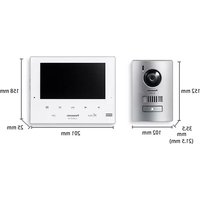
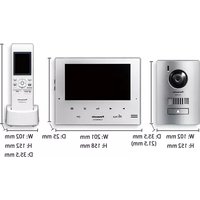
| Monitor Dimensions | 200 x 130 x 25 mm |
| Monitor Weight | 500 g |
| Door Station Dimensions | 130 x 90 x 30 mm |
| Door Station Weight | 300 g |
| Operating Temperature | -10°C to 50°C |
| Waterproof Rating (Door Station) | IP54 |
| Intercom Functions | Monitor, talk, unlock, intercom, call forwarding |
| Connection | Wired (2-wire bus), up to 100m |
| Mounting | Wall mount (both units) |
| Cleaning | Wipe with soft dry cloth, no chemicals |
| Spare Parts | Available from authorized service centers |
Frequently Asked Questions - VL-V900 PANASONIC
How to connect the door station to the monitor?
Connect the two wires from the door station to the corresponding terminals on the monitor (usually labeled 'BUS' or '+/-'). Make sure polarity is correct if required. Refer to the wiring diagram in the manual.
Can I add multiple monitors?
Yes, up to two monitors can be connected using a Panasonic adapter (model VL-VS90). Each monitor must have the same unit ID set via DIP switches.
How to adjust the ringer volume?
Press the 'Menu' button on the monitor, go to 'Settings' > 'Ring Volume', and adjust using the up/down arrows. Press 'OK' to confirm.
What to do if the monitor shows no picture?
Check the connection cables and ensure the door station is powered. The door station has its own power supply via the monitor. Also, verify the monitor is not in standby mode. Press the power button to wake it.
How to reset the intercom to factory defaults?
On the monitor, go to 'Menu' > 'Setup' > 'Factory Reset' and confirm. This will erase all custom settings such as ringer tone and volume levels.
Can I use the intercom without a doorbell?
Yes, the system can be used as a hands-free intercom between monitors if multiple units are installed. Press the 'Call' button on one monitor to ring the other.
What is the range of the night vision?
The infrared LEDs allow clear visibility up to 5 meters in complete darkness. The camera automatically switches to night mode when ambient light is low.
How to clean the touch screen?
Use a soft, lint-free cloth slightly dampened with water. Do not use alcohol, cleaners, or abrasive materials. Gently wipe the screen.
What to do if the door unlock function does not work?
Check the connection to the electric strike and ensure the lock is compatible (12V DC). Also, verify the unlock duration setting in the menu. Default is 3 seconds.
Is the door station weatherproof?
Yes, the door station has an IP54 rating, meaning it is protected against dust and splashing water. However, it should not be fully exposed to heavy rain.
User questions about VL-V900 PANASONIC
0 question about this device. Answer the ones you know or ask your own.
Ask a new question about this device
No questions yet. Be the first to ask one.
Download the instructions for your Intercom in PDF format for free! Find your manual VL-V900 - PANASONIC and take your electronic device back in hand. On this page are published all the documents necessary for the use of your device. VL-V900 by PANASONIC.
USER MANUAL VL-V900 PANASONIC

Manual assistant
Powered by Anthropic
Waiting for your message
Product information
Brand : PANASONIC
Model : VL-V900
Category : Intercom