WE100 - Weather Station Global Water - Free user manual and instructions
Find the device manual for free WE100 Global Water in PDF.


Pick your language and provide your email: we'll send you a specifically translated version.
| Product Type | Weather Station |
| Brand | Global Water |
| Model | WE100 |
| Dimensions (approx.) | 150 x 100 x 80 mm |
| Weight (approx.) | 300 g |
| Power Supply | 2 x AAA batteries (not included) |
| Display Type | LCD with backlight |
| Temperature Range | -10°C to 60°C (14°F to 140°F) |
| Humidity Range | 20% to 95% RH |
| Wind Speed Measurement | 0 to 30 m/s |
| Wind Direction | 16-point compass |
| Rainfall Measurement | 0 to 999 mm |
| Wireless Range | Up to 100 m (open area) |
| Mounting | Pole or wall mount included |
| Maintenance | Clean sensor surfaces with soft cloth; avoid solvents |
| Safety | IPX4 water resistant; do not immerse |
| Spare Parts | Replacement sensors available from manufacturer |
| Repairability | Repair by authorized service center recommended |
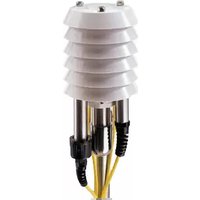
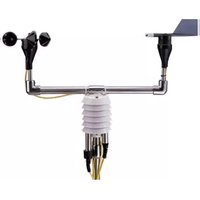
| General Information | Includes outdoor sensor unit and indoor display console |
Frequently Asked Questions - WE100 Global Water
How do I set up the WE100 weather station?
Place the outdoor sensor unit in an open area away from obstructions. Insert batteries into both sensor and display console. The display will automatically sync with the sensor within 2 minutes. Refer to the manual for detailed pairing instructions.
What batteries does the WE100 use?
The WE100 requires 2 AAA batteries for the display console and 2 AAA batteries for the outdoor sensor. Use alkaline batteries for best performance. Do not recharge non-rechargeable batteries.
How do I change the temperature unit from Celsius to Fahrenheit?
Press and hold the 'UNIT' button on the display console for 3 seconds. The unit will toggle between °C and °F. Release the button when the desired unit appears.
Why is my outdoor sensor not connecting?
Ensure the sensor is within 100 meters of the display console. Check that batteries are fresh and inserted correctly. Press the 'SYNC' button on the sensor to initiate pairing. Avoid interference from metal objects or other wireless devices.
How do I clean the rain gauge?
Remove the rain gauge from its mount. Rinse with clean water and use a soft brush to remove debris. Ensure the tipping bucket moves freely. Reinstall securely. Do not use chemicals.
What is the maximum wind speed the WE100 can measure?
The anemometer can measure wind speeds up to 30 m/s (approx. 67 mph). For higher winds, the sensor may be damaged. Consider stowing the sensor during severe storms.
Can I mount the sensor on a metal pole?
Yes, the sensor includes a mounting bracket that fits standard poles. Use the provided screws and clamps. Ensure the pole is grounded to avoid lightning damage. Do not mount near metal structures that may obstruct readings.
How do I reset the rainfall total?
Press and hold the 'RAIN' button on the display console for 5 seconds. The rainfall total will reset to zero. This does not affect historical data logs.
Is the display console portable?
Yes, the display console is designed for indoor use and can be placed on a desk or mounted on a wall. It operates on batteries, so it can be moved freely. However, it must remain within range of the outdoor sensor.
What should I do if the display shows inaccurate data?
First, perform a master reset: remove batteries from both units, wait 10 seconds, then reinsert. Ensure the sensor is clean and properly positioned. If the issue persists, contact Global Water support for troubleshooting or replacement.
User questions about WE100 Global Water
0 question about this device. Answer the ones you know or ask your own.
Ask a new question about this device
No questions yet. Be the first to ask one.
Download the instructions for your Weather Station in PDF format for free! Find your manual WE100 - Global Water and take your electronic device back in hand. On this page are published all the documents necessary for the use of your device. WE100 by Global Water.
USER MANUAL WE100 Global Water


Manual assistant
Powered by Anthropic
Waiting for your message
Product information
Brand : Global Water
Model : WE100
Category : Weather Station