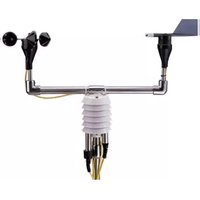
WE900 - Weather Station Global Water - Free user manual and instructions
Find the device manual for free WE900 Global Water in PDF.


| Product Type | Weather Station (Sensor Suite Only) |
| Model | WE900 |
| Brand | Global Water |
| Included Sensors | Wind Speed, Wind Direction, Temperature, Humidity (Rain Gauge optional, Barometric Pressure and Solar Radiation optional accessories) |
| Sensor Outputs | Analog 4-20 mA (up to 7 channels) and one pulse output for rain gauge |
| Mounting | 1-inch diameter pipe mounting hardware included; mast and crossbar made of stainless steel |
| Mast Height | Recommended minimum 8 feet above ground or roof for best results |
| Power Requirement | No internal power; sensors require external 4-20 mA loop power or pulse input from data logger, PLC, RTU, or SCADA system |
| Calibration | Each sensor must be calibrated to the user's system using provided calibration numbers; refer to individual sensor manuals |
| Compatibility | Compatible with PLC, RTU, SCADA systems, and Global Water dataloggers (optional) |
| Stand Material | 1-inch stainless steel tube |
| Operating Environment | Outdoor, rugged; suitable for extreme wind with optional guy wires |
| Maintenance | Periodic cleaning of stand with soap and water; refer to sensor manuals for specific maintenance |
| Warranty | One year from date of shipment against defects in material and workmanship |
| Technical Support | Phone: 800-876-1172 (US) or (979) 690-5560; Email: globalw@globalw.com |
| Return Policy | RMA required; call for authorization before returning |
| Manual Contents | Installation, calibration, maintenance, troubleshooting, warranty, optional equipment mounting |
Frequently Asked Questions - WE900 Global Water
User questions about WE900 Global Water
0 question about this device. Answer the ones you know or ask your own.
Ask a new question about this device
Download the instructions for your Weather Station in PDF format for free! Find your manual WE900 - Global Water and take your electronic device back in hand. On this page are published all the documents necessary for the use of your device. WE900 by Global Water.
USER MANUAL WE900 Global Water
natural_image
Simple black-and-white icon with a stylized wavy line inside a rounded square (no text or symbols)Global Water
Instrumentation, Inc.
151 Graham Road
P. O. Box 9010
College Station, TX 77842-9010
T: 800-876-1172
Int'l: (979) 690-5560, F: (979) 690-0440
Weather Station: WE800 / WE900

Global Water
800-876-1172 • globalw.com
Congratulations on your purchase of the Global Water WE800/WE900 Weather Station. This instrument has been quality tested and approved for providing accurate and reliable measurements. We are confident that you will find the WE800/WE900 to be a valuable asset for your application. Should you require assistance, our technical staff will be happy to help.
Table of Contents
| I. Checklist • | • | • | • | • | • | • | Page | 3 |
| II. Inspection | • | • | • | • | • | • | 4 | |
| III. Description | • | • | • | • | • | • | 4 | |
| IV. Installing the Weather Station | • | • | • | 4 | ||||
| V. Weather Station Calibration Information | • | • | 5 | |||||
| VI. Specifications | • | • | • | • | • | • | 6 | |
| VII. Maintenance | • | • | • | • | • | • | 6 | |
| VIII. Troubleshooting | • | • | • | • | • | • | 6 | |
| IX. Warranty | • | • | • | • | • | • | 7 | |
| X. Appendix A: Optional Equipment Mounting Instructions | 8 | |||||||
| XI. Appendix B Weather Station Assembly Drawing | • | 10 | ||||||
* Copyright © Global Water Instrumentation, Inc. 2012

Global Water
800-876-1172 • globalw.com
I. Checklist
WE800
a. Weather Sensors
b. Weather Sensor Manual
c. Datalogger
d. Datalogger Communication package (Datalogger Manual, Software, Cable)
e. Mounting Hardware
f. Weather Station Manual
g. 12V Battery (inside Datalogger)
h. Battery charger
WE900
a. Weather Sensors
b. Weather Sensor Manual
c. Mounting Hardware
d. Weather Station Manual

Global Water
800-876-1172 • globalw.com
II. Inspection
a. The WE800 / WE900 unit was carefully inspected and certified by Global Water's Quality Assurance Team before shipping. If any damage has occurred during shipping, please notify Global Water Instrumentation, Inc. and file a claim with the carrier involved.
Use the checklist to ensure that everything needed to operate the Weather Station was shipped.
III. Description
a. The Global Weather Station is a rugged and reliable system for monitoring and/or recording several weather related sensors. The standard logging model can monitor and record up to seven 4-20 mA sensors and one pulse output sensor, such as a rain gauge.
IV. Installing the Weather Station
a. Please refer to Appendix A and B prior to installing the Weather Station to review any optional sensor's mounting instructions that may modify the standard setup.
b. Each sensor comes equipped with mounting hardware for a 1" diameter pipe.
c. The Weather Station stand consists of a 1" diameter stainless steel cross bar with a T fitting and the mast (two 1" diameter tubes connected together with a pvc insert). The top piece of the mast has a T fitting with a 1" stub attached also.
d. Insert the bottom of the mast into a solid base and secure it. Global Water sells a Tripod for this purpose, WE830.
e. Slide the top of the mast onto the pvc insert to complete the mast.
f. Mount the cross bar to the top of the mast using the attached T fitting. Tighten the set screw with the enclosed hex wrench. Ensure that the

Global Water
800-876-1172 • globalw.com
cross bar is level. NOTE: For best results the cross bar should be at least 8' above the ground or roof.
g. The Wind Speed and Wind Direction sensors should be mounted on the opposite ends of the cross bar. Loosen the set screw holding the Wind Direction sensor in the elbow. Line up the notches on the Wind Direction Sensor, turn the sensor until the notches face north, and secure the sensor.
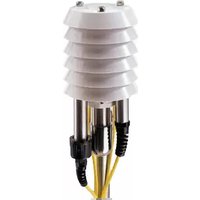
h. The Temperature Sensor and Humidity Sensor are pressure fitted inside the Solar Shield. The Solar Shield has a 1" elbow that mounts on the stub attached to the top portion of the mast. Place the elbow on the stub and secure with the set screw.
i. If the mast is in an area of extreme wind it may be necessary to secure the Weather Station with guy wires (not included).
V. Weather Station Calibration Information
WE800
a. The Weather Station comes factory calibrated and the sensors are pre-attached to the Datalogger and if removed should be reattached to the same channel. Refer to the Weather Sensor manual to determine how often each sensor should have its calibration checked. Refer to the Datalogger manual for instructions on recalibration.
WE900
a. Each Weather Sensor will have to be calibrated to your PLC, RTU, or SCADA system. Calibration numbers have been attached to each sensor. Refer to the Weather Sensor manual to determine how often each sensor should have its calibration checked.

Global Water
800-876-1172 • globalw.com
VI. Specifications
a. Refer to the Weather Sensor manual for individual sensor specifications.
b. Refer to the Datalogger manual for datalogger specifications.
c. Weather Station Stand
Material: 1" Stainless Steel Tube
VII. Maintenance
a. Refer to the Weather Sensor manual for individual sensor maintenance instructions.
b. Refer to the Datalogger for the datalogger's maintenance instructions.
c. Periodic cleaning of the stand may be necessary. Use soap and water.
VIII. Trouble Shooting
a. Refer to Weather Sensor and Datalogger manuals for more information.
Other issues
b. Call us for tech support: 800-876-1172 or (979) 690-5560 (many problems can be solved over the phone). Fax: (979) 690-0440 or Email: globalw@globalw.com.
Be prepared to describe the problem being experienced, including specific details of the application and installation and any additional pertinent information.
c. In the event that the equipment needs to be returned to the factory for any reason, please call to obtain a RMA # (Return Material Authorization). Do not return items without a RMA # Weather Stationed on the outside of the package.

Global Water
800-876-1172 • globalw.com
Include a written statement describing the problems.
Send the package with shipping prepaid to Global Water's factory address. Insure the shipment, as the warranty does not cover damage incurred during transit.
d. When calling for tech support, please have the following information ready;
- Model #.
- Unit serial number.
- P.O.# the equipment was purchased on.
- Global Water's sales number or the invoice number.
- Repair instructions and/or specific problems relating to the product.
IX. Warranty
a. Global Water Instrumentation, Inc. warrants that its products are free from defects in material and workmanship under normal use and service for a period of one year from date of shipment from factory.
Global Water's obligations under this warranty are limited to, at Global Water's option: (I) replacing or (II) repairing; any products determined to be defective. In no case shall Global Water's liability exceed the products original purchase price. This warranty does not apply to any equipment that has been repaired or altered, except by Global Water Instrumentation, Inc., or which has been subject to misuse, negligence or accident. It is expressly agreed that this warranty will be in lieu of all warranties of fitness and in lieu of the warranty of merchantability.
b. The warranty begins on the date of the product's invoice.

Global Water
800-876-1172 • globalw.com
X. Appendix A: Optional Equipment Mounting Instructions
Datalogger Mounting Instructions
a. The optional mounting hardware is located on the rear of the Datalogger enclosure.
b. Loosen the nut so the retaining bolt can be removed and the fitting can placed around the mast. Global Water recommends that the Datalogger be attached to the lower portion of the mast.
c. Place the Datalogger on the mast with the cables coming out the bottom of the unit.
d. Secure the bolt in the fitting and tighten the nut to secure the Datalogger to the mast.
Barometric Pressure Sensor Mounting Instructions
a. If the Barometric Pressure Sensor was installed at Global Water, it was installed inside the Datalogger enclosure.
b. If the sensor is being installed in the field Global Water recommends that it be attached to the lid of the Datalogger with tape in such a way that the enclosure can open and close freely. The cable can either be cut, stripped, and connected to the Datalogger on a free channel or the cable can be run out of the enclosure through a free strain relief, run back into the enclosure through a different strain relief, and connected to a free channel on the Datalogger.
c. Ensure that a strain relief hole is open, or the pressure valve is open to allow airflow or the Pressure Sensor will read incorrectly.
Solar Radiation Sensor Mounting Instructions
a. The Solar Radiation Sensor comes with mounting hardware similar to the Wind Direction and Wind Speed Sensors.
b. The T fitting and stub should be mounted on the upper portion of the mast and secured at a height and in a direction where the sensor will not be shaded by any other sensor of object. Tighten the T fitting's set screws with the enclosed hex wrench to secure the stub in place.
c. The Solar Radiation Sensor has a 1" elbow that mounts on the stub. Place the elbow on the stub and secure with the set screw.
d. Use the bubble level and three mounting screws to level the sensor

Global Water
800-876-1172 • globalw.com
Tipping Bucket Mounting Instructions
a. See Tipping Bucket manual for installation instructions.
Solar Panel Mounting Instructions
a. The Solar Panel comes with mounting hardware similar to the Wind Direction and Wind Speed Sensors.
b. The T fitting and stub may be mounted any where on the mast as long as the solar panel faces the sun's general path across the sky, refer to the solar panel manual for further instructions, available online at, www.globalw.com, in the downloads section. Tighten the T fitting's set screws with the enclosed hex wrench to secure the stub in place.
Weather Station Orientation
a. For optimal results set your weather station up so that the Wind Speed and Wind Directions Sensors are to the East and West.
b. Place the Solar Shield with all of it's sensors in the same hemisphere you are in (IE if you are in the North hemisphere place it on the North side)
c. Place the Solar Radiation sensor on the side closest to the sun, be sure to level the sensor to get accurate results.
d. Place the Solar Panel under the Radiation Sensor and angle it panel so you get maximum coverage.
North


natural_image
Pure mechanical diagram of a pulley system with three blades and a central wheel (no text or symbols)
Global Water
800-876-1172 • globalw.com
Appendix B: Weather Station Assembly Drawing


- Global Water
- Instrumentation, Inc.
- 800-876-1172 • globalw.com
- Checklist
- WE800
- WE900
- Inspection
- Description
- Installing the Weather Station
- Weather Station Calibration Information
- Specifications
- Maintenance
- Trouble Shooting
- Other issues
- Warranty
- Appendix A: Optional Equipment Mounting Instructions
- Datalogger Mounting Instructions
- Barometric Pressure Sensor Mounting Instructions
- Solar Radiation Sensor Mounting Instructions
- Tipping Bucket Mounting Instructions
- Solar Panel Mounting Instructions
- Weather Station Orientation
- North
Brand : Global Water
Model : WE900
Category : Weather Station