
PA-MC5500 - Power amplifier ONKYO - Free user manual and instructions
Find the device manual for free PA-MC5500 ONKYO in PDF.


| Product Type | Multichannel Power Amplifier |
| Brand | ONKYO |
| Model | PA-MC5500 |
| Number of Channels | 5 |
| Output Power (8 Ω, 20 Hz-20 kHz, 0.05% THD) | 150 W per channel |
| Output Power (4 Ω, 1 kHz, 0.1% THD) | 250 W per channel |
| Load Impedance | 4-16 Ω |
| Frequency Response | 10 Hz - 100 kHz (+0/-3 dB) |
| Signal-to-Noise Ratio | 105 dB |
| Total Harmonic Distortion | 0.05% (20 Hz-20 kHz, 8 Ω, half power) |
| Audio Inputs | 5 x RCA, 5 x XLR (balanced) |
| Speaker Outputs | Screw terminals (5 pairs) |
| Power Consumption | 1200 W |
| Power Supply | 220-240 V AC, 50/60 Hz |
| Dimensions (W x H x D) | 435 x 198 x 463 mm |
| Weight | 19.5 kg |
| Special Features | 12 V trigger input, auto standby mode |
| Maintenance and Cleaning | Unplug the device, clean with a dry, soft cloth. Do not use abrasive or liquid products. |
| Safety | Do not expose to moisture, do not block ventilation openings. Unplug before any handling. |
| Spare Parts and Repairability | Contact an authorized ONKYO service center for any repairs. No user-serviceable parts. |
| General Information | Complies with Canadian NMB-003 standard. Use only with a grounded outlet. |
Frequently Asked Questions - PA-MC5500 ONKYO
User questions about PA-MC5500 ONKYO
0 question about this device. Answer the ones you know or ask your own.
Ask a new question about this device
Download the instructions for your Power amplifier in PDF format for free! Find your manual PA-MC5500 - ONKYO and take your electronic device back in hand. On this page are published all the documents necessary for the use of your device. PA-MC5500 by ONKYO.
USER MANUAL PA-MC5500 ONKYO
Thank you for purchasing an Onkyo 9-Channel Amplifier. Please read this manual thoroughly before making connections and plugging in the unit. Following the instructions in this manual will enable you to obtain optimum performance and listening enjoyment from your new 9-Channel Amplifier. Please retain this manual for future reference.
WARNING:
TO REDUCE THE RISK OF FIRE OR ELECTRIC SHOCK,DO NOT EXPOSE THIS APPARATUS TO RAIN OR MOISTURE.
CAUTION:
TO REDUCE THE RISK OF ELECTRIC SHOCK, DO NOT REMOVE COVER (OR BACK). NO USER-SERVICEABLE PARTS INSIDE. REFER SERVICING TO QUALIFIED SERVICE PERSONNEL.

WARNING
RISK OF ELECTRIC SHOCK
DO NOT OPEN
AVIS
RISQUE DE CHOC ELECTRIQUE
NE PAS OUVRIR


The lightning flash with arrowhead symbol, within an equilateral triangle, is intended to alert the user to the presence of uninsulated "dangerous voltage" within the product's enclosure that may be of sufficient magnitude to constitute a risk of electric shock to persons.

The exclamation point within an equilateral triangle is intended to alert the user to the presence of important operating and maintenance (servicing) instructions in the literature accompanying the appliance.
Important Safety Instructions
- Read these instructions.
- Keep these instructions.
- Heed all warnings.
- Follow all instructions.
- Do not use this apparatus near water.
- Clean only with dry cloth.
- Do not block any ventilation openings. Install in accordance with the manufacturer's instructions.
- Do not install near any heat sources such as radiators, heat registers, stoves, or other apparatus (including amplifiers) that produce heat.
- Do not defeat the safety purpose of the polarized or grounding-type plug. A polarized plug has two blades with one wider than the other. A grounding type plug has two blades and a third grounding prong. The wide blade or the third prong are provided for your safety. If the provided plug does not fit into your outlet, consult an electrician for replacement of the obsolete outlet.
- Protect the power cord from being walked on or pinched particularly at plugs, convenience receptacles, and the point where they exit from the apparatus.
- Only use attachments/accessories specified by the manufacturer.
- Use only with the cart, stand, tripod, bracket, or table specified by the manufacturer, or sold with the apparatus. When a cart is used, use caution when moving the cart/ apparatus combination to avoid injury from tip-over.
- Unplug this apparatus during lightning storms or when unused for long periods of time.
-
Refer all servicing to qualified service personnel. Servicing is required when the apparatus has been damaged in any way, such as power-supply cord or plug is damaged, liquid has been spilled or objects have fallen into the apparatus, the apparatus has been exposed to rain or moisture, does not operate normally, or has been dropped.
-
Damage Requiring Service
Unplug the apparatus from the wall outlet and refer servicing to qualified service personnel under the following conditions:
A. When the power-supply cord or plug is damaged,
B. If liquid has been spilled, or objects have fallen into the apparatus,
C. If the apparatus has been exposed to rain or water,
D. If the apparatus does not operate normally by following the operating instructions. Adjust only those controls that are covered by the operating instructions as an improper adjustment of other controls may result in damage and will often require extensive work by a qualified technician to restore the apparatus to its normal operation,
E. If the apparatus has been dropped or damaged in any way, and
F. When the apparatus exhibits a distinct change in performance this indicates a need for service.
- Object and Liquid Entry
Never push objects of any kind into the apparatus through openings as they may touch dangerous voltage points or short-out parts that could result in a fire or electric shock.
The apparatus shall not be exposed to dripping or splashing and no objects filled with liquids, such as vases shall be placed on the apparatus.
Don't put candles or other burning objects on top of this unit.
- Batteries
Always consider the environmental issues and follow local regulations when disposing of batteries.
- If you install the apparatus in a built-in installation, such as a bookcase or rack, ensure that there is adequate ventilation.
Leave 20cm (8") of free space at the top and sides and 10cm (4") at the rear. The rear edge of the shelf or board above the apparatus shall be set 10cm (4") away from the rear panel or wall, creating a flue-like gap for warm air to escape.
-
Recording Copyright—Unless it's for personal use only, recording copyrighted material is illegal without the permission of the copyright holder.
-
AC Fuse—The AC fuse inside the unit is not user-serviceable. If you cannot turn on the unit, contact your Onkyo dealer.
-
Care—Occasionally you should dust the unit all over with a soft cloth. For stubborn stains, use a soft cloth dampened with a weak solution of mild detergent and water. Dry the unit immediately afterwards with a clean cloth. Don't use abrasive cloths, thinners, alcohol, or other chemical solvents, because they may damage the finish or remove the panel lettering.
4. Power
WARNING
BEFORE PLugging IN THE UNIT FOR THE FIRST TIME, READ THE FOLLOWING SECTION CAREFULLY.
AC outlet voltages vary from country to country. Make sure that the voltage in your area meets the voltage requirements printed on the unit's rear panel (e.g., AC 230 V, 50 Hz or AC 120 V, 60 Hz).
The power cord plug is used to disconnect this unit from the AC power source. Make sure that the plug is readily operable (easily accessible) at all times.
Pressing the [ON/STANDBY] button to select Standby mode does not fully shutdown the unit. If you do not intend to use the unit for an extended period, remove the power cord from the AC outlet.
5. Preventing Hearing Loss
Caution
Excessive sound pressure from earphones and headphones can cause hearing loss.
6. Batteries and Heat Exposure Warning
Batteries (battery pack or batteries installed) shall not be exposed to excessive heat as sunshine, fire or the like.
- Never Touch this Unit with Wet Hands—Never handle this unit or its power cord while your hands are wet or damp. If water or any other liquid gets inside this unit, have it checked by your Onkyo dealer.
8. Handling Notes
- If you need to transport this unit, use the original packaging to pack it how it was when you originally bought it.
- Do not leave rubber or plastic items on this unit for a long time, because they may leave marks on the case.
- This unit's top and rear panels may get warm after prolonged use. This is normal.
- If you do not use this unit for a long time, it may not work properly the next time you turn it on, so be sure to use it occasionally.
For U.S. models
FCC Information for User
CAUTION:
The user changes or modifications not expressly approved by the party responsible for compliance could void the user's authority to operate the equipment.
NOTE:
This equipment has been tested and found to comply with the limits for a Class B digital device, pursuant to Part 15 of the FCC Rules. These limits are designed to provide reasonable protection against harmful interference in a residential installation.
This equipment generates, uses and can radiate radio frequency energy and, if not installed and used in accordance with the instructions, may cause harmful interference to radio communications. However, there is no guarantee that interference will not occur in a particular installation. If this equipment does cause harmful interference to radio or television reception, which can be determined by turning the equipment off and on, the user is encouraged to try to correct the interference by one or more of the following measures:
- Reorient or relocate the receiving antenna.
- Increase the separation between the equipment and the amplifier.
- Connect the equipment into an outlet on a circuit different from that to which the receiver is connected.
- Consult the dealer or an experienced radio/TV technician for help.
For Canadian Models
NOTE: THIS CLASS B DIGITAL APPARATUS COMPLIES WITH CANADIAN ICES-003.
For models having a power cord with a polarized plug: CAUTION: TO PREVENT ELECTRIC SHOCK, MATCH WIDE BLADE OF PLUG TO WIDE SLOT, FULLY INSERT.
Replacement and mounting of an AC plug on the power supply cord of this unit should be performed only by qualified service personnel.
IMPORTANT
The wires in the mains lead are coloured in accordance with the following code:
Blue: Neutral
Brown:Live
As the colours of the wires in the mains lead of this apparatus may not correspond with the coloured markings identifying the terminals in your plug, proceed as follows:
The wire which is coloured blue must be connected to the terminal which is marked with the letter N or coloured black.
The wire which is coloured brown must be connected to the terminal which is marked with the letter L or coloured red.
IMPORTANT
The plug is fitted with an appropriate fuse. If the fuse needs to be replaced, the replacement fuse must approved by ASTA or BSI to BS1362 and have the same ampere rating as that indicated on the plug. Check for the ASTA mark or the BSI mark on the body of the fuse.
If the power cord's plug is not suitable for your socket outlets, cut it off and fit a suitable plug. Fit a suitable fuse in the plug.
For European Models
Declaration of Conformity
We, ONKYO EUROPE ELECTRONICS GmbH LIEGNITZERSTRASSE 6, 82194 GROEBENZELL, GERMANY

declare in own responsibility, that the ONKYO product described in this instruction manual is in compliance with the corresponding technical standards such as EN60065, EN55013, EN55020 and EN61000-3-2, -3-3.
GROEBENZELL, GERMANY

ONKYO EUROPE ELECTRONICS GmbH
Features
150 Watts per channel, minimum RMS into 8 ohms, 2 channels driven, from 20 to 20,000Hz with no more than 0.05% total harmonic distortion
THXTM Ultra2TM certified
■ WRAT-Wide Range Amplifier Technology (5 Hz-100 kHz bandwidth)
Push-Pull amplification design with three-stage inverted Darlington circuitry
Massive toroidal transformer
■ Customized 22,000 F large capacitors for effective power supply
Audio-tuned reference capacitors for each channel
Low-impedance, copper bus plates for perfect ground potential
Gold-plated, XLR and machined, solid brass RCA input terminals
Custom-designed large power transistors to drive high currents
■ High-current, low-impedance circuit board by using thick copper foil (70)
Gold-plated, color-coded, transparent speaker posts
Auto power-down function
Multi-zone capability (up to Zone 3)*2
Bi-amping capability*2
12V trigger in
Aluminum front panel
- Detachable power cord
*1 HX ULTRA2
THX and Ultra2 are trademarks of THX Ltd. THX may be registered in some jurisdictions. All rights reserved.
*2 Depends on AV controller.
Contents
Before using
Important Safety Instructions. 2
Precautions 3
Features 4
Supplied Accessories 5
Amplifier Precautions 6
Operations
Quick Operation Guide. 7
Front & Rear Panels. 8
Front Panel. 8
Rear Panel. 9
Connections
Connecting the Amplifier 11
Connecting Your Speakers 11
Connecting to an AV Controller
with XLR output. 13
Connecting to an AV Controller
with RCA output 14
Bi-amping the Front Speakers. 15
Multiroom Connections. 16
Appendix
Troubleshooting 18
Specifications 19
Supplied Accessories
Check that the following accessories are supplied with the PA-MC5500.
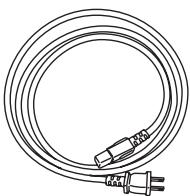
Power cord
(Plug type varies from country to country.)
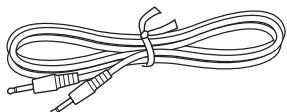
Mono mini-plug cable
(For connecting to the 12V trigger terminals.)
Speaker cable labels
Before using the PA-MC5500 power amplifier, be sure to read the page above entitled Important Safety Instructions and this page of Amplifier Precautions.
Ventilation
While using the PA-MC5500, the internal temperature will fairly rise. Excessive temperature rise may affect the amplifier performance. To prevent damage from occurring due to high internal temperatures, it is vital to have proper ventilation and passage of air to carry out the heat and keep the internal temperature within acceptable ranges.
Caution
- Do not place the PA-MC5500 inside cabinets or closets where there is poor passage of air and ventilation.
- Do not place the PA-MC5500 near external heat sources such as heaters or hot air ducts.
- Do not place other components or object on top of or under the PA-MC5500.
- The cover of the PA-MC5500 contains ventilation holes to allow the passage of air. Do not cover or block these holes in any way.
If you are planning to place it within a cabinet, either open holes in the rear panel of the cabinet to improve ventilation or use a fan to force air circulation.
As a general rule, if during idling the cover is too hot to touch, then ventilation needs to be improved.
Installation location and space
Make sure that the floor or cabinet or rack where it will be located is strong enough to support its weight.
You will also need to leave enough space behind the PA-MC5500 to allow room for the power cord and other cables for connecting system components. A minimum of four inches is required behind the PA-MC5500 to allow room for the cables and cords without excessively bending them.
Do not place the PA-MC5500 near TV or radio. This may cause noise or instable video on radio or TV respectively.
Power cord
Do not use a power cord other than the one supplied with the PA-MC5500. The power cord supplied is designed for use with the PA-MC5500 and should not be used with any other device.
Be sure to only use wall sockets that properly fit the plug of the power cord. If the socket does not match the plug of the power cord, you will need to prepare an adapter. Always use an adapter that is properly certified for this application.
Speakers
Connected speakers should have an impedance of 4 ohms or greater.
If speakers with an impedance of less than 4 ohms are connected, it may damage the PA-MC5500.
Care
From time to time you should wipe the front and rear panels and the cabinet with a soft cloth. For heavier dirt, dampen a soft cloth in a weak solution of mild detergent and water, wring it out dry, and wipe off the dirt. Following this, dry immediately with a clean cloth. Do not use rough material, thinners, alcohol or other Chemical solvents or cloths since these could damage the finish or remove the panel lettering.
Whenever performing maintenance on the PA-MC5500, any of its supplied accessories, or any device connected to it, do not use solvents or cleaners of any kind that are inflammable or combustible.
When you clean the input/output terminals on the rear panel, do not use contact restorer. Doing so may cause resin deterioration.
Other
Below is a list of actions that you should never perform.
- Do not use the PA-MC5500 as a broadcast system or musical instrument amplifier.
- Never use a generator, DC/AC converter, AC/AC converter, or transformer to supply power for the PA-MC5500.
- Never perform a "thumb test" (checking whether current is reaching the lead wire on the hot end of the input by touching it with your fingers) on the ends of the input jacks or input cables.
Doing so may damage the speakers.
- Do not short across the output terminals or across the output terminals and rear panel.
- Never remove the cover of the PA-MC5500.
- Do not install the PA-MC5500 in a location within the reach of small children.
Lightning storms
During lightning storm, never touch the power cord, plug or cover of the PA-MC5500, and any devices connected to the PA-MC5500.
Power
WARNING:
BEFORE PLugging IN THE UNIT FOR THE FIRST TIME, READ THE FOLLOWING SECTION CAREFULLY.
AC outlet voltages vary from country to country. Make sure that the voltage in your area meets the voltage requirements printed on the unit's rear panel (e.g., AC 220-240 V, 50/60 Hz or AC 120 V, 60 Hz).
Here is a quick guide for those who want to listen to music or view their favorite movies as soon as possible. Connections and operations are explained briefly here for the purpose of just getting you started.
For those of you who want to operate the PA-MC5500 (the amplifier) right away, follow the guide below. However, this instruction manual contains a great deal of other information that you should know for the proper operation of the amplifier and for a more pleasurable experience with the amplifier. Be sure to read the rest of this manual as well after reading this quick guide.
The procedures given below assume that the other system components are already connected and configured. (For example, that the source components are already connected to the control amplifier.)
- Lower the volume at the control amplifier. Lower the volume of the control amplifier to the minimum so that when the amplifier is turned on, you do not hear loud unwanted sounds.
- Connect the speakers to the amplifier. Connect the speakers to the amplifier using the proper speaker cables. Be sure to match the channels and the positive (+) and negative (-) polarities between the speakers and the amplifier. If the connections are mistaken, the correct orientation will not be obtained.
- Select balanced input (XLR) or unbalanced input (RCA) with the INPUT SELECT switch. The amplifier possesses a balanced input (XLR) and unbalanced input (RCA) for each channel and the switch for the two is located between the two input terminals. Select the proper input type depending on the functionality of the connected cables and the control amplifier.
Note:
Do not change the INPUT SELECT switch setting when the amplifier is turned on.
- Connect the control amplifier to the amplifier.
After selecting the correct input type in step 3 above, connect the output from the control amplifier to the corresponding input terminal on the amplifier.
Note:
Do not connect anything to the other input jack.
- Connect the supplied power cord to the amplifier and to the wall power outlet.
Be sure to properly plug the power cord all the way in.
- Press the POWER switch.
The STANDBY indicator lights red.
- Press the ON/STANDBY button.
The ON indicator lights blue.
When you connect other device to the 12V TRIGGER IN terminal using the supplied cable, the power on or off status of the amplifier synchronizes to the action of turning on or off the connected device.
While the STANDBY indicator lights red, the amplifier is in standby state waiting for 12V trigger signal.
- Slowly increase the control amplifier volume.
Note:
After the amplifier is turned on, it takes approximately 10 seconds before the output sounds. During this time, do not turn up the volume.
Now all that remains is to control the control amplifier and the other connected system components and enjoy your music or movies.
Front Panel
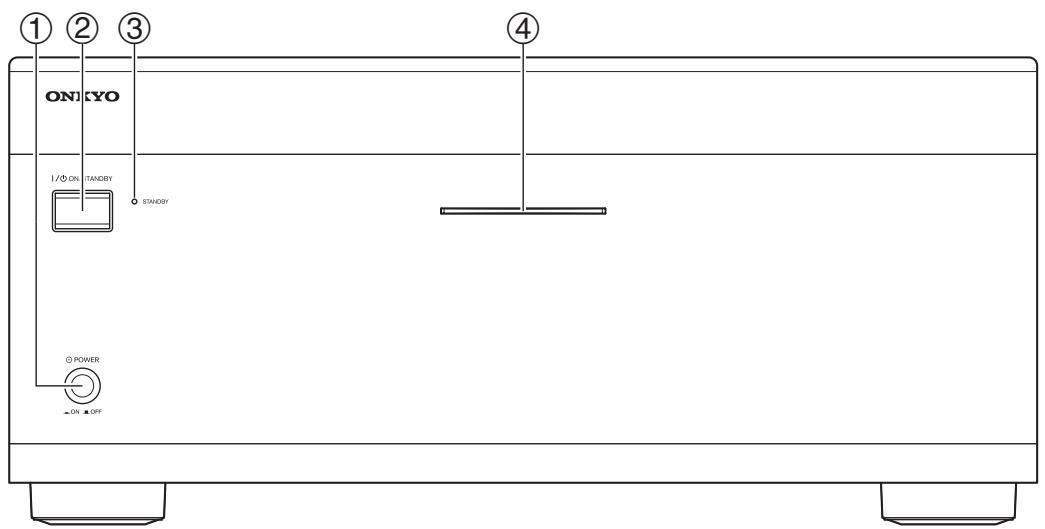
① POWER switch
This is the main power switch. When set to OFF, the amplifier is completely shutdown. It must be set to ON to set the amplifier to On or Standby.
② ON/STANDBY button
This button is used to set the amplifier to On or Standby.
Note:
If you wish to turn on the amplifier again after it is turned off, wait for several seconds.
③ STANDBY indicator
The amplifier is in standby state and waits for instruction signal from the 12V TRIGGER IN terminal.
④ ON indicator
The main power of the amplifier is turned on and you can play and enjoy an input source.
Notes:
-
If the POWER switch is pressed and both of the ON and STANDBY indicators do not light, check that the power cord is properly connected. If the indictors still do not light, turn off the amplifier, disconnect the power cord from wall outlet, and contact your Onkyo dealer.
-
If the STANDBY indicator flashes red, the protection circuitry of the amplifier has activated. The protection circuitry activates if a problem such as a speaker cable shorting or excessive temperature occurs. Turn off the amplifier, remove the cause of the problem, and then turn it back on. If the problem is still not solved, turn off the amplifier, disconnect the power cord from wall outlet, and contact your Onkyo dealer.
Rear Panel
This unit comprises 9 independent power amplifiers, each being capable of reproducing the same quality sound through its channel. Note that you should connect an input source and a speaker to each channel in use.
Caution
- Do not connect the power cord until you have finished all other connections.
- Read the instructions that came with the other components you are connecting.
- Do not make connections to input or output jacks while the amplifier is turned on (POWER ON).
- Turn the volume of the control amplifier down before turning on the amplifier.
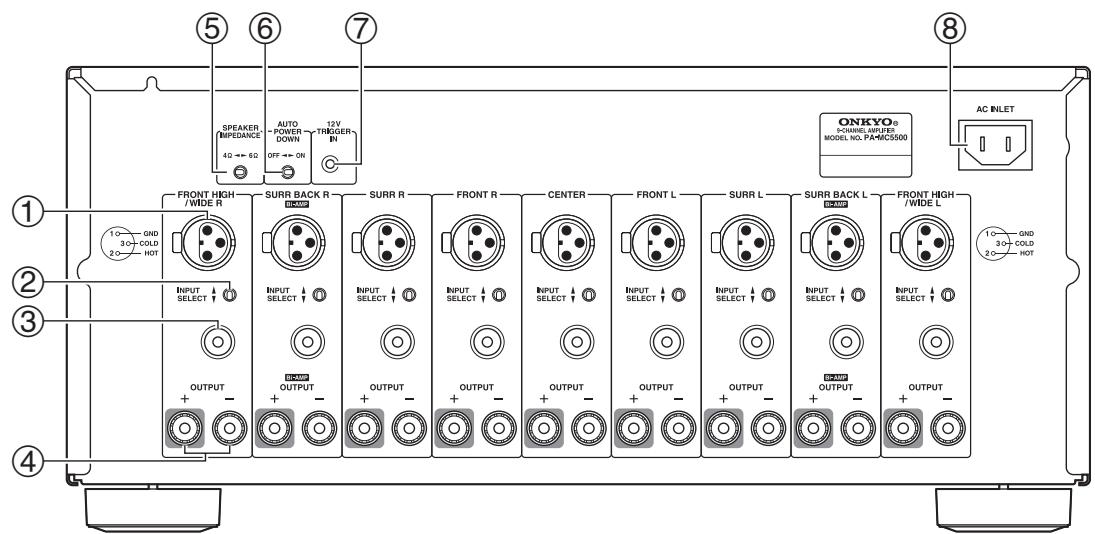
① Balanced Input (XLR terminal)
Connect AV controllers or control amplifiers with balanced outputs for high-quality sound.
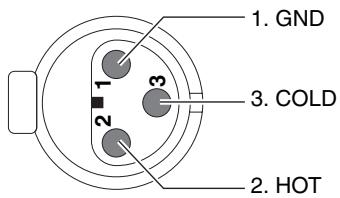
Connector ground terminal: Chassis grounded
The pin assignments for this terminal are given above. This pin assignment conforms to the standard adopted by the Audio Engineering Society. Refer to the instruction manual supplied with the control amplifier and verify that its output terminal is compatible with the pin assignments for this terminal. The output terminal of Onkyo PR-SC5507 is compatible with the pin assignments for the terminal of the amplifier.
The amplifier uses the European type XLR terminal. Phase is reversed when an XLR cable is connected to the control amplifier that uses the USA type XLR terminal. In this case, swap pin 2 and pin 3 to set the polarity to the European type before connecting.
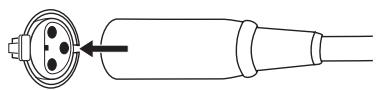
Plugging the XLR cable
Match the pins and insert the terminal until you hear a "click." Make sure that the terminal is locked by lightly pulling the connection cable.
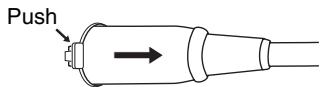
Unpugging the XLR cable
Pull out the connection cable while holding down the lever.
Notes:
- When using this balanced connection for a specific channel between the control amplifier and the amplifier, set the INPUT SELECT switch to the upper side (the balanced input side) to select balanced input. Next, use commercial XLR balanced cable and connect the balanced output from the control amplifier to the corresponding balanced input on the amplifier.
- Do not connect anything to the RCA-type audio input jack.
② INPUT SELECT switch
This switch is located between the balanced input and single-ended RCA input for each channel. Use this switch to select the input type for its channel. When setting the switch to the upper side, the balanced input is selected.
When setting the switch to the lower side, the RCA audio input is selected.
Notes:
- Do not change the INPUT SELECT switch setting when the amplifier is turned on.
- Make sure that connections have been made only to the inputs selected with the INPUT SELECT switches and nothing is connected to the other ones.
③ Unbalanced Input (single end RCA input)
Connect AV controllers or control amplifiers with single-ended outputs.
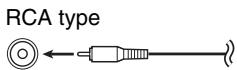
Notes:
- When using this single-ended connection for a specific channel, set the INPUT SELECT switch to the lower side (the RCA audio input side), use commercial RCA audio pin cable and connect the single-ended outputs.
- Do not connect anything to the balanced input jack.
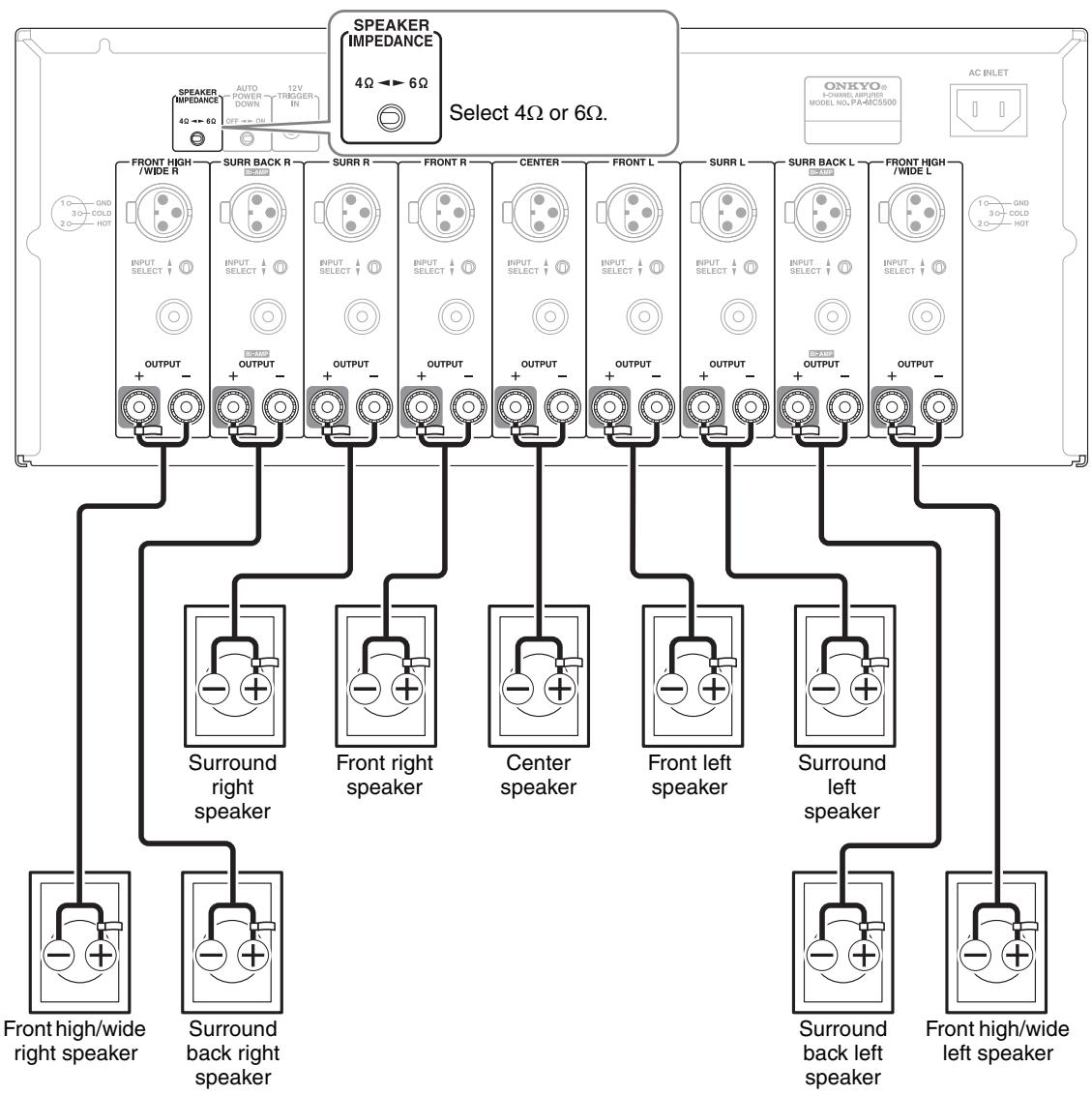
(4) OUTPUT (Speaker output and binding post) These terminal posts are for connecting the front L/R, center, surround L/R, surround back L/R, and front high/wide L/R speakers.
The FRONT L/R and SURR BACK L/R terminal posts can be used with front speakers and surround back speakers respectively, or used to bi-amp the front speakers. See "Bi-amping the Front Speakers" on page 15.
⑤ SPEAKER IMPEDANCE switch
Use this switch to select the speaker impedance.
4Ω: Select if the impedance of any speaker is 4 ohms or more but less than 6.
6Ω: Select if the impedances of all speakers are between 6 and 16 ohms.
⑥ AUTO POWER DOWN switch
You can use the auto power-down function. If the amplifier receives no signal for 3 hours, it will automatically enter standby mode. Once the auto power-down function has been activated, the amplifier will not automatically turn on even if it receives the signal. To turn on the amplifier, press the
ON/STANDBY button manually. You can also disable the function by setting this switch to OFF side.
Default setting: ON (European models), OFF
(North American and Asian models)
Notes:
- Regardless of the position of this switch, this function will not work when the amplifier has been turned on by the 12V trigger.
- Before entering standby mode by the auto power-down function, the amplifier notifies you by flashing the ON indicator for 10 seconds.
- Depending on some sources, the auto power-down function may activate during playback.
⑦ 12V TRIGGER IN
Connects to the 12V trigger output terminal on the other component to control the amplifier. This enables the amplifier to turn on or go into standby state based on the power on/standby status of the connected component.
Use the supplied or commercially available 1/8-inch mono cable to connect to the 12V trigger output terminal on the other device.
The tip polarity of the connectors are as shown below.
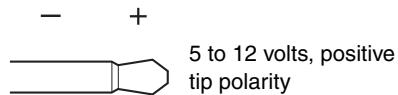
⑧ AC INLET
Plug the supplied power cord into this AC INLET and then into the power outlet on the wall.
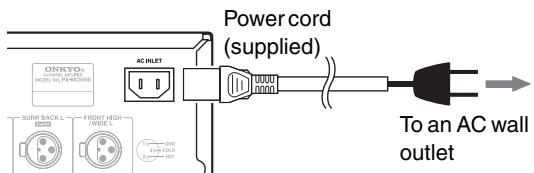
- Do not plug the amplifier into the AC outlet other than an AC wall socket.
- Do not use a power cord other than the one supplied with the amplifier. The power cord supplied is designed for use with the amplifier and should not be used with any other device.
- Never have the power cord disconnected from the amplifier while the other end is plugged into the wall outlet. Doing so may cause an electric shock. Always connect by plugging into the wall outlet last and disconnect by unplugging from the wall outlet first.
- Before you plug in the amplifier, confirm that all connections have been made properly.
- Turning on the power may cause a momentary power surge, which might interfere with other electrical equipment on the same circuit, such as computers. If this happens, use a wall outlet on a different circuit.
Connecting Your Speakers
Before connecting the speakers, place them correctly by consulting the instruction manuals that came with them. For surround playback, the configuration and placement of your speakers are very important.
Please note that connecting speakers with a low power input rating does not produce large sound volumes. For those speakers, large sound volumes causing excessive input level may damage the speakers.
Note:
Once you've completed speaker connections, you must turn on the AV controller or control amplifier and configure the output channels.
Attaching the Speaker Labels
The amplifier's positive (+) speaker terminals are all red (the negative (-) speaker terminals are all black).
| Speaker | Color |
| Front left | White |
| Front right | Red |
| Center | Green |
| Surround left | Blue |
| Surround right | Gray |
| Surround back left | Brown |
| Surround back right | Tan |
| Front high/wide left | White |
| Front high/wide right | Red |
The supplied speaker cable labels are also color-coded and you should attach them to the positive (+) side of each speaker cable in accordance with the above table. Then all you need to do is to match the color of each label to the corresponding speaker terminal.

(North American models)
- If you are using banana plugs, tighten the speaker terminal before inserting the banana plug.
- Do not insert the speaker code directly into the center hole of the speaker terminal.
Speaker Connection Precautions
Read the following before connecting your speakers:
- You can connect speakers with an impedance of between 4 and 16 ohms. If the impedance of any of the connected speakers is 4 ohms or more, but less than 6 ohms, be sure to set the minimum speaker impedance to "4ohms" (see page 10). If you use speakers with a lower impedance, and use the amplifier at high volume levels for a long period of time, the built-in protection circuit may be activated.
- Disconnect the power cord from the wall outlet before making any connections.
- Read the instructions supplied with your speakers.
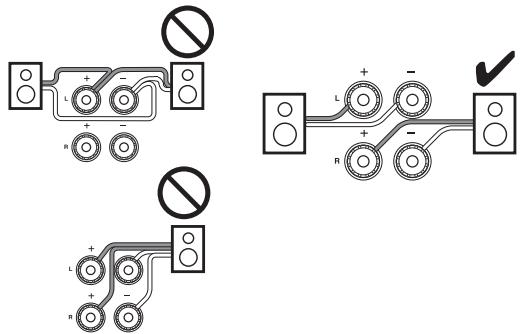
- Pay close attention to speaker wiring polarity. In other words, connect positive (+) terminals only to positive (+) terminals, and negative (-) terminals only to negative (-) terminals. If you get them the wrong way around, the sound will be out of phase and will sound unnatural.
- Unnecessarily long, or very thin speaker cables may affect the sound quality and should be avoided.
- If you use 4 or 5 speakers, connect each of the two surround speakers to the SURR L/R terminals. Do not connect them to the SURR BACK L/R or FRONT HIGH/WIDE L/R terminals.
- Be careful not to short the positive and negative wires. Doing so may damage the amplifier.
- Make sure the metal core of the wire does not have contact with the amplifier's rear panel. Doing so may damage the amplifier.
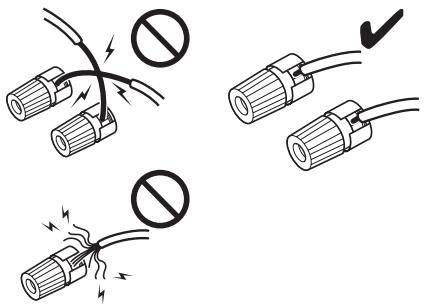
- Don't connect more than one cable to each speaker terminal. Doing so may damage the amplifier.
- Don't connect one speaker to several terminals.
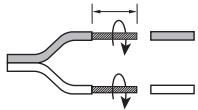
Connecting the Speaker Cables
1
Strip about 1 / 2'' to 5 / 8'' (12 to 15mm ) of insulation from the ends of the speaker cables, and twist the bare wires tightly, as shown.
1/2" to 5/8" (12 to 15 mm)
2
Unscrew the terminal.

3
Fully insert the bare wires.
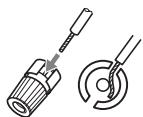
4
Screw the terminal tight.

The following illustration shows which speaker should be connected to each pair of terminals. If you're using only one surround back speaker, connect it to the SURR BACK L terminal.
Note:
If you use front high or front wide speakers, you must turn on the AV controller and select the speakers to be used. For more details, see the instruction manual of the connected component.
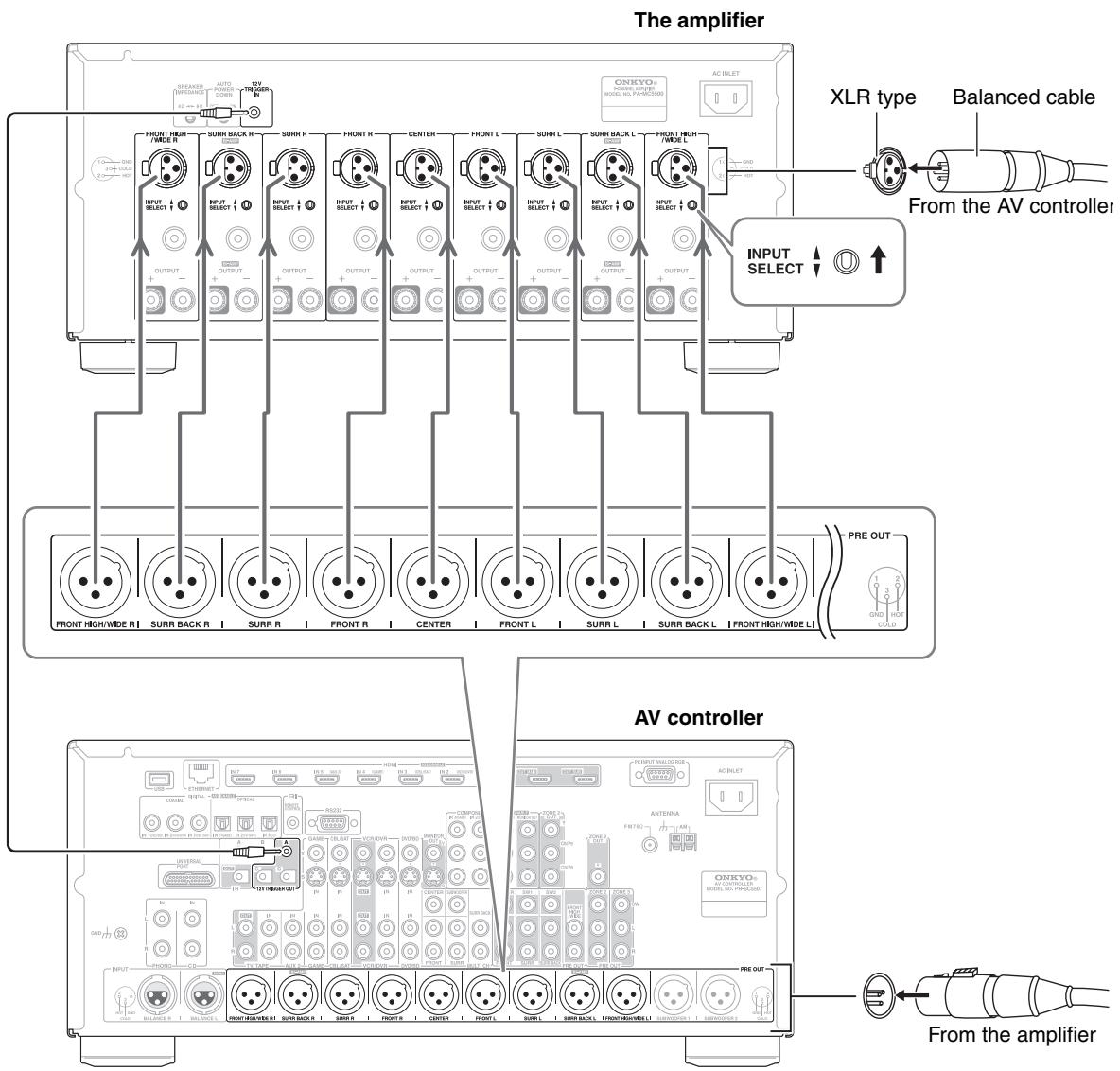
Connecting to an AV Controller with XLR output
Since many users will purchase the amplifier together with the Onkyo AV controller PR-SC5507, here is an explanation of how to connect the amplifier to the PR-SC5507. For more details, see the instruction manual of the connected component.
Notes:
- When using the balanced inputs, do not connect anything to the RCA inputs.
- Make sure that the balanced cable is not split. The split balanced cable may be the cause of noise.
- If a device with the USA type terminal is connected, the phase will be reversed. In this case, swap the polarity of the XLR connector in order to set the polarity to the European type before connecting.
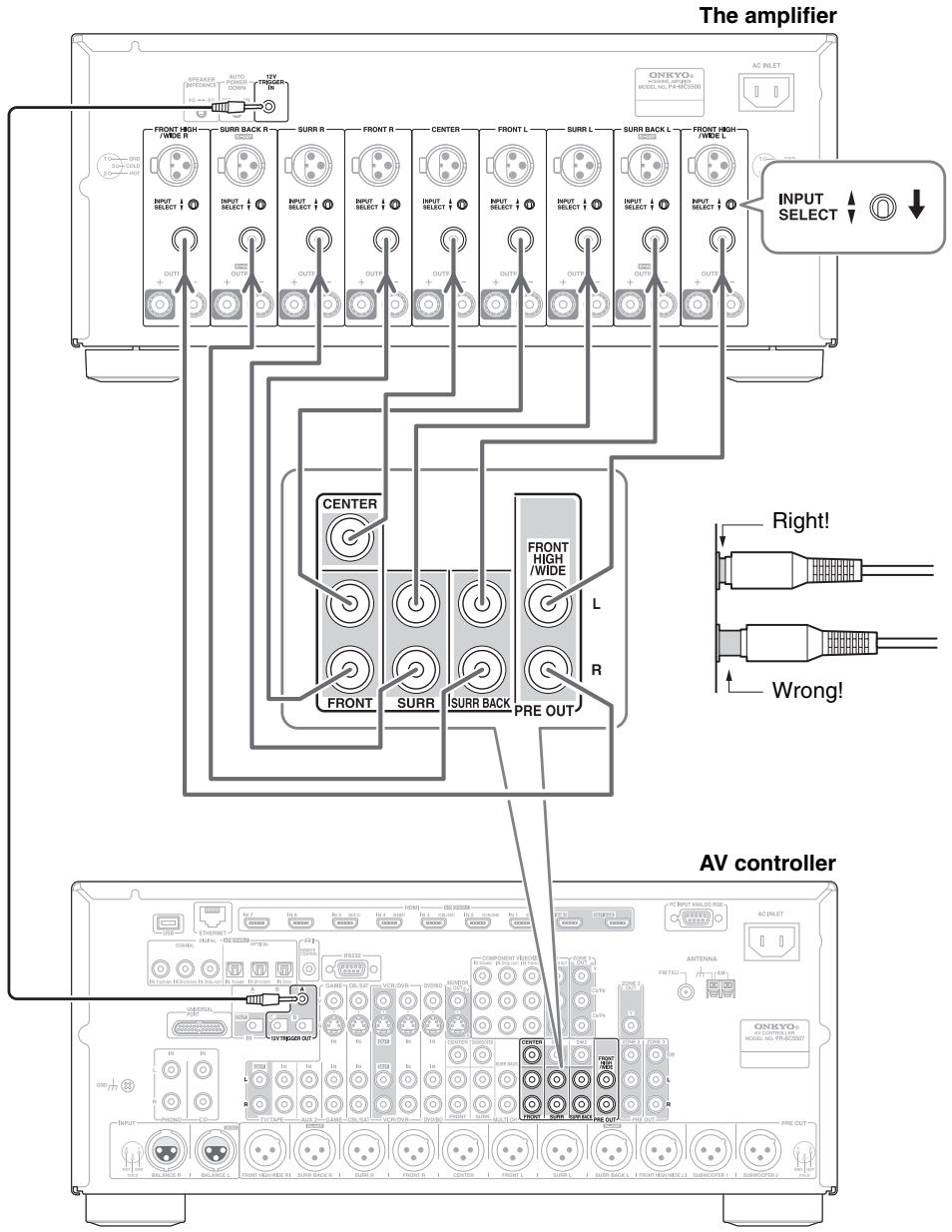
Connecting to an AV Controller with RCA output
Since many users will purchase the amplifier together with the Onkyo AV controller PR-SC5507, here is an explanation of how to connect the amplifier to the PR-SC5507. For more details, see the instruction manual of the connected component.
Notes:
- When using the RCA inputs, do not connect anything to the balanced inputs.
- Make sure that the pin cable is not split. The split pin cable may be the cause of noise.
- Push plugs in all the way to make good connections (loose connections can cause noise or malfunctions).
- To prevent interference, keep audio and video cables away from power cords and speaker cables.
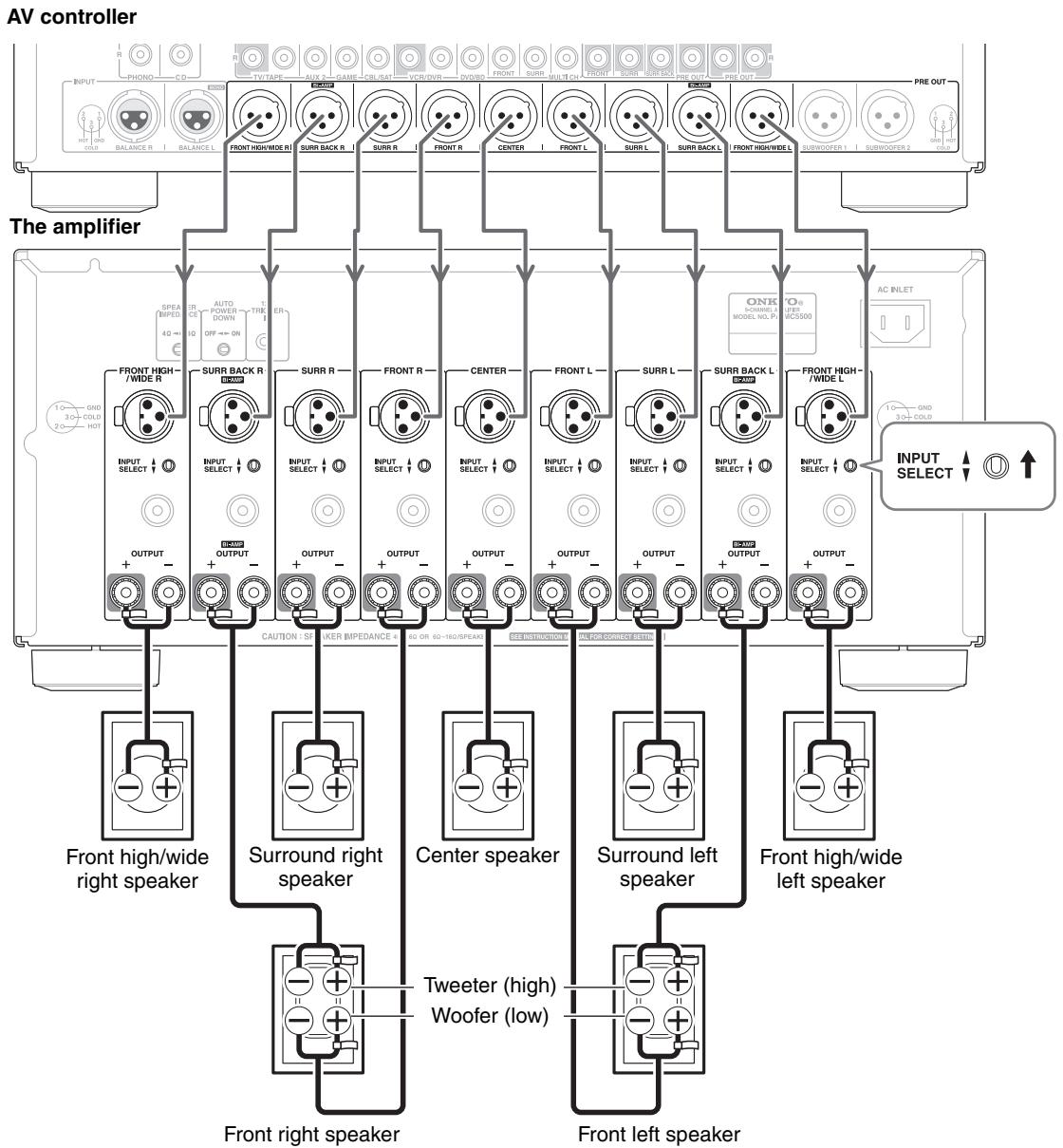
Bi-amping the Front Speakers
The FRONT L/R and SURR BACK L/R outputs can be used with front speakers and surround back speakers respectively, or bi-amped to provide separate tweeter and woofer feeds for a pair of front speakers that support bi-amping, providing improved bass and treble performance.
Notes:
- Please make sure that your AV controller supports bi-amping.
- When bi-amping is used, the amplifier is able to feed up to 7-channel speakers in the main room.
- When bi-amping is used, surround back speakers cannot be used.
- For bi-amping, the FRONT L/R outputs feed the front speakers' woofer terminals. And the SURR BACK L/R outputs feed the front speakers' tweeter terminals.
- Once you've completed the bi-amping connections shown below, you must turn on the AV controller and configure it to enable bi-amping. For more details, see the instruction manual of the connected component.
- You can also use unbalanced (RCA) connections for bi-amping.
Important:
- When making the bi-amping connections, be sure to remove the jumper bars that link the speakers' tweeter (high) and woofer (low) terminals.
- Bi-amping can only be used with speakers that support bi-amping. Refer to your speaker manual.
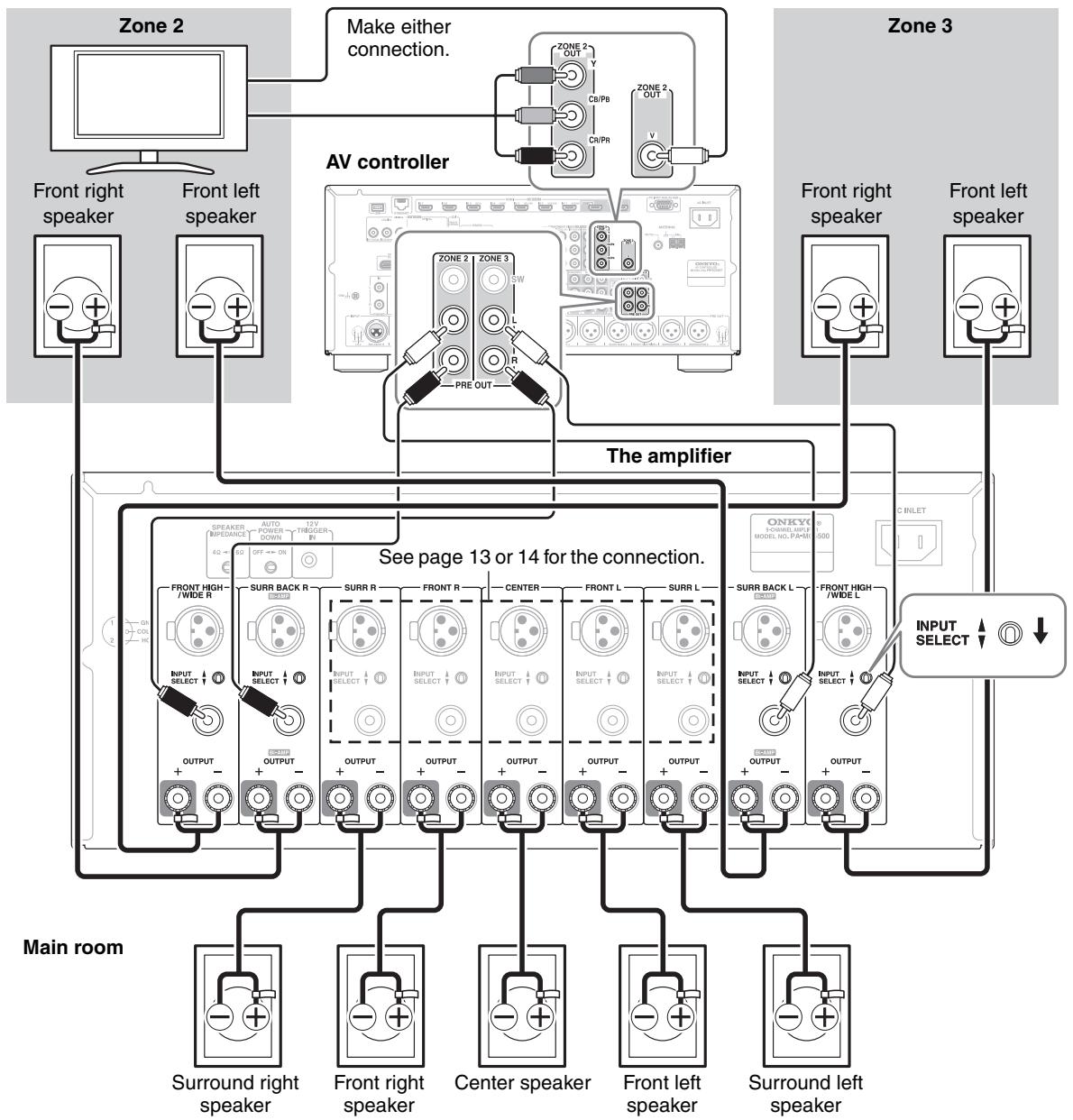
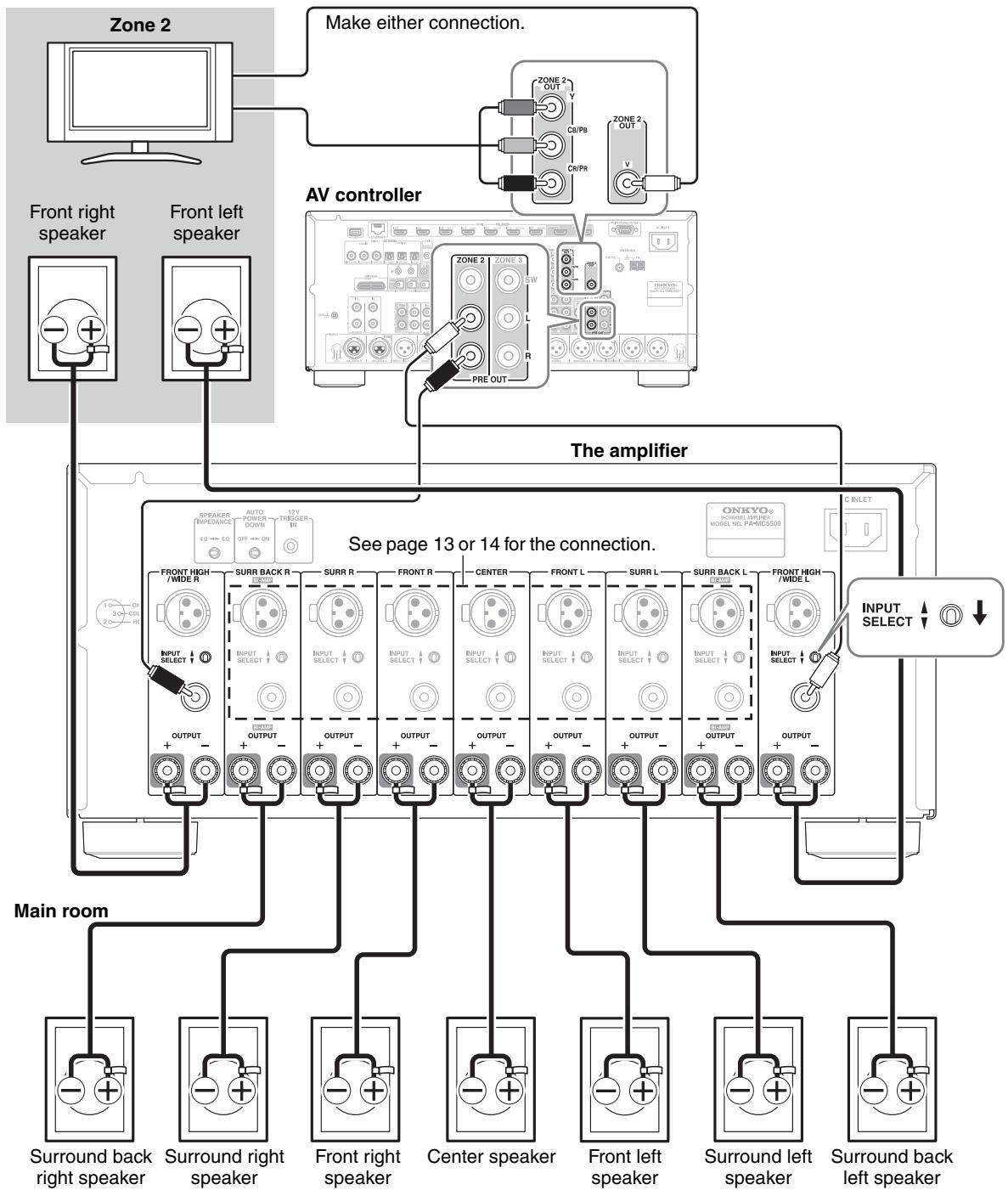
Multiroom Connections
You can use three speaker systems with this amplifier—a surround-sound speaker system in your main listening room, Zone 2: a stereo speaker system in a second room, Zone 3: a stereo speaker system in a third room. The following examples are based on using the amplifier with the AV controller, PR-SC5507. For more details, see the instruction manual of the connected component.
Notes:
- Please make sure that your AV controller has the multi-zone capability.
- Once you've completed multi-zone connections shown below, you must turn on the AV controller and configure it to enable the multi-zone capability.
- If your AV controller has balanced outputs for multiroom versatility, you can also use the balanced inputs on the amplifier.
Connection 1
Main room: You can enjoy up to 5-channel surround-sound playback.
Zone 2: You can enjoy 2-channel stereo playback and video playback.
Zone 3: You can enjoy 2-channel stereo playback.
Connection 2
Main room: You can enjoy up to 7-channel surround-sound playback.
Zone 2: You can enjoy 2-channel stereo playback and video playback.
If the PA-MC5500 fails to function normally, first check the following points before contacting your Onkyo dealer. If the problem is not solved after going through the following list, unplug the power cord and contact your Onkyo dealer.
No power.
- Power cord is not correctly plugged into AC outlet/ Inlet.
Plug the power cord into the AC outlet/Inlet properly. - POWER switch is not set to ON position.
Set the POWER switch to ON.
Power turns on but no sound.
Incomplete connections.
Check speaker cable connections.
Insert all plugs firmly into jacks.
- No input signal from control amplifier.
Check for input signal from control amplifier. - Incorrect INPUT SELECT switch setting.
Set INPUT SELECT switch to correct setting.
The STANDBY indicator flashes red.
- The protection circuitry has been activated.
Remove the power cord from the wall outlet immediately. Set the POWER switch to OFF, disconnect all speaker cables and input sources, and then leave the amplifier with its power cord disconnected for 1 hour. After that, reconnect the power cord, set the POWER switch to ON. If the amplifier stays on, disconnect the power cord, and reconnect your speakers and input sources. If the amplifier turns off, disconnect the power cord, and contact your Onkyo dealer.
The 12V trigger of the PA-MC5500 does not react to that of the PR-SC5507.
- Connection between the 12V trigger terminals is incomplete.
Connect the cables to the terminals firmly.
Humming or other noise is heard.
- Input cable connection is incomplete.
Insert the input cable to pin jack or connector completely. -
Noise from power cord or power transformer affects the input cable.
Keep power cord or power transformer away from the input cable. -
Power cord or speaker cables are bundled together with pin cords.
This may cause humming or noise. Do not bundle power cord or speaker cables with pin cables together. - Connection to the input terminals is not complete or not appropriate.
For each channel's input terminals, connect cables or cords to either balanced input terminal or audio input terminal only and switch the INPUT SELECT switch accordingly.
Avoid connecting the cables or cords to the input terminals that will not be used.
Amplifier section
Rated Output Power
All channels:
North American:
150 watts minimum continuous power per channel, 8 ohm loads, 2 channels driven from 20Hz to 20kHz , with a maximum total harmonic distortion of 0.05% (FTC)
175 watts minimum continuous power per channel, 8 ohm loads, 2 channels driven at 1kHz with a maximum total harmonic distortion of 0.7% (FTC)
185 watts minimum continuous power per channel, 6 ohm loads, 2 channels driven at 1kHz with a maximum total harmonic distortion of 0.1% (FTC)
Others:
9ch× 220 W at 6 ohms, 1kHz 1 ch driven (IEC)
Maximum Effective Output Power
Asian:
9 ch × 280 W at 6 ohms, 1 kHz, 1 ch driven (JEITA)
Dynamic Power
400 W (3 Ω, Front)
300 W (4 Ω, Front)
180 W (8 Ω, Front)
THD (Total Harmonic Distortion)
0.05% (Power Rated)
Damping Factor
60 (Front, 1 kHz, 8 Ω)
Input Sensitivity and Impedance
1 V, 47 kΩ (Unbalanced)
2 V, 22 kΩ (Balanced)
Frequency Response
5Hz - 100kHz / + 1 dB-3dB
Signal to Noise Ratio
110 dB (Unbalanced, IHF-A)
Speaker Impedance
4Ω-16Ω
General
Power Supply
North American:
AC 120V 60Hz
Others:
AC 220 - 240 V, 50/60 Hz
Power Consumption
North American: 11.7 A
Others: 1050 W
Dimensions (W× H× D)
435× 198.5× 458.5mm
17-1/8" × 7-13/16" × 18-1/16"
Weight
23kg (50.7 lbs.)
Audio Inputs
Balance Inputs
9
Unbalance Inputs
9
Speaker Outputs
FL, FR, C, SL, SR, SBL, SBR, LH, RH
Control Terminal
12 V Trigger In
1
Specifications and features are subject to change without notice.
ONKYO CORPORATION
Sales & Product Planning Div.: 2-1, Nisshin-cho, Neyagawa-shi, OSAKA 572-8540, JAPAN
Tel: 072-831-8023 Fax: 072-831-8163
18 Park Way, Upper Saddle River, N.J. 07458, U.S.A.
Tel: 800-229-1687, 201-785-2600 Fax: 201-785-2650 http://www.us.onkyo.com/
ONKYO EUROPE ELECTRONICS GmbH
Liegnitzerstrasse 6, 82194 Groebenzell, GERMANY
Tel: +49-8142-4401-0 Fax: +49-8142-4401-555 http://www.eu.onkyo.com/
ONKYO EUROPE ELECTRONICS GmbH (UK BRANCH)
The Coach House 81A High Street, Marlow, Buckinghamshire, SL7 1AB, UK
Tel: +44-(0)1628-473-350 Fax: +44-(0)1628-401-700
ONKYO CHINA LIMITED
Unit 1 & 12, 9/F, Tower 1, Ever Gain Plaza, 88, Container Port Road, Kwai Chung,
N.T., Hong Kong. Tel: 852-2429-3118 Fax: 852-2428-9039
http://www.ch.onkyo.com/
Y1001-1
- WARNING:
- CAUTION:
- WARNING
- AVIS
- Important Safety Instructions
- Power
- Preventing Hearing Loss
- Caution
- Batteries and Heat Exposure Warning
- Handling Notes
- For U.S. models
- FCC Information for User
- NOTE:
- For Canadian Models
- IMPORTANT
- For European Models
- Features
- Contents
- Before using
- Operations
- Connections
- Appendix
- Supplied Accessories
- Power cord
- Mono mini-plug cable
- Ventilation
- Installation location and space
- Speakers
- Care
- Other
- Lightning storms
- Power
- Front Panel
- ① POWER switch
- ② ON/STANDBY button
- ③ STANDBY indicator
- ④ ON indicator
- Notes:
- Rear Panel
- ① Balanced Input (XLR terminal)
- Plugging the XLR cable
- Unpugging the XLR cable
- ② INPUT SELECT switch
- ③ Unbalanced Input (single end RCA input)
- OUTPUT (Speaker output and binding post) These terminal posts are for connecting the front L/R, center, surround L/R, surround back L/R, and front high/wide L/R speakers.
- ⑤ SPEAKER IMPEDANCE switch
- ⑥ AUTO POWER DOWN switch
- ⑦ 12V TRIGGER IN
- ⑧ AC INLET
- Connecting Your Speakers
- Attaching the Speaker Labels
- (North American models)
- Speaker Connection Precautions
- Connecting the Speaker Cables
- Connecting to an AV Controller with XLR output
- Connecting to an AV Controller with RCA output
- Bi-amping the Front Speakers
- Important:
- Multiroom Connections
- Connection 1
- Connection 2
- No power.
- Power turns on but no sound.
- The STANDBY indicator flashes red.
- The 12V trigger of the PA-MC5500 does not react to that of the PR-SC5507.
- Humming or other noise is heard.
- Amplifier section
- General
- Audio Inputs
- Speaker Outputs
- Control Terminal
- ONKYO CORPORATION
Brand : ONKYO
Model : PA-MC5500
Category : Power amplifier