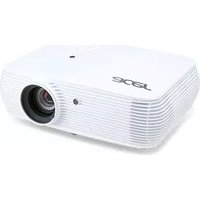
X110P - Video projector ACER - Free user manual and instructions
Find the device manual for free X110P ACER in PDF.


Pick your language and provide your email: we'll send you a specifically translated version.
| Product Type | Video Projector |
| Brand | Acer |
| Model | X110P |
| Display Technology | DLP |
| Native Resolution | SVGA (800 x 600) |
| Brightness | 2500 ANSI Lumens |
| Contrast Ratio | 2000:1 |
| Lamp Life (Normal) | 4000 hours |
| Lamp Life (Eco) | 6000 hours |
| Zoom Ratio | 1.1x |
| Keystone Correction | ±40° Vertical |
| Inputs | VGA, S-Video, Composite, Audio In |
| Outputs | VGA, Audio Out |
| Noise Level (Normal) | 30 dB |
| Noise Level (Eco) | 26 dB |
| Dimensions (W x D x H) | 26 cm x 23 cm x 8 cm |
| Weight | 2.5 kg |
| Power Consumption | 250 W |
| Power Supply | 100-240 V AC, 50/60 Hz |
| Included Accessories | Remote control, Power cord, VGA cable, User manual |
| Cleaning | Clean the lens with a soft, dry cloth. Clean air vents with a vacuum. |
| Safety | Do not look directly at the lens. Ensure proper ventilation. Replace lamp only when cool. |
Frequently Asked Questions - X110P ACER
How do I replace the lamp in my Acer X110P projector?
Turn off and unplug the projector. Allow it to cool for at least 30 minutes. Remove the lamp cover screw and slide off the cover. Disconnect the lamp connector, then remove the old lamp. Insert the new lamp (Acer part number MC.JPT11.001) and reconnect. Replace the cover and screw. Reset the lamp timer via the on-screen menu.
What is the native resolution of the Acer X110P?
The Acer X110P has a native resolution of SVGA (800 x 600). It supports up to UXGA (1600 x 1200) compressed.
Can I connect my laptop to the X110P?
Yes, use a VGA cable to connect your laptop's VGA output to the projector's VGA input. You may need an adapter for newer laptops. Also ensure the correct input source is selected via the remote or menu.
How do I clean the projector lens?
Use a soft, dry microfibre cloth to gently wipe the lens. Do not use any liquids or abrasive materials. For stubborn dirt, slightly dampen the cloth with water, but never spray directly onto the lens.
What is the lamp life of the Acer X110P?
The lamp lasts up to 4000 hours in normal mode and up to 6000 hours in eco mode. Actual life depends on usage conditions.
Why is my projector overheating?
Ensure vents are not blocked and clean the air filter if equipped. The projector automatically shuts down if overheated. Place it in a well-ventilated area with at least 30 cm clearance around the vents.
How do I adjust the keystone correction?
Press the Keystone button on the remote or navigate to the Image menu. Use the arrow keys to adjust the vertical keystone within ±40° to correct trapezoid distortion.
What should I do if the image is out of focus?
Rotate the focus ring on the lens barrel until the image is sharp. If still blurry, adjust the zoom ring and ensure the projector is at the correct distance from the screen.
Can I use the projector without a remote?
Yes, the control panel on the projector has buttons for power, menu, source, and navigation. However, some advanced settings may require the remote.
Where can I download the user manual?
The manual is available for free on notice-facile.com or the Acer support website. Search for 'Acer X110P manual' and download the PDF version.
User questions about X110P ACER
0 question about this device. Answer the ones you know or ask your own.
Ask a new question about this device
No questions yet. Be the first to ask one.
Download the instructions for your Video projector in PDF format for free! Find your manual X110P - ACER and take your electronic device back in hand. On this page are published all the documents necessary for the use of your device. X110P by ACER.
USER MANUAL X110P ACER
Manual assistant
Powered by Anthropic
Waiting for your message
Product information
Brand : ACER
Model : X110P
Category : Video projector