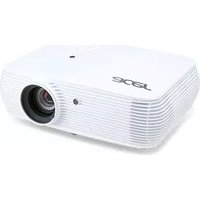
X1161PA - Video projector ACER - Free user manual and instructions
Find the device manual for free X1161PA ACER in PDF.


Pick your language and provide your email: we'll send you a specifically translated version.
| Product Type | DLP Video Projector |
| Brand | Acer |
| Model | X1161PA |
| Display Technology | DLP |
| Native Resolution | SVGA (800 x 600) |
| Brightness (Normal Mode) | 2700 ANSI Lumens |
| Contrast Ratio | 2000:1 |
| Lamp Type | 180W UHP |
| Lamp Life (Normal/Eco) | 3000 / 5000 Hours |
| Input Ports | VGA, S-Video, Composite Video, Audio |
| Dimensions (W x D x H) | 268 x 192 x 80 mm |
| Weight | 2.4 kg |
| Power Consumption | 225W (Standby < 1W) |
| Noise Level | 30 dB (Eco Mode) |
| Keystone Correction | ±40° Vertical |
| Maintenance | Replace lamp & clean air filter |
| Safety Features | Auto-off, Overheating Shutdown, Kensington Lock |
| Repairability | Spare parts: Lamp module, filter kit; Service manual available |
| Warranty | Standard 1 year (check local) |
Frequently Asked Questions - X1161PA ACER
What is the native resolution of the Acer X1161PA?
The native resolution is SVGA (800 x 600).
How do I replace the lamp?
Turn off and unplug the projector, let it cool. Remove the lamp cover screw, slide out the old lamp module, insert new one, and replace cover. Refer to manual for details.
How long does the lamp last?
Lamp lasts about 3000 hours in normal mode and up to 5000 hours in eco mode.
Can I connect my laptop to this projector?
Yes, use the VGA port to connect your laptop. You may need a VGA cable (not included).
What should I do if the projector overheats?
The projector will automatically shut down. Ensure air vents are clear and clean the filter. Let it cool before restarting.
How do I clean the air filter?
Locate the filter on the side/bottom, remove it, vacuum or wash with water (let dry completely), then reinstall. Clean every 1000 hours.
Why is the image not sharp?
Check that the focus ring is adjusted properly and the projector is at the correct distance. Also verify the input resolution matches the native resolution.
Does it support HDMI?
No, the X1161PA does not have HDMI. It has VGA, S-Video, and Composite video inputs. An HDMI-to-VGA adapter may work for video.
Where can I find the user manual?
The manual is available on notice-facile.com in PDF format. You can download it for free in multiple languages.
What spare parts are available?
Common spare parts include replacement lamps and air filter kits. Contact Acer support or authorized dealers.
User questions about X1161PA ACER
0 question about this device. Answer the ones you know or ask your own.
Ask a new question about this device
No questions yet. Be the first to ask one.
Download the instructions for your Video projector in PDF format for free! Find your manual X1161PA - ACER and take your electronic device back in hand. On this page are published all the documents necessary for the use of your device. X1161PA by ACER.
USER MANUAL X1161PA ACER
Manual assistant
Powered by Anthropic
Waiting for your message
Product information
Brand : ACER
Model : X1161PA
Category : Video projector