
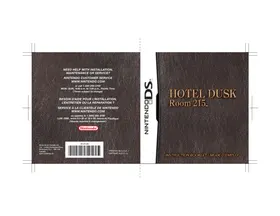
DS HOTEL DUSK ROOM 215 - Video game NINTENDO - Free user manual and instructions
Find the device manual for free DS HOTEL DUSK ROOM 215 NINTENDO in PDF.


| Product Type | Nintendo DS Game Card |
| Brand | Nintendo |
| Model | Hotel Dusk: Room 215 |
| Category | Adventure Video Game |
| Card Dimensions | Approximately 35 x 33 x 3.8 mm |
| Card Weight | Approximately 3 g |
| Power | Provided by Nintendo DS console |
| Main Features | Narrative adventure game with investigation, dialogues, puzzles, use of touch screen and stylus, compatible with Rumble Pak |
| Number of Players | 1 |
| Languages | French, English, and others |
| Care and Cleaning | Clean with a soft, dry cloth. Avoid any liquids. |
| Safety | Respect warnings: risk of epilepsy, radio interference, injuries from repetitive motion, lithium-ion battery |
| Spare Parts and Repairability | Not applicable (sealed game card) |
| General Information | Published by Nintendo, released in 2007. Genre: adventure, mystery. ESRB: Teen (13+). |
| Warranty | 3 months for the game, 12 months for the console |
Frequently Asked Questions - DS HOTEL DUSK ROOM 215 NINTENDO
User questions about DS HOTEL DUSK ROOM 215 NINTENDO
0 question about this device. Answer the ones you know or ask your own.
Ask a new question about this device
Download the instructions for your Video game in PDF format for free! Find your manual DS HOTEL DUSK ROOM 215 - NINTENDO and take your electronic device back in hand. On this page are published all the documents necessary for the use of your device. DS HOTEL DUSK ROOM 215 by NINTENDO.
USER MANUAL DS HOTEL DUSK ROOM 215 NINTENDO
NEED HELP WITH INSTALLATION, MAINTENANCE OR SERVICE?
NINTENDOCUSTOMER SERVICE
WWW.NINTENDO.COM
or call 1-800-255-3700
MON.-SUN., 6:00 a.m. to 7:00 p.m., Pacific Time
(Times subject to change)
BESOIN D'AIDE POUR L'INSTALLATION, L'ENTRETIEN OU LA RÉPARATION ?
SERVICE à LA CLIENTÉLÉ DE NINTENDO WWW.NINTENDO.COM
ouappelezle1(800)255-3700
Nintendo of Canada Ltd.
110-13480 Crestwood Place
Richmond, B.C. V6V 2J9
Canada
www.nintendo.ca
61313A

PRINTED IN U.S.A. /
IMPRIME AUX É.-U.
SCDON3LNIN
HOTEL DUSK
Room 215
PLEASE CAREFULLY READ THE SEPARATE HEALTH AND SAFETY PRECAUTIONS BOOKLET INCLUDED WITH THIS PRODUCT BEFORE USING YOUR NINTENDO® HARDWARE SYSTEM, GAME CARD OR ACCESSORY. THIS BOOKLET CONTAINS IMPORTANT HEALTH AND SAFETY INFORMATION.
IMPORTANT SAFETY INFORMATION: READ THE FOLLOWING WARNINGS BEFORE YOU OR YOUR CHILD PLAY VIDEO GAMES.
WARNING - Seizures
Some people (about 1 in 4000) may have seizures or blackouts triggered by light flashes or patterns, such as while watching TV or playing video games, even if they have never had a seizure before.
- Anyone who has had a seizure, loss of awareness, or other symptom linked to an epileptic condition should consult a doctor before playing a video game.
- Parents should watch when their children play video games. Stop playing and consult a doctor if you or your child have any of the following symptoms:
Convulsions
Altered vision
Eye or muscle twitching
Involuntary movements
Loss of awareness
Disorientation
To reduce the likelihood of a seizure when playing video games:
- Sit or stand as far from the screen as possible.
- Play video games on the smallest available television screen.
- Do not play if you are tired or need sleep.
- Play in a well-lit room.
- Take a 10 to 15 minute break every hour.
WARNING - Radio Frequency Interference
The Nintendo DS can emit radio waves that can affect the operation of nearby electronics, including cardiac pacemakers.
- Do not operate the Nintendo DS within 9 inches of a pacemaker while using the wireless feature.
- If you have a pacemaker or other implanted medical device, do not use the wireless feature of the Nintendo DS without first consulting your doctor or the manufacturer of your medical device.
- Observe and follow all regulations and rules regarding use of wireless devices in locations such as hospitals, airports, and on board aircraft. Operation in those locations may interfere with or cause malfunctions of equipment, with resulting injuries to persons or damage to property.
WARNING - Repetitive Motion Injuries and Eyestrain
Playing video games can make your muscles, joints, skin or eyes hurt after a few hours. Follow these instructions to avoid problems such as tendinitis, carpal tunnel syndrome, skin irritation or eyestrain.
- Avoid excessive play. It is recommended that parents monitor their children for appropriate play.
Take a 10 to 15 minute break every hour, even if you don't think you need it. - When using the stylus, you do not need to grip it tightly or press it hard against the screen. Doing so may cause fatigue or discomfort.
- If your hands, wrists, arms or eyes become tired or sore while playing, stop and rest them for several hours before playing again.
If you continue to have sore hands, wrists, arms or eyes during or after play, stop playing and see a doctor.
WARNING - Battery Leakage
The Nintendo DS contains a rechargeable lithium ion battery pack. Leakage of ingredients contained within the battery pack, or the combustion products of the ingredients, can cause personal injury as well as damage to your Nintendo DS.
If battery leakage occurs, avoid contact with skin. If contact occurs, immediately wash thoroughly with soap and water. If liquid leaking from a battery pack comes into contact with your eyes, immediately flush thoroughly with water and see a doctor.
To avoid battery leakage:
- Do not expose battery to excessive physical shock, vibration, or liquids.
- Do not disassemble, attempt to repair or deform the battery.
- Do not dispose of battery pack in a fire.
- Do not touch the terminals of the battery, or cause a short between the terminals with a metal object.
- Do not peel or damage the battery label.
Important Legal Information
This Nintendo game is not designed for use with any unauthorized device. Use of any such device will invalidate your Nintendo product warranty. Copying of any Nintendo game is illegal and is strictly prohibited by domestic and international intellectual property laws. "Back-up" or "archival" copies are not authorized and are not necessary to protect your software. Violators will be prosecuted.
The official seal is your assurance that this product is licensed or manufactured by Nintendo. Always look for this seal when buying video game systems, accessories, games and related products. Official Nintendo Seal
Nintendo does not license the sale or use of products without the Official Nintendo Savi.
THIS GAME IS COMPATIBLE WITH
THE RUMBLE PAK ACCESSORY.


CONTENT RATED BY
ESRB
Nintendo
©2007 NINTENDO/CING. ALL RIGHTS, INCLUDING THE COPYRIGHTS OF GAME, SCENARIO, MUSIC AND PROGRAM, RESERVED BY NINTENDO AND CING. TM, ® AND THE NINTENDO DS LOGO ARE TRADEMARKS OF NINTENDO. © 2007 NINTENDO. ALL RIGHTS RESERVED. This product uses the LC Font by Sharp Corporation, except some characters. LCFONT, LC Font and the LC logo mark are trademarks of Sharp Corporation.
Nintendo's game pages, at www.nintendo.com/games, feature walkthroughs, frequently-asked questions, and codes for many of our games. If your answer isn't there, check out our forums where you can exchange tips with other gamers online.
For more information about our forums, visit www.nintendo.com/community.
If you don't have access to the web-site, recorded tips for many titles are available on Nintendo's Power Line at (425) 885-7529. This may be a long-distance call, so please ask permission from whoever pays the phone bill.

CONTENTS
5
| Prologue | 6 | Talking | 18 |
| Characters | 8 | Searching | 20 |
| Controls | 10 | Solving Puzzles | 22 |
| Checking In | 12 | Using Your Notebook | 23 |
| In Pursuit of the Truth | 14 | Progressing Through the Story | 26 |
| Controlling Kyle | 16 | Manuel en Français | 30 |
Holding the Nintendo DS
You will hold the Nintendo DS sideways when playing Hotel Dusk. Put the Touch Screen on the right if you're right-handed, or on the left if you're left-handed. You can change the handedness setting when you start a game for the first time (see p. 12) or on the system menu (see p. 25). Explanation in this manual default to right-handednes
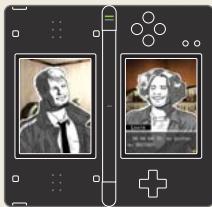
Single screenshots in this manual are labeled TOUCH for Touch Screen images, and are unlabeled for images on the other screen.
PROLOGUE
6
The name's Kyle Hyde.
On December 24, 1976, I shot a man named Brian Bradley. He was my partner. And my friend.
"Hey, Bradley! I just heard from the chief. You really going to do it?"
"Yeah. We think it's the only way to get the info we need."
"I don't know..."
"Look, I know it's dangerous, but I'm the only one in position to get this done."
"All right, partner. If you say so. ...So what are you going to tell Mila?"
"Not much. Probably tell her I'm being transferred or something. Might even send her to Boston to live with some family until this whole thing blows over. Safer than letting you watch her, right?"
December, 1975. Bradley goes undercover to investigate a Manhattan-based crime syndicate. A year later he sells us out and gives confidential police information to the bad guys. He's a traitor. I hear the news, canvas the city, and finally track him down.
"Why'd you do it, Bradley?"
He turns to run...and I shoot him. Bradley crumples and takes a dive into the river, but the body's never found. A dirty cop's not a popular subject, so the whole thing's swept under the carpet in a matter of days.
"We don't waste manpower looking for dead rats, Hyde. Forget it."
As for me? I leave my badge and gun on my desk and walk away.
Eight years on the force...done.
It's been three years since I left the 89th Precinct and New York behind. Now I'm a salesman for an outfit called Red Crown...but I'm still looking for Bradley.
On the surface, Red Crown's a door-to-door sales firm dealing in household goods. But Ed, the boss, has himself a little side business finding things that don't always want to be found, and from time to time, I lend a hand.
When a job comes in, Ed tells me where to go and puts whatever I'm supposed to find on an order sheet that he mails to me. When I arrive, I just lay low until the sheet shows. But once I get it, it's time to go to work.
December 28, 1979. The last Friday of the year. Ed pages me, but I let it slide for a few hours before calling in. ...It was a rough night.
"Hyde! Why haven't you checked in?"
"Stop yelling, Ed. My head's pounding like a marching band caught in a stampede."
"Hung over again, eh? Well, no sympathy here. Ya reap what ya sow! Now listen up! I got a job for ya! It's a place called Hotel Dusk. Package is on the way, and the order sheet's inside."
"Got it."
I hang up and climb back into my beat-up station wagon. Time to hit the road.
I didn't realize it when I started this trip, but as I pull up to Hotel Dusk I get the feeling I'm going to find something. Something that will lead me to Bradley.
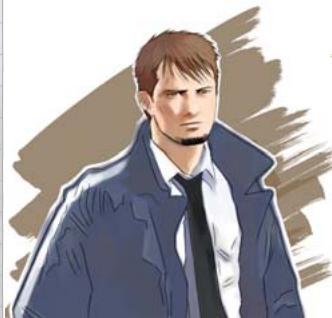
Kyle Hyde
A thirty-three-year-old former N.Y.P.D. detective. He's been a traveling salesman for the past three years, but continues to search for his missing ex-partner, Brian Bradley. He presents a gruff and cavalier exterior, but drops all pretense when something grabs his attention.

Mila
A girl Kyle sees on the road while traveling to Hotel Dusk. When she arrives at the hotel, Kyle learns she cannot speak. She wears a bracelet identical to the one Bradley wore.

Rachel
The twenty-seven-year-old secretary for Red Crown's president, Ed. She's Kyle's main contact person and sometimes confidante. She's witty and kind, and knows nothing about Kyle's search for Bradley.

Dunning
The forty-nine-year-old owner of Hotel Dusk. He's a stubborn man who dislikes cops, crooks, and trouble in equal measure. He tells Kyle the story of Room 215.
Ed
The fifty-five-year-old president of Red Crown. He's a friend of Kyle's deceased father, and ex-L.A.P.D. He's the only one who knows that Hyde's looking for Bradley.

Brian Bradley
The man Kyle is trying to find, Bradley is Kyle's former partner and friend.

Three years ago he switched sides and gave confidential police information to a crime syndicate he was supposed to be investigating. Kyle shot him, but Bradley disappeared and hasn't been seen since.
CONTROLS
10
Hotel Dusk is controlled almost exclusively by tapping and sliding the stylus on the Touch Screen. Below is the Nintendo DS layout and corresponding game controls.
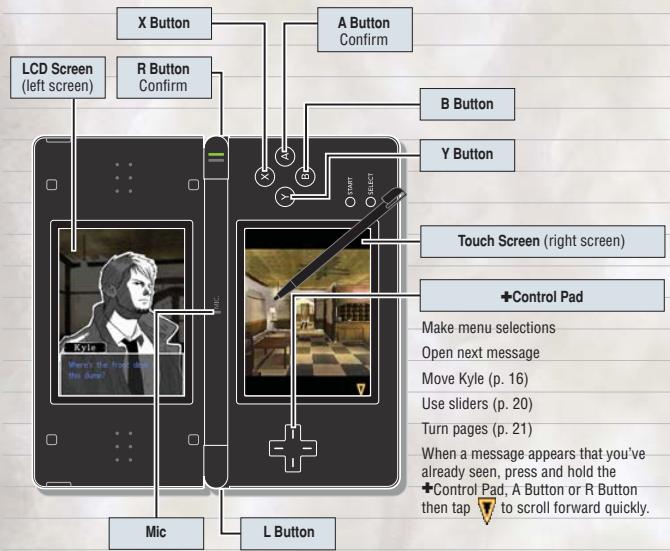
If you're playing right-handed, you will not use the B, X, Y, or L Buttons.
Close the Nintendo DS in mid-game to activate the energy-saving Sleep Mode. Open the system to continue playing.
Menu Selection Controls
To make a choice on a conversation screen (p. 18), tap an option once to select it, then once more to confirm your choice. Menu choices on all other screens are completed by tapping a selection once.
About Left-Handed Settings
If you select to play left-handed at the beginning of the game, the button functionality will change as shown to the right. If you want to change handedness during game play, open your notebook and select System to do so (p. 25).
Please note that the +Control Pad up, down, left, and right displays will be the same as when you are holding the Nintendo DS sideways.
| Right-Handed | Left-Handed | |
| +Control Pad - up | ▲ | Y Button |
| +Control Pad - down | ▲ | A Button |
| +Control Pad - left | ▲ | B Button |
| +Control Pad - right | ▲ | X Button |
| A Button | ▲ | +Control Pad - up |
| R Button | ▲ | L Button |
CHECKING IN
12
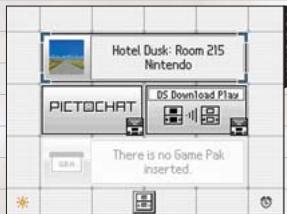
Make sure your Nintendo DS is turned off. Insert the Hotel Dusk Room 215 Game Card into the DS Game Card Slot until it clicks into place, then turn the power on.
When playing with a Rumble Pak, insert it into the
Game Boy Advance Game Pak slot until it clicks into place.
After you turn the power on, read the information on the start-up screen (shown to the right), then tap it to proceed to the DS Menu Screen.
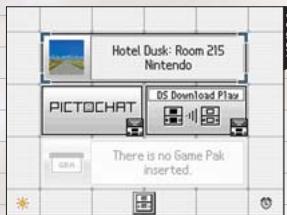
2. On the DS Menu Screen, tap the Hotel Dusk Room 215 panel.
If you have your Nintendo DS Start-up Mode set to Auto, the DS Menu Screen will not appear. See your Nintendo DS Instruction Booklet for more details.
- When playing for the first time, you'll need to choose either the right-handed or left-handed setting before moving to the title screen.
The next time you play, you'll skip the handedness setting and move directly to the title screen.
WARNING-HEALTH AND SAFETY
BEFORE PLAYING, READ THE HEALTH AND SAFETY PRECAUTIONS BOOKLET FOR IMPORTANT INFORMATION ABOUT YOUR HEALTH AND SAFETY.
TO GET AN EXTRA COPY FOR YOUR REGION. GO ONLINE AT www.nintendo.com/healthsafety/
Touch the Touch Screen to continue.
Touch

Title Screen
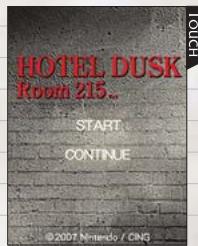
Choose a selection by tapping it with the stylus.
| START | Start playing from the beginning. |
| CONTINUE | Continue playing a game in progress. After you select CONTINUE, you must choose a save file from which to start playing. |
About Saving
To save your game, select the notebook icon on the movement screen (p. 16). When the notebook screen (p. 23) appears, choose Save / Load, then tap Save. Next, select a file to which you want to save, then confirm by tapping Yes when it appears. You will also have the chance to save at the end of each chapter (p. 14). To erase a saved data file, select Save / Load, then tap Erase when it displays.
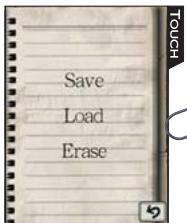
You can erase all saved data by pressing and holding the A, B, X, Y, L, and R Buttons at the same time when you start up the game.
Be careful! Deleted game data cannot be restored!
IN THE PURSUIT OF THE TRUTH
14
The story of Hotel Dusk Room 215 is divided into chapters. To progress through the game, guide Kyle Hyde through the hotel so he can interact with the people staying there.
1. Controlling Kyle (p. 16-17)
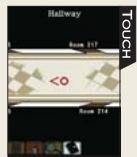
Touch a spot on the screen to start Kyle moving in that direction. The farther the stylus is from him, the faster he'll move. When you come to a door, tap the door icon [ ] to interact with the door. You can knock on a door by tapping it, or try to open it by touching the handle twice.

5. Moving to the Next Chapter
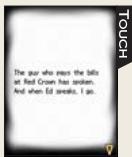
As you repeat steps 1 through 4, time will pass in the game. After a certain amount of time has passed, you'll
stop and reflect on what has happened in the current chapter, then move on to the next one.
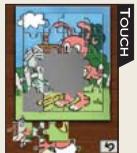
- Solving Puzzles (p. 22) In the course of the game, you'll sometimes run into a puzzle that must be solved.
Use all the functions of the Nintendo DS to figure them out!

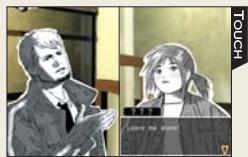
2. Talking (p.18-19)
Talk to people to gather information, then use that information to progress through the story.
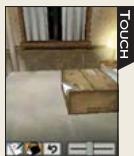
3. Searching (p. 20-21)
Search any areas or items that catch your interest. You may find an important clue!
Game Over
Be careful when interacting with people! If you say the wrong thing or behave in the wrong way, you may get tossed out of the hotel and end your game.
Using the Notebook (p. 23-25)
Tap the notebook icon on the movement screen (p. 16) to open your notebook. Here you can check information on people and items, save your game, look at a map, and perform other tasks.
CONTROLLING KYLE
16
As you play, you must guide Kyle through the hotel. The left screen will show what Kyle sees as he travels. Move close to people with whom you want to talk or areas you want to search.
Movement Screen
Kyle will move in the direction dictated by touching the screen with the stylus. Touch the screen farther away from him to make him walk faster.
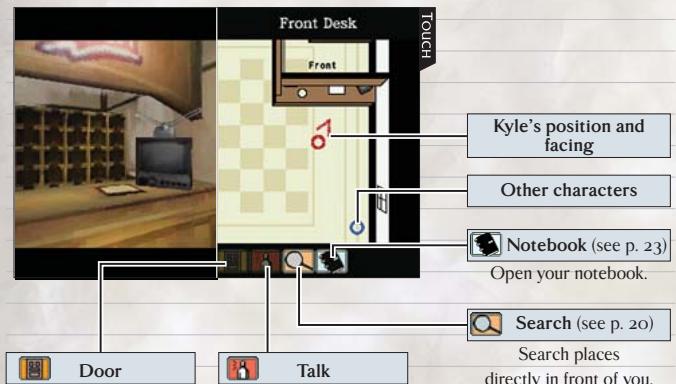
Interact with doors directly in front of you.
Talk to people directly in front of you.
Kyle's position and facing
Other characters
Notebook (see p. 23)
Open your notebook.
Search (see p. 20)
Search places
directly in front of you.

Move Closer to People and Items
When you approach a person, will light up. Tap it to initiate conversations, ask questions, and follow up on clues (see p.18). When you approach an area that can be searched, will light up. Tap it to zoom in on whatever's in front of you, at which point you can search the area.
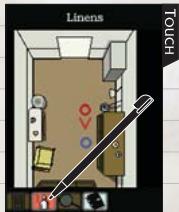
Doors
When you approach a door, will light up.
If you tap the icon, the door will appear on the Touch Screen. Tap the door twice to knock, or tap the knob twice to attempt to open the door. Select to write memos (see p. 21), to use items (see p. 21), or to go back to the movement screen.
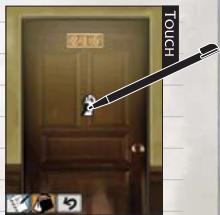
Using Keys
Many doors in the hotel are locked. If you have a key for a particular room, touch , select the key, then touch the doorknob to use it.
TALKING
Hotel Dusk is populated by deadbeats, liars, and thieves—but you'll have to talk to them if you want to uncover their secrets and progress through the game.
Conversation Screen
Tap on the movement screen to advance to the conversation screen, where you can speak to people. Tap to scroll through messages as they appear. When conversation choices appear, tap a selection once to choose it, then tap it again to confirm your choice.
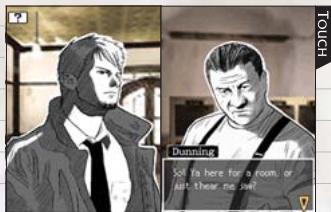
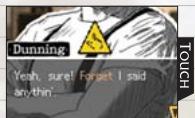
Following Up
When you see, you can follow up on what the person you're speaking with just said by tapping. If you're playing left-handed, this will appear on the
left screen where Kyle is displayed. Following up on the right things is like opening a door into the heart of the story, so use this ability wisely.
GAME OVER
Depending on the paths conversations take, and how you handle certain puzzles, Kyle may get tossed out of the hotel or retreat to his room. If either one happens, it's game over for you. If you want to pick up from where you left off, choose Retry. If you want to return to the title screen, choose Back to Title.

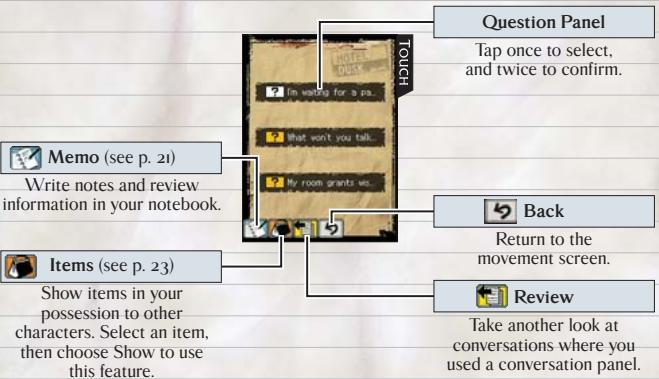
Question Panels

When Kyle hears something that sparks his curiosity,
he'll store a question about it in his mind. These questions are divided into three different categories, and he can ask them whenever there is a break in the conversation. The three question types are shown below.
| ? | Questions that can be satisfied by talking with one person. If you miss the chance to ask one of these questions, you may remember it later. In this case, the icon will be grey. |
| ? | Questions that require talking to more than one person, or questions that you don’t know whom to ask. |
| ? | Questions necessary to solve a specific problem. |
SEARCHING
20
To solve the mysteries you come across, you'll need to search areas and items. Be sure to conduct a thorough examination of anything you find suspicious. Who knows what clues you may uncover?
Search Screen
Tap on the movement screen to move to the search screen. On this screen, double-tap whatever you want to examine.
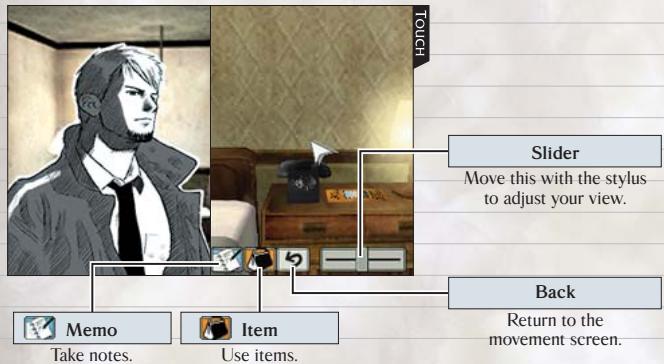

Use Items
To use items, tap , then touch the item you want to use. Double-tap the area or item on which you want to use the selected item to see what happens. To cancel, tap
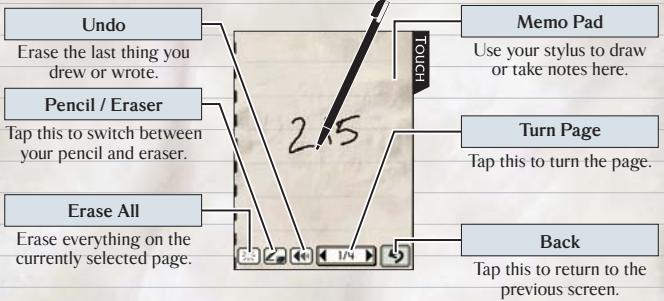
Memo No. 1
Tap to open your memo pad. You can take up to three pages of notes and sketches. Any notes you receive from other characters will appear after the first three pages.
About Items
You'll find items as the result of conversations and searches. Some items can be used on—or stored in—other items in the environment.
SOLVING PUZZLES
22
As you progress through the game, you'll use the Touch Screen to solve puzzles. If people need your help, it's usually in your best interest to lend a hand.
Puzzle Screen
The puzzle screen appears as the result of certain conversations and searches. You may need to use all the functionalities of your Nintendo DS to solve the puzzles.
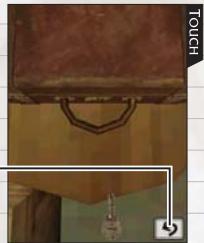
Quit
Tap this to quit a puzzle and return to the previous screen.
Failure
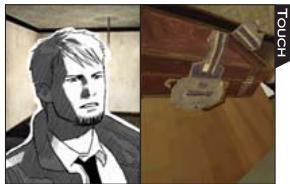
Don't give up if you fail a puzzle! You can try puzzles as many times as needed. If you're stuck, try talking to people or searching for extra clues.
USING YOUR NOTEBOOK
23
Your notebook contains a lot of useful information, so be sure to open it as you progress through the game. You can use it to check on information you've gathered and also to write down important clues.
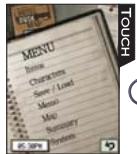
Notebook Screen
Tap on the
movement screen to display the screen shown here. Tap a menu item to select it.
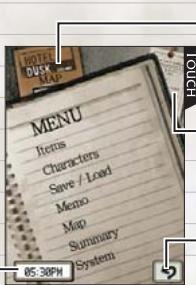
Hotel Brochure
View the hotel map (see p. 25).
Bookmark
Read chapter summaries (see p. 25).
Current Time
Back
Return to the movement screen.
Items
Tap an item to view an item explanation. When you see on the left screen, use the scroll button to scroll the text up and down.
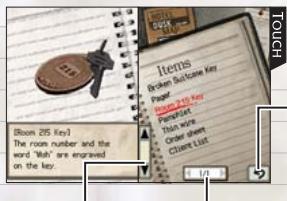
Back
Return to the menu screen.
Scroll Button
Turn Page
Characters
Tap a character's name to see a profile and list of questions you want to ask that character. When you see on the left screen, use the scroll button to scroll text up and down.
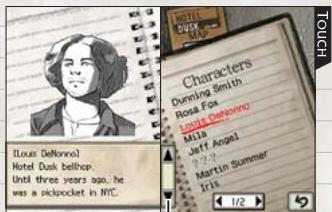
Scroll Button
Save/Load
Select this to save, load, or erase game data.
First, choose either Save or Load to move to the file-select screen. Next, choose the file you want to load, or the file slot to which you want to save, then choose Yes. If you want to delete data, choose Erase.
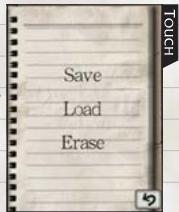
Memo No. 1
This is the place to take and look over notes (see p. 21).

Map
As you progress through the game, Map and Brochure (see p. 23) will appear as menu items. Tap either one to bring up a hotel map. Tap 1st Floor or 2nd Floor to see a close-up of that floor.
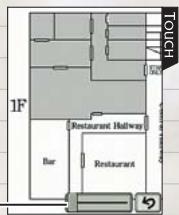
Slider
Summary
After you clear Chapter One, Summary (see p. 23) will appear as a menu selection. Both will display information on chapters you've cleared. Tap the chapter you want to review to display it. When you see on the left screen, use the scroll button to scroll summary text up and down.
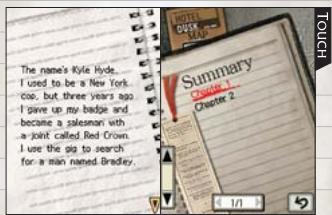
System
Come here to turn the Rumble feature on or off or switch your handedness settings.
PROGRESSING THROUGH THE STORY
26
At certain points, you may find yourself wondering what to do next. Here are a few hints to help you get unstuck.
Pay Attention!
Pay close attention to the conversation choices you take and how the person you're speaking with reacts. If you can get people to trust you, they may provide vital information.
Search Everywhere!
If you use the slider to look at an area from different angles, you may find something new. Also try looking at areas from a distance. Some things may be easier to see from far away.
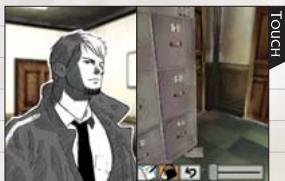
Write it Down!
If you hear or find something you think is important, write it down in the notebook (see p.21). It may come in handy later on.
Warranty & Service Information
You may need only simple instructions to correct a problem with your product. Try our website at www.nintendo.com or call our Consumer Assistance Hotline at 1-800-255-3700, rather than going to your retailer. Hours of operation are 6 a.m. to 7 p.m., Pacific Time, Monday - Sunday (times subject to change). If the problem cannot be solved with the troubleshooting information available online or over the telephone, you will be offered express factory service through Nintendo. Please do not send any products to Nintendo without contacting us first.
HARDWARE WARRANTY
Nintendo of America Inc. ("Nintendo") warrants to the original purchaser that the hardware product shall be free from defects in material and workmanship for twelve (12) months from the date of purchase. If a defect covered by this warranty occurs during this warranty period, Nintendo will repair or replace the defective hardware product or component, free of charge. The original purchaser is entitled to this warranty only if the date of purchase is registered at point of sale or the consumer can demonstrate, to Nintendo's satisfaction, that the product was purchased within the last 12 months.
GAME & ACCESSORY WARRANTY
Nintendo warrants to the original purchaser that the product (games and accessories) shall be free from defects in material and workmanship for a period of three (3) months from the date of purchase. If a defect covered by this warranty occurs during this three (3) month warranty period, Nintendo will repair or replace the defective product, free of charge.
SERVICE AFTER EXPIRATION OF WARRANTY
Please try our website at www.nintendo.com or call the Consumer Assistance Hotline at 1-800-255-3700 for troubleshooting information and repair or replacement options and pricing. In some instances, it may be necessary for you to ship the complete product, FREIGHT PREPAID AND INSURED FOR LOSS OR DAMAGE, to Nintendo. Please do not send any products to Nintendo without contacting us first.
WARRANTY LIMITATIONS
THIS WARRANTY SHALL NOT APPLY IF THIS PRODUCT: (a) IS USED WITH PRODUCTS NOT SOLD OR LICENSED BY NINTENDO (INCLUDING, BUT NOT LIMITED TO, NON-Licensed GAME ENHANCEMENT AND COPIER DEVICES, ADAPTERS, AND POWER SUPPLIES); (b) IS USED FOR COMMERCIAL PURPOSES (INCLUDING RENTAL); (c) IS MODIFIED OR TAMPERED WITH; (d) IS DAMAGED BY NEGLIGENCE. ACCIDENT, UNREASONABLE USE, OR BY OTHER CAUSES UNRELATED TO DEFECTIVE MATERIALS OR WORKMANSHIP, OR (e) HAS HAD THE SERIAL NUMBER ALTERED, DEFACED OR REMOVED.
ANY APPLICABLE IMPLIED WARRANTY, INCLUDING WARRANTY OF MERCHANTABILITY AND FITNESS FOR A PARTICULAR PURPOSE, ARE HEREBY LIMITED IN DURATION TO THE WARRANTY PERIODS DESCRIBED ABOVE (12 MONTHS OR 3 MONTHS, AS APPLICABLE). IN NO EVENT SHALL NINTENDO BE LIABLE FOR CONSEQUENTIAL OR INCIDENTIAL DAMAGES RESULTING FROM THE BREACH OF ANY IMPLIED OR EXPRESS WARRANTY. SOME STATES DO NOT ALLOW LIMITATIONS ON HOW LONG AN IMPLIED WARRANTY LASTS OR EXCLUSION OF CONSEQUENTIAL OR INCIDENTIAL DAMAGES, SO THE ABOVE LIMITATIONS MAY NOT APPLY TO YOU.
This warranty gives you specific legal rights. You may also have other rights which vary from state to state or province to province.
Nintendo's address is: Nintendo of America Inc., P.O. Box 957, Redmond, WA 98073-0957 U.S.A.
This warranty is only valid in the United States and Canada.
NOTES
28
NOTES
29
AVERTISSEMENT : VEUILLEZ LIRE ATTENTIVEMENT LE MANUEL SPECIFIQUE DE PRECAUTIONS COMPRIS AVEC CE PRODUIT, AVANT D'UTILISER VOTRE APPAREIL NINTENDO®,UNE CARTE DE JEU OU UN ACCESSoire. IL CONTIENT DES RENSEIGNEMENTS IMPORTANTS CONCERNANT LA SANTÉ ET LA SECURITE.
RENSEIGNEMENTS IMPORTANTS SUR LA SECURITE - VEUILLEZ LIRE ATTENTIVEMENT LES AVERTISSEMENTS SUIVANTS AVANT QUE VOUS OU VOITRE ENFANT NE JOUIEZ À DES JEUX VIDÉO.

convulsions troubles de I
WARNING-HEALTH AND SAFETY
BEFORE PLAYING, READ THE HEALTH
AND SAFETY PRECAUTIONS BOOKLET
FOR IMPORTANT INFORMATION
ABOUT YOUR HEALTH AND SAFETY.
TO GET AN EXTRA COPY FOR YOUR REGION, GO ONLINE AT
www.nintendo.com/healthsafety/
Touch the Touch Screen to continue.
TOUCHER

Ecran titre
1. Controller Kyle (p. 44-45)


- SCDON3LNIN
- HOTEL DUSK
- ROOM 215
- WARNING - SEIZURES
- WARNING - RADIO FREQUENCY INTERFERENCE
- WARNING - REPETITIVE MOTION INJURIES AND EYESTRAIN
- WARNING - BATTERY LEAKAGE
- IMPORTANT LEGAL INFORMATION
- NINTENDO
- CONTENTS
- HOLDING THE NINTENDO DS
- PROLOGUE
- KYLE HYDE
- MILA
- RACHEL
- DUNNING
- ED
- BRIAN BRADLEY
- CONTROLS
- MENU SELECTION CONTROLS
- ABOUT LEFT-HANDED SETTINGS
- CHECKING IN
- WARNING-HEALTH AND SAFETY
- TITLE SCREEN
- ABOUT SAVING
- IN THE PURSUIT OF THE TRUTH
- CONTROLLING KYLE (P. 16-17)
- MOVING TO THE NEXT CHAPTER
- TALKING (P.18-19)
- SEARCHING (P. 20-21)
- GAME OVER
- USING THE NOTEBOOK (P. 23-25)
- CONTROLLING KYLE
- MOVEMENT SCREEN
- MOVE CLOSER TO PEOPLE AND ITEMS
- DOORS
- USING KEYS
- TALKING
- CONVERSATION SCREEN
- FOLLOWING UP
- QUESTION PANELS
- SEARCHING
- SEARCH SCREEN
- USE ITEMS
- MEMO NO. 1
- ABOUT ITEMS
- SOLVING PUZZLES
- PUZZLE SCREEN
- QUIT
- FAILURE
- USING YOUR NOTEBOOK
- NOTEBOOK SCREEN
- HOTEL BROCHURE
- BOOKMARK
- BACK
- ITEMS
- CHARACTERS
- SAVE/LOAD
- MAP
- SUMMARY
- SYSTEM
- PROGRESSING THROUGH THE STORY
- PAY ATTENTION
- SEARCH EVERYWHERE
- WRITE IT DOWN
- WARRANTY & SERVICE INFORMATION
- HARDWARE WARRANTY
- GAME & ACCESSORY WARRANTY
- SERVICE AFTER EXPIRATION OF WARRANTY
- WARRANTY LIMITATIONS
- NOTES
- ECRAN TITRE
- CONTROLLER KYLE (P. 44-45)
Brand : NINTENDO
Model : DS HOTEL DUSK ROOM 215
Category : Video game