
HKTS 2 - Home theater audio system HARMAN KARDON - Free user manual and instructions
Find the device manual for free HKTS 2 HARMAN KARDON in PDF.


| Type | 6-piece home cinema audio system |
| Satellite speakers (x4) | 2-way, shielded, 86 dB @ 1 W/1 m, 8 ohms, recommended power 10-50 W |
| Satellite drivers | 1/2" dome tweeter, 3" midrange |
| Satellite dimensions (W x H x D) | 79 x 117 x 93 mm |
| Satellite weight | 0.5 kg |
| Center speaker | 2-way, shielded, 86 dB @ 1 W/1 m, 8 ohms, recommended power 10-50 W |
| Center drivers | 1/2" dome tweeter, two 3" midranges |
| Center dimensions (W x H x D) | 194 x 89 x 93 mm |
| Center weight | 0.86 kg |
| Subwoofer | Amplified 100 W RMS, 10" woofer, bass-reflex |
| Frequency response | 35 Hz - 20 kHz (-6 dB) |
| Subwoofer dimensions (W x H x D) | 400 x 464 x 425 mm |
| Subwoofer weight | 16.2 kg |
| Subwoofer inputs | Speaker level (terminal), line level (RCA), SUB input (LFE) |
| Power supply | Mains, polarized plug |
| Standby consumption | Automatic (red LED) / on (green LED) |
| Included accessories | Wall mounts for satellites, adjustable stand for center, speaker cables (2x 6m, 2x 4.5m, 3x 12m) |
| Mounting | Wall (mounts included) or on optional FSTS 1 stands |
| Recommended use | Home cinema with Dolby Pro Logic, Dolby Digital or DTS compatible receiver/amplifier |
| Maintenance | Disconnect before cleaning, use a damp cloth, no liquid cleaners |
| Safety | Do not expose to water, do not open, use stable support, respect polarity |
Frequently Asked Questions - HKTS 2 HARMAN KARDON
User questions about HKTS 2 HARMAN KARDON
0 question about this device. Answer the ones you know or ask your own.
Ask a new question about this device
Download the instructions for your Home theater audio system in PDF format for free! Find your manual HKTS 2 - HARMAN KARDON and take your electronic device back in hand. On this page are published all the documents necessary for the use of your device. HKTS 2 by HARMAN KARDON.
USER MANUAL HKTS 2 HARMAN KARDON
86dB @ 1 watt/1 meter
Tweeter
One 1/2" dome, video-shielded
Midrange
One 3" driver, video-shielded
Dimensions (H x W x D)
4-5/8" x 3-1/8" x 3-3/4"
117mm x 79mm x 93mm
Weight
1.1 lb/0.5kg
Center
Recommended Power
10 - 50 watts
Impedance
8 ohms nominal
Sensitivity
86dB @ 1 watt/1 meter
Tweeter
One 1 / 2'' dome, video-shielded
Midrange
Dual 3" drivers, video-shielded
3-1/2" x 7-5/8" x 3-3/4"
89mm x 194mm x 93mm
Weight
1.89 lb/0.86kg
Subwoofer
Amplifier
100 watts RMS
Bass
10" woofer, bass-reflex enclosure
Dimensions (H x W x D)
18-1/4" x 15-3/4" x 16-3/4"
464mm x 400mm x 425mm
Weight
35.8 lb/16.2kg
Refinements may be made on occasion to existing products without notice, but will always meet or exceed original specifications unless otherwise stated.
- Trademarks of Dolby Laboratories.
DTS is a registered trademark of Digital Theater Systems, Inc.
HKTS 2 Home-Theater Speaker System
OWNER'S MANUAL
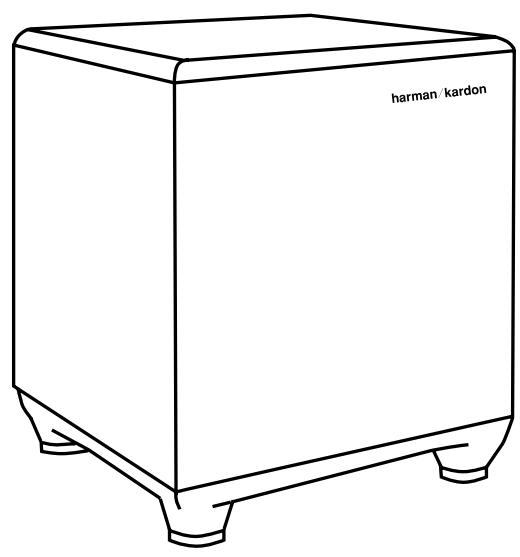
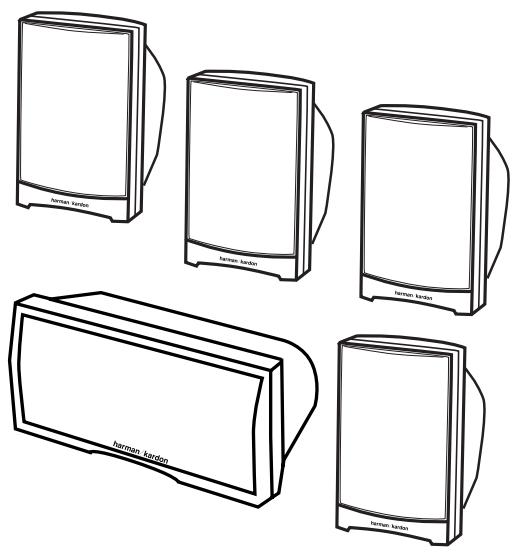
Table of Contents
3 Safety Information
4 Introduction
4 Included
5 Speaker Placement
6 Mounting Options
7 Speaker Connections
7 Speaker-Level Connection Guide
8 Dolby Pro Logic (Non-Digital) - Speaker Level
9 Dolby Pro Logic (Non-Digital) - Line Level
9 Dolby Digital or DTS (or other Digital Surround Mode) Connection
0 Operation
0 Volume
1 Troubleshooting
2 Specifications
CAUTION
RISK OF ELECTRIC SHOCK DO NOT OPEN
CAUTION: To prevent electric shock, do not use this (polarized) plug with an extension cord, receptacle or other outlet unless the blades can be fully inserted to prevent blade exposure.

The lightning flash with arrowhead symbol, within an equilateral triangle, is intended to alert the user to the presence of uninsulated "dangerous voltage" within the product's
enclosure that may be of sufficient magnitude to constitute a risk of electric shock to persons.

The exclamation point within an equilateral triangle is intended to alert the user to the presence of important operating and maintenance (servicing) instructions in themparrying the appliance.
- Read Instructions. All the safety and operating instructions should be read before the product is operated.
- Retain Instructions. The safety and operating instructions should be retained for future reference.
- Heed Warnings. All warnings on the product and in the operating instructions should be adhered to.
- Follow Instructions. All operating and use instructions should be followed.
-
Cleaning. Unplug this product from the wall outlet before cleaning. Do not use liquid cleaners or aerosol cleaners. Use a damp cloth for cleaning.
-
Attachments. Do not use attachments not recommended by the product manufacturer, as they may cause hazards.
-
Water and Moisture. Do not use this product near water-for example, near a bathtub, wash bowl, kitchen sink or laundry tub; in a wet basement; near a swimming pool; or the like.
-
Accessories. Do not place this product on an unstable cart, stand, tripod, bracket or table. The product may fall, causing serious injury to a child or adult, and serious damage to the product. Use only with a cart, stand, tripod, bracket or table recommended by the manufacturer, or sold with the product. Any mounting of the product should follow the manufacturer's instructions, and should use a mounting accessory recommended by the manufacturer.
-
A Product and Cart Combination Should Be Moved with Care. Quick stops, excessive force and uneven surfaces may cause the product and cart combination to overturn.
-
Ventilation. Slots and openings in the cabinet are provided for ventilation and to ensure reliable operation of the product and to protect it from overheating, and these openings must not be blocked or covered. The openings should never be blocked by placing the product on a bed, sofa, rug or other similar surface. This product should not be placed in a built-in installation, such as

a bookcase or rack, unless proper ventilation is provided or the manufacturer's instructions have been adhered to.
11. Power Sources. This product should be operated only from the type of power source indicated on the marking label. If you are not sure of the type of power supply to your home, consult your product dealer or local power company. For products intended to operate from battery power, or other sources, refer to the operating instructions.
12. Polarization. This product may be equipped with a polarized alternating-current-line plug (a plug having one blade wider than the other). This plug will fit into the power outlet only one way. This is a safety feature. If you are unable to insert the plug fully into the outlet, try reversing the plug. If the plug should still fail to fit, contact your electrician to replace your obsolete outlet. Do not defeat the safety purpose of the polarized plug.
13. Power-Cord Protection. Power-supply cords should be routed so that they are not likely to be walked on or pinched by items placed upon or against them, paying particular attention to cords at plugs, convenience receptacles, and the point where they exit from the product.
14. Nonuse Periods. The power cord of the product should be unplugged from the outlet when left unused for long periods of time.
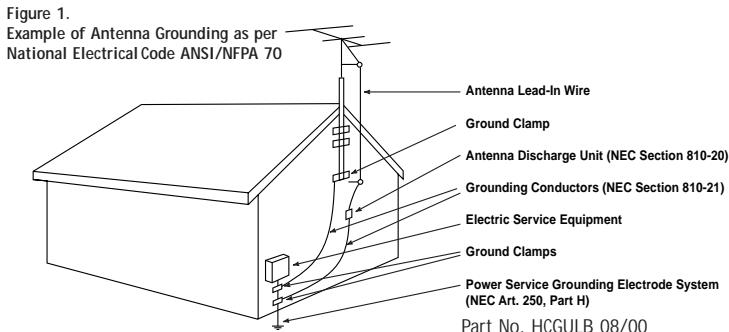
15. Outdoor Antenna Grounding. If an outside antenna or cable system is connected to the product, be sure the antenna or cable system is grounded so as to provide some protection against voltage surges and built-up static charges. Article 810 of the National Electrical Code, ANSI/NFPA 70, provides information with regard to proper grounding of the mast and supporting structure, grounding of the lead-in wire to an antenna discharge unit, size of grounding conductors, location of antenna-discharge unit, connection to grounding electrodes, and requirements for the grounding electrode. See Figure 1.
16. Lightning. For added protection for this product during a lightning storm, or when it is left unattended and unused for long periods of time, unplig it from the wall outlet and disconnect the antenna or cable system. This will prevent damage to the product due to lightning and power-line surges.
17. Power Lines. An outside antenna system should not be located in the vicinity of overhead power lines or other electric light or power circuits, or where it can fall into such power lines or circuits. When installing an outside antenna system, extreme care should be taken to keep from touching such
power lines or circuits, as contact with them might be fatal.
- Overloading. Do not overload wall outlets, extension cords, or integral convenience receptacles, as this can result in a risk of fire or electric shock.
- Object and Liquid Entry. Never push objects of any kind into this product through openings, as they may touch dangerous voltage points or short-out parts that could result in a fire or electric shock. Never spill liquid of any kind on the product.
- Servicing. Do not attempt to service this product yourself, as opening or removing covers may expose you to dangerous voltage or other hazards. Refer all servicing to qualified service personnel.
- Damage Requiring Service. Unplug this product from the wall outlet and refer servicing to qualified service personnel under the following conditions:
a. The power-supply cord or the plug has been damaged: or
b. Objects have fallen onto, or liquid has been spilled into, the product; or
c. The product has been exposed to rain or water; or
d. The product does not operate normally when following the operating instructions. Adjust only those controls that are covered by the operating instructions, as an improper adjustment of other controls may result in damage and will often require extensive work by a qualified technician to restore the product to its normal operation: or
e. The product has been dropped or damaged in any way; or
f. The product exhibits a distinct change in performance: this indicates a need for service.
22. Replacement Parts. When replacement parts are required, be sure the service technician has used replacement parts specified by the manufacturer or that have the same characteristics as the original part. Unauthorized substitutions may result in fire, electric shock or other hazards.
23. Safety Check. Upon completion of any service or repairs to this product, ask the service technician to perform safety checks to determine that the product is in proper operating condition.
24. Wall or Ceiling Mounting. The product should be mounted to a wall or ceiling only as recommended by the manufacturer.
25. Heat. The product should be situated away from heat sources such as radiators, heat registers, stoves or other products (including amplifiers) that produce heat.
Part No. HCGULB 08/00
Thank you for purchasing the Harman Kardon HKTS 2, with which you are about to begin many years of listening enjoyment. The HKTS 2 has been custom designed to provide all the excitement and power of the cinema experience in your own living room.
While sophisticated electronics and state-of-the-art speaker components are hard at work within the HKTS 2 to make all of this happen, hookup and operation are simple. Color-keyed connections and simple controls make the HKTS 2 easy to use.
To obtain maximum enjoyment from your new home-theater speaker system, we urge you to take a few minutes to read through this manual. This will ensure that connections to your receiver or preamp/processor and amplifier or other external devices are made properly. In addition, a few minutes spent learning the functions of the various controls will enable you to take advantage of all the power and refinement the HKTS 2 is able to deliver.
If you have any questions about this product, its installation or operation, please contact your dealer, the best local source of information.
Description and Features
The HKTS 2 is a six-piece home theater speaker system that includes a 10-inch, 100-watt bass-reflex powered subwoofer; four identical 2-way, sealed enclosure satellite speakers for use in the left and right front and rear speaker positions; a dedicated, tandem-midrange center speaker; wallmount brackets for the four satellites; and all of the speaker cables you need to connect your speakers to your receiver or preamp/processor and amplifier.
The HKTS 2 subwoofer is equipped with speaker-level inputs and outputs, line-level inputs, a special subwoofer input for use with equipment that furnishes a pre-filtered subwoofer output, a level control, and an efficient switching system that senses the presence of an audio signal and automatically switches the unit from standby mode to play mode.
Although wall-mount brackets are included for the satellite speakers, Harman Kardon also offers optional stands, model FSTS 1, which can be ordered through your dealer.
Harman Kardon invented the high-fidelity receiver more than forty-seven years ago.
With state-of-the-art features and time-honored circuit designs, the HKTS 2 is a perfect complement to a Harman Kardon receiver, and is one of the finest products ever offered by Harman Kardon.
- Complete home-cinema speaker system
- Speakers are magnetically shielded for flexible placement near video monitors
- Both line- and speaker-level inputs enable compatibility with most audio components
- Subwoofer input offers superior quality bass reproduction when used with the LFE output of a Dolby Digital or DTS system
INCLUDED
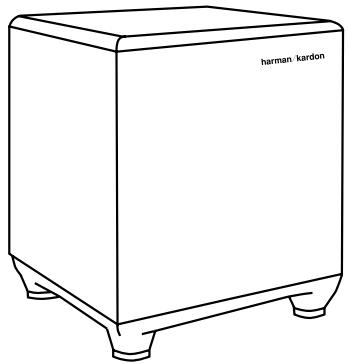
Powered subwoofer.
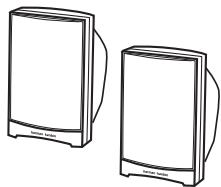
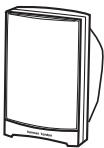
Four satellites for left, right and surrounds. Wall-mount brackets.
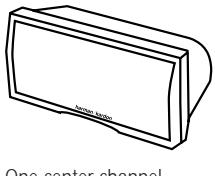
One center-channel speaker with adjustable support leg.
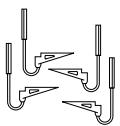
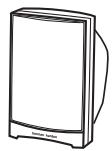
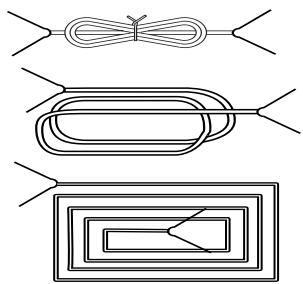
Two 20' speaker cables for connection from receiver to subwoofer.
Two 15' speaker cables for connection from subwoofer to front satellites.
Three 40' speaker cables for connection from receiver to rear satellites and center speaker.
Front Speakers
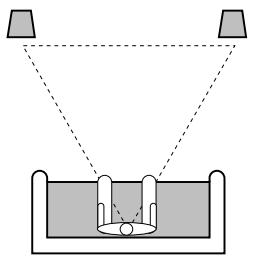
The front speakers should be placed the same distance from each other as they are from the listening position. They should be placed at about the same height from the floor as the listeners' ears will be, or they may be angled toward the listeners.
Center-Channel Speaker
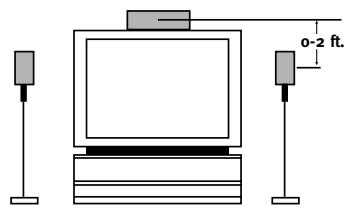
Stands are optional.
The center-channel speaker should be placed slightly behind the front left and right speakers, and no more than two feet above or below the tweeters of the left and right speakers. It is often convenient to set the center speaker on top of the television set, as shown in the drawing. Use the supplied support leg to aim it toward the listener by screwing the leg in to angle the speaker up, or unscrewing the leg slightly to angle the speaker down.
Surround Speakers
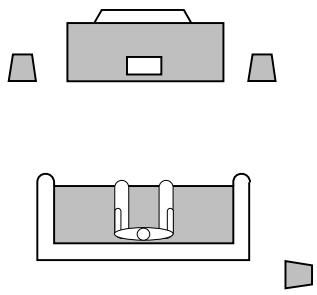
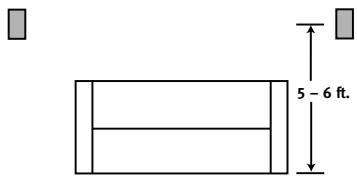
The two surround speakers should be placed slightly behind the listening position and, ideally, should face each other and be at a level higher than the listeners' ears. If that is not possible, they may be placed on a wall behind the listening position, facing forward. The surround speakers should not call attention to themselves. Experiment with their placement until you hear a diffuse, ambient sound accompanying the main-program material heard in the front speakers.
Subwoofer
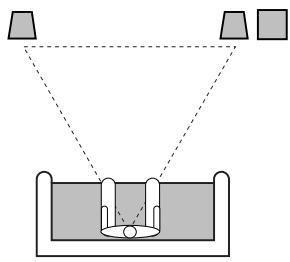
The low-frequency material reproduced by the subwoofer is mostly omnidirectional, and this speaker may be placed in a convenient location in the room. However, the best reproduction of bass will be heard when the subwoofer is placed in a corner along the same wall as the front speakers. Experiment with subwoofer placement by temporarily placing the subwoofer in the listening position and moving around the room until the bass reproduction is best. Place the subwoofer in that location.
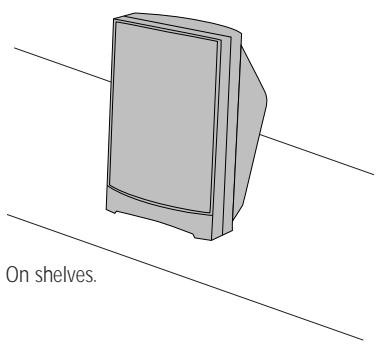
Satellites and Surrounds
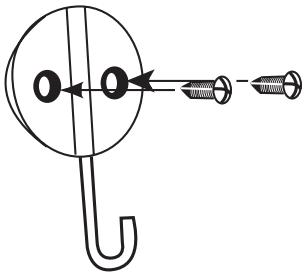
Wall Mounting
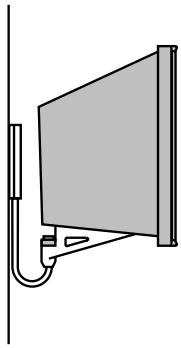
On the wall. Wall brackets included.
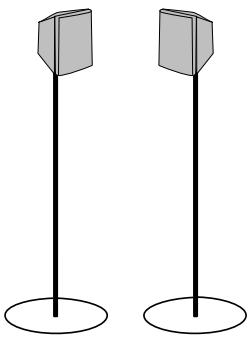
On optional stands (FSTS 1).
Attach plate to wall. The brackets should be placed, if possible, so that the screws will fasten into a wooden wall stud. If that is not possible, use properly selected wall anchors.
The customer is responsible for proper selection and use of mounting hardware, available through hardware stores, to properly and safely wall-mount the speakers.
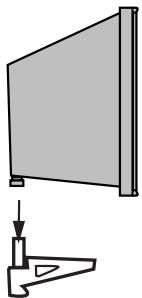
Slide speaker onto support.
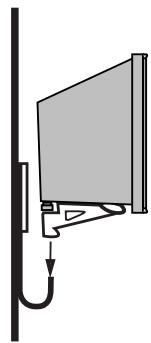
Place speaker and support on wall plate.
Speaker-Level Connection Guide
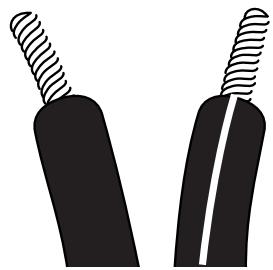
Separate and strip the ends of the speaker wire as shown. Speakers and electronics terminals have corresponding (+) and (-) terminals. Most manufacturers of speakers and electronics, including Harman Kardon, use red to denote the (+) terminal and black for the (-) terminal.
The (+) lead of the speaker wire is noted with a stripe. It is important to connect both speakers identically: (+) on the speaker to (+) on the amplifier and (-) on the speaker to (-) on the amplifier. Wiring "out of phase" results in thin sound, weak bass and a poor stereo image.
With the advent of multichannel surround-sound systems, connecting all of the speakers in your system with the correct polarity remains equally important in order to preserve the proper ambience and directionality of the program material.
Dolby Pro Logic
(Non-Digital) - Speaker Level
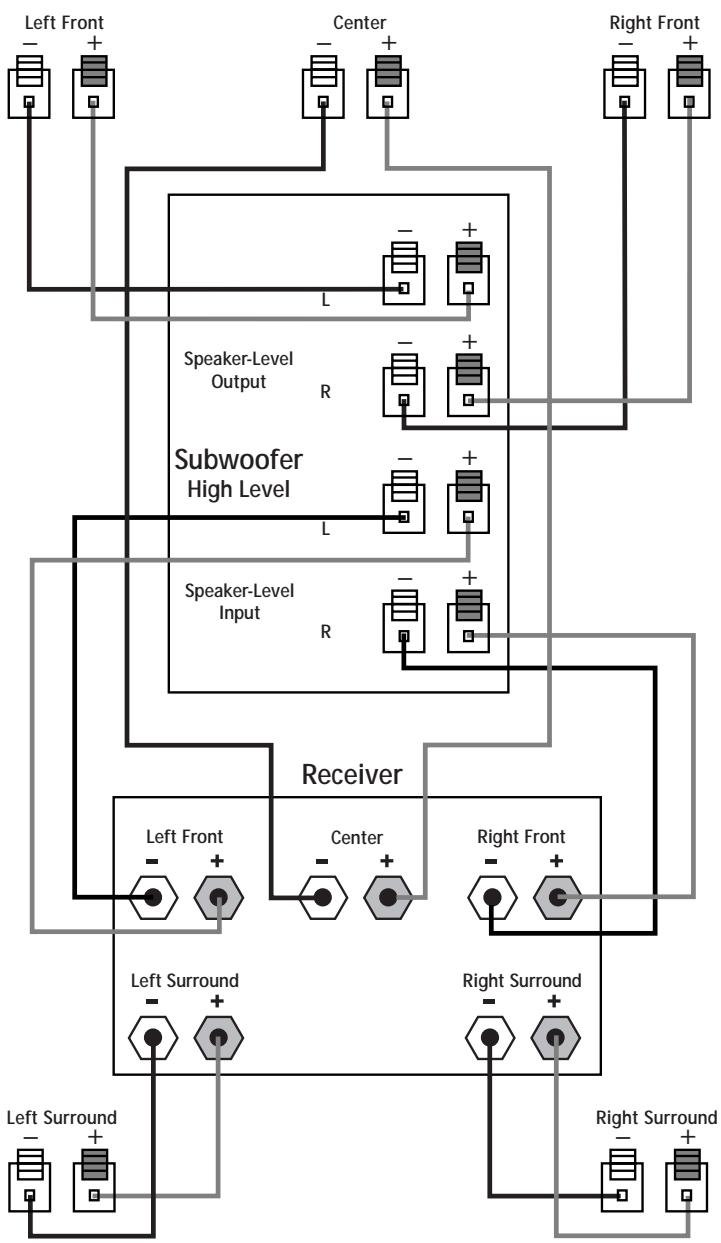
USE THIS INSTALLATION METHOD FOR DOLBY PRO LOGIC APPLICATIONS (NOT DOLBY DIGITAL, DTS OR OTHER DIGITAL PROCESSING), WHERE THE RECEIVER/PROCESSOR DOES NOT HAVE A SUB-WOOFER OUTPUT, OR A VOLUME-CONTROLLED PREAMP (LINE-) LEVEL OUTPUT:
Connect your receiver or amplifier's front left and right speaker terminals to the left and right terminals on the subwoofer that are marked "Speaker-Level Input." Connect the left and right terminals on the subwoofer that are marked "Speaker-Level Output" to the corresponding terminals on the back of your front left and right speakers.
Connect your receiver or amplifier's center, and left and right surround-speaker terminals to the corresponding terminals on the back of your center, and left and right surround speakers.
Dolby Pro Logic (Non-Digital) - Line Level
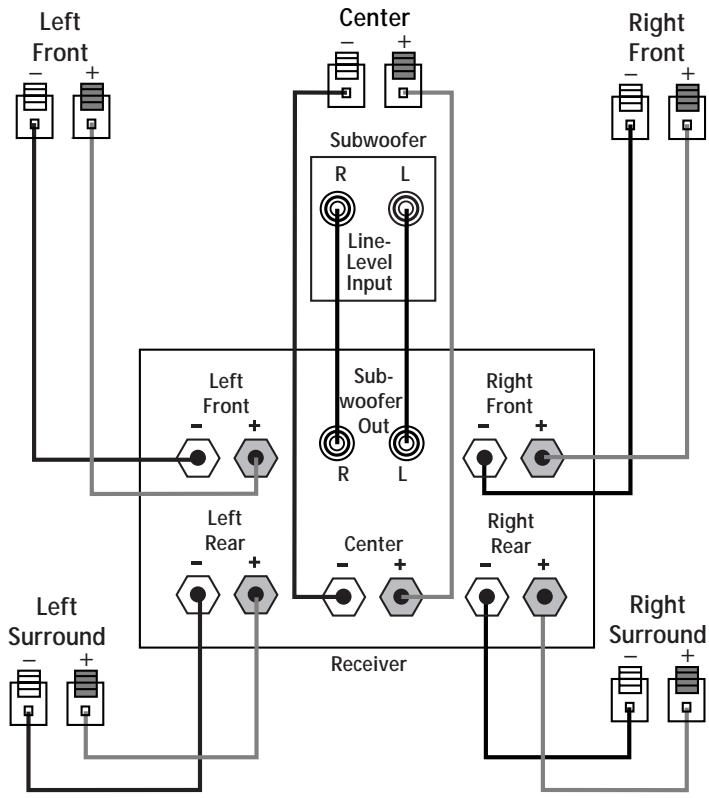
USE THIS INSTALLATION METHOD FOR DOLBY PRO LOGIC APPLICATIONS (NOT DOLBY DIGITAL, DTS OR OTHER DIGITAL PROCESSING), WHERE THE RECEIVER/PROCESSOR IS EQUIPPED WITH A SUB-WOOFER OUTPUT, OR A VOLUME-CONTROLLED PREAMP (LINE-) LEVEL OUTPUT:
Use RCA-type patch cords to connect the line-level subwoofer outputs on your receiver or amplifier to the line-level inputs on the subwoofer. IMPORTANT: Do not use the SUB input on the subwoofer with Dolby Pro Logic processors. Note: If your receiver or amplifier only has one subwoofer output jack, then you will need to use a Y-connector (not included). Plug the male end of the Y-connector into your receiver or amplifier's subwoofer output jack, and connect each of the two female ends to separate RCA-type patch cords. Finally, plug the RCA-type patch cords into the line-level inputs on the subwoofer.
Connect each speaker to the corresponding speaker terminals on your receiver or amplifier.
Dolby Digital or DTS (or other Digital Surround Mode) Connection
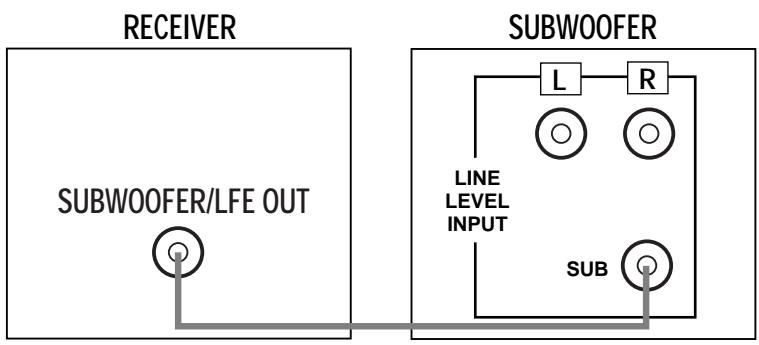
USE THIS INSTALLATION METHOD FOR DOLBY DIGITAL, DTS OR OTHER DIGITAL SURROUND PROCESSORS:
Use the line-level input jack marked "SUB" for the Low-Frequency Effects channel. Connect this jack to the subwoofer output or LFE output on your receiver or amplifier. Connect each speaker to the corresponding speaker terminals on your receiver or amplifier.
Make sure that you have configured your surround-sound processor for "Subwoofer On." The front left, front right, center and rear speakers should all be set to "Small."
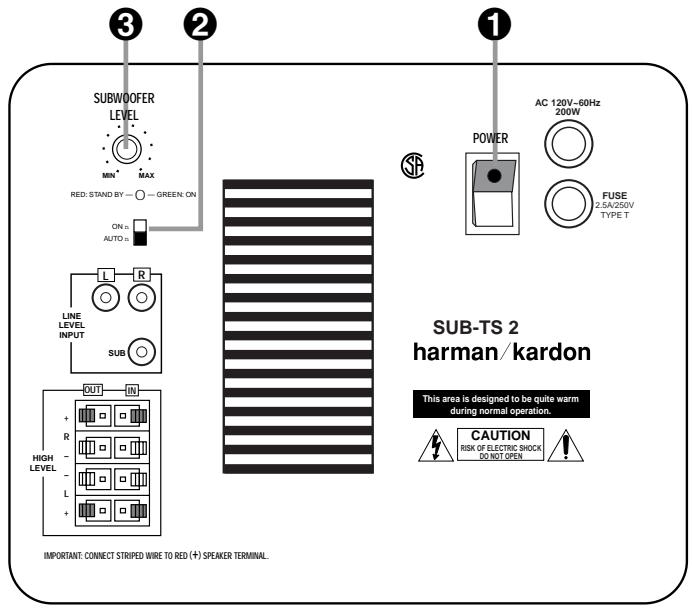
Move the Master Power switch (marked "Power" 1) to the "·" (On) position to use the subwoofer. The HKTS 2 subwoofer will automatically turn itself on or go into standby (sleep) mode when left in the standby mode ("Auto/On" switch 2 in the "Auto" position). When your receiver or amplifier is off, or is not sending program material to the subwoofer, the subwoofer will be in standby mode and the LED will
turn red. When the subwoofer senses an audio signal, it will automatically turn itself on and the LED will turn green. If the subwoofer does not sense a signal after approximately twenty minutes, it will automatically go into standby mode.
When the "Auto/On" switch 2 is switched to the "On" position, the subwoofer will remain on, whether or not program material is playing.
If you will be away from home for an extended period of time, or if the subwoofer will not be used, switch the Master Power switch 1 to the "Off" position.
Volume
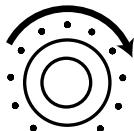
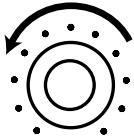
Volume can be adjusted using the Subwoofer Level Control 3, as shown below.
Subwoofer
Level
MIN


Subwoofer
Level
MIN


If there is no sound from any of the speakers:
- Check that receiver/amplifier is on and a source is playing.
- Check that the powered subwoofer is plugged in and its Power switch 1 is switched on to the " • " position.
- Check all wires and connections between receiver/amplifier and speakers. Make sure all wires are connected. Make sure none of the speaker wires are frayed, cut or punctured.
- Review proper operation of your receiver/amplifier.
If there is no sound coming from one speaker:
- Check the "Balance" control on your receiver/amplifier.
- Check all wires and connections between receiver/amplifier and speakers. Make sure all wires are connected. Make sure none of the speaker wires are frayed, cut or punctured.
- In Dolby Digital or DTS modes, make sure that the receiver/processor is configured so that the speaker in question is enabled.
If there is no sound from the center speaker:
- Check all wires and connections between receiver/amplifier and speaker. Make sure all wires are connected. Make sure none of the speaker wires are frayed, cut or punctured.
- If your receiver/processor is set in Dolby Pro Logic mode, make sure the center speaker is not in phantom mode.
- If your receiver/processor is set in Dolby Digital or DTS mode, make sure the receiver/processor is configured so that the center speaker is enabled.
If the system plays at low volumes but shuts off as volume is increased:
- Check all wires and connections between receiver/amplifier and speakers. Make sure all wires are connected. Make sure none of the speaker wires are frayed, cut or punctured.
- If more than one pair of main speakers is being used, check the minimum impedance requirements of your receiver/amplifier.
If there is low (or no) bass output:
- Make sure the connections to the left and right "Speaker Inputs" have the correct polarity (+ and -).
- Make sure the subwoofer is plugged into an active electrical outlet.
- Make sure the powered subwoofer is plugged in and its power switch 1 is switched on to the "·" position.
- In Dolby Digital or DTS modes, make sure your receiver/processor is configured so that the subwoofer and LFE output are enabled.
If there is no sound from the surround speakers:
- Check all wires and connections between receiver/amplifier and speakers. Make sure all wires are connected. Make sure none of the speaker wires are frayed, cut or punctured.
- Review proper operation of your receiver/processor and its surround-sound features.
- Make sure the movie or TV show you are watching is recorded in a surround-sound mode. If it is not, check to see if your receiver/processor has other surround modes you may use.
-
In Dolby Digital or DTS modes, make sure your receiver/processor is configured so that the surround speakers are enabled.
-
Review the operation of your DVD player and the jacket of your DVD to make sure that the DVD features the desired Dolby Digital or DTS mode, and that you have properly selected that mode using both the DVD player's menu and the DVD disc's menu.