
ZD15 - Digital Camera KODAK - Free user manual and instructions
Find the device manual for free ZD15 KODAK in PDF.


| Product Type | Compact digital camera |
| Brand | KODAK |
| Model | ZD15 |
| Dimensions (W × H × D) | 96 × 62 × 25 mm |
| Weight | 130 g (with battery and memory card) |
| Power supply | Rechargeable lithium-ion battery KLIC-7006 |
| Effective resolution | 12 megapixels |
| Optical zoom | 3x (35-105mm equivalent) |
| Digital zoom | 5x |
| Screen | 2.7-inch TFT LCD (230,000 dots) |
| Storage | SD/SDHC card (up to 32 GB) |
| Connectivity | USB 2.0, AV output |
| Image stabilization | Electronic |
| Face detection | Yes |
| Scene modes | Portrait, landscape, sports, night, etc. |
| Video recording | VGA (640×480) at 30 fps |
| Maintenance and cleaning | Clean the lens with a soft, dry cloth. Avoid solvents. |
| Safety | Do not expose to moisture, shock, or extreme temperatures. |
| Spare parts and repairability | Battery and charger available separately. Repair by authorized center. |
| General information | Class B digital device complies with Canadian ICES-003. |
Frequently Asked Questions - ZD15 KODAK
User questions about ZD15 KODAK
0 question about this device. Answer the ones you know or ask your own.
Ask a new question about this device
Download the instructions for your Digital Camera in PDF format for free! Find your manual ZD15 - KODAK and take your electronic device back in hand. On this page are published all the documents necessary for the use of your device. ZD15 by KODAK.
USER MANUAL ZD15 KODAK
Installing the software
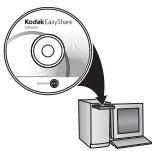
Before connecting any cables, install the software that was included with your camera. Follow the on-screen instructions.
After installing the software, return to this user guide.

Loading the batteries
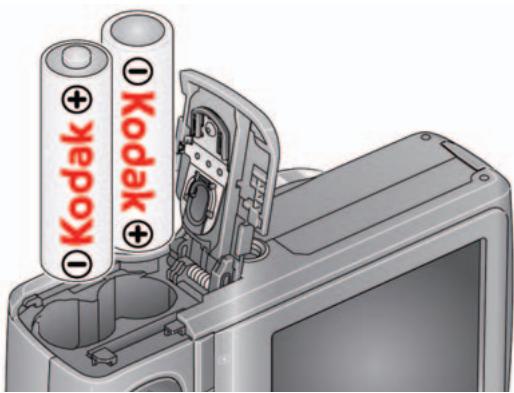
Other power options, including rechargeable batteries
www.kodak.com/go/zd15accessories
Using an (accessory) SD or SDHC Card
Your camera has internal memory. You can purchase an SD or SDHC Card to store more pictures and videos. (Maximum supported card size is 32 GB.)

CAUTION:
A card can only be inserted one way; forcing it may cause damage. Inserting or removing a card when the camera is on may damage the pictures, the card, or the camera.
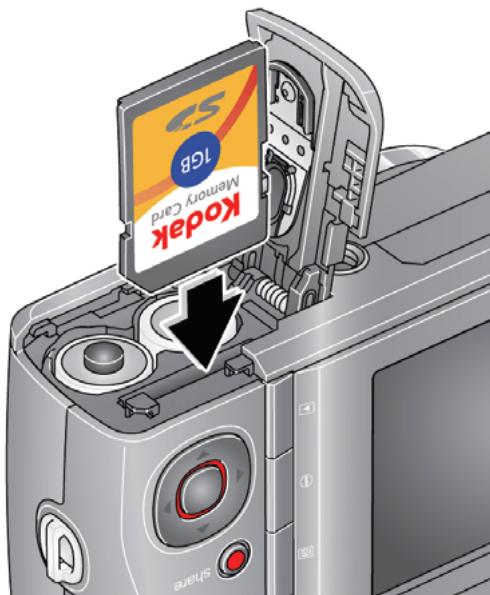
(1) Turn off the camera.
② Insert or remove the optional card.
③ Turn on the camera.
Purchase accessories
www.kodak.com/go/zd15accessories
3 Turning on the camera
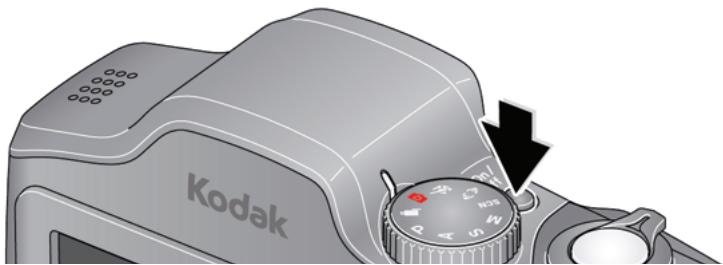
4 Setting the language and date/time
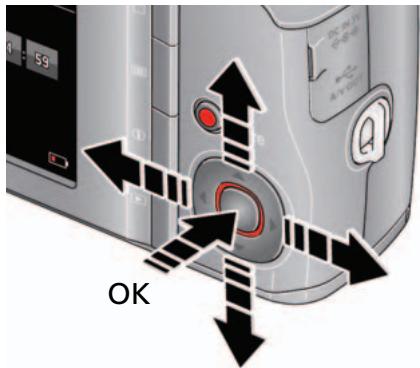
Language:

to change.
OK to accept.
Date/Time:
At the prompt, press OK.

to change current field.

for previous/next field.
OK to accept.
See the Extended user guide
www.kodak.com/go/zd15support
5 Taking a picture
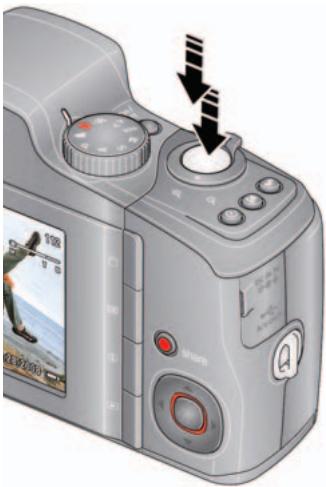
① Turn the Mode dial to Smart Capture
② Press the Shutter button halfway to lock on the subject. When the framing marks turn green, press the Shutter button completely down.

Framing marks
| See the Extended user guide | www.kodak.com/go/zd15support |
| Learn more about picture-taking modes | see page 11 |

Reviewing pictures/videos
Press the Review
button to enter/exit Review.
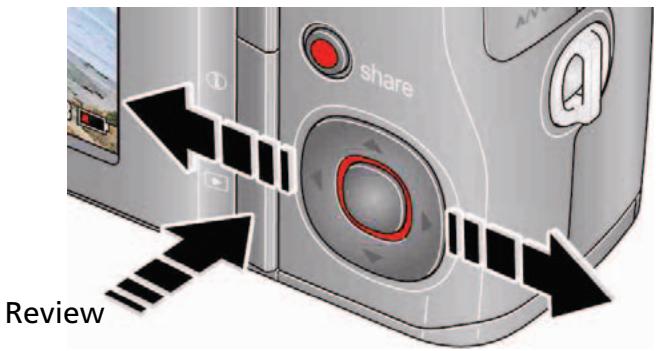
View previous/next picture/video.
OK Play a video.
See the Extended user guide
www.kodak.com/go/zd15support

Transferring pictures/videos
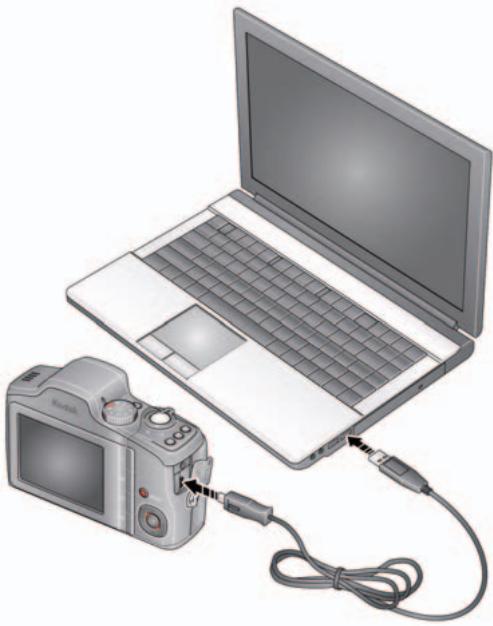
(1) Turn off the camera.
② Connect the KODAK USB Cable, Model U-8.
③ Turn on the camera. KODAK EASYSHARE Software opens on your computer and prompts you through the transfer process.
| See the Extended user guide | www.kodak.com/go/zd15support |
| Purchase accessories | www.kodak.com/go/zd15accessories |

Getting help from your camera
Your camera offers a built-in Help system. It describes every setting for every menu choice. If you learn nothing else about your camera, learn how to use on-camera Help. Because the more you know your camera, the more confident you become.
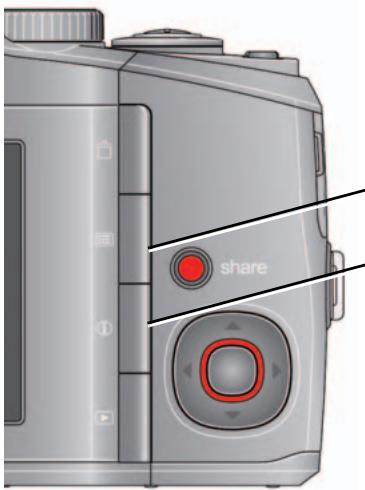
1 Press the Menu button, then highlight a menu choice.
2 Press the Info 1 button.
Scroll through a Help topic
See the Extended user guide
www.kodak.com/go/zd15support

Keep learning about your camera!
Congratulations!
You have:
- set up your camera
- taken pictures
- transferred pictures to your computer
Keep learning!
Finish reading this book, so you can take and share your best pictures!
Visit www.kodak.com/go/zd15support:
- the extended user guide
- interactive troubleshooting and repairs
-
interactive tutorials
-
FAQs
- downloads
- accessories
- printing information
- product registration
Back view

1 Speaker
2 Mode dial
3 On/Off button
4 Zoom Wide Angle/Telephoto lever
5 Shutter button
6 Flash button
7 Focus (Macro/Infinity) button
8 Self-timer/Burst button
9 3V DC-In/USB/AV out
10 Strap post
11 Share button
12 OK
13 Delete/Menu/Info/Review buttons
Front view
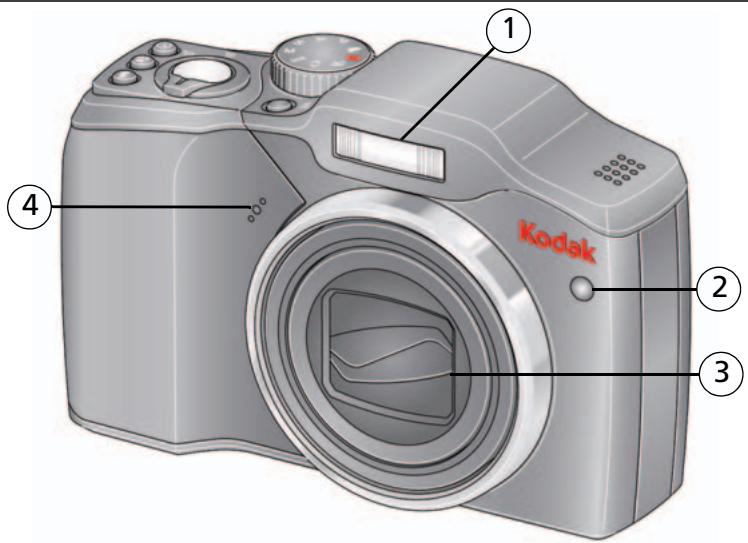
1 Flash
2 Self-timer/Video/AF Assist light
3 Lens/Cover
4 Microphone
1 Doing more with your camera
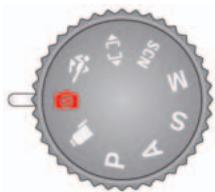
Choose the mode that best suits your subjects and surroundings.
| Use this mode | For | |
| Smart Capture | General picture taking—it offers excellent image quality and ease of use. | |
| Sport | Subjects that are in motion. Shutter speed is fast. | |
| ←]→ | Panorama | "Stitching" 2 or 3 pictures into 1 panoramic scene. |
| SCN | Scene | Point-and-shoot simplicity when taking pictures under special conditions. |
| P | Program | More creative control. (See the Extended user guide www.kodak.com/go/zd15support). |
| A | Aperture | |
| S | Shutter | |
| M | Manual | |
| Video | Video with sound. (See page 12.) | |
Taking a video
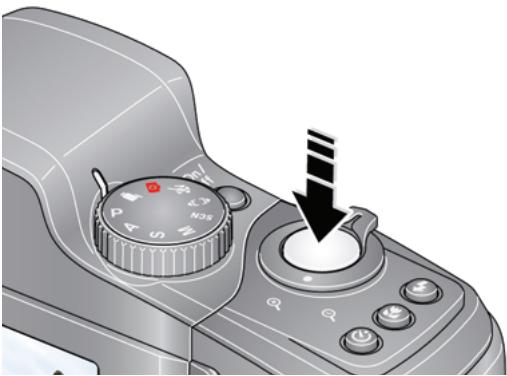
① Turn the Mode dial to Video
Press the Shutter button completely down and release. (To stop recording, press and release again.)
Scene modes
1 Turn the Mode dial to Scene SCN.
2 Press to highlight Scene modes.
NOTE: If the mode description turns off before you finish reading it, press OK.
3 Press OK to choose a Scene mode.
| SCN mode | For |
| Portrait | Full-frame portraits of people. |
| Children | Action pictures of children in bright light. |
| Backlight | Subjects that are in shadow or “backlit” (when light is behind the subject). |
| High ISO | People indoors, in low-light scenes. |
| Beach | Bright beach scenes. |
| Snow | Bright snow scenes. |
| Sunset | Capturing the deep hues seen at sunset. |
| Self-Portrait | Close-ups of yourself. Assures proper focus and minimizes red eye. |
| Night Portrait | Reducing red eye of people in night scenes or low-light conditions. Place the camera on a flat, steady surface or use a tripod. |
| Candle light | Capturing the ambiance of candle light. |
| Night Landscape | Distant scenery at night. Flash does not fire. Place the camera on a flat, steady surface or use a tripod. |
| Landscape | Far-away scenes. The camera uses infinity auto-focus. Framing marks are not available in Landscape. |
| Manner/ Museum | Quiet occasions, like a wedding or lecture. Flash is off. |
| Stage | People on a lit stage. Fast shutter speed, high ISO. Flash and sounds are off. |
| Fireworks | Bright, colorful light displays. Flash does not fire. Place the camera on a flat, steady surface or use a tripod. |
| Flower | Close-ups of flowers or other small subjects in bright light. Focus is Macro. |
| Text | Documents. Focus is Macro. |
Using optical zoom
Use optical zoom to get up to 10X closer to your subject while taking pictures/videos.
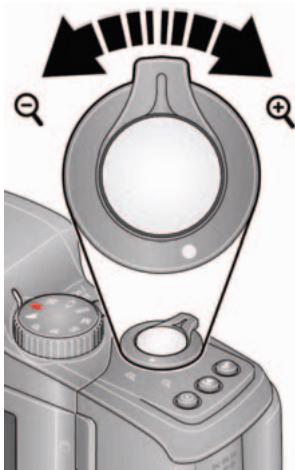
Optical zoom Digital zoom W T D
1 Use the LCD to frame your subject.
2 Press Telephoto (T) to zoom in. Press Wide Angle (W) to zoom out.
3 Take the picture or video.
NOTE: To get a focused picture every time, remember:
Use the framing marks, see page 4.
As you zoom in, move away from your subject.
Use digital zoom to get up to 5X beyond optical zoom while taking pictures. Turn digital zoom on/off using the Setup menu (see page 16). Digital zoom is not available in Smart Capture mode.
NOTE: You may notice decreased image quality when using digital zoom. The slider on the LCD turns red when the picture quality reaches the limit for an acceptable 4 × 6 -in. (10 x 15 cm) print.
Using the flash

Press the flash button repeatedly to scroll through flash modes.
The current flash mode is shown on the LCD.
(Flash settings are limited in some picture-taking modes.)
| Flash modes | Flash fires | |
| Auto | SA | When the lighting conditions require it. |
| Fill | S | Every time you take a picture, regardless of the lighting conditions. Use when the subject is in shadow or is "backlit." In low light, hold the camera steady or use a tripod. NOTE: (Not available in Smart Capture mode.) |
| Red-eye Reduction | Preflash | A preflash fires, shrinking the eye pupil, before the picture is taken. |
| Choose Preflash or Digital Correction using the Setup menu. | Digital Correction | A preflash does not fire; the camera corrects red eye. |
| Off | Never. | |
Using the menu button to change settings
You can change settings to get the best results from your camera.
1 Press the Menu button.
2 Press / to highlight a tab:
Capture/Video for the most common picture/video-taking settings
Setup for other camera settings
3 Press to highlight a setting, then press OK.
4 Highlight an option, then press OK. (Some options let you use
IMPORTANT: Your camera offers a built-in Help system. See page 7.
NOTE: Some modes offer limited settings. Some settings remain until you change them; others, until you change modes or turn off the camera.
Understanding the picture-taking icons
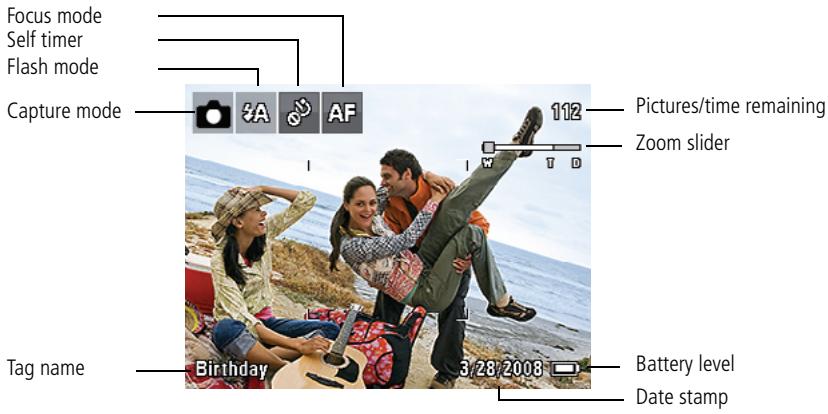
2 Working with pictures/videos
Deleting pictures/videos
1 Press the Review button.
2 Press to find a picture/video.
3 Press the Delete button.
4 Follow the screen prompts.
Using the undo delete feature
If you accidentally delete a picture/video, you may be able to use Undo Delete to retrieve it. This feature is only available immediately after you delete a single picture/video while in Review (not during a Quickview).
Viewing as thumbnails (multi-up)
1 Press the Review button.
2 Press the Wide Angle (W) button to change from single-picture view to multi-up thumbnails.
3 Press Telephoto (T) to return to single-picture view.
Press the Review button to exit Review.
Understanding the review icons
3 Share your stories!
A thousand ways to tell a story... and each begins with a picture.
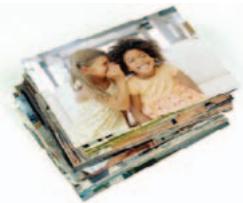
How do you tell yours?
| Prints | Photo gifts | Digitally |
| • 4 x 6 pictures • Enlargements, posters • Collages • Photo books | • Cards • Calendars • Mugs • Ties • Shirts | • EASYSHARE Digital Picture Frame • HDTV devices • Email ...and much more! |

Pictures start here!

Load software.
Take pictures.

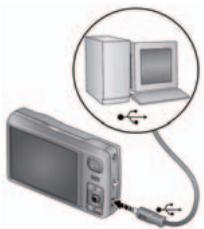
Transfer pictures to your computer.
Pictures become stories here!
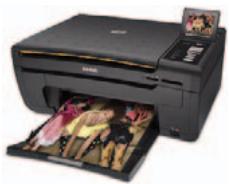
At home
KODAK All-in-One Printers

Online
Kodak Gallery
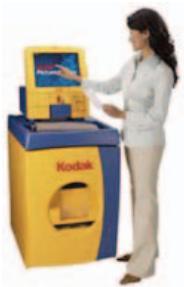
At a local photo retailer
KODAK Picture Kiosk
www.kodak.com/go/tips
4
Solving camera problems
| Status | Solution |
| Camera does not turn on. | ■ Install new batteries (see page 1). ■ Charge rechargeable batteries. |
| Camera does not turn off. | ■ Remove the battery, then reinsert or replace it. If the camera still does not function, visit www.kodak.com/go/zd15support and select Interactive Troubleshooting & Repairs. |
| Pictures remaining number does not decrease after taking a picture. | ■ The camera is operating normally. Continue taking pictures. |
| Stored pictures are corrupted. | ■ Retake pictures. Do not remove card while the camera is on. Keep rechargeable batteries charged. ■ Transfer the pictures to the computer (see page 6), then format the card or internal memory. (See the Setup menu.) CAUTION: Formatting a card deletes all pictures and videos, including protected files. |
| In Review mode, you do not see a picture (or the expected picture) on the LCD screen. | ■ Check the image storage location setting. (See the Setup menu.) |
| Memory card full. | ■ Insert a new card (see page 2), transfer pictures to the computer (see page 6), or delete pictures (see page 18). |
5 Appendix

CAUTION:
Do not disassemble this product; there are no user-serviceable parts inside. Refer servicing to qualified service personnel. KODAK AC Adapters and Battery Chargers are intended for indoor use only. The use of controls, adjustments, or procedures other than those specified herein may result in exposure to shock and/or electrical or mechanical hazards. If the LCD breaks, do not touch the glass or liquid. Contact Kodak customer support.
The use of an accessory that is not recommended by Kodak may cause fire, electric shock, or injury. For approved accessories, visit www.kodak.com/go/accessories.
Use only a USB-certified computer equipped with a current-limiting motherboard. Contact your computer manufacturer if you have questions.
If using this product in an airplane, observe all instructions of the airline.
When removing the battery, allow it to cool; it may be hot.
Follow all warnings and instructions supplied by the battery manufacturer.
Use only batteries approved for this product to avoid risk of explosion.
- Keep batteries out of the reach of children.
- Do not allow batteries to touch metal objects, including coins. Otherwise, a battery may short circuit, discharge energy, become hot, or leak.
Do not disassemble, install backward, or expose batteries to liquid, moisture, fire, or extreme temperature.
- Remove the battery when the product is stored for an extended period of time. In the unlikely event that battery fluid leaks inside the product, contact Kodak customer support.
In the unlikely event that battery fluid leaks onto your skin, wash immediately with water and contact your local health provider. For additional health-related information, contact your local Kodak customer support.
Dispose of batteries according to local and national regulations. Visit www.kodak.com/go/kes.
Do not charge non-rechargeable batteries.
For more information on batteries, see www.kodak.com/go/batterytypes.
Limited warranty
Kodak warrants its digital cameras and accessories (excluding batteries) to be free from malfunctions and defects in both materials and workmanship for the warranty period specified on your Kodak Product packaging. Retain the original dated sales receipt. Proof of purchase date is required with any request for warranty repair.
Limited warranty coverage
Warranty service is only available from within the country where the Products were originally purchased. You may be required to ship Products, at your expense, to the authorized service facility for the country where the Products were purchased. Kodak will repair or replace Products if they fail to function properly during the warranty period, subject to any conditions and/or limitations stated herein. Warranty service will include all labor as well as any necessary adjustments and/or replacement parts. If Kodak is unable to repair or replace a Product, Kodak will, at its option, refund the purchase price paid for the Product provided the Product has been returned to Kodak along with proof of the purchase price paid. Repair, replacement, or refund of the purchase price are the sole remedies under the warranty. If replacement parts are used in making repairs, those parts may be remanufactured, or may contain remanufactured materials. If it is necessary to replace the entire Product, it may be replaced with a remanufactured Product. Remanufactured Products, parts and materials are warranted for the remaining warranty term of the original Product, or 90 days after the date of repair or replacement, whichever is longer.
Limitations
This warranty does not cover circumstances beyond Kodak's control. This warranty does not apply when failure is due to shipping damage, accident, alteration, modification, unauthorized service, misuse, abuse, use with incompatible accessories or attachments (such as third party ink or ink tanks), failure to follow Kodak's operation, maintenance or repacking instructions, failure to use items supplied by Kodak (such as adapters and cables), or claims made after the duration of this warranty. Kodak makes no other express or implied warranty for this product. In the event that the exclusion of any implied warranty is ineffective under the law, the duration of the implied warranty will be the length of the express warranty period specified on your Kodak product packaging. The option of repair, replacement, or refund is Kodak's only obligation. Kodak will not be responsible for any special, consequential or incidental damages resulting from the sale, purchase, or use of this product regardless of the cause. Liability for any special, consequential or incidental damages (including but not limited to loss of revenue or profit, downtime costs, loss of the use of the equipment, cost of substitute equipment, facilities or services, or claims of your customers for such damages resulting from the purchase, use, or failure of the Product), regardless of cause or for breach of any written or implied warranty is expressly disclaimed.
Your rights
Some states or jurisdictions do not allow exclusion or limitation of incidental or consequential damages, so the above limitation or exclusion may not apply to you. Some states or jurisdictions do not allow limitations on how long an implied warranty lasts, so the above limitation may not apply to you. This warranty gives you specific rights, and you may have other rights which vary from state to state or by jurisdiction.
Outside the United States and Canada
In countries other than the United States and Canada, the terms and conditions of this warranty may be different. Unless a specific Kodak warranty is communicated to the purchaser in writing by a Kodak company, no warranty or liability exists beyond any minimum requirements imposed by law, even though defect, damage, or loss may be by negligence or other act.
FCC compliance and advisory
This equipment has been tested and found to comply with the limits for a Class B digital device, pursuant to Part 15 of the FCC Rules. These limits are designed to provide reasonable protection against harmful interference in a residential installation. This equipment generates, uses, and can radiate radio frequency energy and, if not installed or used in accordance with the instructions, may cause harmful interference to radio communications. However, there is no guarantee that interference will not occur in a particular installation. If this equipment does cause harmful interference to radio or television reception, which can be determined by turning the equipment off and on, the user is encouraged to try to correct the interference by one or more of the following measures: 1) reorient or relocate the receiving antenna; 2) increase the separation between the equipment and the receiver; 3) connect the equipment to an outlet on a circuit different from that to which the receiver is connected; 4) consult the dealer or an experienced radio/TV technician for additional suggestions. Any changes or modifications not expressly approved by the party responsible for compliance could void the user's authority to operate the equipment. Where shielded interface cables have been provided with the product or specified additional components or accessories elsewhere defined to be used with the installation of the product, they must be used in order to ensure compliance with FCC regulation.
Canadian DOC statement
DOC Class B Compliance—This Class B digital apparatus complies with Canadian ICES-003.
Waste Electrical and Electronic Equipment labeling

In Europe: For human/environmental protection, it is your responsibility to dispose of this equipment and batteries at a collection facility established for this purpose (separate from municipal waste.) For more information, contact your retailer, collection facility, or appropriate local authorities; or visit www.kodak.com/go/recycle. Product weight: 220 g (7.8 oz)

VCCI Class B ITE
Eastman Kodak Company
Rochester, NY 14650
ΦOTOKaMepa I3rTOBJIeHa B KHTae; ocTaJIbHbIe 9JIeMeHTbI -B COOTBeTCTBIHc MapKIIpOBKOJ.
China RoHS
环保使用期限(EPUP)
Eastman Kodak Company
Rochester, New York 14650
© Kodak, 2009
Kodak and EasyShare are trademarks of Eastman Kodak Company.
4H6739_en