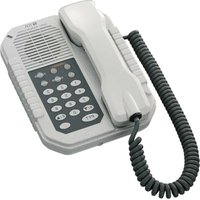
NF-2S - Intercom TOA - Free user manual and instructions
Find the device manual for free NF-2S TOA in PDF.


Pick your language and provide your email: we'll send you a specifically translated version.
| Product Type | Intercom / Door Phone |
| Brand | TOA |
| Model | NF-2S |
| Dimensions (approx.) | 150 x 100 x 50 mm |
| Weight (approx.) | 200 g |
| Power Supply | 12V DC or 24V AC |
| Power Consumption | 1.5 W max |
| Operating Temperature | -10°C to 50°C |
| Microphone Type | Electret condenser |
| Speaker Type | Dynamic |
| Call Button | Yes, push-to-call |
| Volume Control | Adjustable via potentiometer |
| Mounting | Flush or surface mount |
| Material | Metal front plate, ABS resin body |
| Color | White or black (may vary) |
| Protection Rating | IP20 (indoor use) |
| Maintenance | Wipe with dry soft cloth; do not use solvents |
| Compliance | CE, RoHS |
| Spare Parts Availability | Contact TOA or authorized dealers |
Frequently Asked Questions - NF-2S TOA
How do I install the TOA NF-2S intercom?
Installation involves mounting the unit on a wall using the provided bracket. Connect the power supply (12V DC or 24V AC) and the door opener if applicable. Refer to the manual for wiring details.
What is the power requirement for the NF-2S?
The NF-2S typically operates on 12V DC or 24V AC with a maximum power consumption of 1.5W. Use a compatible power adapter.
Can I adjust the volume on the NF-2S?
Yes, the NF-2S has a potentiometer for volume adjustment. Turn it clockwise to increase volume, counterclockwise to decrease.
Is the NF-2S weatherproof?
No, the NF-2S has an IP20 rating, making it suitable for indoor use only. Avoid exposure to rain or moisture.
How do I connect the NF-2S to a door lock?
The NF-2S has terminals for connecting an electric door strike. Wire the lock to the appropriate terminals (consult manual). Ensure the lock voltage matches the power supply.
What should I do if the intercom is not working?
First, check the power supply and connections. Ensure all wires are secure. If still not working, test the unit with a known working power source. If faulty, contact TOA support.
Can I use the NF-2S with other intercom systems?
The NF-2S is designed for TOA systems. Compatibility with third-party systems is not guaranteed. Use with TOA compatible door stations and control units.
How do I clean the NF-2S?
Clean the unit with a soft, dry cloth. Do not use water, solvents, or abrasive cleaners. Keep the microphone and speaker grills free of dust.
What is the warranty period for the NF-2S?
TOA typically offers a 2-year warranty from the date of purchase. Retain the original receipt for warranty claims. Conditions may vary by region.
Where can I get spare parts for the NF-2S?
Spare parts are available through TOA authorized dealers or the official TOA website. Contact customer support with your model and serial number.
User questions about NF-2S TOA
0 question about this device. Answer the ones you know or ask your own.
Ask a new question about this device
No questions yet. Be the first to ask one.
Download the instructions for your Intercom in PDF format for free! Find your manual NF-2S - TOA and take your electronic device back in hand. On this page are published all the documents necessary for the use of your device. NF-2S by TOA.
USER MANUAL NF-2S TOA
Manual assistant
Powered by Anthropic
Waiting for your message
Product information
Brand : TOA
Model : NF-2S
Category : Intercom