N-8033MS - Intercom TOA - Free user manual and instructions
Find the device manual for free N-8033MS TOA in PDF.


Pick your language and provide your email: we'll send you a specifically translated version.
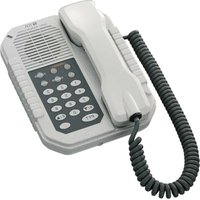
| Product Type | Intercom Master Station |
| Model | N-8033MS |
| Brand | TOA |
| Dimensions (W x H x D) | 210 x 80 x 200 mm |
| Weight | 1.2 kg |
| Power Supply | AC 100-240 V, 50/60 Hz |
| Power Consumption | 10 W (max) |
| Audio | Full-duplex, hands-free |
| Handset | Included |
| Call Tone | Adjustable |
| Connection | Screw terminals for 2-wire intercom line |
| Number of Stations | Up to 10 |
| Functions | Call, monitor, talk, privacy mode, conference |
| Mounting | Desk or wall mount with bracket |
| Operating Temperature | 0°C to 40°C |
| Storage Temperature | -20°C to 60°C |
| Humidity | Up to 90% (non-condensing) |
| Maintenance | Clean with soft dry cloth; avoid liquids |
| Safety | Use only specified power supply; do not disassemble |
| Spare Parts | Contact TOA authorized service center |
| Repairability | Service by qualified technician only |
| General Information | Indoor use only; complies with relevant standards |
Frequently Asked Questions - N-8033MS TOA
How many intercom stations can be connected to the N-8033MS?
The N-8033MS supports up to 10 stations in a standard configuration.
Can the N-8033MS be used hands-free?
Yes, it features full-duplex hands-free communication with a built-in speaker and microphone.
What type of wiring is required for the N-8033MS?
It uses a 2-wire intercom line connected via screw terminals.
Is the N-8033MS compatible with other TOA intercom models?
It is designed to work with TOA N-8000 series intercom systems.
Can I adjust the call tone volume?
Yes, the call tone volume is adjustable via a control on the unit.
Does the N-8033MS have a privacy mode?
Yes, it includes a privacy mode that prevents other stations from listening in.
What is the power consumption of the N-8033MS?
Typical power consumption is 10 watts during operation.
Can I mount the N-8033MS on a wall?
Yes, it comes with a wall-mount bracket for installation.
How do I clean the N-8033MS?
Use a soft dry cloth to gently wipe the surface. Do not use liquids.
Where can I get replacement parts for the N-8033MS?
Contact an authorized TOA service center for genuine spare parts.
User questions about N-8033MS TOA
0 question about this device. Answer the ones you know or ask your own.
Ask a new question about this device
No questions yet. Be the first to ask one.
Download the instructions for your Intercom in PDF format for free! Find your manual N-8033MS - TOA and take your electronic device back in hand. On this page are published all the documents necessary for the use of your device. N-8033MS by TOA.
USER MANUAL N-8033MS TOA
Manual assistant
Powered by Anthropic
Waiting for your message
Product information
Brand : TOA
Model : N-8033MS
Category : Intercom