MM4300 - Chopper Concept - Free user manual and instructions
Find the device manual for free MM4300 Concept in PDF.


Pick your language and provide your email: we'll send you a specifically translated version.
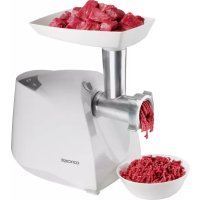
| Product Type | Electric Meat Grinder |
| Brand | Concept |
| Model | MM4300 |
| Power | 800 W |
| Capacity | 1.5 kg of meat per minute |
| Dimensions (L x W x H) | 30 x 15 x 25 cm |
| Weight | 3.2 kg |
| Housing Material | Stainless steel and ABS plastic |
| Blade and discs | Stainless steel blade, 3 discs (fine, medium, coarse) |
| Main functions | Grinding, sausage stuffing (included accessory), auto-reverse |
| Power supply | 220-240 V, 50/60 Hz |
| Cable length | 1.2 m |
| Safety | Bowl safety lock, overload protection |
| Care and cleaning | Removable parts dishwasher safe |
| Included accessories | 3 grinding discs, sausage stuffing accessory, pusher |
| Warranty | 2 years |
| Repairability | Spare parts available on manufacturer's website |
Frequently Asked Questions - MM4300 Concept
How to use the Concept MM4300 meat grinder?
Make sure the appliance is correctly assembled with the disc and blade. Plug it in, place the cut meat into the hopper and use the pusher. Never force with fingers.
How to clean the grinder after use?
Unplug the appliance. Disassemble all removable parts (blade, discs, bowl). Wash them in warm soapy water or in the dishwasher. Dry thoroughly before reassembling.
What to do if the motor does not start?
Check that the bowl is properly locked in place. Make sure the outlet works. If the problem persists, contact customer service.
Can I grind bones or hard foods?
No, the grinder is designed for boneless meat and soft vegetables. Do not insert bones, pits, or hard frozen foods, as this could damage the blade.
How to assemble the grinder correctly?
First place the blade on the central shaft, then the chosen disc, screw on the locking ring. Attach the bowl to the motor and turn until it clicks into place.
What to do if the meat does not come out or accumulates?
Use the auto-reverse function to unclog by pressing the 'Reverse' button. If the problem persists, disassemble and clean the blade.
The grinder is noisy: is this normal?
Some noise is normal, especially during grinding. If the noise becomes abnormally loud or metallic, check that the blade is not clogged or damaged.
Can you grind vegetables or fruits?
Yes, you can grind vegetables like onions or carrots, cut them into small pieces. For soft fruits, use a coarser disc.
How to make homemade sausages with this appliance?
Use the provided sausage stuffing accessory. Grind the meat with spices, then attach the sausage tube. Slide the casing onto the tube and operate the grinder.
Where can I find spare parts for the MM4300?
Spare parts (blades, discs, bowl) are available on the official Concept website or from authorized dealers. Use the model number to order.
User questions about MM4300 Concept
0 question about this device. Answer the ones you know or ask your own.
Ask a new question about this device
No questions yet. Be the first to ask one.
Download the instructions for your Chopper in PDF format for free! Find your manual MM4300 - Concept and take your electronic device back in hand. On this page are published all the documents necessary for the use of your device. MM4300 by Concept.
USER MANUAL MM4300 Concept
Manual assistant
Powered by Anthropic
Waiting for your message
Product information
Brand : Concept
Model : MM4300
Category : Chopper