KSV71CRH - Air Conditioning KELVINATOR - Free user manual and instructions
Find the device manual for free KSV71CRH KELVINATOR in PDF.


Pick your language and provide your email: we'll send you a specifically translated version.
| Brand | Kelvinator |
| Model | KSV71CRH |
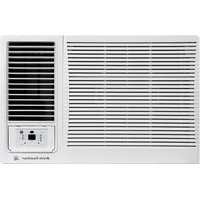
| Product Type | Split System Air Conditioner |
| Cooling Capacity | 7100 BTU/h (approx.) |
| Heating Capacity | N/A (Cooling only) |
| Refrigerant | R32 |
| Power Supply | 220-240V, 50Hz |
| Indoor Unit Dimensions (WxHxD) | 770 x 268 x 194 mm |
| Outdoor Unit Dimensions (WxHxD) | 740 x 350 x 550 mm |
| Indoor Unit Weight | 8.5 kg |
| Outdoor Unit Weight | 28.0 kg |
| Noise Level (Indoor) | 26 - 42 dB(A) |
| Noise Level (Outdoor) | 55 dB(A) |
| Air Flow (Indoor) | 400 m³/h |
| Energy Efficiency Ratio (EER) | 3.0 (approx.) |
| Control Type | Infrared Remote Control |
| Filter | Washable Pre-Filter |
| Functions | Cool, Dehumidify, Fan, Timer, Sleep Mode |
| Installation | Requires professional installation for split system |
| Maintenance | Clean filters every 2 weeks; annual professional check recommended |
Frequently Asked Questions - KSV71CRH KELVINATOR
How do I clean the air filter?
Open the front panel, remove the filter, wash it with mild soap and water, let it dry completely, and reinstall. Clean every 2 weeks for optimal performance.
What do the error codes mean?
Error codes are displayed on the unit. Refer to the manual for specific codes. Common issues include sensor failure or communication error between indoor and outdoor units.
Can I operate the unit without the remote control?
Yes, there is a manual control button on the indoor unit. Press it to toggle between modes or turn on/off. However, full functionality requires the remote.
How do I set the timer?
Press the Timer button on the remote, then set the desired on/off time using the + / - buttons. Confirm by pressing Timer again.
What should I do if the unit is not cooling?
Check if the filter is dirty, ensure the outdoor unit is unobstructed, and verify the thermostat setting. If the problem persists, contact a professional.
Is the unit compatible with a smart home system?
This model does not include WiFi connectivity. For smart control, you may need an external adapter. Check with the manufacturer for compatibility.
How often should I service the air conditioner?
Have a professional service the unit annually. This includes checking refrigerant levels, cleaning coils, and inspecting electrical components.
What is the recommended room size for this air conditioner?
The cooling capacity of 7100 BTU/h is suitable for rooms up to 20-25 m² (215-270 sq ft). Factors like insulation and sunlight affect performance.
How do I switch between cooling and fan mode?
Press the Mode button on the remote until you see the desired mode icon: snowflake (cool), water drop (dehumidify), or fan (fan only).
What should I do if water leaks from the indoor unit?
Turn off the unit immediately. This could be due to a blocked drain pipe or improper installation. Contact a professional to inspect and clear the drainage system.
User questions about KSV71CRH KELVINATOR
0 question about this device. Answer the ones you know or ask your own.
Ask a new question about this device
No questions yet. Be the first to ask one.
Download the instructions for your Air Conditioning in PDF format for free! Find your manual KSV71CRH - KELVINATOR and take your electronic device back in hand. On this page are published all the documents necessary for the use of your device. KSV71CRH by KELVINATOR.
USER MANUAL KSV71CRH KELVINATOR
Manual assistant
Powered by Anthropic
Waiting for your message
Product information
Brand : KELVINATOR
Model : KSV71CRH
Category : Air Conditioning