Video Baby Monitor 6800 - Video baby monitor BT - Free user manual and instructions
Find the device manual for free Video Baby Monitor 6800 BT in PDF.


| Product Type | Video Baby Monitor |
| Model | Video Baby Monitor 6800 |
| Brand | BT |
| Display Size | 2.8 inches (7.1 cm) LCD |
| Camera Resolution | 640 x 480 pixels |
| Night Vision | Yes, infrared LEDs (up to 5 meters) |
| Audio | Two-way talk with built-in microphone and speaker |
| Range (indoor) | Up to 50 meters |
| Frequency | 2.4 GHz FHSS |
| Temperature Sensor | Yes, displayed on parent unit |
| Power Supply - Parent Unit | Rechargeable lithium-ion battery (3.7V, 1000mAh) and AC adapter |
| Power Supply - Baby Unit | AC adapter (input 100-240V, output 5V DC) |
| Dimensions - Parent Unit | 12 x 7 x 4 cm |
| Dimensions - Baby Unit | 10 x 8 x 10 cm |
| Weight - Parent Unit | Approx. 200 g |
| Weight - Baby Unit | Approx. 150 g |
| Additional Features | Sound activation, volume control, lullabies, low battery warning, secure encrypted transmission |
| Cleaning Instructions | Wipe with a soft, dry cloth; do not use liquids or cleaning agents |
| Safety | CE, RoHS compliant; baby unit designed to be out of reach of child |
| Spare Parts / Repairability | Replacement power adapters and batteries available; contact BT support |
Frequently Asked Questions - Video Baby Monitor 6800 BT
User questions about Video Baby Monitor 6800 BT
0 question about this device. Answer the ones you know or ask your own.
Ask a new question about this device
Download the instructions for your Video baby monitor in PDF format for free! Find your manual Video Baby Monitor 6800 - BT and take your electronic device back in hand. On this page are published all the documents necessary for the use of your device. Video Baby Monitor 6800 by BT.
USER MANUAL Video Baby Monitor 6800 BT
about 50 meters indoors. Thick walls and doors reduce the units' range and affect how they link
The maximum range between your parent and baby units is about 250 meters outdoors and
What's the range?
linked so they are now ready to use.
The parent unit and baby unit are automatically

the parent unit on.
Press the button and hold for 2 seconds to turn
get audio feedback sounds.
metre from the baby unit. Any closer and you might
Before you do, move the parent unit at least one
can switch it on.
- After the parent unit has charged for 12 hours you
Looping any extra length and securing it.
Keep the power cord out of baby's reach by
d!⊥
unit up to turn it on.
- Slide the Off On button on the side of the baby

(BLJ06W050100P1-B).
Please use power supply unit item code 089010
the mains power socket and switch the socket on.
- Plug the cable into the baby unit, then plug it into
away from your baby.
most of the time. It should also be at least one metre
room where you're going to be monitoring your baby
- Place the baby unit near a power socket in the
When the battery gets very low, it'll take about 30 minutes to charge enough for you to use it for a short time. To charge the parent unit in the shortest amount of time, turn it off while it's charging.
the night.
going to use for longer than this or throughout
plugged into the mains power socket if you're
hours. We recommend you keep the cable
to fully charge.
haven't used it for a long time, it'll take 12 hours
The first time you use the parent unit, or if you
dī⊥
- Leave to charge for 12 hours.
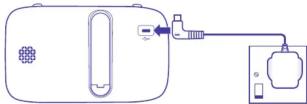
(BLJ06W050100P1-B).
on. Please use power supply unit item code 089010
into the mains power socket and switch the socket
- Plug the cable into the parent unit, then plug it
Getting set up
nadspeak. Take care when disposing of your product. The battery could expode if placed in a hot oven or is crushed or cut. Fine, a hot oven or is crushed or cut. Don't subject the product to extremely low air pressure as the battery may expode or leak rammlable liquid or gas.
If you need repairs, get in touch with our
Battery safety information
Richard the Yang, doi
• Dust with a soft dry cloth (a microfibre
• Regularly check your product for damage
- Treat all parts with cards no shock or vacation and drop full or twist any clefts
Care and malexpression
This device uses wireless technology check for Generation
a flammable atmosphere (e.g., warehouse
between 0 and 40°C.
If required. Designed for use at room temperatures
parked on which sunbows (veq. vanetea wood or delicate fabrics); place on a mat
Product may cause scratches or marks if
davances and power adapters in damp areas of pour sources of water or splashes.
Electronic derivatives have liquids don't place
Ony as per person (adjusted) provided by BT for this specific device; contact our
bed or playpen.
CHINARIAN STOCK - AS (UNDER) ONE HOLE CHAPES; And never place any parts inside a col.
Keep device and cables out of young
don't block any vents with objects on thick screens
In cupboards or back of sofas and
get hot).
(eg- away from radiators, window sill or other electrical equipment which can
Position all parts away from heart and sun
installation and location
carefully before installing and using it.
read the following instructions
BT is manufactured to comply with
Your Video Baby Monitor 6000 from
Keep for future reference
Important safety and care instructions
! i
Start here
Troubleshooting
Can I add another camera unit to
this bundle?
• BT currently does not sell add-on camera units. A brand new bundle
will need to be purchased.
My parent unit / baby unit is working what should I do?
Plesse, WOYA 18
fully charged or plugged into
the mains.
- Ensure both parent unit and baby unit are switched on
2.2.1.1
- Move the parent unit closer to the baby unit and away from large obstructions or other electrical devices as these may affect the signal between the two units.
- Switch the baby unit off, and wait
for about 15 seconds and then switch back on again.
Why can I hear a high-pitched noise?
- This is likely to be caused by the units being too close to each other. We recommend they are kept at least 1 metre apart and preferably in different rooms.
Why is my parent unit beeping?
The parent unit only beeps when:
• The baby unit is switched off and
there is no connection to the parent unit
• The units are too far apart, please
move them closer (but not closer than one metre)
- The battery on the parent unit is
low, please plug into the mains.
• Interference may be causing
connection issues, please ensure
both devices are moved away from other electrical devices (TV's.
Microwaves, mobile phones etc.).
Why is the parent unit not making
any sounds even though there's noise from my baby's room?
• Please ensure both units are
plugged into the mains or that the
parent unit is fully charged.
• The speaker may either be on mute or the volume is too low to hear.
The non-present unit requires a net of
- The parent unit may be out of range of the baby unit, please
move closer (but keep at least 1
metre apart to avoid interference). In this scenario the parent unit
would beep to inform you of
this issue.
• Large metal obstructions and
other electrical devices may be impacting the signal. Try relocating
both devices if possible.
Other information
Radio transmission information
Frequency range (GHz) 2.415–2.471
Max power (dBm) 19.1
Radio Equipment Directive
Declaration of Conformity and
Horsby British Telecommunications
plc declares that the r
type VBM6000 (088306) is in compliance with Directive 2014/53/
EU. The full text of the EU declaration
of conformity and power efficiency
information is available at: bt.com/producthelp
The following products
This device has been evaluated for and shown compliant with European
Guidelines when installed and
operated with a minimum distance
of 10mm between the body.
The item code for both power supply
units is 089010 (BLJ06W050100P1-B).
The full text of the EU declaration of
Conformity is available at the following internet address: bt.com/producthelp
Dipening of vaneld electrical - 70
and electronic equipment
The Government has a
legal requirement to minimise the
and electronic equipment and to
maximise its separate collection and
environmentally sound management
The symbol shown here and on the product, means you shouldn't throw it.
in your normal rubbish at the end of its
working life.
This product may contain substances
that could be harmful to people or the environment if it's not recruiled.
correctly. Check with your retailer
to find out how to recycle your old
something from us that has the
crossed out wheelie bin symbol on
It and It's similar to the kit you d need any more you can send us
old kit and we'll get rid of it in an
environmentally friendly way.
Here's the address: WEEE Take
Back Scheme, BT Returns, BT DE Darlington Road
Northallerton, DL6 7ZY.
Website address: bt.com/weee
We're not responsible for the costs
of returning items. If you don't wish
to return kit to us, lots of electronics shops have their own 'take back'.
schemes where you can recycle very
small electrical and electronic goods.
If you're a household user, you can also take it to your local recycling centre –
go to recyclenow.com to find the one
nearest to you. Please dispose of this carefully and help to protect
our planet.
Guarantee
Your VBM6000 is guaranteed for
2 years from when you bought it. This means we'll either repair it or replace
all or part of the product if it's not
working property
If you bought the product more than 28 days ago, we might replace it with a
22 days ago, the might replace 10 minutes refurbished or repaired one.
Guarantee conditions
• The guarantee only covers problems
found in the 2 year guarantee period. You'll need your receipt or other proof
of purchase.
- Your product is returned to BT or one of our partners as instructed.
- This guarantee doesn't cover any
problems caused by accidents, misuse,
with the equipment, or any attempt
at adjustment or repair other than through approved agents.
• The guarantee is valid with
Ireland only. You're responsible for the
cost of returns to the original retailer or repair agent. If RT needs to provide
- Repair agents & features to provide replacement parts, these can only be
despatched to an address within the UK
- This guarantee doesn't affect your
statutory rights.
Within the 2 year guarantee period
please take a look at the Help
section beginning on page 1 or
contact the Baby Monitor Helpline on 0808.100.6554
Additional answer
asked questions are available from
bt.com/producthelp. If the helpdesk can't fix the problem, they'll let
you know how to get a repair or a
replacement. If you need to return
original box if you still have it and
make sure you include all the parts
You'll also need a fault reference.
number from the helpdesk. This does
not affect your sta
Outside of the 2 year
guarantee period If your product needs support aft
the guarantee period has ended,
we recommend that you contact BT's recommended support age
Discount Communications on
0800 980 8999.
To find out what to do if your product is in or outside of the 2 year guarantee
please visit bt.com/producthelp
Available in other formats including braille,
large print or audio CD. If you would like a
copy, please call 0808 100 6554*.
© British Telecommunications plc 2020. We're registered in England at 51 New York
London, EC1A 7AJ, UK (company number 1800000)
* Calls to our helpdesk made from the UK mainland and
Mobile Networks are free. International Cax costs Video Baby Monitors 6000 US (97/30) Issue 7
Video Baby Monitor 6000 CIG (0.7/20) Issue 7
CE

Using your Video Baby Monitor
In this section you'll find out how to use your baby monitor to make sure you get the best possible use out of it.
To start using your baby monitor, you'll need to turn both units on. You'll see where the Power buttons are located in the diagrams.
The features outlined below are all accessible through the MENU which can be opened by pressing the Menu button, using the and buttons to navigate, and to scroll through the sub menus and OK to select the desired option. To return to the camera feed, simply press the Menu button.
Monitoring volume and mute
There are 8 volume settings. The default is 4.
-
In monitor mode, press or to change the volume.
-
Press OK to confirm.
-
To turn the sound off completely, turn the volume down to 0.
✗ will be displayed on top of the screen.
Screen brightness
There are 8 brightness levels. The default is 4.
-
When viewing the camera feed, press (or) to select the brightness level.
-
Press OK to confirm.
Lullabies
There are 5 lullabies to choose from or you can play all 5 in sequence.
-
Press Menu and select ♪
-
Press or to choose the lullaby 1-5 or press to play all five, then press OK.
-
Press or to select the volume from 1-3 and press to save.
-
To stop the lullaby playing, select ☐
Talk Talk to your baby
To give your baby some words of comfort, press and hold down on the parent unit and speak into the parent unit's microphone. The icon will be displayed at the bottom right corner. Release the button when you've finished speaking.
Pan/tilt and Zoom in/out
- To enter/exit the pan/tilt mode, press OK. When in Pan/tilt mode, press <, >, to move the image.
- To enter zoom mode, press Menu , then press to display, then press or to select the zoom level and press OK to exit menu.
Set a reminder
You can set an alert to remind you of something you need to do, for example when your baby's next feed is due. You can set it for 2, 4 or 6 hours.
-
Press Menu then press to display
-
Press ▲ or ▼ to select the reminder time (2H, 4H or 6H), then press Ⓞ to save. The Ⓗ will be displayed on the top right of the screen.
-
To cancel the alert, select ☑
Set the screen to turn on and off automatically
You can set the screen to turn on by pressing any button. On this setting, the screen will turn off automatically when no button is pressed during 1, 3 or 5 minutes.
-
Press |Menu|, then press >to display ▶
-
Press ∧ and √ to select 1, 3 or 5 minutes and press OK
-
To turn the screen back on at any time, press any button. If you want to set the screen on all the time, set the screen setting ☐ off.
dB Turn sound activated screen mode on or off
When set to On, the screen will turn on if noise is detected from the baby unit. If it's set to Off, the screen will stay off even if noise is detected. To use this feature, you need to set the standby mode first to 1, 3 or 5 minutes as described above.
-
Press Menu, then press > to display .dB
-
Press or to select (for On) or (for Off) and press OK.
-
To turn the screen back on at any time, press the ⏻.
Temperature sensor
The reading from the temperature sensor will be displayed at the top of the parent unit screen.
To change the temperature display from C to F:
-
Press Menu, then press to display find press . OK
-
Press or to select ° C or ° F, then press OK.
Night vision
So that you can see your baby at night, the baby unit automatically uses the light from its infrared LED lights to capture images in a dark room. Because of that, it can only show images in black and white. The Icon will be displayed at the top of the screen.
Other screen icon descriptions
Signal strength
- Baby unit switched on - Camera identification number e.g. Camera 1
Sound on
Mute
Battery status (Full battery shown, scrolling when charging)
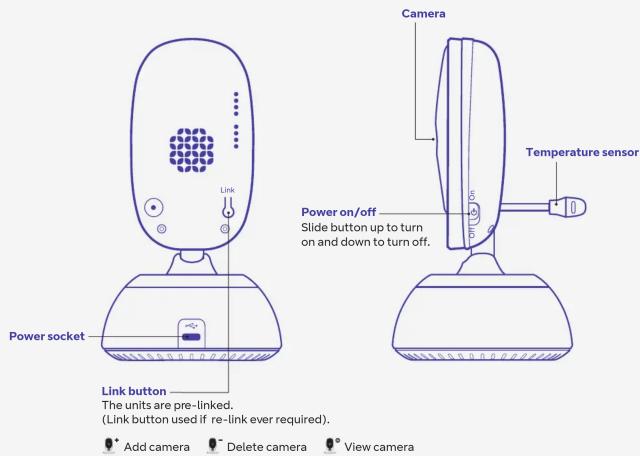
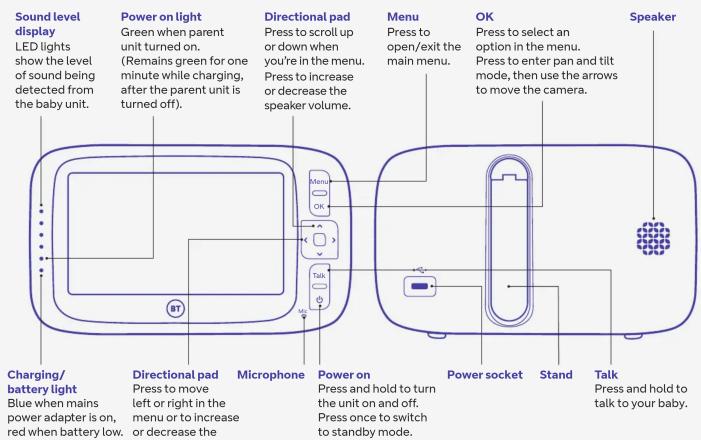
Get to know your Video Baby Monitor
Find out how your baby monitor works by familiarising yourself with the buttons and lights.


- TROUBLESHOOTING
- OTHER INFORMATION
- GUARANTEE
- USING YOUR VIDEO BABY MONITOR
- MONITORING VOLUME AND MUTE
- SCREEN BRIGHTNESS
- LULLABIES
- TALK TALK TO YOUR BABY
- PAN/TILT AND ZOOM IN/OUT
- SET A REMINDER
- SET THE SCREEN TO TURN ON AND OFF AUTOMATICALLY
- DB TURN SOUND ACTIVATED SCREEN MODE ON OR OFF
- TEMPERATURE SENSOR
- NIGHT VISION
- OTHER SCREEN ICON DESCRIPTIONS
- GET TO KNOW YOUR VIDEO BABY MONITOR
Brand : BT
Model : Video Baby Monitor 6800
Category : Video baby monitor