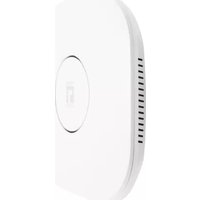
WAP-0008 - Access Point LEVELONE - Free user manual and instructions
Find the device manual for free WAP-0008 LEVELONE in PDF.


Pick your language and provide your email: we'll send you a specifically translated version.
| Product Type | Wireless Access Point |
| Brand | LevelOne |
| Model | WAP-0008 |
| Wireless Standards | IEEE 802.11b/g/n |
| Frequency Band | 2.4 GHz |
| Maximum Data Rate | 300 Mbps |
| Interfaces | 1 x 10/100 Fast Ethernet (RJ-45) |
| Power Supply | 12V DC, 1A (adapter included) or PoE 802.3af |
| Dimensions (W x D x H) | 200 x 150 x 30 mm |
| Weight | 300 g |
| Operating Temperature | 0°C to 40°C |
| Humidity | 10% to 90% (non-condensing) |
| Antenna | 2 x internal antennas |
| MIMO | 2x2 |
| Security | WEP, WPA/WPA2-PSK, WPA2-Enterprise, MAC address filtering |
| Operation Modes | Access Point, Repeater, Bridge, WDS |
| Management | Web-based GUI, SNMP, Telnet |
| LED Indicators | Power, LAN, WLAN |
| Mounting | Desktop or wall-mountable (brackets included) |
| Certifications | CE, FCC |
Frequently Asked Questions - WAP-0008 LEVELONE
How do I reset the LevelOne WAP-0008 to factory defaults?
Locate the reset button on the back panel. Press and hold it for 10 seconds while the device is powered on. The LEDs will flash to confirm the reset.
What is the default IP address and login credentials?
The default IP address is 192.168.1.1. The default username is 'admin' and password is 'admin'. Ensure your computer is on the same subnet to access the web interface.
Can I use the WAP-0008 as a wireless repeater?
Yes, the WAP-0008 supports repeater mode. Access the web interface, go to Operation Mode, select 'Repeater', and follow the setup wizard to connect to an existing wireless network.
Does the WAP-0008 support Power over Ethernet (PoE)?
Yes, it supports 802.3af PoE. You can power it via a PoE switch or injector without needing the AC adapter.
How can I update the firmware?
Download the latest firmware from the LevelOne support website. Log into the web interface, go to System Tools > Firmware Upgrade, select the file and click 'Upgrade'. Do not power off during the process.
What wireless security options are available?
You can configure WEP (64/128-bit), WPA-PSK (TKIP), WPA2-PSK (AES), or WPA2-Enterprise with a RADIUS server. MAC address filtering is also supported for additional control.
How do I configure the WAP-0008 as a bridge?
Set the operation mode to 'Bridge' in the web interface. You need to know the MAC address of the remote AP. Enter it in the bridge settings to establish a wireless link.
Why is my wireless connection slow?
Check for interference from other devices (microwaves, cordless phones). Try changing the wireless channel (1, 6, or 11) in the settings. Also ensure you are using WPA2-AES for optimal performance.
Can I mount the WAP-0008 on a wall?
Yes, the device comes with wall-mounting brackets. Use the provided screws to attach the brackets to the wall, then slide the AP onto the brackets.
How do I enable WDS on this access point?
Go to Wireless > WDS Settings. Enable WDS, then enter the MAC addresses of other WDS-enabled APs you want to connect. All APs must have the same channel and security settings.
User questions about WAP-0008 LEVELONE
0 question about this device. Answer the ones you know or ask your own.
Ask a new question about this device
No questions yet. Be the first to ask one.
Download the instructions for your Access Point in PDF format for free! Find your manual WAP-0008 - LEVELONE and take your electronic device back in hand. On this page are published all the documents necessary for the use of your device. WAP-0008 by LEVELONE.
USER MANUAL WAP-0008 LEVELONE



Manual assistant
Powered by Anthropic
Waiting for your message
Product information
Brand : LEVELONE
Model : WAP-0008
Category : Access Point