GMR-3 - Radio MB QUART - Free user manual and instructions
Find the device manual for free GMR-3 MB QUART in PDF.


Pick your language and provide your email: we'll send you a specifically translated version.
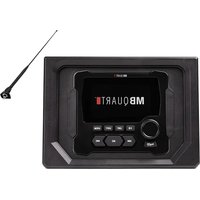
| Product Type | Marine Audio Receiver |
| Model | GMR-3 |
| Brand | MB Quart |
| Dimensions (W x H x D) | 188 x 58 x 55 mm |
| Weight | 0.85 kg |
| Power Supply | 12 V DC (negative ground) |
| Maximum Output Power | 4 x 50 Watts |
| RMS Power | 4 x 22 Watts |
| Frequency Response | 20 Hz - 20 kHz |
| Bluetooth | Yes, v4.2 with A2DP and AVRCP |
| USB Input | Yes, supports MP3/WMA/WAV |
| AUX Input | Yes, 3.5 mm stereo |
| AM/FM Tuner | Yes, 30 presets |
| Weather Band | Yes (NOAA) |
| Satellite Radio Ready | Yes (SIRIUS-XM module required) |
| Water Resistance Rating | IPX6 (water jet resistant) |
| Display | LCD with white LED backlight |
| Faceplate | Detachable, anti-theft |
| Remote Control | Included (wired) |
| Cleaning | Wipe with a soft, dry cloth. Do not use solvents. |
| Safety | Disconnect battery before installation. Use proper fusing. |
| Spare Parts & Repairability | Contact authorized MB Quart service centers. Use only genuine parts. |
Frequently Asked Questions - GMR-3 MB QUART
How do I pair my phone via Bluetooth?
Press the BT button on the faceplate to enter pairing mode. On your phone, select MB Quart GMR-3 from the Bluetooth list. Confirm pairing if prompted.
What is the maximum USB flash drive capacity supported?
The USB port supports flash drives up to 32 GB formatted as FAT32.
Can I use this radio in a car with a 24V electrical system?
No, the GMR-3 requires a 12V DC power supply. Using 24V will damage the unit.
How do I reset the radio to factory settings?
Press and hold the DISP button for 5 seconds until the screen shows 'RESET'. Confirm by pressing the volume knob.
Does the radio come with a wiring harness?
Yes, a standard ISO wiring harness is included for easy installation.
What is the faceplate removal procedure?
Press the REL button on the bottom left of the faceplate. Gently pull the faceplate towards you to detach it.
How do I set the clock?
Press and hold the DISP button for 2 seconds. Use the SEEK buttons to adjust hours and minutes. Press DISP again to save.
Is the radio weatherproof?
It has an IPX6 rating, meaning it is protected against powerful water jets. It is suitable for marine environments but not submersible.
What audio file formats are supported via USB?
The radio supports MP3, WMA, and WAV files. AAC and FLAC formats are not supported.
How do I enable weather band?
Press the BAND button repeatedly until 'WB' appears on the display. Use SEEK to tune to a local weather channel.
User questions about GMR-3 MB QUART
0 question about this device. Answer the ones you know or ask your own.
Ask a new question about this device
No questions yet. Be the first to ask one.
Download the instructions for your Radio in PDF format for free! Find your manual GMR-3 - MB QUART and take your electronic device back in hand. On this page are published all the documents necessary for the use of your device. GMR-3 by MB QUART.
USER MANUAL GMR-3 MB QUART

Manual assistant
Powered by Anthropic
Waiting for your message
Product information
Brand : MB QUART
Model : GMR-3
Category : Radio