
RVM2.0 - Radio MB QUART - Free user manual and instructions
Find the device manual for free RVM2.0 MB QUART in PDF.


Pick your language and provide your email: we'll send you a specifically translated version.
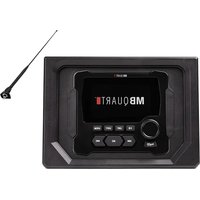
| Product Type | Car Stereo Radio |
| Brand | MB Quart |
| Model | RVM2.0 |
| Dimensions (W x H x D) | 178 x 50 x 160 mm (1-DIN) |
| Weight | 0.8 kg |
| Power Supply | 12V DC (negative ground) |
| Maximum Power Output | 4 x 50 Watts |
| RMS Power Output | 4 x 22 Watts |
| Radio Tuner | AM/FM with RDS |
| Bluetooth | Yes (hands-free calling & audio streaming) |
| USB Port | Front USB for MP3/WMA playback |
| AUX Input | 3.5 mm front AUX input |
| Display | LCD with white illumination |
| Remote Control | Included wired remote control |
| Equalizer | 7-band graphic equalizer |
| Supported Audio Formats | MP3, WMA, WAV, FLAC |
| Antenna Type | Motorized or fixed (depending on installation) |
| Fuse Rating | 10A blade fuse |
| Operating Temperature | -20°C to 60°C |
| Maintenance | Clean with a soft, dry cloth; avoid solvents |
| Safety Precautions | Disconnect battery before installation; use correct fuse |
| Spare Parts Availability | Contact authorized MB Quart service centers |
Frequently Asked Questions - RVM2.0 MB QUART
How do I install the MB Quart RVM2.0 radio in my car?
Disconnect the car battery negative terminal. Use a DIN removal tool to slide the unit into a standard 1-DIN slot. Connect the wiring harness matching colors: yellow to constant 12V, red to switched 12V, black to ground. Connect speakers and antenna. Reconnect battery and test.
What is the recommended fuse for the RVM2.0?
The radio uses a standard 10A blade fuse. Always replace with the same rating to avoid damage.
How do I pair my phone via Bluetooth?
Enable Bluetooth on your phone. Press the 'BT' button on the radio. Select 'MB Quart RVM2.0' from your phone's Bluetooth list. Confirm pairing. The radio will remember paired devices.
What audio formats does the USB port support?
The USB port supports MP3, WMA, WAV, and FLAC files. Format the USB drive as FAT32 for best compatibility.
The radio turns off when I start the car. Why?
This is normal if the red wire is connected to an accessory circuit that cuts power during engine crank. To avoid this, connect the red wire to a constant 12V source with a relay, or use a delay circuit.
How do I reset the radio to factory settings?
Press and hold the 'MODE' button for about 5 seconds. The unit will restart with default settings. Alternatively, disconnect the battery for 30 seconds.
Can I use the radio in a marine environment?
The RVM2.0 is designed for car use and is not waterproof. Avoid exposure to moisture. For marine use, consider MB Quart's marine-specific models.
What is the maximum power output per channel?
The radio delivers a maximum of 50 Watts per channel (4 channels). RMS power is 22 Watts per channel at 4 ohms.
My remote control is not working. What should I do?
Check the remote's battery (typically CR2032). Ensure the IR sensor on the radio is not blocked. Reprogram the remote by pressing 'MODE' and 'VOL+' together until the unit beeps.
Where can I find the serial number on the radio?
The serial number is located on a sticker on the top or side of the chassis. It is also printed on the original packaging.
User questions about RVM2.0 MB QUART
0 question about this device. Answer the ones you know or ask your own.
Ask a new question about this device
No questions yet. Be the first to ask one.
Download the instructions for your Radio in PDF format for free! Find your manual RVM2.0 - MB QUART and take your electronic device back in hand. On this page are published all the documents necessary for the use of your device. RVM2.0 by MB QUART.
USER MANUAL RVM2.0 MB QUART
Manual assistant
Powered by Anthropic
Waiting for your message
Product information
Brand : MB QUART
Model : RVM2.0
Category : Radio