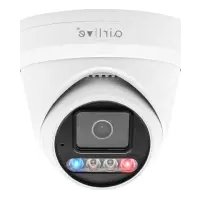
AirCam BUDL-630XAI-RBMS - Surveillance Camera AIRLIVE - Free user manual and instructions
Find the device manual for free AirCam BUDL-630XAI-RBMS AIRLIVE in PDF.


Pick your language and provide your email: we'll send you a specifically translated version.
| Product Type | Outdoor Bullet Surveillance Camera |
| Dimensions | Approx. 80 x 80 x 200 mm |
| Weight | Approx. 600 g |
| Power Supply | DC 12V or PoE (802.3af) |
| Video Resolution | Up to 5MP (2592 x 1944) |
| Night Vision | IR LEDs up to 30m |
| Weatherproof Rating | IP67 |
| Lens Type | Fixed 3.6mm |
| Field of View | Approx. 80° diagonal |
| Motion Detection | Built-in, adjustable sensitivity |
| Audio Support | Built-in microphone, audio output |
| Storage | MicroSD card up to 128GB, NVR compatible |
| Connectivity | Ethernet RJ45, ONVIF compatible |
| Mounting | Wall or ceiling mount included |
| Operating Temperature | -20°C to 50°C |
| Maintenance | Keep lens clean, check connections periodically |
| Security | Encrypted video stream (HTTPS) |
| Spare Parts | Contact vendor for replacement parts |
| General Information | Manufacturer: AirLive. Model: AirCam BUDL-630XAI-RBMS |
Frequently Asked Questions - AirCam BUDL-630XAI-RBMS AIRLIVE
How do I reset the camera to factory settings?
Press and hold the reset button on the camera for about 10 seconds until the LED flashes rapidly. Release the button, and the camera will reboot with default settings.
Can I access the camera remotely?
Yes, after connecting the camera to your network, you can access it via the AirLive app or web browser using the camera's IP address. Ensure remote access is enabled in settings.
What microSD card is supported?
The camera supports microSD cards up to 128GB. Use class 10 or higher for best performance. Insert the card with the contacts facing up.
How do I set up motion detection?
In the camera's settings menu, enable motion detection and adjust the sensitivity and detection area. You can also configure alerts to be sent to your email or phone.
Is the camera weatherproof?
Yes, the camera has an IP67 rating, meaning it is dust-tight and protected against temporary immersion in water. It is suitable for outdoor use.
How do I mount the camera?
Use the included mounting bracket. Attach the bracket to the wall or ceiling with screws (use appropriate anchors for the surface). Then secure the camera to the bracket and adjust the angle.
What is the default username and password?
The default username is typically admin and the password is admin. For security, change the password immediately after first login.
How do I connect the camera via PoE?
Connect an Ethernet cable from a PoE switch or PoE injector to the camera's RJ45 port. The camera will receive both power and data through the same cable.
Can I record continuously?
Yes, you can set continuous recording or schedule recording times. Use a microSD card or connect to an NVR. Ensure sufficient storage space for your needs.
What should I do if the camera is not connecting?
Check the Ethernet cable, power supply, and network settings. Ensure the camera is within the same subnet as your router. Try resetting the camera and reconfiguring it.
User questions about AirCam BUDL-630XAI-RBMS AIRLIVE
0 question about this device. Answer the ones you know or ask your own.
Ask a new question about this device
No questions yet. Be the first to ask one.
Download the instructions for your Surveillance Camera in PDF format for free! Find your manual AirCam BUDL-630XAI-RBMS - AIRLIVE and take your electronic device back in hand. On this page are published all the documents necessary for the use of your device. AirCam BUDL-630XAI-RBMS by AIRLIVE.
USER MANUAL AirCam BUDL-630XAI-RBMS AIRLIVE
Manual assistant
Powered by Anthropic
Waiting for your message
Product information
Brand : AIRLIVE
Model : AirCam BUDL-630XAI-RBMS
Category : Surveillance Camera