850T - Robot vacuum Proscenic - Free user manual and instructions
Find the device manual for free 850T Proscenic in PDF.


Pick your language and provide your email: we'll send you a specifically translated version.
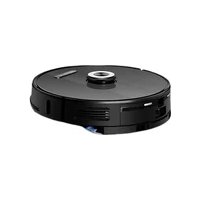
| Product Type | Robot Vacuum Cleaner |
| Brand | Proscenic |
| Model | 850T |
| Dimensions (L x W x H) | Approx. 34 x 34 x 9 cm |
| Weight | Approx. 3.2 kg |
| Power Supply | Rechargeable Li-ion battery, 14.8V 2600mAh |
| Charging Time | Approx. 5 hours |
| Run Time | Up to 120 minutes on standard mode |
| Dustbin Capacity | 600 ml |
| Suction Power | 2000 Pa |
| Cleaning Modes | Auto, Spot, Edge, Scheduled |
| Navigation System | Gyroscope + infrared sensors |
| Cliff Detection | Yes |
| Obstacle Detection | Infrared and bumper sensors |
| Remote Control | Included (RF or IR) |
| App Control | Yes (compatible with iOS and Android) |
| Voice Control | Amazon Alexa, Google Assistant |
| Filter Type | High-efficiency (HEPA) filter |
| Brush Type | Main rotating brush + side brush |
| Maintenance | Empty dustbin after each use; clean filters weekly; replace brushes every 6-12 months |
| Safety Features | Automatic return to charging station, anti-drop sensors |
| Spare Parts Availability | Filters, brushes, batteries available online or from Proscenic support |
| Repair Services | Authorized service centers; user-replaceable parts |
Frequently Asked Questions - 850T Proscenic
How do I start cleaning with my Proscenic 850T?
Press the power button on the robot or use the remote control. You can also schedule cleaning via the app. Ensure the dustbin is empty and the battery is charged.
Can the Proscenic 850T clean multiple rooms?
Yes, it can navigate between rooms using its gyroscope and sensors. However, it may require boundary strips if you want to restrict certain areas.
How do I connect the robot to the app?
Download the Proscenic Home app from the App Store or Google Play. Turn on the robot and press the Wi-Fi button until it beeps, then follow the in-app instructions to connect to your home network.
What should I do if the robot gets stuck?
Remove the robot from the obstacle and check for loose cables, cords, or low-hanging furniture. Ensure there is enough clearance. The robot will try to free itself, but manual assistance may be needed.
How often should I empty the dustbin?
After each cleaning session or when the dustbin is full. A full bin reduces suction efficiency.
Can I use voice commands with the 850T?
Yes, if you have an Amazon Alexa or Google Assistant device. Enable the Proscenic skill in the respective app and link your account.
How do I replace the brush?
Turn the robot upside down and remove the brush guard. Lift out the old brush and snap in a new one. Always replace with genuine Proscenic parts.
What do the error lights mean?
A red light indicates a error (e.g., stuck, low battery). Refer to the user manual for specific codes. A solid blue light means the robot is running, blinking means charging.
How do I reset the robot?
Hold the power button for 5 seconds until the lights flash. Release and wait for the robot to restart. This can fix minor software issues.
Is the Proscenic 850T suitable for pet hair?
Yes, the upgraded suction and rotating brush handle pet hair well. However, regularly clean the brush to avoid tangling.
User questions about 850T Proscenic
0 question about this device. Answer the ones you know or ask your own.
Ask a new question about this device
No questions yet. Be the first to ask one.
Download the instructions for your Robot vacuum in PDF format for free! Find your manual 850T - Proscenic and take your electronic device back in hand. On this page are published all the documents necessary for the use of your device. 850T by Proscenic.
USER MANUAL 850T Proscenic
Manual assistant
Powered by Anthropic
Waiting for your message
Product information
Brand : Proscenic
Model : 850T
Category : Robot vacuum