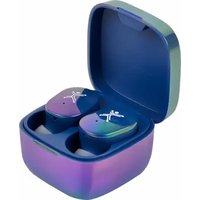
PC-217237 - Headphones Perfect Choice - Free user manual and instructions
Find the device manual for free PC-217237 Perfect Choice in PDF.


Pick your language and provide your email: we'll send you a specifically translated version.
| Product Type | Over-Ear Headphones |
| Brand | Perfect Choice |
| Model | PC-217237 |
| Connectivity | Wired (3.5mm jack) & Wireless Bluetooth 5.0 |
| Dimensions (Foldable) | 7.5 x 6.3 x 3.1 inches (190 x 160 x 80 mm) |
| Weight | 7.4 oz (210 g) |
| Battery Life | Up to 20 hours (wireless mode) |
| Charging Time | Approximately 2 hours via Micro USB |
| Driver Size | 40 mm dynamic drivers |
| Frequency Response | 20 Hz - 20 kHz |
| Impedance | 32 Ohms |
| Noise Cancellation | Passive noise isolation (over-ear design) |
| Built-in Microphone | Yes, with hands-free calling |
| Controls | On-ear buttons for volume, track, and answer calls |
| Compatibility | iOS, Android, Windows, Mac |
| Includes | Headphones, 3.5mm audio cable, Micro USB charging cable, user manual |
| Maintenance & Cleaning | Wipe with a soft, dry cloth. Do not use liquid cleaners. |
| Safety | Listen at moderate volumes to prevent hearing damage. |
| Spare Parts & Repairability | Replacement ear cushions available. Contact manufacturer for service. |
| Warranty | Limited 1-year warranty |
Frequently Asked Questions - PC-217237 Perfect Choice
How do I pair the headphones via Bluetooth?
Turn on the headphones, then press and hold the power button until the LED flashes red and blue. Enable Bluetooth on your device and select 'Perfect Choice PC-217237' from the list.
How long does it take to fully charge the headphones?
Charging takes approximately 2 hours using the included Micro USB cable. Use a standard USB wall adapter (5V/1A) for best results.
Can I use the headphones while charging?
Yes, you can use the headphones in wired mode (with the audio cable) while charging. Wireless playback during charging is not supported.
What should I do if the headphones won't turn on?
First, ensure the headphones are charged. If still not powering on, try resetting by pressing and holding the power button for 10 seconds. If the issue persists, contact support.
How do I clean the headphones?
Wipe the ear cushions and headband with a soft, dry cloth. For stubborn dirt, lightly dampen the cloth with water. Avoid using alcohol or abrasive cleaners.
Are the ear cushions replaceable?
Yes, the ear cushions are replaceable. You can purchase replacement cushions from the manufacturer or authorized retailers. Refer to the manual for removal instructions.
Does the headset have a microphone?
Yes, it has a built-in microphone for hands-free calling. The microphone is located on the control module on the cable (wired) or inside the ear cup (wireless).
What is the wireless range?
The Bluetooth range is approximately 33 feet (10 meters) in open space. Walls and obstacles may reduce the range.
Can I connect to two devices at once?
No, this model supports single-device connection at a time. You need to disconnect from one device before pairing to another.
How do I adjust the volume?
Use the on-ear controls: press the '+' button to increase volume and the '-' button to decrease. You can also adjust volume from your connected device.
User questions about PC-217237 Perfect Choice
0 question about this device. Answer the ones you know or ask your own.
Ask a new question about this device
No questions yet. Be the first to ask one.
Download the instructions for your Headphones in PDF format for free! Find your manual PC-217237 - Perfect Choice and take your electronic device back in hand. On this page are published all the documents necessary for the use of your device. PC-217237 by Perfect Choice.
USER MANUAL PC-217237 Perfect Choice
Manual assistant
Powered by Anthropic
Waiting for your message
Product information
Brand : Perfect Choice
Model : PC-217237
Category : Headphones