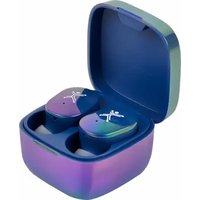
PC-116929 - Headphones Perfect Choice - Free user manual and instructions
Find the device manual for free PC-116929 Perfect Choice in PDF.


Pick your language and provide your email: we'll send you a specifically translated version.
| Product Type | Wireless Over-Ear Headphones |
| Brand | Perfect Choice |
| Model | PC-116929 |
| Dimensions | 20 x 15 x 5 cm (folded) |
| Weight | 200 g |
| Power Source | Built-in rechargeable lithium-ion battery, 300 mAh |
| Battery Life | Up to 20 hours of playtime |
| Charging Time | Approximately 2 hours via USB-C |
| Connectivity | Bluetooth 5.0, range up to 10 meters |
| Drivers | 40 mm dynamic drivers |
| Frequency Response | 20 Hz - 20 kHz |
| Impedance | 32 Ohms |
| Noise Cancellation | Passive noise isolation |
| Microphone | Built-in omnidirectional microphone |
| Controls | On-ear buttons for power, volume, and track control |
| Compatibility | All Bluetooth-enabled devices (smartphones, tablets, PCs) |
| Foldable Design | Yes, for easy storage and portability |
| Care and Cleaning | Wipe with a soft, dry cloth. Do not use liquids or abrasives. |
| Safety | Avoid prolonged exposure to high volume levels. Keep away from moisture. |
| Spare Parts | Replacement ear pads and USB cable available separately. |
| Reparability | Ear pads are user-replaceable; other repairs should be done by a professional. |
Frequently Asked Questions - PC-116929 Perfect Choice
How do I pair the headphones with my phone?
Turn on the headphones by pressing and holding the power button until the LED flashes. On your phone, enable Bluetooth and select 'PC-116929' from the list of available devices.
How long does the battery last?
The battery provides up to 20 hours of playback time on a full charge. Charging takes approximately 2 hours via the included USB-C cable.
Can I use the headphones while charging?
Yes, you can use the headphones in wired mode via the audio cable (if provided) while charging, but wireless playback is not possible during charging.
How do I clean the headphones?
Wipe the exterior with a soft, lint-free cloth. For the ear pads, gently wipe with a slightly damp cloth and air dry. Do not immerse in water.
Are the headphones noise-cancelling?
They offer passive noise isolation due to the over-ear design, but they do not have active noise cancellation.
What devices are compatible?
Any device that supports Bluetooth, such as smartphones, tablets, computers, and some TVs. They also work with non-Bluetooth devices using the included 3.5mm audio cable (if provided).
How do I adjust the volume?
Use the volume up/down buttons on the ear cup. You can also adjust volume from your connected device.
The headphones are not connecting. What should I do?
Ensure the headphones are charged and in pairing mode (LED flashing). Restart both the headphones and your device. Remove the device from Bluetooth list and try pairing again.
Can I replace the ear pads?
Yes, the ear pads are replaceable. You can order replacement pads from Perfect Choice or third-party sellers. Gently pull off the old pads and snap on the new ones.
What is the warranty period?
Perfect Choice offers a 1-year warranty against manufacturing defects. Keep your proof of purchase for warranty claims.
User questions about PC-116929 Perfect Choice
0 question about this device. Answer the ones you know or ask your own.
Ask a new question about this device
No questions yet. Be the first to ask one.
Download the instructions for your Headphones in PDF format for free! Find your manual PC-116929 - Perfect Choice and take your electronic device back in hand. On this page are published all the documents necessary for the use of your device. PC-116929 by Perfect Choice.
USER MANUAL PC-116929 Perfect Choice
Manual assistant
Powered by Anthropic
Waiting for your message
Product information
Brand : Perfect Choice
Model : PC-116929
Category : Headphones