DS101 - Uncategorized DRAWMER - Free user manual and instructions
Find the device manual for free DS101 DRAWMER in PDF.


Pick your language and provide your email: we'll send you a specifically translated version.
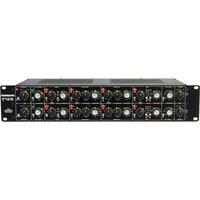
| Product Type | Dual-Channel Noise Gate |
| Channels | 2 independent channels |
| Form Factor | 1U Rackmount |
| Dimensions (W x D x H) | 483 x 200 x 44 mm (19 x 7.9 x 1.75 in) |
| Weight | 2.5 kg (5.5 lb) |
| Power Supply | Internal, 90-250 VAC, 50/60 Hz, IEC connector |
| Power Consumption | 15 W |
| Inputs | 2 x XLR female (balanced), 1/4" TRS (balanced/unbalanced) |
| Outputs | 2 x XLR male (balanced), 1/4" TRS (balanced/unbalanced) |
| Key Inputs | 2 x 1/4" TRS (external sidechain) |
| Controls per Channel | Threshold, Ratio, Attack, Release, Key Filter (HPF/LPF), Gate/AT/DUCK switch |
| Display | LED gain reduction meter and gate open/closed indicator |
| Frequency Response | 20 Hz - 20 kHz (±0.5 dB) |
| Signal-to-Noise Ratio | >90 dB |
| Maximum Input Level | +24 dBu |
| Maximum Output Level | +24 dBu |
| Operating Temperature | 0°C to 40°C (32°F to 104°F) |
| Maintenance | Wipe with dry cloth; no user-serviceable parts inside |
| Safety | Class I equipment; earth connection required |
| Accessories Included | IEC power cable, rack ears, screws |
| Intended Use | Professional audio noise reduction and processing |
Frequently Asked Questions - DS101 DRAWMER
How do I connect the DS101 to my mixer?
Use balanced XLR or TRS cables from the mixer's insert send channel to the DS101's input, then from the DS101's output back to the mixer's insert return. Alternatively, use it inline between the source and the mixer.
What is the key input used for?
The key input allows an external signal to control the gate opening. For example, you can key a kick drum gate to open only when a bass drum hits, using a separate microphone.
Can I use the DS101 as a ducker?
Yes, set the channel switch to 'DUCK' and connect the signal to be ducked to the input, and the controlling signal to the key input. The channel will attenuate when the key signal is present.
How do I adjust the gate threshold?
Set the source signal level while monitoring the gain reduction meter. Turn the Threshold knob clockwise to increase the threshold (gate opens at higher levels) or counterclockwise to lower it (gate opens at lower levels). Adjust so the gate opens cleanly when desired.
What do the Attack and Release controls do?
Attack controls how fast the gate opens after the signal exceeds the threshold. Release controls how fast it closes after the signal falls below. Faster settings are good for rhythmic parts, slower for smooth decays.
Can I use the DS101 with unbalanced gear?
Yes, use TRS cables with tip/ring/sleeve for balanced, or TS cables for unbalanced (tip/sleeve). For unbalanced connections, leave the ring unconnected at the source if possible.
How do I clean the DS101?
Disconnect power and use a soft, dry cloth to wipe the exterior. Do not use solvents or abrasive cleaners. Avoid getting moisture into any openings.
What is the key filter and how do I use it?
The key filter allows you to filter the sidechain signal. It includes a high-pass and low-pass filter. Use it to focus the gate on specific frequencies, e.g., to avoid triggering on hi-hat bleed when gating a snare.
Why is my gate not opening?
Check that the channel is not muted, the threshold is set correctly, the input signal is present, and the key input (if used) is properly connected. Also ensure the power is on and the unit is not in bypass mode.
What is the AT mode on the switch?
AT stands for Auto/Transient mode. It automatically sets the hold time based on the signal, allowing the gate to stay open during pauses when needed. It's useful for vocals or instruments with variable sustain.
User questions about DS101 DRAWMER
0 question about this device. Answer the ones you know or ask your own.
Ask a new question about this device
No questions yet. Be the first to ask one.
Download the instructions for your Uncategorized in PDF format for free! Find your manual DS101 - DRAWMER and take your electronic device back in hand. On this page are published all the documents necessary for the use of your device. DS101 by DRAWMER.
USER MANUAL DS101 DRAWMER
Manual assistant
Powered by Anthropic
Waiting for your message
Product information
Brand : DRAWMER
Model : DS101
Category : Uncategorized