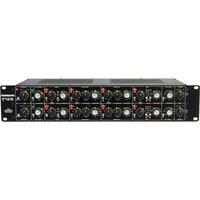
1971 - Audio Equalizer DRAWMER - Free user manual and instructions
Find the device manual for free 1971 DRAWMER in PDF.


Pick your language and provide your email: we'll send you a specifically translated version.
| Product Type | Stereo Compressor/Limiter |
| Brand | Drawmer |
| Model | 1971 |
| Channels | 2 (Stereo or Dual Mono) |
| Rack Mountable | Yes, 19" 1U |
| Dimensions (HxWxD) | 44 x 483 x 200 mm |
| Weight | 3.5 kg |
| Power Supply | 115/230 V AC, 50/60 Hz, 15 W |
| Input Connectors | XLR and 1/4" TRS balanced/unbalanced |
| Output Connectors | XLR and 1/4" TRS balanced/unbalanced |
| Frequency Response | 20 Hz - 20 kHz ±0.5 dB |
| Threshold Range | -40 dB to +20 dB |
| Ratio | 1.5:1 to 20:1 continuously variable |
| Attack Time | 0.1 ms to 50 ms |
| Release Time | 0.1 s to 3 s |
| Make-Up Gain | Up to 20 dB |
| Bypass | Hard relay bypass per channel |
| Sidechain | External sidechain insert (TRS) |
| Metering | Gain reduction and output level VU meters |
| Operating Temperature | 0°C to 40°C |
| Accessories Included | Power cord, rack ears, user manual |
Frequently Asked Questions - 1971 DRAWMER
What is the Drawmer 1971?
The Drawmer 1971 is a stereo compressor/limiter designed for studio and live sound applications. It offers precise control over dynamics with features like threshold, ratio, attack, release, and make-up gain.
How do I set the threshold on the 1971?
Adjust the Threshold knob to set the level at which compression begins. Turn clockwise to raise the threshold (less compression) or counterclockwise to lower it (more compression). Watch the gain reduction meter to see the effect.
What is the ratio control for?
The Ratio control determines the amount of compression applied once the signal exceeds the threshold. A higher ratio (e.g., 10:1) results in more aggressive limiting, while a lower ratio (e.g., 2:1) provides gentle compression.
How do I adjust attack and release times?
Use the Attack knob to set how quickly compression starts after the signal exceeds the threshold. Use the Release knob to set how quickly compression stops after the signal falls below threshold. For percussive material, use fast attack and medium release; for vocals, slower settings often work better.
Can I use the 1971 as a limiter?
Yes, set a high Ratio (e.g., 20:1) and a low Threshold to operate as a limiter. The 1971’s fast attack time allows it to catch transients effectively.
How do I connect the sidechain?
Connect an external signal to the Sidechain Insert jack (TRS). This allows you to trigger compression from a different source, such as for de-essing or ducking effects. The internal sidechain is disconnected when a plug is inserted.
What do the VU meters show?
The top meter shows Gain Reduction in dB (0 to -20 dB). The bottom meter shows Output Level with a reference of 0 dBu. Use these to monitor compression depth and output level.
How do I bypass the compressor?
Press the Bypass switch to engage a hard relay bypass. When the switch is in, the compressor is active; when out, the signal passes unprocessed. The switch affects only the corresponding channel (or both in link mode).
What power supply does the 1971 require?
The unit accepts 115 or 230 V AC at 50/60 Hz (selectable via voltage switch). It consumes approximately 15 W. Always use the provided power cord and ensure correct voltage setting before powering on.
How do I clean and maintain the 1971?
Disconnect power before cleaning. Use a soft dry cloth to wipe the front panel. Avoid solvents or abrasive cleaners. Check connections periodically for dust. No internal user-serviceable parts; refer to qualified personnel for repairs.
User questions about 1971 DRAWMER
0 question about this device. Answer the ones you know or ask your own.
Ask a new question about this device
No questions yet. Be the first to ask one.
Download the instructions for your Audio Equalizer in PDF format for free! Find your manual 1971 - DRAWMER and take your electronic device back in hand. On this page are published all the documents necessary for the use of your device. 1971 by DRAWMER.
USER MANUAL 1971 DRAWMER
Manual assistant
Powered by Anthropic
Waiting for your message
Product information
Brand : DRAWMER
Model : 1971
Category : Audio Equalizer