dēzl OTR700 - Browser GARMIN - Free user manual and instructions
Find the device manual for free dēzl OTR700 GARMIN in PDF.


Pick your language and provide your email: we'll send you a specifically translated version.
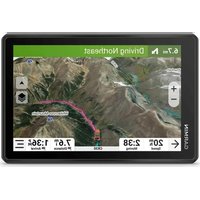
| Product Type | GPS Navigator for Trucks |
| Brand | Garmin |
| Model | dēzl OTR700 |
| Display Size | 7 inches |
| Display Resolution | 1024 x 600 pixels |
| Dimensions (W x H x D) | 20.1 x 11.4 x 2.0 cm (7.9 x 4.5 x 0.8 in) |
| Weight | 312 g (11.0 oz) |
| Power Source | 12V vehicle power adapter |
| Battery Type | Rechargeable lithium-ion |
| Battery Life | Up to 1 hour (typical use) |
| Water Resistance | IPX7 (water-resistant) |
| Operating Temperature | -20°C to 60°C (-4°F to 140°F) |
| Main Features | Truck-specific routing, traffic alerts, lane guidance, speed limit warnings |
| Maps Included | North America or Europe (depending on region) |
| Map Updates | Lifetime traffic and map updates |
| Connectivity | Bluetooth, Wi-Fi (for updates) |
| Maintenance | Clean screen with soft, dry cloth; avoid solvents |
| Safety | Use provided mount; do not operate while driving |
| Spare Parts | Contact Garmin for replacement mounts, cables |
| Repairability | Not user-serviceable; battery/case not replaceable by user |
| Warranty | 1 year limited warranty |
Frequently Asked Questions - dēzl OTR700 GARMIN
How do I mount the Garmin dēzl OTR700 in my truck?
Use the included suction cup mount on the windshield or a friction mount on the dashboard. Ensure the mount is securely attached and the device is within easy reach but not obstructing your view.
How do I update maps on my dēzl OTR700?
Connect the device to Wi-Fi or use Garmin Express software on a computer. The device supports lifetime map updates, which can be downloaded via Garmin Express.
Can I use this navigator in a car instead of a truck?
Yes, you can. However, the truck-specific routing features are optimized for large vehicles. You can adjust the vehicle profile in settings to switch between truck and car modes.
Why is my device not acquiring GPS signal?
Ensure you are outdoors with a clear view of the sky. Check if the GPS antenna is not obstructed. Sometimes a soft reset (power off/on) helps.
How do I set up truck-specific routing?
Go to Settings > Navigation > Vehicle Profile and select 'Truck'. Enter your truck's height, weight, length, and hazardous material restrictions for accurate routing.
Does the dēzl OTR700 support Bluetooth hands-free calling?
Yes, it has Bluetooth connectivity for hands-free calling and audio streaming. Pair your phone via the Bluetooth settings.
How do I clean the screen?
Use a soft, lint-free cloth slightly dampened with water or a mild screen cleaner. Avoid abrasive cleaners or cloths. Wipe gently in circular motions.
What should I do if the device freezes or crashes?
Perform a soft reset by pressing and holding the power button for 10 seconds until the device restarts. If the issue persists, try a factory reset from settings.
Can I replace the battery?
The battery is built-in and not user-replaceable. If the battery no longer holds a charge, contact Garmin support for service options.
Does the navigator include live traffic updates?
Yes, it includes lifetime traffic updates via FM traffic receiver (if available in your area) or via a smartphone connection using the Garmin Drive app.
User questions about dēzl OTR700 GARMIN
0 question about this device. Answer the ones you know or ask your own.
Ask a new question about this device
No questions yet. Be the first to ask one.
Download the instructions for your Browser in PDF format for free! Find your manual dēzl OTR700 - GARMIN and take your electronic device back in hand. On this page are published all the documents necessary for the use of your device. dēzl OTR700 by GARMIN.
USER MANUAL dēzl OTR700 GARMIN
Manual assistant
Powered by Anthropic
Waiting for your message
Product information
Brand : GARMIN
Model : dēzl OTR700
Category : Browser