
AMA05KF - Air-conditioner HAIER - Free user manual and instructions
Find the device manual for free AMA05KF HAIER in PDF.



| Product Type | Window Air Conditioner |
| Brand | HAIER |
| Model | AMA05KF |
| Cooling Capacity | 5000 BTU/h (estimated) |
| Supply Voltage | 115 V ~ 60 Hz |
| Current (Amperage) | 12 A |
| Dimensions (H x W x D) | 31.5 x 47 x 36 cm (approx.) |
| Weight | 16.3 to 19.1 kg |
| Operating Modes | Cool, Fan Only |
| Fan Speeds | 2 speeds: Hi and Low |
| Thermostat | Adjustable (rotary) |
| Air Direction | Horizontally adjustable tab |
| Air Filter | Washable and reusable |
| Installation Type | Double-hung window |
| Window Opening Required (min) | 59.1 cm (width) x 31.4 cm (height) |
| Power Supply | 3-prong grounded outlet |
| Power Cord Length | 1.83 m (6 ft) |
| Overcurrent Protection | Time-delay fuse or 15 A circuit breaker |
| Safety Device | Power cord with test/reset (AFCI/GFCI) |
| Mechanical and Electrical Parts Warranty | 1 year |
| Compressor Warranty | 1 year |
| Country of Manufacture | United States (licensed) |
Frequently Asked Questions - AMA05KF HAIER
User questions about AMA05KF HAIER
0 question about this device. Answer the ones you know or ask your own.
Ask a new question about this device
Download the instructions for your Air-conditioner in PDF format for free! Find your manual AMA05KF - HAIER and take your electronic device back in hand. On this page are published all the documents necessary for the use of your device. AMA05KF by HAIER.
USER MANUAL AMA05KF HAIER
For questions about features, operation/performance, parts, accessories or service call: 1-888-842-2440
ACONDICIONADOR DE AIRE PARA HABITACION
AIR CONDITIONER SAFETY 3
INSTALLATION REQUIREMENTS 3
Tools and Parts 3
Location Requirements 4
Electrical Requirements 4
INSTALLATION INSTRUCTIONS 5
Unpack the Air Conditioner 5
Prepare Air Conditioner for Installation. 5
Prepare Window for Installation. 6
Position Air Conditioner 7
Complete Installation 8
AIR CONDITIONER USE 9
Starting Your Air Conditioner 9
Changing Air Direction 9
Normal Sounds. 9
AIR CONDITIONER CARE 10
Cleaning the Air Filter 10
Cleaning the Front Panel. 10
TROUBLESHOOTING 10
ASSISTANCE OR SERVICE 12
In the U.S.A. 12
In Canada 12
WARRANTY 13
INDICE
SEGURIDAD DEL ACONDICIONADOR DE AIRE 14
ASSISTANCE OU SERVICE 34
Aux Etats-Unis. 34
Au Canada. 34
GARANTIE 35
AIR CONDITIONER SAFETY
Your safety and the safety of others is very important.
We have provided many important safety messages in this manual and on your appliance. Always read and obey all safety messages.

This is the safety alert symbol.
This symbol alerts you to potential hazards that can kill or hurt you and others.
All safety messages will follow the safety alert symbol and either the word "DANGER" or "WARNING."
These words mean:
DANGER
WARNING
All safety messages will tell you what the potential hazard is, tell you how to reduce the chance of injury, and tell you what can happen if the instructions are not followed.
You can be killed or seriously injured if you don't immediately follow instructions.
You can be killed or seriously injured if you don't follow instructions.
IMPORTANT SAFETY INSTRUCTIONS
WARNING: To reduce the risk of fire, electrical shock or injury when using your air conditioner, follow these basic precautions:
Plug into a grounded 3 prong outlet.
Do not use an extension cord.
Do not remove ground prong.
Unplug air conditioner before servicing.
- Do not use an adapter.
Use two or more people to move and install air conditioner.
SAVE THESE INSTRUCTIONS
INSTALLATION REQUIREMENTS
Tools and Parts
- Gather the required tools and parts before starting installation.
- Read and follow the instructions provided with any tools listed here.
Tools needed
Phillips head screwdriver
Flat-blade screwdriver
Scissors
Level
- Socket wrench and sockets
Tape measure
Cordless drill and 1/8" bit
Pencil
Pliers
Adjustable wrench
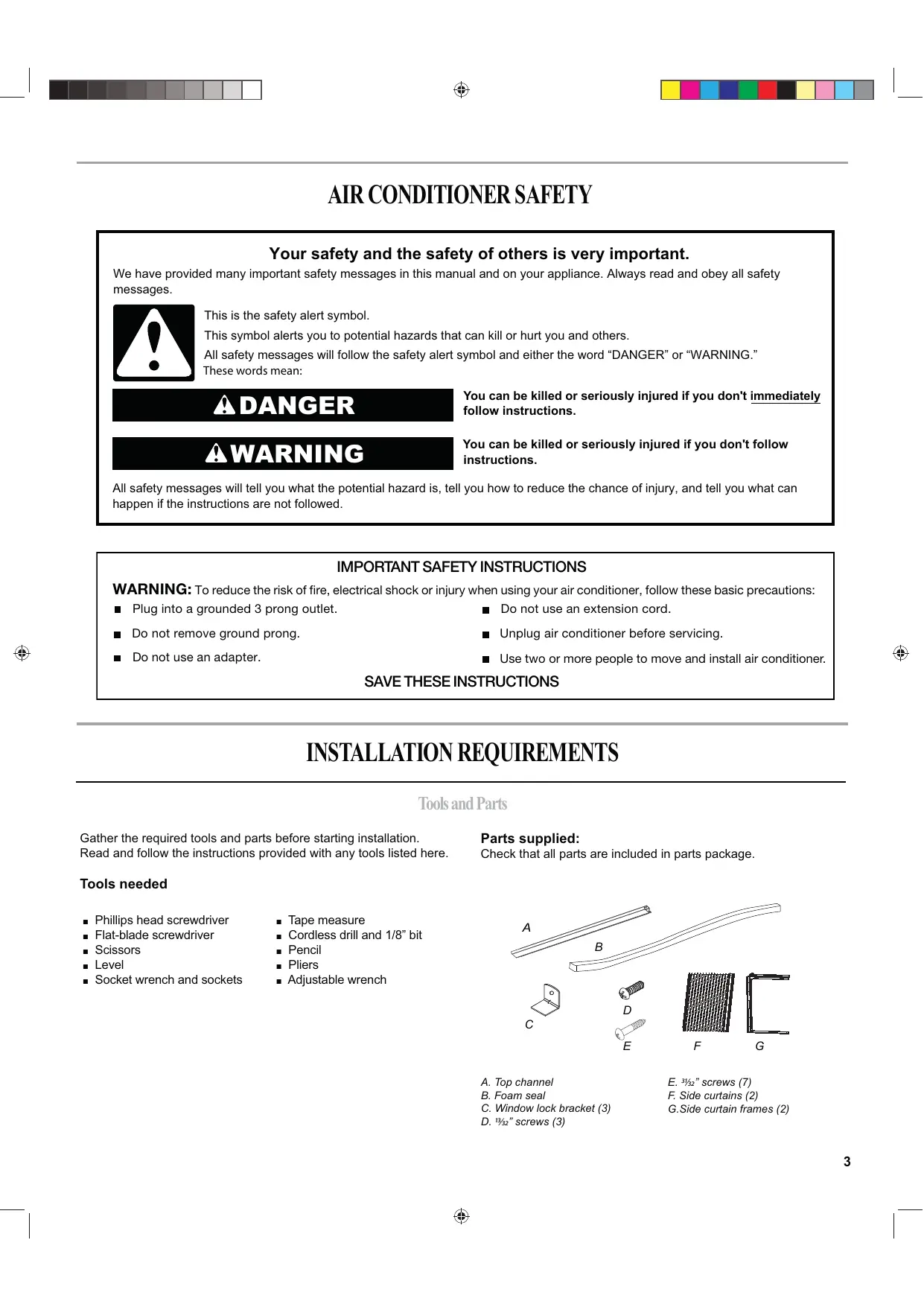
Parts supplied:
Check that all parts are included in parts package.
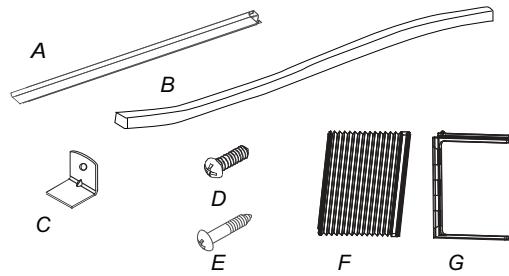
A. Top channel
B. Foam seal
C. Window lock bracket (3)
D. 1312 3 screws (3)
E. 3^1/32 screws (7)
F. Side curtains (2)
G.Side curtain frames (2)
Location Requirements
IMPORTANT: Observe all governing codes and ordinances.
Check the location where the air conditioner will be installed.
Make sure you have everything necessary for correct installation.
The location should provide:
Grounded electrical outlet within 6 ft (183 cm) of where the power cord exits the air conditioner.
NOTE: Do not use an extension cord.
Free movement of air in room to be cooled.
A large enough opening for the air conditioner. Installation parts are supplied for double-hung windows.
- Adequate wall support for weight of air conditioner. Air conditioner weighs 36 lbs to 42 lbs (16.3 kg to 19.1 kg).
NOTE: Cabinet louvers must not be obstructed. Air must be able to pass freely through the cabinet louvers.
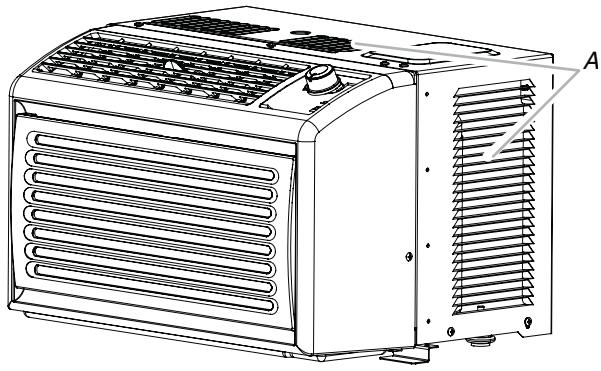
A. Cabinet louvers
Window Installation
Window opening measurements:
- 231/4 " minimum to 36" (59.1 cm to 91.4 cm) maximum opening width.
12%" (31.4 cm) minimum opening height.
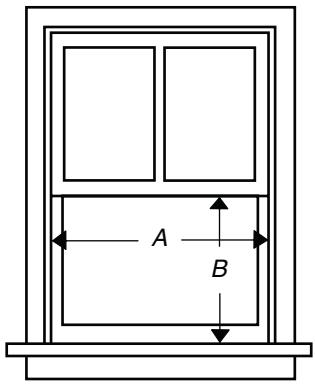
A. 2314 (59.1 cm) minimum
B. 12^3/8 (31.4 cm) minimum
Electrical Requirements
AWARNING

Electrical Shock Hazard
Plug into a grounded 3 prong outlet.
Do not remove ground prong.
Do not use an adapter.
Do not use an extension cord.
Failure to follow these instructions can result in death, fire, or electrical shock.
The electrical ratings for your air conditioner are listed on the model and serial number label. The model and serial number label is located either on the side or back of the air conditioner cabinet or behind the front grille.
Specific electrical requirements are listed in the chart below. Follow the requirements for the type of plug on the power supply cord.
Power Supply Cord
Electrical Requirements
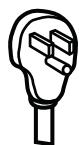
115-volt (103.5 min. to 126.5 max.)
0 to 12 amps
15-amp time-delay fuse or circuit breaker
Use on single outlet circuit only.
Recommended Grounding Method
This air conditioner must be grounded. This air conditioner is equipped with a power supply cord having a 3 prong grounding plug. The cord must be plugged into a mating, grounded 3 prong outlet, grounded in accordance with all local codes and ordinances. If a mating outlet is not available, it is the customer's responsibility to have a properly grounded 3 prong outlet installed by a qualified electrical installer.
It is the customer's responsibility:
To contact a qualified electrical installer.
- To assure that the electrical installation is adequate and in conformance with National Electrical Code, ANSI/NFPA 70—latest edition, and all local codes and ordinances.
Copies of the standards listed may be obtained from:
National Fire Protection Association
1 Batterymarch Park
Quincy, MA 02169
Power Supply Cord
NOTE: Your air conditioner's device may differ from the one shown.
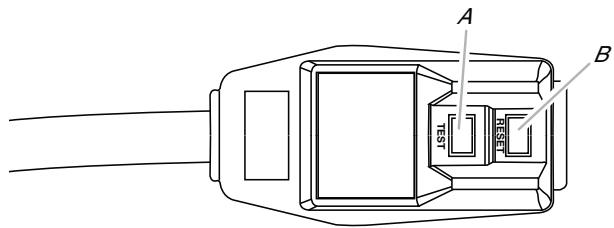
A. Test button
B. Reset button
This room air conditioner is equipped with a power supply cord required by UL. This power supply cord contains state-of-the-art electronics that sense current leakage. If the cord is crushed, the electronics detect current leakage and power will be disconnected in a fraction of a second.
To test your power supply cord:
- Plug power supply cord into a grounded 3 prong outlet.
- Press RESET (on some devices, a green light will turn on).
- Press TEST (listen for click; Reset button will trip, and on some devices, a green light will turn off).
- Press and release RESET (listen for click; Reset button will latch, and on some devices, a green light will turn on). The power supply cord is ready for operation.
WARNING

Electrical Shock Hazard
Plug into a grounded 3 prong outlet.
Do not remove ground prong.
Do not use an adapter.
Do not use an extension cord.
Failure to follow these instructions can result in death, fire, or electrical shock.
NOTES:
The Reset button must be pushed in for proper operation.
- The power supply cord must be replaced if it fails to trip when the test button is pressed or fails to reset.
- Do not use the power supply cord as an off/on switch.
A damaged power supply cord must be replaced with a new power supply cord obtained from the product manufacturer and must not be repaired.
- The power supply cord contains no user serviceable parts. Opening the tamper-resistant case voids all warranty and performance claims.
INSTALLATION INSTRUCTIONS
Unpack the Air Conditioner
WARNING
Excessive Weight Hazard
Use two or more people to move and install air conditioner.
Failure to do so can result in back or other injury.
Remove Packaging Materials
- Remove and dispose of/recycle packaging materials. Remove tape and glue residue from surfaces before turning on the air conditioner. Rub a small amount of liquid dish soap over the adhesive with your fingers. Wipe with warm water and dry.
- Do not use sharp instruments, rubbing alcohol, flammable fluids, or abrasive cleaners to remove tape or glue. These products can damage the surface of your air conditioner.
- Handle the air conditioner gently.
Prepare Air Conditioner for Installation
Install Top Channel
- Place the top channel on the top of the air conditioner, lining up the holes in the top channel with the holes in the top of the air conditioner.
- Using three (3) 1332 screws, attach the top channel to the air conditioner.
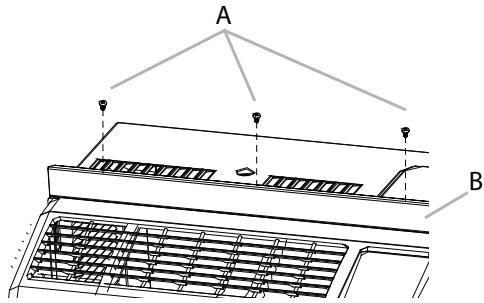
A. 1332 " screws
B. Top channel
NOTE: Your model may differ from the one shown.
Install Side Curtains
NOTE: Attach curtains to the air conditioner before placing the air conditioner in window.
- Place the tabbed side of the side curtain in the track on the right-hand side of the air conditioner cabinet.
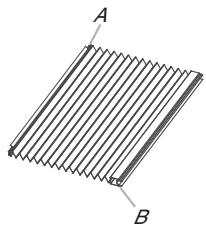
A. Tabbed side of side curtain
B. Lock edge side of side curtain
- Slide the side curtain down the track until the curtain is aligned with the top and bottom of the air conditioner cabinet.
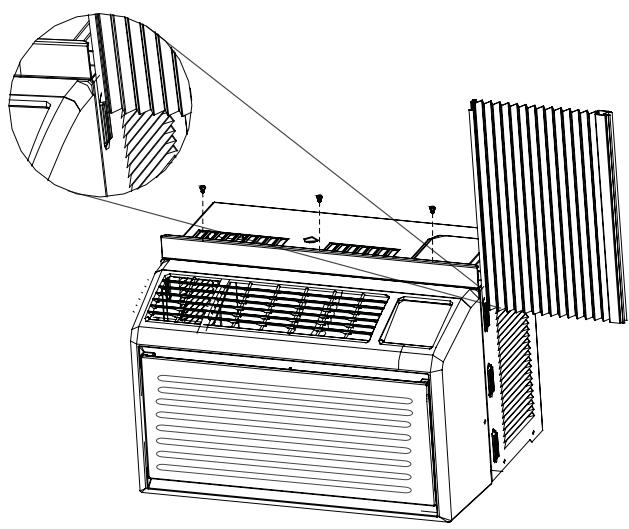
- Slide the side curtain frame into the top channel on the top of the air conditioner and the track on the bottom of the air conditioner.
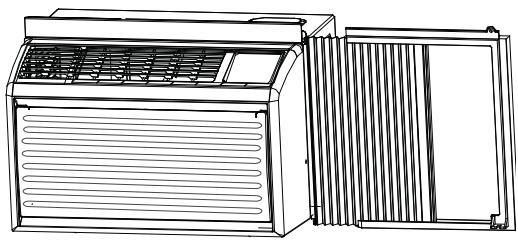
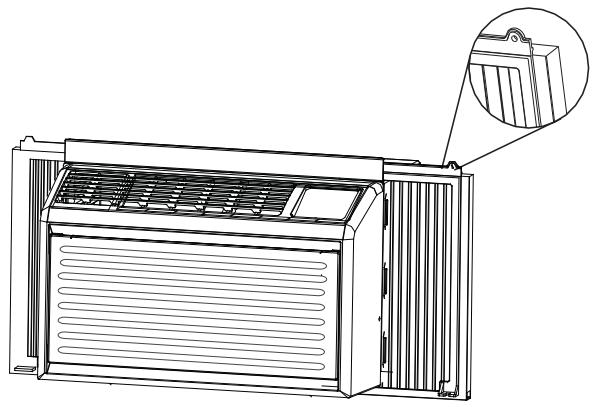
- Slide the side curtain frame as close to the air conditioner as necessary to lock the side curtain to the frame.
- Repeat above steps for the left-hand side curtain and frame.
Prepare Window for Installation
- Measure the width of the window opening.
- Mark the center line on the inside windowsill.
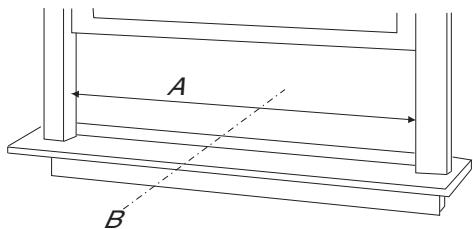
A. Width of window opening
B. Center line
- Install the Window lock bracket behind the inner windowsill, with the short side of Window lock bracket as shown.Use the two(2) wood screws 31/32" provided.
The Window lock bracket helps to hold air conditioner securely in place. Be sure to place Window lock bracket edge flush against back of inner sill.
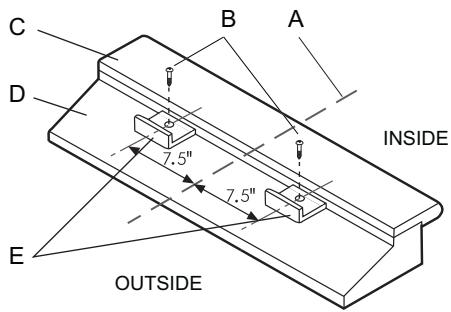
A. Center line
B. 3 [3]2 "screws
C. Inner sill
D. Outer sill
E. Window lock bracket
Position Air Conditioner
WARNING
Excessive Weight Hazard
Use two or more people to move and install air conditioner.
Failure to do so can result in back or other injury.
NOTES:
- Handle the air conditioner gently.
- Be sure your air conditioner does not fall out of the opening during installation or removal.
The place where the power cord exits the air conditioner should be no more than 6 ft (183 cm) from a grounded outlet. - Do not block the louvers in the front panel.
-
Do not block the louvers on the outside of the air conditioner.
-
Center the air conditioner in the window. Make sure the bottom guide of the air conditioner drops into the notches of the basepan angle. Lower the window sash behind the top channel to hold the cabinet in place
NOTE: Your model may differ from the one shown.
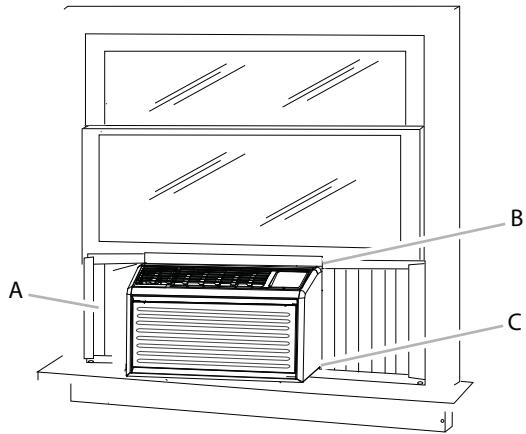
A. Side curtain against window channel
B. Window sash behind top channel
C. Bottom channel in behind windowsill
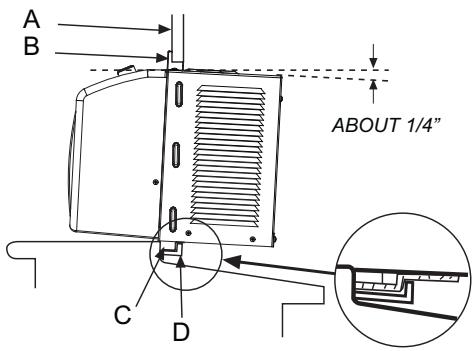
A. Window frame
B. Top channel
C. Bottom guide
D. Window lock bracket
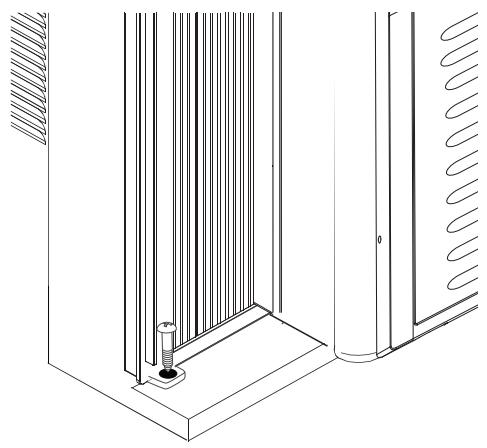
Attach Side Curtains to Window
- Pull the left-hand curtain out until it fits into the window channel.
- Use a 18 drill bit to drill a starter hole through the top hole in the side curtain and into the window sash.
- Insert one (1) of the ^31 / _32 screws through the top hole of the lefthand curtain and into the window sash.
- Repeat for the right-hand curtain.
Top View
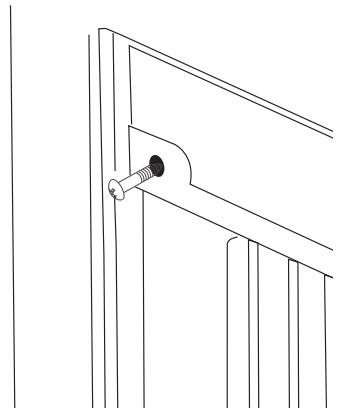
- Use a 18 drill bit to drill a starter hole through the bottom hole in the side curtain and into the window frame.
- Insert one(1) of the 31/32 " screws through the bottom hole of the left-hand curtain and into the window frame.
- Repeat for the right-hand curtain.
Bottom View
Complete Installation
WARNING

Electrical Shock Hazard
Plug into a grounded 3 prong outlet.
Do not remove ground prong.
Do not use an adapter.
Do not use an extension cord.
Failure to follow these instructions can result in death, fire, or electrical shock.
- Insert the foam seal behind the top of the lower window sash and against the glass of the upper window.
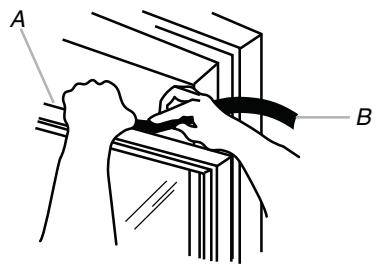
A. Top of lower window sash
B. Foam seal
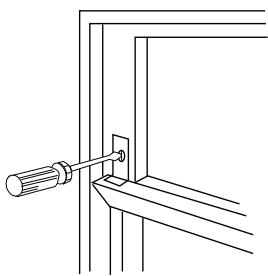
- Place the window lock bracket as shown. Use a 18 drill bit to drill a starter hole through the hole in the window lock bracket and into the upper window.
- Attach the window lock bracket to the upper window with one(1) 3132 screw to secure the window in place.
- Plug into a grounded 3 prong outlet.
- Press RESET on the power supply cord. See "Electrical Requirements."
AIR CONDITIONER USE
Operating your air conditioner properly helps you to obtain the best possible results.
This section explains proper air conditioner operation.
IMPORTANT:
If you turn off the air conditioner, wait at least 3 minutes before turning it back on. This keeps the air conditioner from blowing a fuse or tripping a circuit breaker.
- Do not try to operate your air conditioner in the Cool mode when outside temperature is below 65^ ( 18^ ). The inside evaporator coil will freeze up, and the air conditioner will not operate properly.
NOTE: In the event of a power failure, your air conditioner will operate at the previous settings when the power is restored.
Starting Your Air Conditioner
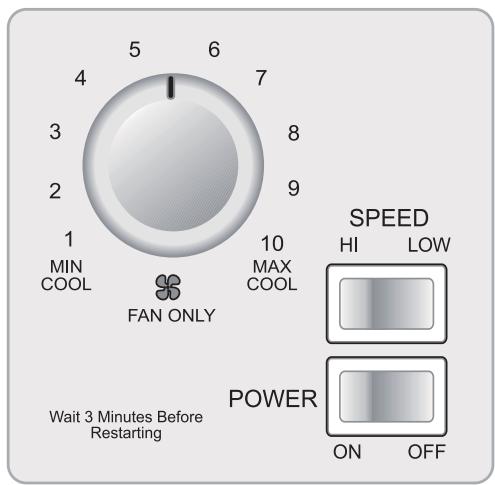
POWER Turn air conditioner on or off.
SPEED
LOW Low speed fan operate with optional cooling.
HIGH High speed fan operate with optional cooling. This automatically controls the temperature of indoor air. Turn the knob so that the arrow points to the cooler marks for more moderate cooling.
Normal Fan
- Turn the SPEED mode switch to the "HI" or the "LOW" setting.
- Set the thermostat control to the "FAN ONLY" setting.
Normal cooling
- Turn the SPEED mode switch to the "HI" or the "LOW" setting.
- Set the thermostat control to the desired temperature.(The mid-point is a good starting position.)
If the room temperature is not satisfactory after a reasonable time, adjust the control to a cooler setting, as appropriate.
Maximum cooling
- Turn the SPEED mode switch to the "HI" setting.
- Set the thermostat control to the MAX COOL temperature mark.
Quieter operation
- Turn the SPEED mode switch to the "LOW" setting.
- Set the thermostat control as needed.
Changing Air Direction
Use the tab to direct the airflow right or left.
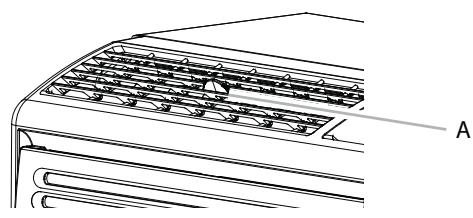
A. Tab
Normal Sounds
When your air conditioner is operating normally, you may hear sounds such as:
- Droplets of water hitting the condenser, causing a pinging or clicking sound. The water droplets help cool the condenser.
Air movement from the fan. - Clicks from the thermostat cycle.
Vibrations or noise due to poor wall or window construction.
A high-pitched hum or pulsating noise caused by the modern high-efficiency compressor cycling on and off.
AIR CONDITIONER CARE
Your new air conditioner is designed to give you many years of dependable service. This section tells you how to clean and care for your air conditioner properly.
Cleaning the Air Filter
The air filter is removable for easy cleaning. A clean filter helps remove dust, lint, and other particles from the air and is important for best cooling and operating efficiency. Be sure to check the filter every two (2) weeks to see whether it needs cleaning.
NOTE: Do not operate the air conditioner without the filter in place.
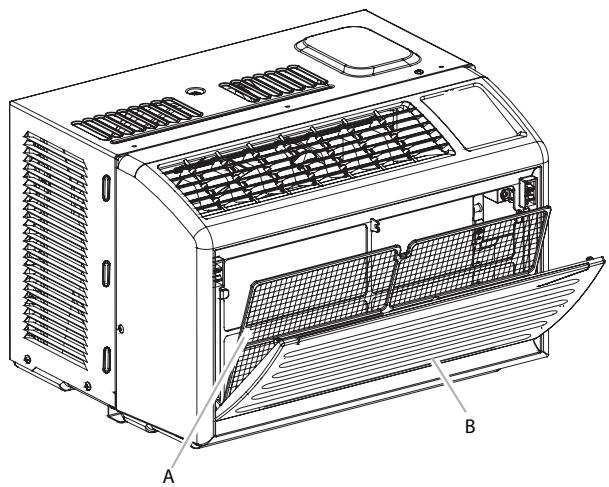
A. Air filter
B. Front panel
- Turn off the air conditioner.
- Remove the air filter by opening the front panel and removing the air filter.
- Use a vacuum cleaner to clean air filter. If the air filter is very dirty, wash it in warm water with a mild detergent. Do not wash the air filter in the dishwasher or use any chemical cleaners. Air dry the air filter completely before replacing to ensure maximum efficiency.
- Replace the air filter.
- Close the front panel.
- Turn on the air conditioner.
Cleaning the Front Panel
- Turn off the air conditioner.
- Clean the front panel with a soft, damp cloth.
- Air dry the front panel completely.
- Turn on the air conditioner.
TROUBLESHOOTING
Before calling for service, try the suggestions below to see whether you can solve your problem without outside help.
Air Conditioner Will Not Operate
WARNING

Electrical Shock Hazard
Plug into a grounded 3 prong outlet.
Do not remove ground prong.
Do not use an adapter.
Do not use an extension cord.
Failure to follow these instructions can result in death, fire, or electrical shock.
- The power supply cord is unplugged. Plug into a grounded 3 prong outlet. See "Electrical Requirements."
- The power supply cord has tripped (Reset button has popped out). Press and release RESET (listen for click; Reset button will latch and on some devices, a green light will turn on) to resume operation.
- A household fuse has blown, or circuit breaker has tripped. Replace the fuse or reset the circuit breaker. If the problem continues, call an electrician. See "Electrical Requirements."
- The Power button has not been pressed or the Mode control knob is turned to Off. Press POWER or turn the Mode control knob to an active setting.
The local power has failed. Wait for power to be restored.
Air conditioner blows fuses or trips circuit breakers
- Too many appliances are being used on the same circuit. Unplug or relocate appliances that share the same circuit.
- Time-delay fuse or circuit breaker of the wrong capacity is being used. Replace with a time-delay fuse or circuit breaker of the correct capacity. See "Electrical Requirements."
An extension cord is being used. Do not use an extension cord with this or any other appliance. - You are trying to restart the air conditioner too soon after turning off the air conditioner. Wait at least 3 minutes after turning off the air conditioner before trying to restart the air conditioner.
Air conditioner power supply cord trips (Reset button pops out)
Disturbances in your electrical current can trip (Reset button will pop out) the power supply cord. Press and release RESET (listen for click; Reset button will latch and on some devices, a green light will turn on) to resume operation.
- Electrical overloading, overheating, cord pinching or aging can trip (Reset button will pop out) the power supply cord. After correcting the problem, press and release RESET (listen for click; Reset button will latch and on some devices, a green light will turn on) to resume operation.
NOTE: A damaged power supply cord must be replaced with a new power supply cord obtained from the product manufacturer and must not be repaired.
Air conditioner seems to run too much
- The current air conditioner replaced an older model. The use of more efficient components may cause the air conditioner to run longer than an older model, but the total energy consumption will be less. Newer air conditioners do not emit the "blast" of cold air you may be accustomed to from older air conditioners, but this is not an indication of lesser cooling capacity or efficiency. Refer to the efficiency rating (EER) and capacity rating (in Btu/h) marked on the air conditioner.
- The air conditioner is in a heavily occupied room, or heat producing appliances are in use in the room. Use exhaust vent fans while cooking or bathing and try not to use heatproducing appliances during the hottest part of the day. A higher capacity air conditioner may be required, depending on the size of the room being cooled.
Air conditioner cycles on and off too much or does not cool room in cooling mode
- The air conditioner is not properly sized for your room. Check the cooling capabilities of your room air conditioner. Room air conditioners are not designed to cool multiple rooms.
The filter is dirty or obstructed by debris. Clean the filter. - There is excessive heat or moisture (open container cooking, showers, etc.) in the room. Use a fan to exhaust heat or moisture from the room. Try not to use heatproducing appliances during the hottest part of the day.
- The louvers are blocked. Install the air conditioner in a location where the louvers are free from curtains, blinds, furniture, etc.
- The outside temperature is below 65^ (18^) . Do not try to operate your air conditioner in the cooling mode when the outside temperature is below 65^ (18^) .
- The temperature of the room you are trying to cool is extremely hot. Allow extra time for the air conditioner to cool off a very hot room.
- Windows or doors to the outside are open. Close all windows and doors.
- The Temperature control is not at a cool enough setting. Adjust the control to a cooler setting to reduce the temperature. Set the Fan Speed control to the highest setting.
Water drips from cabinet into your house
- The air conditioner is not properly leveled. The air conditioner should slope slightly downward toward the outside. Level the air conditioner to provide a downward slope toward the outside to ensure proper drainage. See the Installation Instructions.
NOTE: Do not drill a hole into the bottom of the metal base and condensate pan.
ASSISTANCE OR SERVICE
Before calling for assistance or service, please check
"Troubleshooting." It may save you the cost of a service call. If you still need help, follow the instructions below.
When calling, please know the purchase date and the complete model and serial number of your appliance. This information will help us to better respond to your request.
If you need replacement parts
If you need to order replacement parts, we recommend that you use only factory-specified replacement parts. Factory-specified replacement parts will fit right and work right because they are made with the same precision used to build every new appliance. To locate factory-specified replacement parts in your area, call your nearest designated service center.
Please record your model's information.
Whenever you call to request service on your appliance, you need to know your complete model number and serial number.
You can find this information on the model and serial number label. See "Electrical Requirements" for the location of the model and serial number label.
Please record the model and serial number information below. Also, record the purchase date of your appliance and the store's name, address, and telephone number.
Model Number
Serial Number
Purchase Date
Store Name
Store Address
Store Phone
Keep this book and the sales slip together for future reference.
In the U.S.A.
Visit www.haieramerica.com or call Haier America toll free: 1-888-842-2440.
Our consultants provide assistance with:
Features and specifications on our appliances.
Installation information.
Use and maintenance procedures.
Repair parts sales.
- Referrals to repair parts distributors, and service companies. Manufacturer-authorized service technicians are trained to fulfill the product warranty and provide after-warranty service, anywhere in the United States.
For Further Assistance
If you need further assistance, you can write with any questions or concerns to:
Haier America
1356 Broadway
New York, NY 10018
Please include a daytime phone number in your correspondence.

In Canada
Call Haier America toll free: 1-888-842-2440.
Our consultants provide assistance with:
Features and specifications on our appliances.
Installation information.
Use and maintenance procedures.
Repair parts sales.
- Referrals to repair parts distributors, and service companies. Manufacturer-authorized service technicians are trained to fulfill the product warranty and provide after-warranty service, anywhere in the Canada.
For Further Assistance
If you need further assistance, you can write with any questions or concerns to:
Haier America
1356 Broadway
New York, NY 10018
Please include a daytime phone number in your correspondence.
LIMITED WARRANTY
ONE YEAR LIMITED WARRANTY
This warranty covers all defects in workmanship or material for the mechanical and electrical parts (including labor costs) contained in this product for a period of 12 months from the date of purchase. For commercial or rental application, the warranty is 90 days. You must keep and be able to provide your original sales receipt as proof of the date of purchase.
ONE YEAR LIMITED WARRANTY ON THE SEALED SYSTEM
The sealed system and compressor (hermetic compressor, condenser and evaporator) contained in this product is for a period of 1 years from the date of purchase. You must keep and be able to provide your original sales receipt as proof of the date of purchase.
WHO IS COVERED
The original retail purchaser of this product.
WHAT WILL BE DONE
Haier America will repair or replace any mechanical, electrical part or the compressor, which proves defective in normal household use for a period of 12 months.
HOW CAN YOU GET SERVICE
Contact your nearest manufacturer-authorized Service Depot. For the name of the Service Depot nearest you, contact Haier America at 1-888-842-2440.
All service must be performed by a manufacturer-authorized Service Depot.
THIS WARRANTY DOES NOT COVER
- Damages from improper installation.
- Damages in shipping.
- Defects other than manufacturing.
- Damages from misuse, abuse, accident, alteration, lack of proper care and maintenance or incorrect current or voltage.
- Damage from other than household use.
- Damages from service by other than an authorized dealer or service center.
- Decorative trims or replaceable light bulbs.
- Labor, service, transportation and shipping charges for the removal of defective parts and installation of replacement parts beyond the initial 12-month period.
- Credit or refund for products over 30 days past date of purchase, or for any loss or injury caused by the product or defects to the product including but not limited to incidental or consequential damages.
- Food loss for food spoiled as a direct result of mechanical failure of a product or of any delay in providing service, repair or replacement.
- Refurbished product purchased as/like new or second-hand.
THIS LIMITED WARRANTY IS GIVEN IN LIEU OF ALL OTHER WARRANTYES, EXPRESS OR IMPLIED, INCLUDING THE WARRANTYES OF MERCHANTABILITY AND FITNESS FOR A PARTICULAR PURPOSE.
The remedy provided in this warranty is exclusive and is granted in lieu of all other remedies. This warranty does not cover incidental or consequential damages. Some states do not allow the exclusion of incidental or consequential damages, so this limitation may not apply to you. Some states do not allow limitations on how long an implied warranty lasts, so this limitation may not apply to you. This warranty gives you specific legal rights and you may also have other rights which vary from state to state.
This warranty covers units within the continental United States, Canada and Puerto Rico.
Copyright 2010
All rights reserved.
Amana® is a registered Trademark/TM of Maytag Corporation or its related
companies. Manufactured under license by Haier America, New York, New York.
Used under license by Maytag Limited in Canada.
SEGURIDAD DEL ACONDICIONADOR DE AIRE
National Fire Protection Association
1 Batterymarch Park
Quincy, MA 02169
Fil d'alimentation
ASSISTANCE OU SERVICE
- ACONDICIONADOR DE AIRE PARA HABITACION
- INDICE
- AIR CONDITIONER SAFETY
- Your safety and the safety of others is very important.
- DANGER
- WARNING
- IMPORTANT SAFETY INSTRUCTIONS
- INSTALLATION REQUIREMENTS
- Tools and Parts
- Tools needed
- Location Requirements
- Window Installation
- Electrical Requirements
- AWARNING
- Electrical Shock Hazard
- Power Supply Cord
- Recommended Grounding Method
- To test your power supply cord:
- NOTES:
- INSTALLATION INSTRUCTIONS
- Remove Packaging Materials
- Install Top Channel
- Install Side Curtains
- Prepare Window for Installation
- Position Air Conditioner
- Excessive Weight Hazard
- Attach Side Curtains to Window
- Top View
- Bottom View
- Complete Installation
- AIR CONDITIONER USE
- IMPORTANT:
- Starting Your Air Conditioner
- SPEED
- Normal Fan
- Normal cooling
- Maximum cooling
- Quieter operation
- Changing Air Direction
- Normal Sounds
- AIR CONDITIONER CARE
- Cleaning the Air Filter
- Cleaning the Front Panel
- TROUBLESHOOTING
- Air Conditioner Will Not Operate
- Air conditioner blows fuses or trips circuit breakers
- Air conditioner power supply cord trips (Reset button pops out)
- Air conditioner seems to run too much
- Air conditioner cycles on and off too much or does not cool room in cooling mode
- Water drips from cabinet into your house
- ASSISTANCE OR SERVICE
- If you need replacement parts
- Please record your model's information.
- In the U.S.A.
- Our consultants provide assistance with:
- For Further Assistance
- In Canada
- LIMITED WARRANTY
- ONE YEAR LIMITED WARRANTY
- ONE YEAR LIMITED WARRANTY ON THE SEALED SYSTEM
- WHO IS COVERED
- WHAT WILL BE DONE
- HOW CAN YOU GET SERVICE
- THIS WARRANTY DOES NOT COVER
- THIS LIMITED WARRANTY IS GIVEN IN LIEU OF ALL OTHER WARRANTYES, EXPRESS OR IMPLIED, INCLUDING THE WARRANTYES OF MERCHANTABILITY AND FITNESS FOR A PARTICULAR PURPOSE.
- SEGURIDAD DEL ACONDICIONADOR DE AIRE
- Fil d'alimentation
- ASSISTANCE OU SERVICE
Brand : HAIER
Model : AMA05KF
Category : Air-conditioner