USER MANUAL HR 165 HAIER
Cautions- 1\~2
Refrigerator diagram- 3
Preparation- 4~6
Operation- 7
Instructions- 8~10
Defrosting, cleaning and de-commissioning- 11~12
Trouble shooting 13~14
Catalogue
Disposal of the old appliance
Before disposing an old appliance, please make sure it's inoperative and safe. Unplug the appliance and remove or destroy all of the springs, latches, or bolt-locks in order to avoid the risk of child entrapment.
It must be noted that the refrigeration system contains insulating gases and refrigerants, which require specialized waste disposal. The valuable materials contained in a refrigerator can be recycled. Contact your local waste disposal center for proper disposal of an old appliance and contact your local authority or your dealer if you have any question. Please ensure that the pipe work of your refrigerator dose not get damaged prior to being picked up by the relevant waste disposal center, and contribute to environmental awareness by insisting on an appropriate, any-pollution method of disposal.
Disposal of the packaging of your new appliance
All the packaging materials employed in the package of your new appliance may be disposed without any danger to the environment.
The cardboard box may be broken or cut into smaller pieces and given to a waste paper disposal service. The wrapping foil is made of polyethylene and the polyethylene pads and stuffing contain no fluorochloric hydrocarbon.
All these valuable materials may be taken to a waste collecting center and used again after adequate recycling.
Consult your local authorities for the name and address of the waste materials collecting centers and waste paper disposal services nearest to your house.
Safety Instructions andWarnings
Before starting the appliance, read the information given in the User's Guide carefully. The User's Guide contains very important observations relating to the assembly, operation and maintenance of the appliance.
Keep the User's Guide in a safe place and remember to hand it over to the subsequent owner, if you ever sell the appliance.
The manufacturer does not accept responsibility for any damages that may arise due to non-observation of the following instruction.
Cautions
*Damaged appliances are not to be put into operation. In case of doubt, consult your supplier.
*Connection and installation of the appliance are not to be carried out in strict compliance with the relative instructions set forth in the Use's Guide.
*For the purpose of safety, the appliance must be properly grounded in accordance with specifications.
- Always remember to unplug the appliance before cleaning. To disconnect the appliance, pull at the plug itself not the cord.
*Keep alcoholic beverages in airtight bottles or containers and always store in an upright position. In addition, do not store any explosive substances inside the appliance-Danger of explosion!
*Do not damage any parts of the appliance that carry refrigerant by piercing or perforating the refrigerant's grooves with sharp or pointed items, crushing or twisting any tubes, or scraping the coatings off the surfaces. If the refrigerant spurs out and gets into eyes, it may result in serious eye injuries.
*Do not obstruct or cover the ventilation grille of the appliance.
*Do not allow children to play with the appliance. In no case should children be allowed to sit on the drawers or hang onto the door.
*Warning: Keep ventilation openings in the appliance enclosure or in the structure for building in, clear of obstruction.
*Warning: Do not use mechanical devices or other means to accelerate the defrosting process, other than those recommended by the manufacturer.
*Warning: Do not damage the refrigerant circuit.
*Warning: Do not use electrical appliances inside the food storage of the appliance.
*If the supply cord is damaged, it must be replaced by the manufacture or its service agent or a similarly qualified person in order to avoid a hazard.
Specifications
*This appliance is designed for food refrigeration, ice making and frozen food storage.
*It is intended strictly for household use. If using it for industrial or commercial purpose, be sure to observe the relevant norms and regulations.
*The refrigerating circuit is leak-proof.
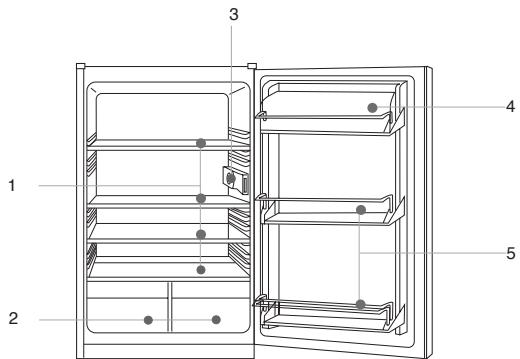
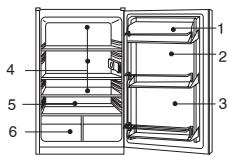
1.Shelves
2. Vegetable and fruit tray
3.Temperature Controller
4.Egg tray
5.Bottle racks
This diagram may vary slightly with the layout of the refrigerator you have just purchased due to technical improvements.
Unpacking
Remove all packing materials.
Check attachments and materials
Checking should be conducted with reference to the Packing List. Contact the local distributor if discrepancies are found.
Ensure proper location of the refrigerator.
Clean the refrigerator before use.
(See the following section "Cleaning")
Idle time
After the refrigerator has been sited and cleaned, let it stand for more than 30 minutes before connecting the power source
The door of the refrigerator can be opened both from the left or right as required. The following are the steps required to position the door to open to the right.
- Remove the door and place aside after removing the bracket (2) and the screw hole cover (3).
- Remove the upper bracket (6) and the pivot pin (1) and the spring washer and re-fix to the corresponding position on the left. (Bracket cover (5) should also be moved to the corresponding left position.
- Carefully place the door on the upper bracket (6) and lower bracket (2). Tighten the lower bracket screws to the refrigerator case.
- Place the screw cover (3) over the original lower bracket hole on the right side.
- Change the position of component (4) to the corresponding opposite position.
- After installation open and close the door to ensure the door operates smoothly.
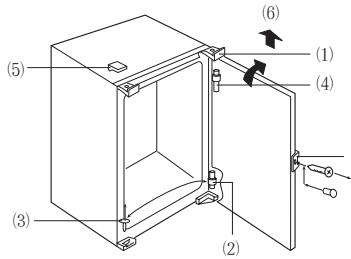
(Figure A)
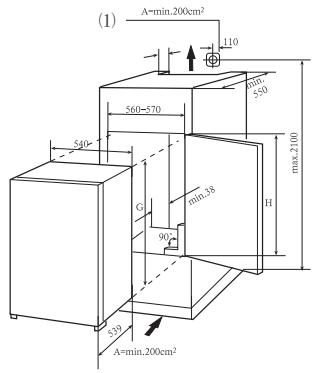
(Figure B)
Level the kitchen cabinet unit with a spirit level and a try square. Level the unit by placing packing material underneath if required.
A minimum gap of 38mm must be maintained at the back of the appliance for ventilation.
Air inlet A must be at least 200 cm square and air must flow through the panel in the cabinet plinth.
Check that the position of the power socket (1) is correct. AC voltage in the location at which the appliance is to be used must comply with that as shown on the data plate located on the left inside wall of the appliance next to the vegetable bins. The power supply must be suitably earthed.
Preparation
- Check that the kitchen unit door is in the correct operating position.
- Run the mains cable through the unit such that it can be connected to the power supply after installing the appliance. Remove the cover (6) only if space is restricted.
3.Push the appliance into the kitchen unit leaving a gap of 4mm at the handle side of the appliance. Align the top and bottom front edges of the support brackets (2) such that they are flush with the front edge of the kitchen unit. See detail X
4.Cut sealing strip (1) to the height of the kitchen unit and attach to the handle side of the unit to close the gap between the appliance and the side panel of the kitchen unit (press the strip (a) into the gap. Pull away the protective strip on the plastic profile before insertion.
5.Push the appliance against the side panel of the kitchen unit and secure it at the top and bottom (3).
- Install the door connecting element (4) in accordance with the handle height and the number of doors. Open the door fully and insert the connecting rod (5) and screw it to the kitchen unit door maintaining distance (d) to the edge of the door (d=the thickness of the panel). Adjust the connecting element so that the handle side of the kitchen unit door does not make contact with the unit body when closed. (Approximately 1mm gap for large appliances), mount the second door connecting element where appropriate.
7.Plug the open hole in the appliance door.
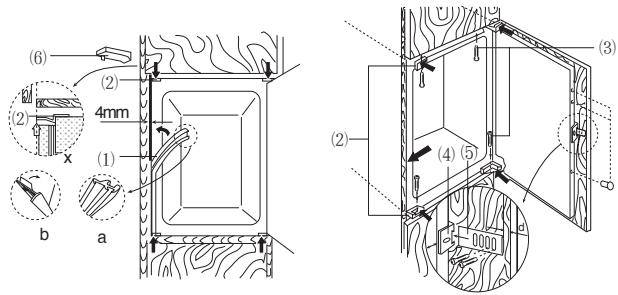
Figure C
Starting the refrigerator
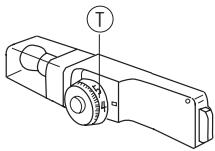
After connecting to the power supply, turn the temperature controller clockwise from position 0 to any position between 1 and 7 to start the refrigerator. The refrigerator compressor will stop when the temperature controller is at position 0.
Adjusting the temperature:
The temperature inside the refrigerator is adjusted by turning the temperature controller. Positions 1 to 7 represent different temperatures from the lowest to the highest.
| Position | Conditions |
| 1-2 | Summer or ambient temperature between25-35℃ |
| 3-4 | Spring, autumn or ambient temperature between15-25℃ |
| 4-5 | Winter, or ambient temperature between5-15℃ |
| 6-7 | Quick freeze |
Caution: Some time will be required for the refrigerator to reach the set level when temperature adjustments are made. The length of this period is determined by difference in the existing and set temperatures, the ambient temperature, the frequency with which the door is opened and closed and the amount of food in storage.
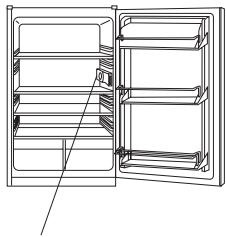
Temperature Controller
Loading the refrigerator with food
When the refrigerator is switched on, do not load food until 1~2 hours have passed. Usually, food for cold storage or deep freezing can be loaded when the temperature inside the compartment reaches the set point.
Cold storage is for short-term food storage or for daily consumption.
Although the temperature in most parts of the cold storage compartment can be regulated between 0 and 10 degrees Centigrade, extended periods of food storage is not recommended. Cold storage should only be used for short-term storage.
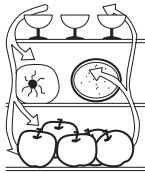
Cold storage compartment
- Eggs and butter
- Pickled food and seasonings
- Beverages and bottled food
- Cookies, cooked food and milk
- Meat and sausages
- Fruits, vegetables and salads
Cautions for cold storage
- Hot food must be cooled to room temperature before storing in the refrigerator
- Dry any water droplets on the food before placing it in the refrigerator.
- It is recommended that food be sealed in suitable storage bags before being placed in the refrigerator; this will prevent moisture in the food from evaporating and prevent vegetables and fruit from withering or altering in flavor.
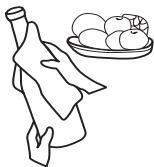
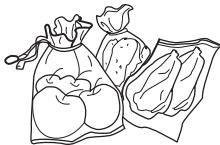
- Do not store excess quantities or weights of food; food should be stored with spaces in between for better storage results. Never overload shelves, as they may collapse under excessive loads.
- Food to be stored should be sorted according to consumer requirements. Food consumed daily should be placed in the most convenient area, this will minimize opening periods for the door. Do not place food too close to the internal walls.
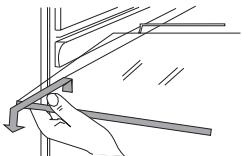
Food holder cleaning
- Food holders can be taken out for cleaning
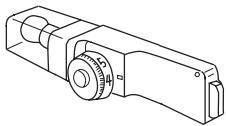
Lamp & Replacement:
*Lamp:220-240V,15W
Lamp holder: E14 (lamps exceeding 15W must not be used)
For replacement, unplug to disconnect the power
* Remove the lamp by turning anti-clockwise
Instructions
Instructions for food storage
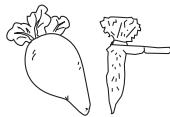
*Storage period will be extended if vegetables are placed with their roots towards the cold source.
Leaves of carrots or turnips should be removed before storage.
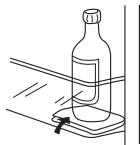
Put a wad of tissue on the bottle holder before placing bottles on it so that later cleaning is easier
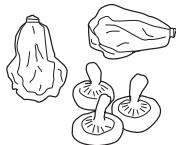
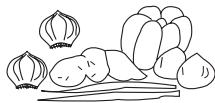
Onions, garlic, ginger, water chestnuts and other root vegetables should not be stored in the refrigerator, as these foods are suitable for long-term storage at normal temperatures.
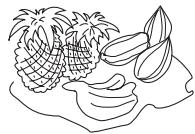
Ripe squash, melon, papaw, bananas and pineapples should not be stored in the refrigerator. Freezing will accelerate the ripening process.
Defrosting the cold storage compa
ment
The cold storage compartment is designed for automatic defrosting. Frost formed on the back wall will melt and flow via the drainpipe to the evaporating container over the compressor on the back of the refrigerator, where the heat generated by the compressor will evaporate the water.
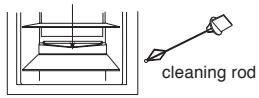
Water outlet,
Caution: Always keep the drain over the vegetable and fruit tray clear to ensure the normal flow of defrosted water. Use the rod provided to clear any blockages.
Cleaning
The refrigerator should be cleaned regularly to prevent the formation of bad odors.
- Disconnect the power before cleaning the refrigerator.
- Do not use a hard brush, steel brush, detergent, gasoline or other solvents, hot water, acid or alkali for cleaning.
- Wipe water drops on the surface of the refrigerator with a soft cloth.
(1) Do not use excessive amounts of water for cleaning the refrigerator
(2) Use a dry cloth to clean the switch, the lamp and the temperature controller
- Always keep the rubber door seal clean
- Clean the back and sides of the refrigerator regularly.
Cessation of Operation
If the power failure lasts for an extended period, unplug the refrigerator and clean the refrigerator as previously described.
Keep the door of refrigerator open when the power is turned off to prevent any food remaining in the compartment from producing bad odors.
Caution: It is recommended that the refrigerator is not turned off
Power failure
Even in summer, food can be stored in the refrigerator for a few hours after a power failure.
- Don't put additional food into the refrigerator during a power failure.
- Avoid opening the door during power failures
- If prior notice of a power failure is given, make some ice and put it in a container in the top of the cold storage compartment.
Caution: temperature in the refrigerator will rise during a power failure or in the event of technical problems, and the storage period will be reduced.
During Vacations
- Remove any food from refrigerator is the vacation is short. Turn the temperature selection knob to the proper position, and make sure that the door of the refrigerator is properly closed.
- If the vacation is long, take out the food from the refrigerator and disconnect the power. When the frost inside melts, clean and dry the compartment.
Discarding
- Remove the door of the refrigerator when you get rid of it, in case children may get trapped in.
Moving the refrigerator
- Unplug the refrigerator
- Remove any food
- Tigh0ten the shelf and vegetable tray with tapes
- Tightly close the door with tape
Events below are not problems:
- The temperature of the refrigerator and the compressor will rise and the compressor will run for comparatively longer periods when the refrigerator is first started.
- Wipe water drops on the external surface of the refrigerator with a soft cloth.
- When the refrigerator is opened frequently or stay open too long in humid seasons, the cavity will be dampened.
- A slight sound will be heard when the liquid refrigerant circulates or when the compressor switches on and off.
- A slight sound will be heard when defrosted water drops into the evaporating dish.
- The compressor will operate for comparatively longer periods if excessive quantities of food are stored or the ambient temperature is high.
- The evaporator will produce odors if the compartment is not cleaned.
Caution: The refrigerator should never be restarted until a period of at least five minutes has elapsed.
Please determine the cause of the problem before making any repairs.
| Phenomena | Causes |
| Refrigerator will not start. | * Bad connection to power source (plug, socket and fuse) * The temperature knob is at the 0 position * Low voltage |
| The lamp does not blink. | * Bulb failure * Power supply not connected * The temperature knob is at the 0 position |
| Excessive noise. | * Uneven placement * Contact between the refrigerator and a wall or other article |
| Compressor operates for a long period or temperature does not reach set point. | * First time of operation * Excessive food stored * Frequent opening of the refrigerator door due to hot weather * The temperature controller is not set properly * Refrigerator is in direct sunlight, or close to a heat source * Poor ventilation, or dirt on the condenser |
| Food dry | * Food not properly covered or sealed |
| Strange odor | * Failure to seal food properly * Rotting food inside refrigerator * Refrigerator should be cleaned. See "Cleaning" |