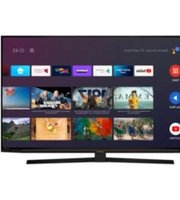
TORINO 49 GDU 7905B - Television GRUNDIG - Free user manual and instructions
Find the device manual for free TORINO 49 GDU 7905B GRUNDIG in PDF.


Pick your language and provide your email: we'll send you a specifically translated version.
| Product Type | Television |
| Brand | Grundig |
| Model | TORINO 49 GDU 7905B |
| Screen Size | 49 inches (123 cm diagonal) |
| Display Technology | LED-backlit LCD |
| Resolution | 3840 x 2160 (4K UHD) |
| Smart TV | Yes |
| Dimensions (without stand) | 110.5 x 64.0 x 7.5 cm (W x H x D) |
| Dimensions (with stand) | 110.5 x 69.0 x 25.0 cm |
| Weight (without stand) | 11.2 kg |
| Weight (with stand) | 12.5 kg |
| Power Consumption (typical) | 98 W |
| Power Supply | AC 220-240V, 50/60Hz |
| HDMI Ports | 3 |
| USB Ports | 2 |
| Built-in Tuner | DVB-T2/C/S2 |
| Audio Output Power | 20 W (2 x 10 W) |
| Remote Control | Included |
| Warranty | 2 years |
Frequently Asked Questions - TORINO 49 GDU 7905B GRUNDIG
How do I turn on the TV for the first time?
Plug the TV into a power outlet and press the power button on the remote or on the TV. The setup wizard will guide you through language, network, and channel tuning.
How can I connect my smartphone to the TV?
You can use screen mirroring (Miracast) or DLNA if supported. Alternatively, connect via an HDMI cable using a suitable adapter.
What should I do if the remote control isn't working?
First, check the batteries and replace them if needed. Ensure nothing is blocking the IR sensor on the TV. You can also use the buttons on the TV itself.
Can I mount this TV on a wall?
Yes, the TV is compatible with a VESA 200x200 mm wall mount. Use appropriate screws and ensure the wall can support the weight.
How do I perform a factory reset?
Go to Settings > General > Reset and confirm. Note that this will erase all personal settings and data.
What is the recommended cleaning method for the screen?
Use a soft, dry microfiber cloth. If needed, slightly dampen the cloth with water. Do not use any abrasive cleaners or spray directly onto the screen.
Why is there no picture but sound is working?
This may indicate a backlight issue or a faulty panel. Check if the screen is completely black or very dim. You can try adjusting brightness settings or restarting the TV.
How can I update the TV's firmware?
Go to Settings > Support > Software Update and select 'Update via Network' or 'Update via USB' if you downloaded the file from the Grundig support website.
What do the LED indicators mean?
A steady red light means standby; a flashing red light may indicate a power or standby issue; a green/blue light means the TV is on. Refer to the manual for exact details.
Where can I find spare parts like the remote or stand?
Spare parts can be ordered from authorized Grundig service centers or online retailers. Use the model number TORINO 49 GDU 7905B to find compatible parts.
User questions about TORINO 49 GDU 7905B GRUNDIG
0 question about this device. Answer the ones you know or ask your own.
Ask a new question about this device
No questions yet. Be the first to ask one.
Download the instructions for your Television in PDF format for free! Find your manual TORINO 49 GDU 7905B - GRUNDIG and take your electronic device back in hand. On this page are published all the documents necessary for the use of your device. TORINO 49 GDU 7905B by GRUNDIG.
USER MANUAL TORINO 49 GDU 7905B GRUNDIG

Manual assistant
Powered by Anthropic
Waiting for your message
Product information
Brand : GRUNDIG
Model : TORINO 49 GDU 7905B
Category : Television