DynaMic 7B - Microphone icon - Free user manual and instructions
Find the device manual for free DynaMic 7B icon in PDF.


| Product Type | Dynamic Microphone |
| Brand | icon |
| Model | DynaMic 7B |
| Polar Pattern | Cardioid |
| Frequency Response | 50 Hz - 15 kHz |
| Sensitivity | -54 dB ± 3 dB (1 kHz) |
| Impedance | 600 ohms |
| Connector | XLR 3-pin |
| Power Requirement | None (passive) |
| Dimensions (L x Diameter) | 180 mm x 50 mm |
| Weight | 350 g |
| Material | Metal body with mesh grille |
| On/Off Switch | No |
| Accessories Included | Microphone clip, carrying pouch |
| Compatibility | Standard XLR inputs (mixers, audio interfaces) |
| Cleaning Instructions | Wipe with a dry, lint-free cloth |
| Storage Conditions | Dry environment, room temperature |
| Safety Precautions | Avoid drops, keep away from moisture |
| Spare Parts Availability | Grille and clip available separately |
| Repairability | Limited; professional service recommended |
Frequently Asked Questions - DynaMic 7B icon
User questions about DynaMic 7B icon
0 question about this device. Answer the ones you know or ask your own.
Ask a new question about this device
Download the instructions for your Microphone in PDF format for free! Find your manual DynaMic 7B - icon and take your electronic device back in hand. On this page are published all the documents necessary for the use of your device. DynaMic 7B by icon.
USER MANUAL DynaMic 7B icon
When your broadcasts need the very best.
A professional broadcast quality all metal microphone with a full, rich tone, ideal for high end podcasting, streaming and broadcasting as a well as a host of other applications.




The lightning flash with arrowhead symbol within an equilateral triangle, is intended to alert the user to the presence of uninsulated dangerous voltage within the product's enclosure, that may be of sufficient magnitude to electric shock to persons. Le symbol clair avec point de flche l'int rieur d'un triangle quilat ral est utilis pour alerter l'utilisateur de la pr sence l'int rieur du coffret de voltage dangereux non isol d ampleur suff
Important Safety Instructions
- Read this manual thoroughly before using this unit.
- Keep this manual for future reference.
- Take notice of and comply with all warnings included in the user's manual or indicated on the appliance.
- Follow all instructions included in this manual.
- Do not expose this unit to rain or moisture. Avoid having water or other liquids spilled on this unit.
- Do not block any ventilation openings or interfere with the proper ventilation of this unit. Install in accordance with the manufacturer's instructions.
- Do not use or store near any heat sources such as radiators, heat registers, stoves, or other heat-producing appliances.
- To avoid the risk of electrical shock, do not touch any exposed wiring while the unit is in operation.
- Only use attachments/accessories specified by the manufacturer.
- Unplug this unit and all connected electrical equipment during lightning storms or when left unused a long period of time.
- Refer all servicing to qualified service personnel. Servicing is required when the appliance has been damaged in any way or fails to operate normally.
Contents
Introduction......4
What's in the package? 4
Register your ICON ProAudio product to your personal account......5
Features 6
Operating the DynaMic....7
Specifications 9
Services....10
Introduction
Firstly, congratulations on your purchase of the ICON Pro Audio DynaMic dynamic microphone! In these pages, you'll find a detailed description of the features of the DynaMic dynamic microphone and a full list of specifications.
Please register the product on our website at the link below
www.iconproaudio.com/registration:
As with most electronic devices, we strongly recommend you retain the original packaging. In the unlikely event that the product is returned for servicing, the original packaging (or reasonable equivalent) is required. With proper care and adequate air circulation, your DynaMic microphone will operate flawlessly for many years to come.
We trust that this product will provide years of excellent service and in the unlikely event that your product does not perform to the highest standard, every effort will be made to address the issue.
What's in the package?
• DynaMic microphone
- Shock Mount (attached)

Register your ICON ProAudio product to your personal account
1. Check serial number of your device
Please go to http://iconproaudio.com/registration or scan the QR code below.

Input your device's serial number and the other information on the screen. Click "Submit".
A message will pop up showing your device information such as model name and its serial number - Click "Register this device to my account" or if you see any other message, please contact our after-sales service team
2. Log in to your personal account page for existing user or sign up for new user
Existing user: Please log into your personal user page by inputing your user name and password.
New user: Please click "Sign Up" and fill in all the information.
3. Download all useful materials
All your registered devices under your account will show on the page. Each product will be listed along with all its available files such as drivers, firmware, user manual in different languages and bundled software etc. for download. Please make sure you have download the necessary files such as driver before you begin device installation.
Features
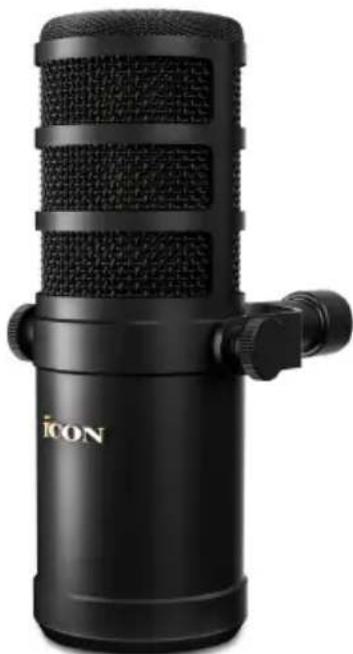
The DynaMic7B is a large-bodied, dynamic microphone is perfect for vocal applications. It lends itself to high quality live streaming, podcast or broadcast applications in addition to capturing any number of sources. Its good looks are matched by its extremely robust exterior. The internal pop shield minimises plosive consonants, resulting in a smooth, open, natural and rich sound. The attached swing mount allows for flexible positioning. The high-quality components and architecture within ensure every detail of your voice is captured in intricate detail. Switches to the rear of the DynaMic7B offer the user both low cut (to rid the source of low frequency rumble) and high-mid boost (to increase 'presence'). Of course, the DynaMic is not limited to just the spoken word. Use it on any number of sources for a fully rounded and detailed sound, including sung vocals at close proximity. Despite its origins as a broadcast mic, this style of mic is a favorite of bands, vocalists and rappers alike. Try it anywhere you need warmth, smooth detail and intelligibility.
• High degree of clarity and quality for all manner of vocal applications
- Ideal as a broadcast microphone suited to radio, podcasts and streaming
- Cardioid pickup pattern for outstanding sound source separation and feedback rejection
• Pressure-gradient transducer with shock-mounted capsule
• Ultra-rugged construction with all metal finish
- Attached swing mount allows for flexibility with positioning
- Internal pop filter – no need for external pop shields
• Exceptional build quality
- Robust, high grade XLR connector at the rear
• Low cut filter switch (300 Hz)
• High boost switch (1KHz - 7KHz)
Operating the DynaMic Setting up the signal level
When connecting the DynaMic7B to a mixer or recorder input, be sure that the input is at a suitable level. Most mixers and recorders of reasonable quality will offer a microphone input with MIC trim (usually called Trim or Gain) control. The purpose of the MIC trim control is to optimize the amount of good signal to any noise associated with the mixers electronics. A good MIC preamplifier with trim also will have a Peak or Clip LED. To set a good level on the DynaMic7B, set it up in front of the desired sound source (i.e. a presenter talking) and slowly raise the MIC trim control until you see the Peak LED light up. Then, turn the mix trim control down until the LED does not light any more. On most mixers, the ideal setting is that the trim control is turned up as much as possible without lighting the Peak LED.
Microphone Placement
In order to maximize the sound quality, please pay careful attention to the placement of your DynaMic and how it is positioned. All microphones, especially cardioids microphones, exhibit a phenomenon know as the “proximity effect”. Very simply put, proximity effect is a resulting change in the frequency response of a microphone based on the position of the MIC capsule relative to the sound source. Specifically, when you point a cardioid MIC directly at the sound source (on-axis) you will get the best frequency response, however, when you start pointing the microphone slightly away (off-axis) you will notice the low frequency dropping off and the microphone will start to sound thinner.
For most vocal applications you'll want to position the microphone directly in front of the presenter. If you find that the voice produces an overly 'bassy' effect, try switching the low cut on and re-positioning the mic (experimentation is the best teacher, here). Equally, if you feel the voice is in need of more 'presence', try switching on the 'high boost' switch.
Connecting the DynaMic7B
This DynaMic has an XLR connection, which provides a balanced output. Unlike condenser mics, you will not need to use ‘phantom power’ if you are connecting using an ‘XLR to XLR’ cable. Simply plug straight in to your device and the microphone will work.
You will need a standard 3-pin XLR cable, as well as an audio-interface like the iCON Duo 44 which will act as the ‘connector’ to your computer for recording. You can then use the microphone to record to a Digital Audio Workstation (DAW) like Cubase, Harrison Mixbus 32C or Pro Tools.
Equally, you can use a device such as iCON Pro Audio's 'Live Console', specifically designed for live streaming. Find out more here; https://iconproaudio.com/product/live-console/
The switches
The low cut and high boost switches at the rear of the microphone can be switched on and off using your finger.
The window below the switches will indicate the EQ change. For example, when the switches are both off, a straight line will display. When the low cut is switched on, the window will display a low cut shelf (a slope veering to zero on the left). When the high boost switch is on, the EQ setting will display in the window with a 'bell' shape, indicating a 'boost' in the upper-mid frequencies.
The bass roll off is at 400Hz and the mid-high frequency boost is at 1KHz – 7KHz

No EQ Low Cut Mid-High Boost
Specifications
Frequency response-vary axis


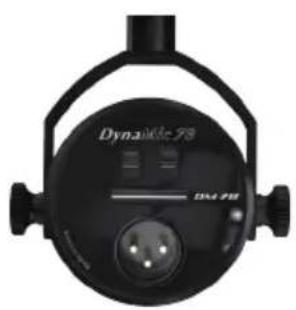


No EQ Low Cut Mid-High Boost
Frequency range....50 Hz to 20 kHz
Polar pattern....cardioid
Sensitivity (dB re iV/Pa)....-59dbv/pa
Output impedance....150 Ω
Output connector....3-pin XLR male
Dimension....55mm X 55mm X 259mm
Weight....0.654kg
Services
If your DynaMic7B needs servicing, follow these instructions.
Check our online Help Center at http://support.iconproaudio.com, for information, knowledge, and downloads such as:
- FAQ
- Download
- Product Registration
- Video Tutorials
Very often you will find solutions on these pages. If you don't find a solution, create a support ticket at our online Help Center at the link below, and our technical support team will assist you as soon as we can.
Navigate to http://support.iconproaudio.com and then sign in to submit a ticket.
Once you have submitted an inquiry ticket, our support team will assist you to resolve the problem with your ICON ProAudio device as soon as possible.
To send defective products for service:
- Ensure the problem is not related to operation error or external system devices.
- Keep this owner's manual. We don't need it to repair the unit.
- Pack the unit in its original packaging including end card and box. This is very important. If you have lost the packaging, please make sure you have packed the unit properly. ICON is not responsible for any damage that occurs due to non-factory packing.
- Ship to the ICON tech support center or the local return authorization. See our service centers and distributor service points at the link below:
If you are located in US
Send the product to:
North America
Mixware, LLC – U.S. Distributor
3086 W. POST RD.
LAS VEGAS NV 89118
Tel.: (818) 578 4030
Contact: www.mixware.net/help
If you are located in Europe
Send the product to:
Sound Service GmbH
European Headquarter Moriz-
If you are located in Hong Kong
Send the product to:
ASIA OFFICE:
Unit F, 15/F., Fu Cheung Centre,
No. 5-7 Wong Chuk Yueng Street,
Fotan,
Sha Tin, N.T., Hong Kong.
Tel: (852) 2398 2286
Fax: (852) 2789 3947
Email: info.asia@icon-global.com
- For additional update information please visit our website at:
www.iconproaudio.com
iCON
Pro Audio

天猫官方旗舰店

天猫店艾肯旗舰店
抖音号

抖音ICON艾肯
哔哩哔哩

B站iCONProAudio
微信公众号

微信号ICON-PRO
Support

support.iconproaudio.com
Dashboard

iconproaudio.com/dashboard/


- WHEN YOUR BROADCASTS NEED THE VERY BEST
- IMPORTANT SAFETY INSTRUCTIONS
- CONTENTS
- INTRODUCTION
- WHAT'S IN THE PACKAGE
- REGISTER YOUR ICON PROAUDIO PRODUCT TO YOUR PERSONAL ACCOUNT
- CHECK SERIAL NUMBER OF YOUR DEVICE
- LOG IN TO YOUR PERSONAL ACCOUNT PAGE FOR EXISTING USER OR SIGN UP FOR NEW USER
- DOWNLOAD ALL USEFUL MATERIALS
- FEATURES
- OPERATING THE DYNAMIC SETTING UP THE SIGNAL LEVEL
- MICROPHONE PLACEMENT
- CONNECTING THE DYNAMIC7B
- THE SWITCHES
- SPECIFICATIONS
- SERVICES
Brand : icon
Model : DynaMic 7B
Category : Microphone