
Cook4Me Touch WIFI CZ9128 - Cooker KRUPS - Free user manual and instructions
Find the device manual for free Cook4Me Touch WIFI CZ9128 KRUPS in PDF.
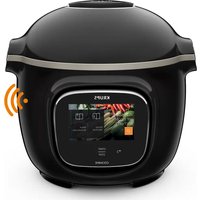


| Product Type | Multi-cooker with pressure cooking |
| Brand | Krups |
| Model | Cook4Me Touch WIFI CZ9128 |
| Capacity | 5.5 liters |
| Dimensions (W x D x H) | 33 x 29 x 30 cm |
| Weight | 6.5 kg |
| Power Supply | 220-240 V, 50-60 Hz |
| Power Consumption | 1200 W |
| Display | Touch screen with color display |
| Connectivity | WiFi (2.4 GHz) |
| Number of Programs | Over 50 automatic programs |
| Cooking Modes | Pressure cooking, slow cooking, steaming, sautéing, rice, yogurt, etc. |
| Compatible App | Krups Cook4Me app (iOS/Android) |
| Voice Control | Works with Amazon Alexa and Google Assistant |
| Inner Pot Material | Stainless steel with non-stick coating |
| Safety Features | Overheat protection, pressure safety valve, lid lock indicator |
| Cleaning and Maintenance | Removable inner pot and steam valve, dishwasher-safe accessories |
| Spare Parts Availability | Sealing ring, inner pot, steam basket available from Krups service |
| Repairability Index | High (user-replaceable parts, service centers) |
| Warranty | 2 years limited manufacturer warranty |
| Included Accessories | Measuring cup, spatula, steam basket, recipe book |
Frequently Asked Questions - Cook4Me Touch WIFI CZ9128 KRUPS
User questions about Cook4Me Touch WIFI CZ9128 KRUPS
0 question about this device. Answer the ones you know or ask your own.
Ask a new question about this device
Download the instructions for your Cooker in PDF format for free! Find your manual Cook4Me Touch WIFI CZ9128 - KRUPS and take your electronic device back in hand. On this page are published all the documents necessary for the use of your device. Cook4Me Touch WIFI CZ9128 by KRUPS.
USER MANUAL Cook4Me Touch WIFI CZ9128 KRUPS
17256·89(02)


FOLLOW THESE 6 KEY STEPS BEFORE COOKING YOUR FIRST RECIPE


For Cook4me Touch WIFI make sure you have updated before the first use to benefit from the latest services and features.

DISCOVER MANY TUTORIALS ON THE KRUPS YOUTUBE CHANNEL TO ACCOMPANY YOU THROUGHOUT THE EXPERIENCE


This is a QR Code. By scanning the QR code with the camera of your mobile phone or a special app, you can excess the Cook4me Touch playlist or YouTube.
And join the Cook4me movement


Krups Application Krups Facebook Krups Instagram
MANUAL CONTENTS
Discover your Cook4me Touch 36
Cleaning your Cook4me Touch....40
Installing the steam basket 44
Easy cooking....46
Mastering the cooking process....47
Using the different options 48
Cook4me Touch functions....51
Personalise your Cook4me Touch....52
Safety features....52
Troubleshooting....55
Cook4me Touch error codes 58
NB: A safety information booklet is included with this appliance. Before using your appliance for the first time, please read this booklet carefully and keep it in a safe place for future reference.
COOK4ME TOUCH IN THE KITCHEN.
Cook4me Touch helps you with every meal.

My Cook4me Touch lets me cook quickly and well.
It provides me with lots of recipe ideas in no time at all.
The Cook4me Touch has a large touchscreen display to show me all the steps to follow.
The Cook4me Touch does the cooking for me.
DISCOVER YOUR COOK4ME TOUCH
Release/closure handle of the lid

Visual closure reference mark

Indicator light depending on the model


Rear condensation collector

Silent valve

Carrying handle

Interior cooking bowl

CLEANING YOUR COOK4ME TOUCH
There are 5 steps to follow before you use your Cook4me Touch for the first time and after each use.

Clean the Cook4me Touch with a damp cloth.

STEP 2 — the touch screen
Clean the touch screen with a soft, damp cloth.
Do not use a metal sponge as it may scratch the screen.

STEP 3 — the cooking bowl
To clean the bowl, you can:
• put the bowl in the dishwasher
of
- wash it in hot soapy water.
If the cooking bowl turns an off-white colour on the outside, a metal sponge can be used.

STEP 4 — the water tray
After each use:
clean the condensation collector with clean water or
in the dishwasher
• dry the condensation collector
• remember to return the condensation collector to
the Cook4me Touch
CLEANING YOUR COOK4ME TOUCH
STEP 5 - the lid

Unscrew the central nut.

Remove the inner part of the lid by pulling it towards you.

Remove the cover underneath the lid.
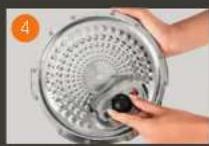
Remove the valve cover and take out the ball.

Check the mobility of: the locking rod
the safety valve

Clean all parts of the Cook4me Touch lid with clean water or in the dishwasher.
Wash the steam basket using hot soapy water.
Rinse and thoroughly dry the steam basket.
How to install the steam basket?

Replacing the steam basket. Squeeze the leg between your thumb and index finger to position it in the notches.

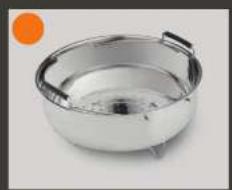
Put the steam basket back into place. Place the steam basket in the Cook4me Touch cooking bowl using the handles.


To ensure safety while cooking, place your Cook4me Touch on a flat, dry surface.
Plug in your Cook4me Touch.
When using your Cook4me Touch for the first time, the pot can release a slight odour. This is normal.

On the recipe menu, visible on the touch screen, there are 250 recipes, including:
- starters,
- mains,
• and desserts,
The recipes are delicious and quick to make.

You can connect your Cook4me Touch to Wi-Fi and discover even more recipes.
MASTERING THE COOKING PROCESSEASY COOKING

Using the ingredients menu, you can cook food without worrying about the cooking mode or the cooking time.
The Cook4me Touch provides all the information you need according to the weight and type of ingredients.
USING THE DIFFERENT OPTIONS
Using the manual mode, you can select the cooking mode and cooking time for your meal.
The various cooking modes:

Pressure cooker
Lid position: closed and locked
Cooking intensity
Low: to cook soft ingredients quickly.
High: to cook all ingredients quickly.
Express: to cook ingredients very quickly.
Timer delay mode: Possible
The timer delay mode allows you to start cooking at a later time.

Steam
Use the steam basket.
Lid position: closed and locked.
Cooking intensity
Gentle: to cook soft ingredients.
Boost: to cook all ingredients quickly.
Timer delay mode: Possible

Browning
The bowl heats from below, like a stove.
Lid position: open and raised.
Cooking intensity
Gentle: to brown delicate ingredients.
Medium: to brown and crisp all ingredients quickly.
High: to brown and crisp all ingredients very quickly.

Stewing
The bowl heats from below to act like a stew pot.
Lid position: open and raised.
Cooking intensity
Gentler slow and gentle cooking.
Medium: slow cooking.
High: medium cooking.

Keeping warm
The Cook4me Touch keeps your dishes warm until it is time to serve them.
Lid position: May be open or closed.

Reheating
The Cook4me Touch reheats dishes to the perfect temperature.
Lid position: May be open or closed.
COOK4ME TOUCH FUNCTIONS
Depending on your COOK4ME TOUCH model, these are various useful features.


The "Recipe Book" function:
You can create several recipe books.
Examples:
Paul's recipes
• My favourite desserts

The "What's in my fridge" function:
Input the ingredients that you have in your fridge and the Cook4me Touch will find a suitable recipe.
- adjust the brightness,
• turn the sound on or off.
• select country and language,
• understand your Cook4me Touch's connectivity.

Open

and scan
This is a QR Code. By scanning the QR code with the camera of your mobile phone or a special app, you can access the cooked touch mini playlist on YouTube.
SAFETY FEATURES
The Cook4me Touch has several safety features.
Safe opening:
The locking rod is a safety system that automatically locks The Cook4me Touch as soon as it is pressed.

The Cook4me Touch is locked when the icon 🔒 appears on the touch screen.
Do not open the Cook4me Touch when it is locked.
Wait for the internal pressure to drop before opening the lid.
The internal pressure has dropped when there is no more steam coming out of the valve.
Safety in case of too much pressure:
If the pressure is too high, the Cook4me Touch can release pressure automatically through the safety valve.
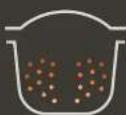
If any of the safety systems are activated:
- unplug the Cook4me Touch.
- allow the Cook4me Touch to cool completely.
• open the Cook4me Touch,
check and clean: - the safety valve.
- the ball,
- the covering
If your Cook4me Touch is still leaking or not working, take it to an Approved Service Centre.
An Approved Service Centre is a repair centre that has been approved by Krups.
Regulating the Cook4me Touch:
When pressure cooking, the Cook4rne Touch can emit small amounts of steam. This serves to automatically regulate the pressure.

The Cook4me Touch lid:
The metal lid should only be used with the Cook4me Touch. The metal lid should not be used with other equipment. The Cook4me Touch lid is easy to recognise thanks to the red safety valve.

TROUBLESHOOTING
You may encounter various problems when using the Cook4me Touch.
The lid does not close:
- There may be something stuck between the bowl and the hot plate. Remove the bowl to check that all parts are clean:
- the heating plate,
- the central element,
- under the bowl.
Also check that the central element can move around.
- The lid release handle is not in the correct position.
Ensure that the release handle is fully open.
- The metal lid is not installed correctly. Ensure that all elements of the metal lid are in the correct position.
- The bowl damaged after being hit or dropped.
The bowl should be replaced at an Approved Service Centre.
The Cook4me Touch pressure fails to raise and steam is not being released properly:
- The gasket seal is dirty or damaged. Ensure that the gasket seal is clean and in good condition
The gasket seal should be changed every three years at an Approved Service Centre.
- The inner lid is missing or not tight enough. Ensure that the central nut under the metal lid is tight enough.
- The locking rod is dirty or the seal is missing. Clean the locking rod according to the instructions.
The locking rod must be able to move up and down properly
Ensure that the seal is correctly positioned on the locking rod.
- The decompression ball is dirty or incorrectly positioned.
Ensure that the ball is correctly positioned and that the ball cover is in
the locked position. Clean and dry the ball and the support.
- The edge of the bowl is damaged or dirty. Clean the bowl. Ensure that the bowl is in good condition.
- If the locking rod is built upside down: Place the magnetic side of the stem on the same side as the ball
The Cook4me Touch does not decompress:
•The ball cover is out of place: Leave the Cook4me Touch to cool down completely, remove the metal lid, and place the ball cover in the correct position.
Water is leaking behind the Cook4me Touch:
- The collector is not in place or is overflowing. Ensure that the collector is correctly positioned behind the COOK4ME TOUCH.
-
The bowl is too full. Ensure that the contents do not exceed the maximum volume.
• If you are using certain ingredients such as: -
cream,
- wine,
- or milk,
Respect the quantities shown in the recipe.
These ingredients can cause the Cook4me Touch to overflow
The lid won't open when steam is released:
- The locking rod is still in the upwards position. Check that all of the steam has been released and wait until the Cook4me Touch has cooled down fully.
The light on the lid handle no longer lights up:
The LED is not working.
Take the device to an Approved Service Centre.
The screen does not light up:
•TheCOOK4ME TOUCH is not plugged in. Ensure that the COOK4ME TOUCH is plugged in correctly.
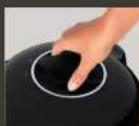
• The Cook4me Touch is on standby. Press the dot on the screen.
The inner metal lid cannot be removed:
- The ball lid is positioned incorrectly: Unscrew the nut on the lid, remove the inner part of the lid by pulling it towards you, access the ball cover, correctly reposition the lid.
COOK4ME TOUCH ERROR CODES
There are several error codes:
- error 1 error communicating with the keypad.
- error 2 error communicating with the Wi-Fi.
- error3 error communicating with the power board.
-
If the temperature sensor fails, the numbers 04, 05, 06, 07, 08, 09 are displayed on the Cook4me Touch.
-
error 10 heating error.
- error 11 pressure problem. Unplug the Cook4me Touch. Ensure that all elements of your Cook4me Touch are in good condition. If needed, clean the elements of your Cook4me Touch following the cleaning instructions. Ensure that the valve cover is correctly in place.
- error 13 excess pressure.
- error 14 low pressure due to lack of water:
- add water to the bowl,
- resume cooking.
- error 15 decompression fault:
- unplug the Cook4me Touch,
- leave to cool,
- remove the metal lid,
-
correctly position the ball cover.
-
error 16 the Cook4me Touch doesn't build up pressure:
- add water to the bowl,
- resume cooking.
- error 17 the Cook4me Touch pressure fails to raise.
See page 55
"The Cook4me Touch pressure fails to raise and steam is not being released properly". - error 18 failure to detect the locking rod.
- error 101, 106 display or recipe loading error:
Unplug and restart the appliance. If the problem persists, take your appliance to an Approved Service Centre.
For all problems, unplug the
Cook4me Touch.
If the problem persists, contact an
Approved Service Centre.
If you experience connection problems, visit www.krups.de or
the Krups app.
Your Cook4me Touch model : SERIE EPC13
Technical information about your
Cook4me Touch:
Low pressure: 40kPa (109°C)
High pressure: 70kPa (115°C)
Very high pressure: 100kPa (119°C)
PS = 140kPa
Cook4me Touch capacity: 6L
Usable capacity: 4L
Built-in heater:
enclosed heating resistor.
A beep signals that operating pressure has
been reached.
For models with WiFi:
Maximum transmitted power:
20dBm, 100mW
Frequency: 2,4GHz
Power consumption in standby mode: 0.28W
Power consumption in networked
standby mode : 0.28W
60
What do Cook4me Touch
pictograms mean ?
• Product connected to the Wifi

• Product connected to the Wifi
but not connected to KRUPS
database

• Product not connected to
the Wifi


- FOLLOW THESE 6 KEY STEPS BEFORE COOKING YOUR FIRST RECIPE
- DISCOVER MANY TUTORIALS ON THE KRUPS YOUTUBE CHANNEL TO ACCOMPANY YOU THROUGHOUT THE EXPERIENCE
- MANUAL CONTENTS
- COOK4ME TOUCH IN THE KITCHEN
- COOK4ME TOUCH HELPS YOU WITH EVERY MEAL
- CLEANING YOUR COOK4ME TOUCH
- STEP 2 — THE TOUCH SCREEN
- STEP 3 — THE COOKING BOWL
- STEP 4 — THE WATER TRAY
- MASTERING THE COOKING PROCESSEASY COOKING
- USING THE DIFFERENT OPTIONS
- THE VARIOUS COOKING MODES
- PRESSURE COOKER
- COOKING INTENSITY
- STEAM
- BROWNING
- STEWING
- KEEPING WARM
- REHEATING
- COOK4ME TOUCH FUNCTIONS
- THE "RECIPE BOOK" FUNCTION
- THE "WHAT'S IN MY FRIDGE" FUNCTION
- SAFETY FEATURES
- SAFE OPENING
- SAFETY IN CASE OF TOO MUCH PRESSURE
- REGULATING THE COOK4ME TOUCH
- THE COOK4ME TOUCH LID
- TROUBLESHOOTING
- THE LID DOES NOT CLOSE
- THE COOK4ME TOUCH PRESSURE FAILS TO RAISE AND STEAM IS NOT BEING RELEASED PROPERLY
- THE INNER METAL LID CANNOT BE REMOVED
- COOK4ME TOUCH ERROR CODES
- THERE ARE SEVERAL ERROR CODES
- YOUR COOK4ME TOUCH MODEL : SERIE EPC
- FOR MODELS WITH WIFI
- WHAT DO COOK4ME TOUCH
Brand : KRUPS
Model : Cook4Me Touch WIFI CZ9128
Category : Cooker