
MoGo - Projector XGIMI - Free user manual and instructions
Find the device manual for free MoGo XGIMI in PDF.
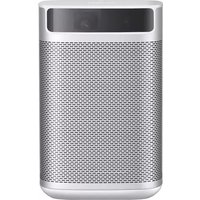


| Product Type | Portable DLP Projector |
| Native Resolution | 1920 x 1080 (Full HD) |
| Brightness | 300 ANSI Lumens |
| Contrast Ratio | 1000:1 |
| Display Chip | 0.23" DMD |
| Light Source / Lamp Life | LED / up to 30,000 hours |
| Projection Size | 30 - 120 inches |
| Keystone Correction | Automatic & Manual ±40° (Vertical) |
| Focus | Autofocus |
| Operating System | Android TV 9.0 |
| Built-in Speakers | 2 x 3W (Harman Kardon) |
| Connectivity | HDMI 2.0, USB 2.0, Wi-Fi 802.11ac, Bluetooth 5.0 |
| Screen Mirroring | Chromecast, Miracast, AirPlay |
| Dimensions (W x H x D) | 146 mm x 80 mm x 80 mm |
| Weight | 0.9 kg |
| Power Supply | AC 100-240V, 50/60Hz, 45W |
| Included Accessories | Remote control, power adapter, user manual |
| Cleaning | Use a soft, dry cloth to clean the lens and vents. Do not use liquid cleaners. |
| Safety Features | Auto-off after inactivity, overheat protection |
Frequently Asked Questions - MoGo XGIMI
User questions about MoGo XGIMI
0 question about this device. Answer the ones you know or ask your own.
Ask a new question about this device
Download the instructions for your Projector in PDF format for free! Find your manual MoGo - XGIMI and take your electronic device back in hand. On this page are published all the documents necessary for the use of your device. MoGo by XGIMI.
USER MANUAL MoGo XGIMI
For other languages please see
MoGo 2 Pro
User Guide
Benutzerhandbuch
Guía del usuario
Building A4, No. 1129 Century City Road, New and High-tech zones, Chengdu City China
service@xgimi.com www.xgimi.com

×GIMI
CONTENTS
02 English 10 Deutsch 18 Español 26 Français 34 Italiano 42 日本語 50 한국어 58 Polski 66 Português 74 Русский язык 82 繁体中文 90 العربية
Overview
Front view

A B C
| EN | ToFAutofocus | Lens | Auto KeystoneCorrection | Note: To prevent auto keystone correction failure, avoid blocking the sensor. |
| DE | AutofokusToF Teil | Objektiv | AutomatischeTrapez-korrektur | Hinweis: Um ein Versagen der automatischen Trapezkorrektur zu vermieden, sollten Sie den Sensor nicht blockeren. |
| ES | EnfoqueautomáticoPieza ToF | Lente | Correccióntrapezoidalautomática | Nota: Para evitar errores en la corrección trapezoidal automática, no bloquee el sensor. |
| FR | Mise au point automatiqueCapteur ToF | Objectif | Correctionautomatique dela distorsiontrapézoidale | Remarque: Pour éviter tout échec de la correction de la distorsion trapézoidale, ne pas obstruer le capteur. |
| IT | Messa afuocoautomaticaParte ToF | Lente | Correzioneautomaticaeffettotrapezoidale | Nota: Non bloccare il sensore per evitare errori di correzione trapezoidale. |
| JP | オートフォーカスToF部 | レンズ | 自動台形補正 | 注:自動台形補正の失敗を防ぐために、センサーを違らないようにしてください。 |
| KR | 자동 초점ToF 부품 | 렌즈 | 자동 키스톤보정 | 참고:자동 키스톤 보정 실파를 빈지하격ن 센서를 저단하지 마십시오. |
| PL | Automatyczna regulacjaostrości CzęśćToF | Obiektyw | Automatyczna korekcja znieksztalceńtrapezowych | Uwaga: Aby unknąć błędów korekcji znieksztalceń trapezowych, nie należy zasłaniać czujnika. |
| PT | FocagemautomáticaComponenteToF | Objetiva | Correçãotrapezoidalautomática | Nota: Para evitar a falhada correção trapezoidal automática, evite bloquear o sensor. |
| RU | АвтофокусКомпонентToF | Объектив | Автоматическая коррекциятрапецидальных искажений | Примечание:Не закрывайте датчик, чтобы избежать сбор автоматической коррекции трапецидальных искажений. |
| TW | 自動對焦ToF 零件 | 鎖頭 | 自動梯形校正 | 附注:為防止自動梯形校正失敗,請勿追撓感應程. |
| AE | الケーキ teleфтиToF.الجز | الحصة | الاحرف teleфтиال spectroscopic | ملاحظة:البعق القل conshec الاحرف القلقي, تُولج حجب المستثم globally. |
Rear view
EN Note:
- The Type-C port only supports power supply.
- Using a non-XGMI standard adapter may have a certain impact on the brightness and volume. For the best experience, it is recommended to use the XGMI standard adapter.
DE Hinweis
Please read the Product Instructions carefully before using the product.
Thank you for buying and using the products of XGIMI Technology Co., Ltd. (hereinafter referred to as "XGIMI Technology" or "XGIMI"). You should read the Product Instructions carefully before using this product for both your safety and interests.
XGIMI Technology will assume no responsibility for any personal injury, damage to property or other loss caused because due to failure to operate this product according to the Product Instructions or precautions.
About the Product Instructions (hereinafter referred to as "the Instructions")
Copyright of the Instructions belongs to XGIMI Technology;
Trademarks and names mentioned in the Instructions belong to their respective right owners; In the case of inconformity between the content of the Instructions and the actual product, the actual product shall prevail.
Google. Android TV, and Chromecast built-in are trademarks of Google LLC.
Google Assistant is not available in certain languages and countries.
HDMI®
HDMI High-Definition Multimedia interface, and the HDMI Logo are
trademarks or registered trademarks of HDMI Licensing Administrator, Inc.
Dolby Audio
Dolby, Dolby Audio, and the double-D symbol are trademarks of
Dolby Laboratories
Disposal instructions for used products.

The product is designed and manufactured with high quality materials and
components that are recyclable.

This symbol on the product indicates that it is protected under the
Directive 2012/19/EU.
* Model: XK04T
* XGIMI Technology reserves the right to interpret and amend the Instructions.
Getting Started
① Power on / off

Connect the device to a power source and press " " to turn on the device.
When the device is on, press "●" to turn the device off.
② Remote control pairing
Place the remote control within 10cm of the device, press "" and "simultaneously, an indicator light will begin flashing as the remote control enters pairing mode. Release the buttons as soon as flashing begins, and the connection is successful when a "Ding" is heard.
If pairing fails, repeat the above steps after 30s.

3 Remote control functions
Focus adjustment function
Short press the "①" to trigger autofocus.
Long press the "⊕" to trigger manual focus.
Shortcut button
To access the shortcut button function, briefly press the "?"
4 Intelligent Screen Adaption technology
When the automatic keystone function is enabled, the frame will be adjusted automatically if you move the device to another location.

When the automatic obstacle avoidance function is enabled, the frame will automatically avoid any obstacles that block projection area. When the automatic screen alignment function is enabled, the frame will automatically adjust to an aspect ratio of 16:9 or 16:10.
Press the "⑨" on the remote control to enter the "Keystone Correction" page. Select "Auto Keystone Correction" to enable the automatic keystone correction function. Select "Manual Keystone Correction" to manually adjust the four points and size of the projection area.


⑤ Google Assistant
Google Assistant can be activated by pressing the "button on the remote control.
Using your voice, you can quickly access entertainment, control smart devices, and get answers on screen.
6 Settings
Adjust device and image settings at any interface by pressing "OK" on the remote control. Specific functions for various settings are as follows:
| Clear Apps | Remove apps from the device |
| Keystone Correction | Adjust the keystone for the projected image |
| Image mode | Adjust image parameters under the video or signal source |
| Sound Settings | Adjust the device's voice output channel |
| 3D Video Setup | 3D settings for video and signal sources |
| Sleep Timer | Automatically shut down the device after a pre-set time |
| All settings | Settings for other related functions |
* 3D mode and Image mode settings can only be adjusted via the video play or signal source channel. * Frame ratio and HDMI version settings can only be adjusted via the HDMI channel.
7 Chromecast built-in™
- Cast your favorite entertainment apps—movies & TV shows, music, games, sports and more—from your Android, iOS device, Mac, Windows computer, or Chromebook to the device. Find Chromecast-enabled apps at g.co/castapps.
- Quickly cast video and audio contents to the TV through "☐" of mobile application supported.
- Screencasting will not be interrupted due to calling or message sending, and the mobile phone battery consumption is minimal. • The whole frame of Android phones or Chrome browser on PC can be cast to the TV.
Note:
Screencasting is optimized for selected services only. Streaming quality for other content might vary. Supported operating systems and devices: AndroidTM2.3 Gingerbread and higher, iOS ® 7 and higher, Windows ® 7 and higher, Mac OS10.7 and higher and Chrome OS (version 38 or higher).
8 System upgrade
Online upgrade
The online upgrade can be made through system setting
WARNING
Please refer to the information on the exterior bottom of the enclosure for electrical and safety information before installing or operating the apparatus.

CAUTION
Warning for remote controller and portal device
- There is a risk of explosion if the battery is replaced with the wrong type of battery.
- Disposal of a battery into fire, mechanically crushing or cutting the battery, may result in an explosion.
- Do not leave battery in an environment with extremely high temperature that may result in an explosion or the leakage of flammable liquid or gas.
- Do not put battery in an environment with extremely low pressure that may result in an explosion or the leakage of flammable liquid or gas.
Correct use of the device:
- Do not face lens into eyes as injury to the eyes can be caused by the strong projector light.
- Do not block the air inlet/outlet of the device in order to avoid damage to internal electronic devices arising from normal heat dissipation failure of the device.
- Do not wipe the lens directly with cleaning tools including paper and cloth etc. in order to avoid damage to lens, please clean up the dust on the lens surface through clean air blowing.
- Do not wash the device with chemicals, detergents or any liquid in order to avoid corrosion of circuit board by rainwater, moisture and mineral-containing liquids.
- Keep the device and its components and accessories out of reach of children.
- Ensure that the device is used in a dry and ventilated environment.
- Do not store the device in overheated or overcooled places, because extreme temperatures will shorten the life of electronic devices. Permissible environment for storage and use of the device in an environment of 0°C-40°C.
- Do not put the device into any heating equipment (such as dryer and microwave oven etc.) for drying.
- Do not extrude the device firmly or place barriers on it or its back to avoid damage to the device.
- Do not throw, strike, or sharply vibrate the device to avoid damage to the internal circuit board.
- Do not try to disassemble and assemble the device yourself. Please contact after-sales service of XGIMI for any problem.
- Do not repair any product on your own. In the case of normal operation failure of the device or any component, you shall consult after-sales service of XGIMI promptly or return it to the factory for repair. • Operations in the 5.15-5.35 GHz band are restricted to indoor usage only.
- In the installation and operation of the device, the distance between radiator and body should be at least 20cm. • As with any bright source, do not stare into the direct beam, RG2 IEC 62471-5:2015
- Use careful with the earphone maybe excessive sound pressure from earphones and headphones can cause hearing loss.
- Adapter plug is used as the disconnect device, so the disconnect device shall remain readily operable.
RG2

FCC warning
The device meets provisions of part 15 of FCC rule. Operation meets the following 2 conditions: (1) the device will not cause harmful interference, and (2) the device must accept any interference received, including interference that may result in accidental operations. Users that intentional or unintentional modification and replacement of radiators without explicit approval from the responsible compliance party may prevent the user from operating the device. If the manual is provided in a form other than paper, such as, provided in computer disk through the Internet, then the information required in the section can be included in the manual in the alternative form under the premise that users can have access to the form information.
For B-class digital or peripheral device, instructions provided by users shall include the following or similar statements and put them in a prominent place of manual text:
Notes:
the device has been tested to meet restrictions of part 15 of FCC rule on B-class digital device. These restrictions are aimed at proving the effective prevention of harmful interference in a residential installation. If installation and use are not made according to the instructions, the device will generate and radiate radio frequency energy, and may cause harmful interference to radio communication. However, there is no guarantee that interference will not occur in a particular installation. If the device does cause harmful interference to radio or television reception (determined by stopping and starting the device). It is suggested that users should attempt to correct the interference by one or more of the following measures
* Reposition direction of receiving antenna. * Increase the distance between the device and the receiver. * Connect the device to a circuit socket different from the circuit connected to the receiver. * Consult distributors or experienced radio/television technicians to seek help.
Be careful that the product may emit harmful light radiation. FCC ID: 2AFENXK03T
Declaration of Conformity
XGIMI Technology Co., Ltd hereby declares that this product is in compliance with the essential requirements and other relevant provisions of Directive 2014/53/EU, Radio Equipment Regulations 2017, Directive 2011/65/EU and UK.
The Restriction of the Use of Certain Hazardous Substances in Electrical and Electronic Equipment Regulations 2012, and compliance with REACH Directive (Regulation No 1907/2006).
This product is allowed to be used in some EU member states as illustrated in the right chart.
This frequency applies to the following Member States or the geographical area within a Member State where restrictions on putting into service or requirements for authorization of use exist.
You can find the Declaration of Conformity on https://global.xgimi.com/pages/product-support
| B | |||
| BE | HL | LT | PT |
| BG | ES | LU | RO |
| CZ | FR | HU | SI |
| DK | HR | MT | SK |
| DE | IT | NL | FI |
| EE | CY | AT | SE |
| IE | LV | PL | UK |
ISED Warning
This device complies with Innovation, Science and Economic Development Licence-exempt RSS standard(s). Operation is subject to the following two conditions:
(1) This device may not cause interference, and
(2) This device must accept any interference, including interference that may cause undesired operation of the device.
IC: 27045-XK03T
Radiation Exposure Statement
The device is compiled by using FCC and ISED Innovation, Science and Economic Development radiation exposure limits specified for uncontrolled environments.
The transmitter shall not be placed or operated in conjunction with any other antenna or transmitter.
For the LED projector, the device meets FCC and ISED Innovation, Science and Economic Development radiation exposure limits specified for uncontrolled environments.
* Only use attachments/accessories specified or provided by the manufacturer (such as the exclusive supply adapter, etc.).
* Beware that this product may emit harmful light radiation.
Wireless Specification
- Bluetooth version 5.2 • Bluetooth transmitter frequency range: 2400 MHz - 2483.5 MHz
- Bluetooth transmitter power ≤17 dBm (EIRP) • Wi-Fi network: IEEE 802.11 a/b/g/n/ac (2.4GHz/5GHz) • 2.4G Wi-Fi transmitter frequency range: 2412 - 2472 MHz (2.4 GHz ISM Band, USA 11 Channels, Europe and others 13 Channels) • 2.4G Wi-Fi transmitter power ≤17 dBm (EIRP) • 5G Wi-Fi transmitter frequency range: 5.15 - 5.35GHz, 5.470 - 5.725GHz, 5.725 - 5.850GHz • 5G Wi-Fi transmitter power: 5.15 - 5.25GHz < 22dBm (EIRP), 5.25 - 5.35GHz & 5.470 - 5.725GHz < 19dBm (EIRP), 5.725 - 5.825GHz < 13dBm (EIRP)
Note: This power is for EU only.
EAC RoHS CE UK CA
* More information, please find the electronic manual: xgimv.com/us/support/index
⑤ Google Assistant
7 Chromecast built-in™
Radiation Exposure Statement
7 Chromecast built-in™

⑤ Assistant Google
7 Chromecast built-in™
Dolloy Laboratories.

Google Assistant
Chromecast built-in™

Google Assistant
Remote control logo button
Chromecast built-in™
https://global.xgimi.com/pages/product-support
| B | |||
| BE | EL | LT | PT |
| BG | ES | LU | RO |
| CZ | FR | HU | SI |
| DK | HR | MT | SK |
| DE | IT | NL | FI |
| EE | CY | AT | SE |
| IE | LV | PL | UK |
ISED Warning
When the automatic obstacle avoidance function is
activated, if there is an obstacle in the noun area, the frame
will automatically avoid the obstacle.
When the automatic screen alignment function is
activated, the frame will
automatically adjust to 16:9 or 16:10
Automatically 16:9 or 16:10
It adjusts to the screen ratio.
Press the "99" button on the remote control to
enter the "Keystone Correction" stage.
To activate the automatic keystone correction
function, select "Automatic
Keystone Correction".
To manually adjust the four points and frame size,
select "Manual
Keystone Correction".


⑤ Google Assistant
7 Chromecast built-in™
| B | |||
| BE | EL | LT | PT |
| BG | ES | LU | RO |
| CZ | FR | HU | SI |
| DK | HR | MT | SK |
| DE | IT | NL | FI |
| EE | CY | AT | SE |
| FE | LV | PL | UK |
ISED Warning

⑤ Google Assistant
7 Chromecast built-in™

⑤ Google Assistant
7 Chromecast built-in™

5 Google Assistant
7 Chromecast built-in™
https://global.xgimi.com/pages/product-support
| B | |||
| BE | EL | LT | PT |
| BO | ES | LU | RO |
| CZ | FR | HU | SI |
| DK | HR | MT | SK |
| DE | IT | NL | FI |
| EE | CY | AT | SE |
| IE | LV | PL | UK |
ISED Warning

⑤ Google Assistant
You can press the dedicated button on the remote control
「●:」to activate Google Assistant.
7 Chromecast built-in™
https://global.xgimi.com/pages/product-support
| B | |||
| BE | EL | LT | PT |
| BG | ES | LU | RC |
| CZ | FR | HU | SI |
| DK | HR | MT | SK |
| DE | IT | NL | FI |
| EE | CY | AT | SE |
| IE | LV | PL | UK |
ISED Warning
"Automatic Keystone Correction"

5 Google Assistant
7 Chromecast built-in™


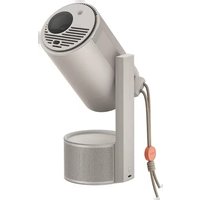
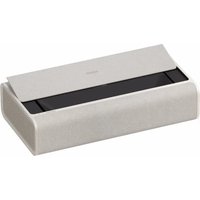
- MOGO 2 PRO
- CONTENTS
- OVERVIEW
- FRONT VIEW
- EN NOTE
- DE HINWEIS
- PLEASE READ THE PRODUCT INSTRUCTIONS CAREFULLY BEFORE USING THE PRODUCT
- ABOUT THE PRODUCT INSTRUCTIONS (HEREINAFTER REFERRED TO AS "THE INSTRUCTIONS")
- HDMI®
- DOLBY AUDIO
- GETTING STARTED
- ① POWER ON / OFF
- ② REMOTE CONTROL PAIRING
- REMOTE CONTROL FUNCTIONS
- INTELLIGENT SCREEN ADAPTION TECHNOLOGY
- ⑤ GOOGLE ASSISTANT
- SETTINGS
- CHROMECAST BUILT-IN™
- NOTE
- SYSTEM UPGRADE
- ONLINE UPGRADE
- WARNING
- CAUTION
- WARNING FOR REMOTE CONTROLLER AND PORTAL DEVICE
- CORRECT USE OF THE DEVICE
- FCC WARNING
- NOTES
- DECLARATION OF CONFORMITY
- ISED WARNING
- RADIATION EXPOSURE STATEMENT
- WIRELESS SPECIFICATION
- EAC ROHS CE UK CA
- ⑤ ASSISTANT GOOGLE
- GOOGLE ASSISTANT
Brand : XGIMI
Model : MoGo
Category : Projector