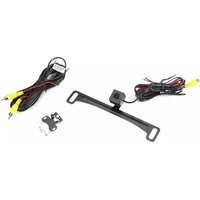
ACA801 - Dash cam AUDIOVOX - Free user manual and instructions
Find the device manual for free ACA801 AUDIOVOX in PDF.


Pick your language and provide your email: we'll send you a specifically translated version.
| Product Type | Dash Cam |
| Brand | Audivox |
| Model | ACA801 |
| Dimensions (approx.) | 5.5 x 2.5 x 1.5 inches |
| Weight | 100 g (approx.) |
| Power Supply | 12V DC via cigarette lighter adapter |
| Battery | Built-in rechargeable lithium battery |
| Video Resolution | Full HD 1080p |
| Field of View | 140 degrees |
| Recording Mode | Loop recording |
| G-Sensor | Built-in for impact detection |
| Night Vision | Infrared LEDs |
| Storage | MicroSD card up to 32GB (not included) |
| Display | 2.0 inch LCD screen |
| Mounting | Suction cup or adhesive bracket |
| Connectivity | USB for data transfer and charging |
| Maintenance | Clean lens with soft cloth; avoid solvents |
| Safety | Ensure device does not obstruct driver's view |
| Spare Parts | Mount, USB cable, car charger, manual |
| Repairability | Not user-serviceable; contact support |
| Warranty | 1 year limited |
Frequently Asked Questions - ACA801 AUDIOVOX
How do I install the dash cam?
Attach the mount to the windshield using the suction cup or adhesive, insert a MicroSD card, connect the power adapter to the cigarette lighter, and adjust the camera angle.
How do I set the date and time?
Press the Menu button, navigate to Date/Time settings, and use the arrow keys to adjust. Confirm with the OK button.
Why is my video recording choppy or skipping?
Ensure you are using a high-speed MicroSD card (Class 10 or higher). Also check that the card is formatted in the camera or as FAT32.
Can I use the dash cam while charging?
Yes, the camera operates with the power adapter connected. It also charges its internal battery while powered.
How do I view recorded videos?
Press the Play button on the camera, or remove the MicroSD card and insert it into a computer to access files.
What does the G-Sensor do?
The G-Sensor detects a sudden impact or collision and automatically locks the current video file to prevent overwriting.
How do I reset the dash cam?
Use a paperclip to press the reset hole on the side of the device. This will restore factory settings.
Does the camera record sound?
Yes, the built-in microphone records audio. You can disable it in the settings if desired.
How long does the internal battery last?
The battery lasts approximately 30 minutes when fully charged, mainly for short-term parking mode or file saving.
What should I do if the screen shows 'Card Error'?
Try formatting the MicroSD card in the camera via Menu > Format. If the error persists, replace the card with a compatible one (up to 32GB, Class 10).
User questions about ACA801 AUDIOVOX
0 question about this device. Answer the ones you know or ask your own.
Ask a new question about this device
No questions yet. Be the first to ask one.
Download the instructions for your Dash cam in PDF format for free! Find your manual ACA801 - AUDIOVOX and take your electronic device back in hand. On this page are published all the documents necessary for the use of your device. ACA801 by AUDIOVOX.
USER MANUAL ACA801 AUDIOVOX
Manual assistant
Powered by Anthropic
Waiting for your message
Product information
Brand : AUDIOVOX
Model : ACA801
Category : Dash cam