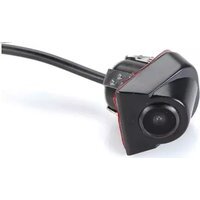
ACA501D - Dash cam AUDIOVOX - Free user manual and instructions
Find the device manual for free ACA501D AUDIOVOX in PDF.


| Product Type | Wired Backup Camera / Dash Cam |
| Brand | Audiovox |
| Model | ACA501D |
| Power Supply | 12V DC from reverse lamp or front power |
| Connection | Wired with RCA video connector |
| Image Flip (Horizontal) | Adjustable by cutting white loop |
| Parking Lines | Dynamic lines that move with vehicle trajectory; can be disabled by cutting blue loop |
| Mounting | Surface mount with double-sided tape; requires 17mm hole |
| Compatibility | Most monitors with RCA video input |
| Trigger Wire | Red wire for reverse trigger (optional if powered from front) |
| Cable Length | Extension cable included (exact length not specified, estimated 5-10 m) |
| Warranty | 12 months limited warranty |
Frequently Asked Questions - ACA501D AUDIOVOX
User questions about ACA501D AUDIOVOX
0 question about this device. Answer the ones you know or ask your own.
Ask a new question about this device
Download the instructions for your Dash cam in PDF format for free! Find your manual ACA501D - AUDIOVOX and take your electronic device back in hand. On this page are published all the documents necessary for the use of your device. ACA501D by AUDIOVOX.
USER MANUAL ACA501D AUDIOVOX
VOXX ^SM Electronics Corporation
Installation / Owner's Guide
Backup Camera / ACA501D
Warning
The product is intended to assist in safe driving and to allow the driver to have a broader rear view while the vehicle is in reverse. You, as the driver, are solely responsible for the safe operation of your vehicle and the safety of your passengers according to local traffic regulations. Your first priority while driving should always be the safe operation of your vehicle. Audiovox Electronics Corporation will not accept any responsibility, whatsoever, for accidents resulting from failure to observe these precautions or safety instructions.
- This product utilizes high voltage. Any unauthorized modifications or damage to the product may result in electrical shock. Handle all components with care. Inspect regularly for damage to components and cabling.
- You are responsible for ensuring that the installation of this product does not void or affect the vehicle manufacturer's warranty. Audiovox Electronics Corporation or its subsidiaries are not liable in full or in part for improper installation resulting in loss or damage to your property, or for voiding all or part of the vehicle manufacturer's warranty.
- Do not apply excessive force to any of the components contained within this kit. Excessive force used before, during or after installation that results in a damaged or non-functional part will void all warranties.
- Please follow the procedures in this installation manual. Improper installation or modification of this product will void all warranties.
Product Description
This camera design integrates a backup camera with your vehicle's rear trunk lid. The camera is easy to mount on your car, truck, or van but ALWAYS CHECK AND DOUBLE CHECK before drilling or mounting any item on the vehicle. Make sure there are no obstructions in front of the camera, behind where mounting the camera, and that the wire can be run without pinching or interfering with any other item.
This Wired Camera is compatible with most monitor/TFT screens and can be connected using a standard RCA connector. If an extension lead is required be sure to use a Video cable with RCA type ends. An Audio cable will cause poor picture quality.
This camera is equipt with Dynamic Parking Lines. When the camera detects the motion of the vehicle, the parking lines on the image will bend to display the trajectory of the vehicle.
Note: The parking lines will only move while the vehicle is in motion.


© 2018 Voxx Electronics Corp., 180 Marcus Blvd, Hauppauge, NY 11768
System Layout
Installation
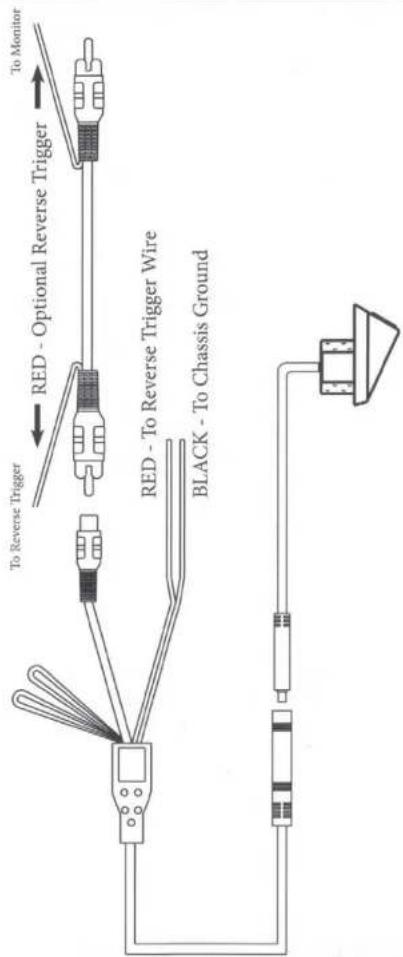
flowchart
graph TD
    A["Sensor"] --> B["To Reverse Trigger"]
    A --> C["Red - Optional Reverse Trigger"]
    A --> D["Black - To Chassis Ground"]
    A --> E["To Monitor"]
    F["Sensor"] --> G["To Reverse Trigger"]
    F --> H["Red - To Reverse Trigger Wire"]
    F --> I["Black - To Chassis Ground"]
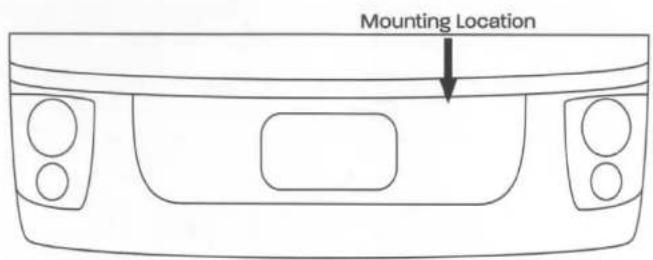
Look for a location that will give you the best view behind the vehicle. This should not be directly next to or under a reverse/backup lamp as it may blind the camera at night. Avoid license plate lamps as well as they too can blind the camera at night.
Before drilling determine the best way to run the power wires to the reverse lights & the extension cable through the car. Insure that your route will not interfere with any safety equipment, trunk release or other items on the vehicle.
Once your location has been confirmed AGAIN DOUBLE CHECK BEFORE YOU DRILL! Look for wires, sensors, double metal, anything that could cause a problem or damage. The camera should lay flat against the mounting surface for proper installation and weather proofing.
-
After selecting a mounting surface, either remove the panel if possible or tape off the area to be drilled with masking tape in order to protect the surroundings.
-
For the ACA50ID Camera, we include a 17mm hole saw. Use this drill bit to drill through your mounting surface for the camera. Make sure that there is not a metal lip or double metal in this area as it could damage the hole saw blade.
- After drilling carefully remove any burs or sharp edges so you do not damage the cable when pulling it through. Coat the edge of the hole with rust preventative. On the ACA501 remove the backing on the double sided tape on the top of the camera base before inserting into the mounting location.
- Carefully route the camera cable connector through the hole and insert the camera into the hole.
Installation (CONT)
Operation
- Wire the Camera's power wire to the vehicle's reverse lamp.
a. Locate the reverse lamp in the tail light assembly.
b. Using a crimp connector or by soldering, attach the red wire to the positive 12 volt wire from the reverse lamp.
c. Attach the black wire to ground.
NOTE: If a trigger wire is required at the front of the vehicle or you wish to power your camera from the front of the vehicle use the additional red wire on the video extension cable.
NOTE: Do not connect to the reverse lamp and to power at the front of the vehicle. This will cause the reverse lamp to turn on any time you power the camera.
- Run the extension cable to the location of the monitor and connect the other end of the extension cable to the camera. Yellow RCA connected to the Video input.
Image Adjustment Loops
This Camera is equipt with two (2) image adjustment loops. These loops are used to orient the camera image so that it is displayed correctly on the monitor
For Front Camera Mounting:
Cut the WHITE Loop. This loop will flip the camera image horizontally. This will be used when installing the camera on the front of the vehicle.
Parking Line Adjustment
Cut the BLUE Loop. This loop will stop the parking lines from moving when the vehicle is in motion.
Reverse Camera Operation:
To use the backup camera, Place the vehicle's gear selector into reverse gear. The camera image will automatically be displayed on the monitor.
Note: Never solely rely on the backup camera while in reverse. Always check use the mirrors to visually check your surroundings and blind spots.
When the vehicle's gear selector is moved to any other gear, the camera image will automatically turn off.
Front Camera Operation:
Please contact your installation center for front camera operation instructions.
Warranty

AUDIOVOX
12 MONTH LIMITED WARRANTY
Applies to Audiovox Series Control Modules, Sirens, Sensors, Transmitters and Relays
Vice Electronics Corporation (the Company) warrants to the original purchaser of this product that should this product or any part thereof, under normal use and conditions, be proven defective in material or人身warming within 12 months from the date of original purchase, such defect(s) will be repaired or replaced with new or preconditioned product, (at the Company's option) without charge for parts or repair labor. To obtain repair or replacement within the terms of this Warranty, the product is to be delivered with proof of warranty coverage (e.g. dated bill of sale), authorization number, specification of defect(s), transportation prepaid, to an approved warranty station. This warranty is not transferable.
This Warranty does not cover damage to the vehicle's electrical system or costs incurred for the installation, removal or reinstallation of the product. This Warranty does not cover letteries nor apply to any product or part thereof which, in the opinion of the Company, has suffered or been damaged through alteration, improper installation, mishandling, misuse, abuse, neglect, accident, or by removal or defacement of the factory serial number/bar code label(s).
This Warranty is in line of all other express warranties or liabilities. ANY IMPLIED WARRANTIES, INCLUDING ANY IMPLIED WARRANTY OF MERCHANTABILITY SHALL BE LIMITED TO THE DURATION OF THIS WRITTEN WARRANTY. ANY ACTION FOR BREACH OF ANY WARRANTY HEREUNDER INCLUDING ANY IMPLIED WARRANTY OF MERCHANTABILITY MUST BE BROUGHT WITHIN A PERIOD OF 24 MONTHS FROM DATE OF ORIGINAL PURCHASE. IN NO CASE SHALL THE COMPANY BE LIABLE FOR ANY CONSEQUENTIAL OR INCIDENTAL DAMAGES FOR BREACH OF THIS OR ANY OTHER WARRANTY: No person or representatively is authorized to assume for the Company any liability other than expressed herein in connection with the sale of this product.
The company does not warrant that this product cannot be compromised or circumvented. THE EXTENT OF THE COMPANY'S LIABILITY UNDER THIS WARRANTY IS LIMITED TO THE REPAIR OR REPLACEMENT PROVIDED ABOVE AND, IN NO EVENT; SHALL THE COMPANY'S LIABILITY EXCEED THE PURCHASE PRICE PAID BY PURCHASER FOR THE PRODUCT WITHOUT INSTALLATION LABOR.
Some states do not allow limitations on how long an implied warranty lasts or the exclusion or limitation of incidental or consequential damage so the above limitations or exclusions may not apply to you. This Warranty gives you specific legal rights and you may also have other rights which vary from state to state.
U.S.A.: Voxia Findetronix Corporation, 180 Merzca Blvd., Hauppauge, New York, 11785
126-9338
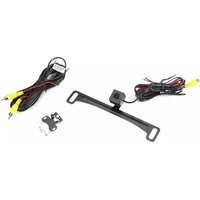
Brand : AUDIOVOX
Model : ACA501D
Category : Dash cam