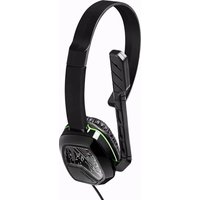
Afterglow LVL 1 - Headphones PDP - Free user manual and instructions
Find the device manual for free Afterglow LVL 1 PDP in PDF.


Pick your language and provide your email: we'll send you a specifically translated version.
| Product Type | Wired Gaming Headset |
| Brand | PDP |
| Model | Afterglow LVL 1 |
| Compatibility | Xbox Series X|S, Xbox One, Windows 10/11 |
| Driver Size | 40 mm |
| Frequency Response | 20 Hz – 20 kHz |
| Impedance | 32 Ohms |
| Microphone Type | Detachable noise-cancelling mic |
| Connection Type | 3.5 mm audio jack + USB-A (for power/LED) |
| Dimensions | 8.5 x 6.7 x 3.5 inches |
| Weight | 0.7 lbs (320 g) |
| Power Source | USB powered (5V) |
| LED Lighting | RGB customizable via included software |
| Controls | In-line remote: volume wheel, mute switch |
| Cable Length | 6.5 ft (2 m) braided cable |
| Ear Cushion Material | Leatherette memory foam |
| Headband Adjustment | Self-adjusting padded headband |
| Cleaning Instructions | Wipe with a dry, soft cloth. Do not use liquids or abrasive cleaners. |
| Safety Precautions | Avoid prolonged use at high volume to prevent hearing damage. Keep away from water and heat sources. |
| Spare Parts Availability | Replaceable ear cushions and cable available from PDP support |
Frequently Asked Questions - Afterglow LVL 1 PDP
How do I connect the PDP Afterglow LVL 1 headset to my Xbox?
Plug the 3.5 mm audio jack into your controller and connect the USB-A cable to the console's USB port to power the LEDs.
Can I use this headset with a PlayStation or Nintendo Switch?
The headset is designed for Xbox and PC only. It may work with other devices via the 3.5 mm jack but LED and chat features may not be supported.
How do I adjust the volume and mute the microphone?
Use the volume wheel on the in-line remote to adjust volume. Flip the mute switch to mute or unmute the mic.
The RGB lights are not turning on. What should I do?
Ensure the USB cable is fully inserted into a powered USB port. If still not lit, try a different USB port or restart your console.
How do I detach the microphone?
Hold the mic plug and gently pull it straight out from the ear cup. Align the notch when reattaching.
Why is there no sound coming from the headset?
Check the audio jack connection, ensure volume is not muted, and verify audio settings on your device. Test with another device if possible.
Can I customize the RGB lighting?
Yes, download the PDP Control Hub software on PC to adjust lighting patterns, colors, and effects.
How do I clean my Afterglow LVL 1 headset?
Wipe the ear cushions and headband with a dry, soft cloth. Avoid using any liquids or chemical cleaners.
Is the headset compatible with Windows 11?
Yes, it works with Windows 10 and 11. Install the PDP Control Hub for full LED customization.
What is the warranty period?
PDP offers a 2-year limited warranty from the date of purchase. Contact PDP support for warranty claims.
User questions about Afterglow LVL 1 PDP
0 question about this device. Answer the ones you know or ask your own.
Ask a new question about this device
No questions yet. Be the first to ask one.
Download the instructions for your Headphones in PDF format for free! Find your manual Afterglow LVL 1 - PDP and take your electronic device back in hand. On this page are published all the documents necessary for the use of your device. Afterglow LVL 1 by PDP.
USER MANUAL Afterglow LVL 1 PDP


Manual assistant
Powered by Anthropic
Waiting for your message
Product information
Brand : PDP
Model : Afterglow LVL 1
Category : Headphones