
TEW-691GR, TEW-692GR - Wireless Router TRENDNET - Free user manual and instructions
Find the device manual for free TEW-691GR, TEW-692GR TRENDNET in PDF.


| Product Type | Concurrent dual-band wireless router |
| Brand | TRENDnet |
| Model | TEW-691GR / TEW-692GR |
| Wireless speeds | Up to 450 Mbps (2.4 GHz + 5 GHz simultaneously) |
| Wireless standards | IEEE 802.11a/b/g/n |
| LAN ports | 4 RJ-45 Gigabit Ethernet ports (10/100/1000 Mbps) |
| WAN port | 1 RJ-45 Gigabit Ethernet port |
| Power | Power adapter 12V DC, 1A |
| Wireless security | WEP, WPA-PSK, WPA2-PSK (AES/TKIP) |
| Main features | Setup wizard, parental control (not specified), NAT/SPI firewall, QoS, VPN pass-through |
| Approximate dimensions | 190 x 120 x 30 mm |
| Approximate weight | 250 g |
| Maintenance and cleaning | Clean with a soft, dry cloth. Do not use liquid or abrasive products. |
| Electrical safety | Compliant with European directives (CE). Use only the supplied adapter. |
| Spare parts and repairability | No user-serviceable parts. For any repairs, contact TRENDnet after-sales service. |
| General information | Concurrent dual-band router 450 Mbps. Configuration via web interface (192.168.10.1). Compatible with all Internet service providers (ADSL, cable, fiber). |
Frequently Asked Questions - TEW-691GR, TEW-692GR TRENDNET
User questions about TEW-691GR, TEW-692GR TRENDNET
0 question about this device. Answer the ones you know or ask your own.
Ask a new question about this device
Download the instructions for your Wireless Router in PDF format for free! Find your manual TEW-691GR, TEW-692GR - TRENDNET and take your electronic device back in hand. On this page are published all the documents necessary for the use of your device. TEW-691GR, TEW-692GR by TRENDNET.
USER MANUAL TEW-691GR, TEW-692GR TRENDNET
IP Address: __. _. . ___. (p. ex. 215.24.24.129)
3. PPP over Ethernet
Nom d'utilisateur:
Mot de passer:
DNS principal:
DNS Secondaire:
Clone de I'adresse MAC (Activer/Désactiver)
Wireless Security Setup Wizard
The following Web-based Setup Wizard is designed to assist you in your wireless network setup. This wizard can be used through step-by-step instructions on how to set up your wireless network and how to make it secure.
Launch Wireless Security Setup Wizard
Note: Some changes made using this Setup Wizard may require you to change some settings on your wireless client adapters so they can still connect to the router.
-
I typed http://192.168.10.1 in my Internet Browser's Address Bar, but an error message says "The page cannot be displayed." How can I get into the TEW-692GR's web configuration page?
-
Check your hardware settings again by following the instructions in Section 2.
- Make sure the Network Port and Wireless lights are lit.
- Make sure your TCP/IP settings are set to Obtain an IP address automatically (see the steps below).
- If you are still having problems, reset the TEW-692GR. To reset the TEW-692GR, take a pin or paperclip and press the reset button on the back of the wireless router for 20 seconds. Then let go.
Windows 7
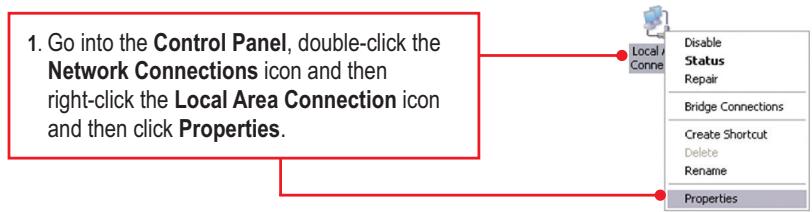
- Go into the Control Panel, click Network and Internet, click Network and Sharing Center, click Change Adapter Settings and then right-click the Local Area Connection icon and then click Properties.

Local Area Connection Identify NVIDIA nDisable
Disable
Status
Diagnose
Bridge Connections
Create Shortcut
Delete
Rename
Properties
Obain an IP address automatically
Use the following IP address:
IP address:
Subnet mask:
Default gateway
- Click Internet Protocol Version 4(TCP/IPv4) and then click Properties. Then click on Obtain an IP address automatically.
Windows Vista
- Go into the Control Panel, click Network and Internet, click Network and Sharing Center, click Manage Network Connections and then right-click the Local Area Connection icon and then click Properties.

Local Area Connection
Identifyin
NVIDIA n
Disable
Status
Diagnose
Bridge Connections
Create Shortcut
Delete
Rename
Properties
Obain an IP address automatically
Use the following IP address:
IP address:
Subnet mask:
Default gateway
- Click Internet Protocol Version 4(TCP/IPv4) and then click Properties. Then click on Obtain an IP address automatically.

2. I am not sure what type of Internet Account Type I have for my Cable/DSL connection. How do I find out?
Contact your Internet Service Provider's (ISP) support service for the correct information.
3. I configured my router with my ISP settings, but I cannot get onto the Internet. What should I do?
- Verify that you can get onto the Internet with a direct connection into your modem.
- Contact your ISP and verify all the information that you have in regards to your Internet connection settings is correct.
- Power cycle your modem and router. Unplug the power to the modem and router. Wait 30 seconds, and then reconnect the power to the modem. Wait for the modem to fully boot up, and then reconnect the power to the router.
4. All the settings are correct, but I cannot make a wireless connection to the Router. What should I do?
- Double check that the WLAN light on the Router is lit.
- Power cycle the TEW-692GR. Unplug the power to the router. Wait 30 seconds and then reconnect the power to the router.
- Contact the manufacturer of your wireless network adapter and make sure the wireless network adapter is configured with the proper SSID. The default SSID of the TEW-692GR is TRENDnet692_2.4GHz and TRENDnet692_5GHz. If you have enabled any encryption on the TEW-692GR, make sure to configure the wireless network adapter with the same wireless security password.
5. When I connect a computer to the router's LAN port, I am not getting Gigabit speeds. What should I do?
- Make sure that you have a Gigabit Ethernet adapter installed.
-
Make sure to use a Cat-5e or Cat 6 network cable. Some CAT-5 cables are not rated to run in Gigabit.
-
Please give me an explanation of all the LEDs and Buttons.
| LED/Button | Color | Sequence | Definition |
| Power LED | Green | Solid | Device is on |
| N/A | Off | Device is off | |
| Network Port Link/Act LEDs(Ports 1-4) | Green | Solid | LAN port connected at 10/20 Mbps or 100/200Mbps(Half/Full Duplex) |
| Blinking | LAN port data transmitting/receiving 10/20Mbpsor 100/200Mbps (Half/Full Duplex) | ||
| Amber | Solid | LAN port is connected at 2000Mbps (Full Duplex) | |
| Blinking | LAN port data transmitting/receiving at 2000Mbps(Full Duplex) | ||
| N/A | Off | LAN port is disconnected/No Ethernet Link | |
| WAN Link/Act LED | Green | Solid | WAN port is connected at 10/20Mbps or 100/200Mbps(Half/Full Duplex) |
| Blinking | WAN port data transmitting/receiving at 10/20Mbpsor 100/200Mbps (Half/Full Duplex) | ||
| Amber | Solid | WAN port is connected at 2000Mbps (Full Duplex) | |
| Blinking | WAN port data transmitting/receiving at 2000Mbps(Full Duplex) | ||
| N/A | Off | WAN port is disconnected/No Ethernet Link | |
| Wireless (2.4GHz)LED | Green | Blinking | Wireless LAN (2.4GHz) is on or enabled/Wireless data transmission |
| N/A | Off | Wireless LAN (2.4GHz) is off or disabled | |
| Wireless (5GHz)LED | Blue | Blinking | Wireless LAN (5GHz) is on or enabled/Wireless data transmission |
| N/A | Off | Wireless LAN (5GHz) is off or disabled | |
| WPS LED | Green | Solid | WPS authentication process complete |
| Blinking | WPS authentication in process | ||
| N/A | Off | WPS is not activated or disabled | |
| Power Switch(EU Version only) | N/A | N/A | Turns on/off power to the TEW-692GR |
| Reset Button | N/A | N/A | Hold 20 seconds to reset device to factory defaults |
| WPS Button | N/A | N/A | Hold 3 seconds to activate WPS |
If you still encounter problems or have any questions regarding the TEW-692GR, please contact TRENDnet's Technical Support Department.
The following are some general wireless tips to help minimize the impact of interference within an environment.
Assign your network a unique SSID
Do not use anything that would be identifying like "Smith Family Network". Choose something that you would easily identify when searching for available wireless networks.
Do not turn off the SSID broadcast
The SSID broadcast is intended to be on and turning it off can cause connectivity issues. The preferred method of securing a wireless network is to choose a strong form of encryption with a strong and varied encryption key.
Note: after setting up the SSID, encryption type and encryption key/passphrase, please make a note of them for future reference. You will need this information to connect your wireless computers to the wireless router/access point.
Change the channel
Most wireless access points and routers are defaulted to channel 6. If you have a site survey tool that will display the channels you can plan your channel selection around neighboring access points to minimize interference from them. If your site survey tool does not display the channel try using channels 1 or 11.
Change the channel bandwidth
If you are using an 802.11n router or access point you can also make the following changes. Change the channel bandwidth to 20/40MHz. This will provide the highest possible performance using an 802.11n device. Also, if using 802.11n you should be securing the network with WPA2 security.
Note: Due to Wi-Fi certification considerations if you choose WEP, WPA or WPA2-TKIP encryption this device may operate in legacy wireless mode (802.11b/g). You may not get 802.11n performance as these forms of encryption are not supported by the 802.11n specification.
Avoid stacking hardware on top of each other to prevent overheating issues
Maintain enough free space around the hardware for good ventilation and airflow. There should also be plenty of free space around the antennas to allow the wireless signal to propagate. Please also make sure that the wireless hardware is not placed in any type of shelving or enclosures.
There are a number of other environmental factors that can impact the range of wireless devices.
- Adjust your wireless devices so that the signal is traveling in a straight path, rather than at an angle. The more material the signal has to pass through the more signal you will lose.
Detalls standard applicable:
EN 300 328 V1.7.1: 10-2006
EN 301 489-1 V1.8.1: 04-2008
Director of Technology
Position / Title

Signature
GPL/LGPL General Information
This TRENDnet product includes free software written by third party developers. These codes are subject to the GNU General Public License ("GPL") or GNU Lesser General Public License ("LGPL"). These codes are distributed WITHOUT WARRANTY and are subject to the copyrights of the developers. TRENDnet does not provide technical support for these codes. The details of the GNU GPL and LGPL are included in the product CD-ROM.
Please also go to (http://www.gnu.org/licenses/gpl.txt) or (http://www.gnu.org/licenses/gpl.txt) for specific terms of each license.
The source codes are available for download from TRENDnet's web site (http://trendnet.com/downloads/list_gpl.asp) for at least three years from the product shipping date.
You could also request the source codes by contacting TRENDnet.
20675 Manhattan Place, Torrance, CA 90501, USA. Tel: +1-310-961-5500 Fax: +1-310-961-5511
Informations generales GPL/LGPL
Alternatively, you can use the following code to implement the TRENDDnet.
20675 Manhattan Place, Torrance, CA 90501, USA. Tel: +1-310-961-5500 Fax: +1-310-961-5511
067aIHHFopMaIgOJIuHcEHNxGPL/LGPL
B coctab dahHoro npOdykta TRENDnet bXoDIT 6ecnllatHoe npOrpammHoe oecneueHme, hAncaHoe cToPOHHMM papa60tHcMM. 3rO IIO paocnpocpaTaeHa ycNobmI liuHem3n GUN General Public License ("GPL") iINi GNU Lesser General Public License ("LGPL"). IporpammbI paocnpocTahnOHTe B3 fApaHTIn oXpanHOTa cTbOpckmm npAbampaPap60tchNko.TRENDnet He OKa3bIaBaeTe XHmEeKyU OndepRkcy tTOr npOrpammHORO oecneueHHe. Ipo4o6Hoe oncaHHe nIeuH3n GUN GPL LGPL moKHO haNTn HAOMaKT-dNcke, npImraaEMOM K npOdykTu.
B nyhKtax (http://www.gnu.org/licenses/gpl.txt) n (http://www.gnu.org/licenses/gpl.txt) n30KeHb KOKHeTbIe ycnOBIA kackdN 13 liNeHnA
Ncdohndk oD pnpaam DocytnenB aqzaykr C be6-caita TRENDnet ( http://trendnet.com/downloads/list_glp.asp ) B TENEHNI KAK MNNHMYM, TEX net GO hNOCTABK npODKTA.
Kpomo TOrE, XyocDnB KIo MOnkO 3anpoCbT no apdecy TRENDnet. 20675 Manhattan Place, Torrance, CA 90501, USA. Tel: +1-310-961-5500 Fax: +1-310-961-5511
This equipment has been tested and found to comply with FCC and CE Rules. Operation is subject to the following two conditions:
(1) This device may not cause harmful interference.
(2) This device must accept any interference received. Including interference that may cause undesired operation.


Waste electrical and electronic products must not be disposed of with household waste. Please recycle where facilities exist. Check with you Local Authority or Retailer for recycling advice.

NOTE: THE MANUFACTURER IS NOT RESPONSIBLE FOR ANY RADIO OR TV INTERFERENCE CAUSED BY UNAUTHORIZED MODIFICATIONS TO THIS EQUIPMENT. SUCH MODIFICATIONS COULD VOID THE USER'S AUTHORITY TO OPERATE THE EQUIPMENT.
ADVERTENCIA
Product Warranty Registration
Please take a moment to register your product online. Go to TRENDnet's website at http://www.trendnet.com/register
- PPP over Ethernet
- Wireless Security Setup Wizard
- Windows 7
- Obain an IP address automatically
- Use the following IP address:
- Windows Vista
- I am not sure what type of Internet Account Type I have for my Cable/DSL connection. How do I find out?
- I configured my router with my ISP settings, but I cannot get onto the Internet. What should I do?
- All the settings are correct, but I cannot make a wireless connection to the Router. What should I do?
- When I connect a computer to the router's LAN port, I am not getting Gigabit speeds. What should I do?
- Assign your network a unique SSID
- Do not turn off the SSID broadcast
- Change the channel
- Change the channel bandwidth
- Avoid stacking hardware on top of each other to prevent overheating issues
- There are a number of other environmental factors that can impact the range of wireless devices.
- Detalls standard applicable:
- GPL/LGPL General Information
- Informations generales GPL/LGPL
- 067aIHHFopMaIgOJIuHcEHNxGPL/LGPL
- ADVERTENCIA
- Product Warranty Registration
Brand : TRENDNET
Model : TEW-691GR, TEW-692GR
Category : Wireless Router