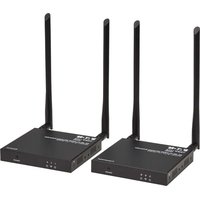
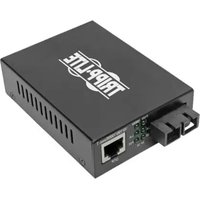
B127-1A1-WHD3 - Audio/video converter Tripp Lite - Free user manual and instructions
Find the device manual for free B127-1A1-WHD3 Tripp Lite in PDF.


Pick your language and provide your email: we'll send you a specifically translated version.
| Product Type | Wireless HDMI Transmitter and Receiver Kit |
| Brand | Tripp Lite |
| Model | B127-1A1-WHD3 |
| Video Input | HDMI |
| Video Output | Wireless HDMI |
| Max Resolution | 1080p @ 60Hz |
| Wireless Range | Up to 100 ft (30 m) line-of-sight |
| Frequency Band | 5 GHz |
| Latency | < 1 ms |
| Encryption | 128-bit AES |
| Power Supply | USB 5V (2x micro-USB cables included) |
| Transmitter Dimensions | 3.5 x 2.0 x 0.8 in (8.9 x 5.1 x 2.0 cm) |
| Receiver Dimensions | 3.5 x 2.0 x 0.8 in (8.9 x 5.1 x 2.0 cm) |
| Transmitter Weight | 0.2 lbs (90 g) |
| Receiver Weight | 0.2 lbs (90 g) |
| Operating Temperature | 32°F to 104°F (0°C to 40°C) |
| Compliance | FCC, CE |
| Warranty | 1-year limited |
| Maintenance | Wipe with a soft, dry cloth. Do not use liquids. |
| Safety | Keep away from moisture. Do not disassemble. |
| Spare Parts | Contact Tripp Lite support for replacement cables. |
Frequently Asked Questions - B127-1A1-WHD3 Tripp Lite
What devices are compatible with the B127-1A1-WHD3?
The kit works with any HDMI source (e.g., laptop, game console) and HDMI display (e.g., TV, projector). Supports 1080p @ 60Hz.
How do I set up the wireless HDMI extender?
Connect the transmitter to your source via HDMI and power via USB. Connect the receiver to your display via HDMI and power. They will automatically pair.
What is the maximum wireless range?
Up to 100 feet (30 meters) line-of-sight. Walls and obstacles may reduce range.
Does it support 4K resolution?
No, this model supports up to 1080p @ 60Hz. For 4K, consider another Tripp Lite model.
Can I connect multiple receivers to one transmitter?
No, this kit supports only a 1-to-1 connection. For multiple displays, you need a separate receiver per transmitter.
How do I avoid wireless interference?
Use the 5 GHz band which is less congested. Keep the transmitter and receiver within line-of-sight and away from other wireless devices like routers.
Is there any audio delay?
The latency is less than 1 ms, so audio and video remain synchronized.
How do I clean the device?
Wipe with a soft, dry cloth. Do not use any liquids or abrasive cleaners.
What is the warranty period?
Tripp Lite provides a 1-year limited warranty against defects in materials and workmanship.
Can I extend the range further?
No, the wireless range is fixed. For longer distances, consider a wired HDMI extender over Ethernet.
User questions about B127-1A1-WHD3 Tripp Lite
0 question about this device. Answer the ones you know or ask your own.
Ask a new question about this device
No questions yet. Be the first to ask one.
Download the instructions for your Audio/video converter in PDF format for free! Find your manual B127-1A1-WHD3 - Tripp Lite and take your electronic device back in hand. On this page are published all the documents necessary for the use of your device. B127-1A1-WHD3 by Tripp Lite.
USER MANUAL B127-1A1-WHD3 Tripp Lite
Manual assistant
Powered by Anthropic
Waiting for your message
Product information
Brand : Tripp Lite
Model : B127-1A1-WHD3
Category : Audio/video converter