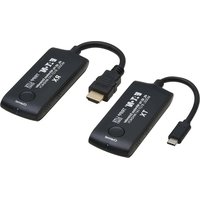
B127-1A1-WHD4CH - Audio/video converter Tripp Lite - Free user manual and instructions
Find the device manual for free B127-1A1-WHD4CH Tripp Lite in PDF.


| Product Type | Wireless HDMI Extender (Transmitter and Receiver Kit) |
| Model | B127-1A1-WHD4CH |
| Brand | Tripp Lite |
| Video Resolution | Up to 4K @ 60Hz (4:4:4) |
| Maximum Range | Up to 100 meters (330 feet) line-of-sight |
| HDMI Input | 1x HDMI (Type A, female) on transmitter |
| HDMI Output | 1x HDMI (Type A, female) on receiver |
| Wireless Frequency | 5 GHz band |
| Latency | Less than 1 ms (ultra-low) |
| Supported Audio | LPCM 2.0, Dolby Digital, DTS |
| HDCP Support | HDCP 2.2 and 1.4 compliant |
| Power Supply | 2x 5V DC, 1A adapters (included) |
| Power Consumption | 5W per unit (max) |
| Dimensions (Transmitter) | 3.5 x 2.5 x 0.8 inches (89 x 64 x 20 mm) |
| Dimensions (Receiver) | 3.5 x 2.5 x 0.8 inches (89 x 64 x 20 mm) |
| Weight (each) | 0.2 lbs (90 g) |
| Operating Temperature | 32°F to 104°F (0°C to 40°C) |
| Storage Temperature | -4°F to 140°F (-20°C to 60°C) |
| Warranty | 3-Year Limited Warranty |
| Compliance | FCC, CE, RoHS |
| Mounting | Wall-mountable with included brackets |
| Included Accessories | 2x power adapters, 2x mounting brackets, user manual |
| Cleaning | Wipe with dry cloth; do not use liquids |
| Spare Parts | Contact Tripp Lite support for replacement power adapters |
| Repairability | No user-serviceable parts; contact professional service |
Frequently Asked Questions - B127-1A1-WHD4CH Tripp Lite
User questions about B127-1A1-WHD4CH Tripp Lite
0 question about this device. Answer the ones you know or ask your own.
Ask a new question about this device
Download the instructions for your Audio/video converter in PDF format for free! Find your manual B127-1A1-WHD4CH - Tripp Lite and take your electronic device back in hand. On this page are published all the documents necessary for the use of your device. B127-1A1-WHD4CH by Tripp Lite.
USER MANUAL B127-1A1-WHD4CH Tripp Lite
4K 60 Hz HDMI over Wireless Extender Kit
B127-1A1-WHD4CH
(USB-C Mini Transmitter + HDMI Mini Receiver)

Purchased product may differ from image.
Important Safety Instructions

- Do not expose this device to rain or place it near water. Any liquid that goes into the device may cause a failure, fire, or electric shock.
- Never insert anything metallic into the open parts of this device. This may cause an electric shock.
- The device should be repaired only by a qualified technician.
- Do not place this device near or over a radiator or heat register, or where it is exposed to direct sunlight.
Features
• Supports up to 3840 x 2160 @ 60 Hz resolution, backward compatible.
• Supports wireless transmission up to 65 ft. / 20 m (line of sight).
• Supports SSID pairing and channel switching to avoid interference.
• Supports 5G wireless frequency bands, for strong anti-interference.
• Supports firmware upgrade via Micro USB port.
- Portable design, plug and play.
Package Contents

Transmitter x1

Receiver x1

Micro USB cable x2
User Documentation x1
Installation Requirements
• USB-C source device (DVD, game console, PC, etc.)
• HDMI display device (TV, projector, LED screen, etc.)
Product Description
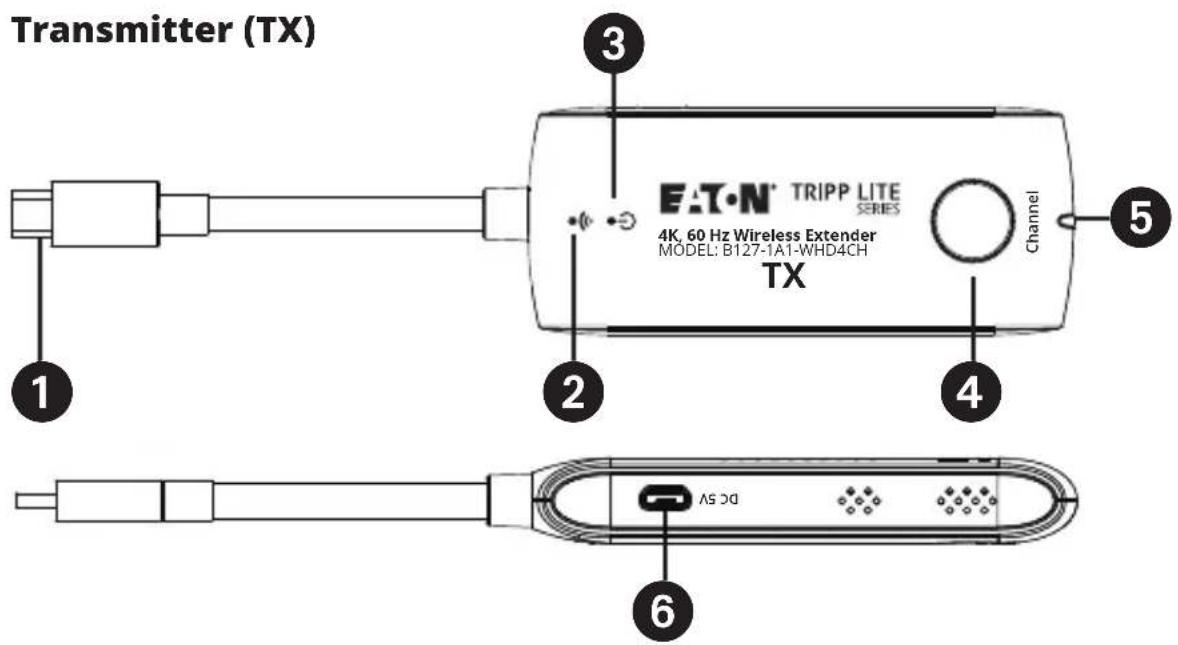
1 USB-C input Connects to a USB-C source device
2 WiFi indicator Slow flash: waiting for connection
Steady on: connection succeeded
Quick flash: SSID Pairing mode
3 Power indicator The indicator will turn red when the power is turned on
4 Channel switch button Press to switch channels
Press and hold 5s for SSID pairing
Press and hold 10s for restore factory settings
5 Signal indicator Light off: no HDMI signal
Steady on: HDMI signal is transmitting
Quick flash: restore factory settings
6 Micro USB port Firmware upgrade
Product Description

① HDMI output Connects to an HDMI display device
2 WiFi indicator Slow flash: waiting for connection
Steady on: connection succeeded
Quick flash: SSID Pairing mode
3 Power indicator The indicator will turn red when the power is turned on
4 Channel switch button After connecting with TX, press to switch channels Press and hold 5s for SSID pairing Press and hold 10s for restore factory settings
5 Signal indicator Light off: no HDMI signal
Steady on: HDMI signal is transmitting
Quick flash: restore factory settings
6 Micro USB port For power input and firmware upgrade
Installation
1. Connection Diagram
One to one connection


USB-C Source Device HDMI DispTransmitter
2. Connection Instructions
- Connect the transmitter to the USB-C output port of the signal source device.
- Connect the receiver to the HDMI input port of the display device.
- Plug the power supply into the devices to get started.
Note: Please connect the Micro USB cable to the 5V 1A wall charger when transmitting 4K video, for long-distance use, or when the picture is not smooth.
3. SSID Pairing
- Enter the SSID pairing mode by holding the transmitter and receiver's channel switch buttons for five seconds. Both WiFi connection indicators will flash quickly in blue.
- When the SSID pairing is successful, the WiFi indicators on the transmitter and receiver will change from quick flashing to slow flashing or steady on.
| NO. Frequency | |
| Channel 1 5.180 GHz | |
| Channel 2 5.200 GHz | |
| Channel 3 5.220 GHz | |
| Channel 4 5.240 GHz |
6
FAQ
Q: Why the receiver and transmitter cannot be connected, showing "Search ipcolor Tx..." on the screen?
A: 1) Move transmitter and receiver closer.
2) Re-power the transmitter or receiver.
3) Re-pair the transmitter and receiver.
Q: Why is the Wi-Fi indicator steady on. but showing "Please check the TX input signal"?
A: 1) Make sure the TX has a USB Type-C input and that the resolution is within the specified range.
2) Try to connect the signal source directly to the display device, or change the signal source and test again.
Q: Why is the display stuttering or unstable?
A: 1) Place the transmitter or receiver within the signal coverage and minimize obstructions between the transmitter and receiver.
2) Switch to a different channel to avoid interference from other wireless signals.
3) Re-power the receiver or transmitter.
Specifications
| Power Supply Voltage | Current Micro USB power supply (5V/1A) | |
| Power consumption TX < 5W, RX < 3.5W | ||
| HDMI Performance and Interface | HDMI version HDMI 2.0 | |
| HDCP version HDCP 1.4/HDCP 2.2 | ||
| Maximum transfer rate 18 Gbps | ||
| Resolution supported 3840x21 | 60@24/30/50/60 Hz(YUV 4:4:4, YUV 4:2:2 and RGB),1080p@50/60 Hz, 720p@50/60 Hz,1920x1200@60 Hz | |
| Input and outputTMDS signal | 0.7~1.2Vp-p (TMDS) | |
| Input and outputDDC signal | 5Vp-p (TTL) | |
| Transmission Wi-Fi Frequency bands 5.18-5.24 GHz | ||
| Protection Level ESD protection 1a Contact discharge level 31b Air discharge level 3Standard: IEC61000-4-2 | ||
Specification
| Operating Environment | Operating temperature -4~122°F (-20~50°C) |
| Storage temperature -22~158°F (-30~70°C) | |
| Humidity (non-condensing) 0~90% RH | |
| Physical Properties Dimensions [W x L x H] TX / RX: 1.6 x 9 x 0.6 in.(40 x 230 x 15 mm) | |
Warranty and Product Registration
1-Year Limited Warranty
We warrant our products to be free from defects in materials and workmanship for a period of one (1) year from the date of initial purchase. Our obligation under this warranty is limited to repairing or replacing (at its sole option) any such defective products. Visit Tripplite.Eaton.com/support/product-returns before sending any equipment back for repair. This warranty does not apply to equipment which has been damaged by accident, negligence or misapplication or has been altered or modified in any way.
EXCEPT AS PROVIDED HEREIN, WE MAKE NO WARRANTIES, EXPRESS OR IMPLIED, INCLUDING WARRANTIES OF MERCHANTABILITY AND FITNESS FOR A PARTICULAR PURPOSE. Some states do not permit limitation or exclusion of implied warranties; therefore, the aforesaid limitation(s) or exclusion(s) may not apply to the purchaser.
EXCEPT AS PROVIDED ABOVE, IN NO EVENT WILL WE BE LIABLE FOR DIRECT, INDIRECT, SPECIAL, INCIDENTAL OR CONSEQUENTIAL DAMAGES ARISING OUT OF THE USE OF THIS PRODUCT, EVEN IF ADVISED OF THE POSSIBILITY OF SUCH DAMAGE. Specifically, we are not liable for any costs, such as lost profits or revenue, loss of equipment, loss of use of equipment, loss of software, loss of data, costs of substitutes, claims by third parties, or otherwise.
Product Registration
Visit Tripplite.Eaton.com/warranty today to register your new product. You'll be automatically entered into a drawing for a chance to win a FREE Eaton Tripp Lite series product!*
* No purchase necessary. Void where prohibited. Some restrictions apply. See website for details.
Regulatory Compliance Identification Numbers
For the purpose of regulatory compliance certifications and identification, your product has been assigned a unique series number. The series number can be found on the product nameplate label, along with all required approval markings and information. When requesting compliance information for this product, always refer to the series number. The series number should not be confused with the marking name or model number of the product.
Warranty and Product Registration
WEEE Compliance Information for Customers and Recyclers (European Union)
Under the Waste Electrical and Electronic Equipment (WEEE) Directive and implementing regulations, when customers buy new electrical and electronic equipment from Eaton, they are entitled to:

- Send old equipment for recycling on a one-for-one, like-for-like basis (this varies depending on the country)
- Send the new equipment back for recycling when this ultimately becomes waste
Eaton has a policy of continuous improvement. Specifications are subject to change without notice.

Powering Business Worldwide
Eaton
1000 Eaton Boulevard
Cleveland, OH 44122
United States
Eaton.com
© 2023 Eaton
All Rights Reserved
Publication No. 23-10-177 /
93-4994 revA
December 2023
Eaton is a registered
trademark.
All trademarks are property
of their respective owners.
12
- 4K 60 HZ HDMI OVER WIRELESS EXTENDER KIT
- IMPORTANT SAFETY INSTRUCTIONS
- FEATURES
- PACKAGE CONTENTS
- INSTALLATION REQUIREMENTS
- PRODUCT DESCRIPTION
- INSTALLATION
- CONNECTION DIAGRAM
- CONNECTION INSTRUCTIONS
- SSID PAIRING
- FAQ
- WARRANTY AND PRODUCT REGISTRATION
- 1-YEAR LIMITED WARRANTY
- PRODUCT REGISTRATION
- REGULATORY COMPLIANCE IDENTIFICATION NUMBERS
- WEEE COMPLIANCE INFORMATION FOR CUSTOMERS AND RECYCLERS (EUROPEAN UNION)
Brand : Tripp Lite
Model : B127-1A1-WHD4CH
Category : Audio/video converter