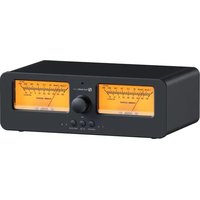
LC30 - Loudspeaker Fosi Audio - Free user manual and instructions
Find the device manual for free LC30 Fosi Audio in PDF.


| Product Type | Bluetooth Speaker |
| Brand | Fosi Audio |
| Model | LC30 |
| Dimensions (W x H x D) | 200 x 100 x 100 mm |
| Weight | 500 g |
| Output Power | 30 W RMS |
| Bluetooth Version | 5.0 |
| Battery Type | Rechargeable Lithium-ion |
| Battery Capacity | 2200 mAh |
| Charging Port | USB-C |
| Audio Inputs | AUX (3.5 mm), Bluetooth |
| Frequency Response | 80 Hz - 20 kHz |
| Signal-to-Noise Ratio | ≥ 80 dB |
| Operating Range | 10 m (Bluetooth) |
| Charging Time | 2-3 hours |
| Playback Time | Up to 8 hours (50% volume) |
| Water Resistance | IPX5 (splash proof) |
| Material | ABS plastic with fabric grille |
| Microphone | Yes (built-in for hands-free) |
| Controls | Volume, Play/Pause, Next/Previous, Power |
| Included Accessories | USB-C charging cable, AUX cable |
| Cleaning Method | Wipe with a soft, dry cloth |
Frequently Asked Questions - LC30 Fosi Audio
User questions about LC30 Fosi Audio
0 question about this device. Answer the ones you know or ask your own.
Ask a new question about this device
Download the instructions for your Loudspeaker in PDF format for free! Find your manual LC30 - Fosi Audio and take your electronic device back in hand. On this page are published all the documents necessary for the use of your device. LC30 by Fosi Audio.
USER MANUAL LC30 Fosi Audio
Introduction
Thank you for purchasing the LC30 VU meter amplifier/speaker selector!
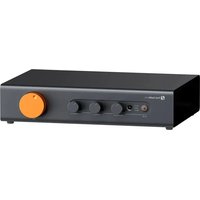
Tailored with audiophiles in mind, the LC30 offers a dual-input/output configuration for flexible audio routing between two sets of amplifiers or speakers, bypassing the need for constant cable swapping and bringing no impacts on the amplifier performance. It stands out with 2 large, square VU meters, offering instant visual feedback on audio signal levels for each channel, and the central control knob is adept at fine-tuning the VU meters' pointer dynamics. Buttons for switching between speakers and amplifiers, power on/off, and VU display brightness are positioned below. Additionally, a high-quality, comprehensive remote control accompanies the LC30, offering immediate, distant switching capability, ensuring fluid control over your audio setup.

① VU Meter
② Infrared Receiver
③ Pointer Sensitivity Adjustment Knob
④ Speaker Switch Button
⑤ Amplifier Switch Button
⑥ Power/VU Meter Brightness Control Button
⑦ Amplifier A Indicator
⑧ Amplifier B Indicator
⑨ Speaker 1 Indicator
⑩ Speaker 2 Indicator
⑪ DC 5V USB-C Power Input
⑫ Amplifier A Connectors
⑬ Amplifier B Connectors
14 Speaker 1 Connectors 15
○ Speakers Connectors
Introduction
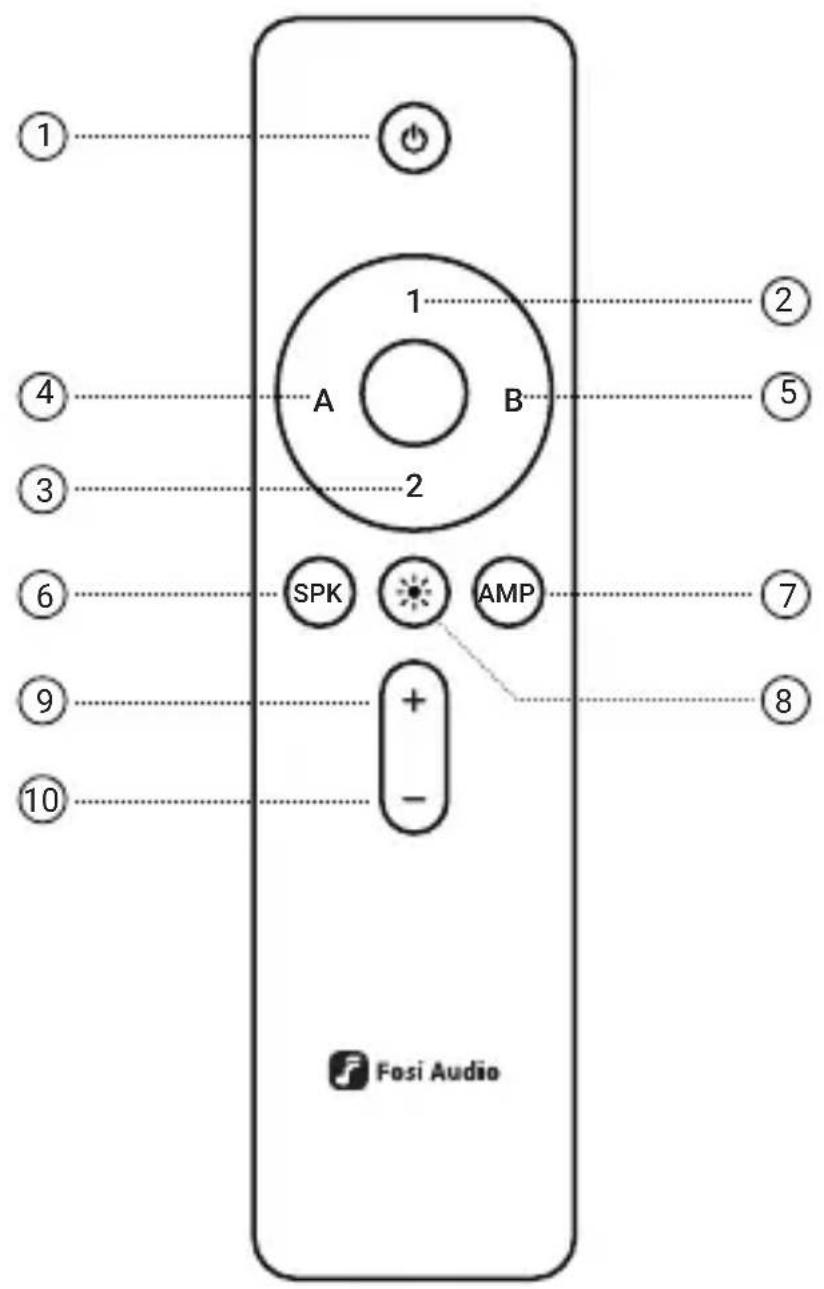
① Power Switch
③ Speaker 2
⑤ Amp B
⑦ Amplifier Selector
⑨ VU Meter Brightness Increase
⑩ VU Meter Brightness Decrease
② Speaker 1
④ Amp A
⑥ Speaker Selector
⑧ VU Meter Light Toggle
Specifications
| Input | Two amplifiers |
| Output | Two pairs of passive speakers |
| Amps Supported | All types including BTL, OCL, Class A, Class D, Class AB, tube amp |
| Maximum Power Output | 250W@4Ω per channel |
| VU Meter Brightness | 4-level adjustment, 100%, 75%, 50%, 0 |
| Amp Protection | Built-in 390Ω resistor for no-load protection |
| Voltage Range | DC 5V |
| Dimensions | 236.6 × 143.5 × 77.4 mm |
| Weight | 1560g |
Package Contents
Fosi Audio LC30 VU Meter Amplifier/Speaker Selector × 1
USB-C Power Cable × 1
User Manual × 1
Remote Control (batteries not included) × 1
Operation Guide
- Connect the USB-C power cable to the DC input port on the LC30 and insert a pair of AAA batteries into the remote control;
- Use speaker cables to connect your speakers to the speaker output terminals on the LC30:
- Connect your amplifier to the amplifier input terminals on the LC30 using speaker cables;
- Turn the VU knob fully counterclockwise and then gently short-press the power button to turn on the device.
Precautions
- The LC30 is capable of connecting to up to two amplifiers and two pairs of speakers. However, it is designed to operate with only one amplifier and one pair of speakers at a time;
- The VU meter pointer sensitivity knob should be adjusted slowly to find the appropriate setting. Rapidly turning the knob to the maximum may result in damage to the VU meter;
- The USB port is for power supply only and does not support data transfer functions.
Frequently Asked Questions
1. Why is only one VU meter's pointer swinging?
The LC30's VU meters independently monitor the left and right audio channels. If the pointer on the left VU meter is stationary, it may indicate an issue with the left channel of your system. Please check your setup. The same applies to the right side.
2. Why doesn't the VU meter light up after powering on?
The VU meter light may not be activated. You can press the power/brightness control button on the unit or use the remote control to increase the VU meter's brightness.
3. Can I use two pairs of speakers simultaneously?
The LC30 is designed to switch between two sets of speakers and does not support simultaneous output to both pairs.
Should you have any further questions, please contact our support team via support@fosiaudio.com.
Warranty and Maintenance
Fosi Audio pledges to give a 24-month limited warranty and support from the date of purchase. If you encounter any problem when using our product, please contact our support team at support@fosiaudio.com.
About Us
Fosi Audio designs and builds innovative audio products with all your music in mind. Great sound, simple but elegant designs, high-quality components, and truly useful features are what Fosi Audio pursues. We sincerely hope you can get as much enjoyment from our products as we've had to create them!
Our Website: www.fosiaudio.com
Amazon Store: www.amazon.com/fosiaudio
Facebook Page: Fosi Audio
Youtube Channel: Fosi Audio
Whatsapp: +86 13716612254
After-Sales Service and Technical Support Email:
support@fosiaudio.com
产品简介
support@fosiaudio.com
产品保修
扫码查看在线帮助
製品について
オンラインサポートを受ける
Einführung
support@fosiaudio.com



- INTRODUCTION
- SPECIFICATIONS
- PACKAGE CONTENTS
- OPERATION GUIDE
- PRECAUTIONS
- FREQUENTLY ASKED QUESTIONS
- WHY IS ONLY ONE VU METER'S POINTER SWINGING
- WHY DOESN'T THE VU METER LIGHT UP AFTER POWERING ON
- CAN I USE TWO PAIRS OF SPEAKERS SIMULTANEOUSLY
- WARRANTY AND MAINTENANCE
- ABOUT US
- 产品简介
- 产品保修
- 製品について
- EINFÜHRUNG
Brand : Fosi Audio
Model : LC30
Category : Loudspeaker