ATLAS OCAP 5-DEVICE - Universal remote UNIVERSAL REMOTE CONTROL - Free user manual and instructions
Find the device manual for free ATLAS OCAP 5-DEVICE UNIVERSAL REMOTE CONTROL in PDF.


User questions about ATLAS OCAP 5-DEVICE UNIVERSAL REMOTE CONTROL
0 question about this device. Answer the ones you know or ask your own.
Ask a new question about this device
Download the instructions for your Universal remote in PDF format for free! Find your manual ATLAS OCAP 5-DEVICE - UNIVERSAL REMOTE CONTROL and take your electronic device back in hand. On this page are published all the documents necessary for the use of your device. ATLAS OCAP 5-DEVICE by UNIVERSAL REMOTE CONTROL.
USER MANUAL ATLAS OCAP 5-DEVICE UNIVERSAL REMOTE CONTROL
Features and Functions 5
Key Charts. 6
Device Table 8
Installing Batteries 9
Programming Device Control. 10
Setting Up a Combo Unit. 11
Searching for Your Code 12
Checking the Codes 13
Programming Channel Control Lock 14
Unlocking Channel Control. 14
Locking Channel Control to CBL. 14
Changing Volume Lock 15
Unlocking Volume Control for a Single Device (Individual Volume Unlock) 15
Unlocking All Volume Control (Global Volume Unlock) 16
Locking Volume Control To One Mode (Global Volume Lock) 16
Programming Cable ID Lock. 17
Programming Macro Keys 17
Programming a Macro Key. 18
Clearing a Macro Key 18
Using the Master Power Key. 19
Programming the Master Power Key 19
Using the Master Power Key. 20
Clearing the Master Power Key 20
Re-Assigning Device Keys. 20
Clearing Custom Programming 22
Activating Backlighting (Optional) 22
Troubleshooting 23
FCC Notice 24
Additional Information 24
Manufacturer's Codes (Codes des manufacturiers) 54
Setup Codes for Audio Amplifiers. 54
Setup Codes for Audio Receivers. 54
Setup Codes for Audio Accessories 57
Setup Codes for Cable Boxes/Converters 57
Setup Codes for DVD Players 59
Setup Codes for DVD Recorders. 64
Setup Codes for DVD Combos. 64
Satellite Receivers and DVR/PVR Systems. 65
Setup Codes for Satellite Receivers 65
Setup Codes for TVs 67
Setup Codes for TVs (DLP) 75
Setup Codes for TVs (HDTV) 75
Setup Codes for TVs (LCD) 78
Setup Codes for TV/DVD Combos 78
Setup Codes for TV/VCR Combos 79

Atlas OCAP M1056.fm Page 3 Tuesday, March 24, 2009 4:45 PM

Setup Codes for TV/OCR/DVD Combos 81
Setup Codes for VCRs. 82
BACKLIGHTING TIPS
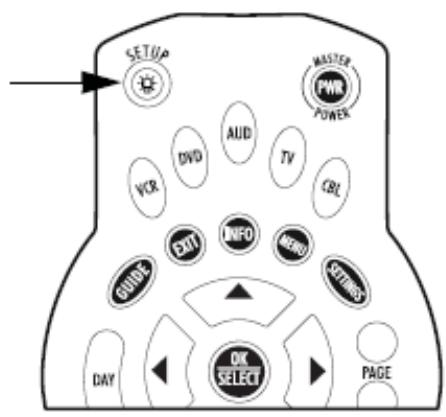
Some Atlas OCAP models include backlighting for keypad illumination. If you have backlighting, you will see a light bulb on the SETUP key, as shown below.
To Enable Backlighting
- Press the SETUP key twice.
- Backlighting will now turn on after any keypress.
To Disable Backlighting
- Press the SETUP key twice.
- Backlighting is now off.
www.urcsupport.com/atlasocap
3
INTRODUCTION
The Atlas OCAP 5-Device Remote Control by Universal Electronics is our latest generation universal remote control. Its sophisticated technology allows you to consolidate up to five of your original home entertainment remote controls into one easy-to-use product. Moreover, its packed with advanced features such as:
- Preprogrammed control to operate the cable converter supplied by your cable service provider
Dedicated keys to control popular functions on your DVR/PVR (Digital/Personal Video Recorder) - Programmable Master Power key for master on/off control of your home entertainment equipment with a single keystroke
Programmable Macro Keys to allow you to activate certain keys in a specific order - Channel Lock to lock channel selection only to the cable converter
Volume Lock to lock volume controls to one mode or individual modes
Device Key Re-Assignment to remotely control a second (duplicate) device
Code Search to help program control of older or discontinued components
Color-coded keys to quickly locate popular functions
Code library for popular video and audio devices - Backlighting (not available on all remotes)
Before using the product, you will need to install the enclosed batteries and also perform some programming to operate the specific home entertainment devices you wish to control.
Please follow the instructions detailed in this manual to set up the unit and then start enjoying your new remote control and cable service.

Atlas OCAP M1056.fm Page 5 Tuesday, March 24, 2009 4:45 PM

FEATURES AND FUNCTIONS
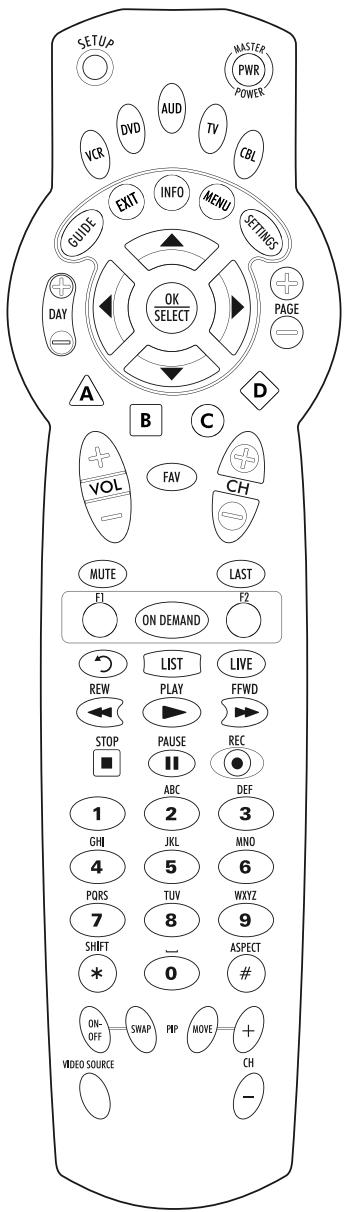
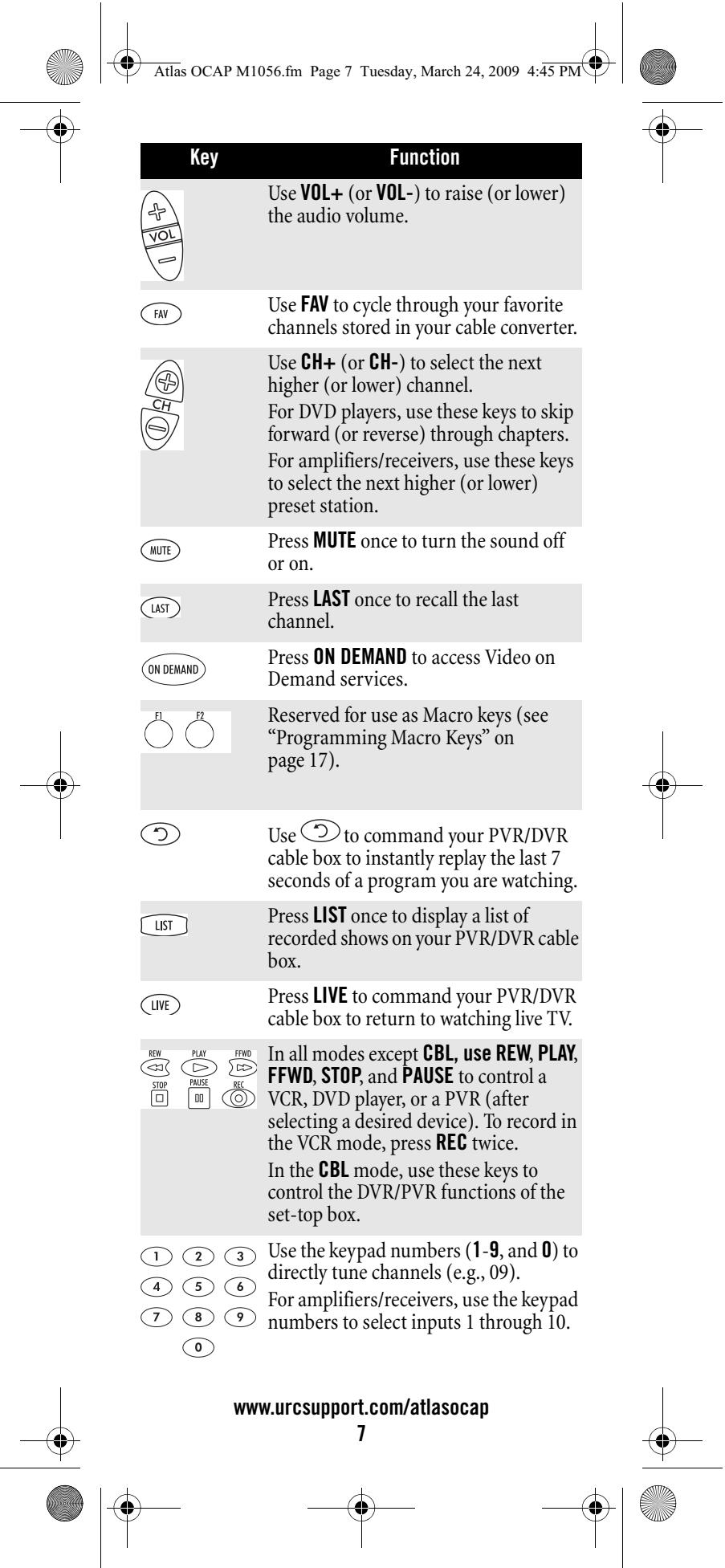
Use the illustration below to locate features on the Atlas OCAP 5-Device Remote Control and then study the Key Charts (on the next three pages) to learn how they function.
To find out what type of devices can be controlled by each device key after programming, see "Device Table" on page 8.
www.urcsupport.com/atlasocap
5


Atlas OCAP M1056.fm Page 6 Tuesday, March 24, 2009 4:45 PM

Key Charts
| Key | Function |
| SETUo | Use SETUP for all programming sequences. Also use to turn backlighting on and off, if applicable. |
| MASTEPWPRPOWKE | Press PWR once to turn on or off a home entertainment device. For MASTER POWER control, see “Using the Master Power Key” on page 19. |
| VCRDVIDAVCDL | Press VCR, DVD, AUD, TV, or CBL once to select a home entertainment device to control. Also see “Device Table” on page 8.Each device key has an embedded LED (red light) that blinks upon selection and indicates the remote control is working and (after programming) is sending signals. |
| GUIDE | Use GUIDE to display the program guide. |
| SETTINGS | Press SETTINGS once to display available interactive services. |
| INFO | Use INFO to display the current channel and program information. |
| DAY | Use DAY+ (or DAY-) to move a day forward (or back) on your cable converter's program guide. |
| OKSELECT | Use the Cursor keys to move the cursor in the program guide and menu screens and to navigate within the interactive service.Use OK/SELECT to choose options, PPV events, and to tune to programs from the program guide. |
| PAGE | Use PAGE+ (or PAGE-) to page up (or page down) through menu screens and the program guide. |
| EXIT | Use EXIT to exit out of your cable converters menu and guide. |
| A B C D | Use A, B, C, or D to access additional cable features (see your cable converter's manual). |
www.urcsupport.com/atlasocap
6

Atlas OCAP M1056.fm Page 8 Tuesday, March 24, 2009 4:45 PM

| Key | Function |
| # | Press ASPECT once to change the aspect ratio of the show you are watching. (Not available on all set-top boxes). |
| SHIFT* | Press SHIFT to access additional cable features (see your cable converter's manual). |
| ON-OFF SWAP PIP | Use PIP ON-OFF to switch the Picture-In-Picture feature on or off (if available on your TV or cable service).Use PIP SWAP to switch images and sound between the main and window pictures (if available on your TV or cable service). |
| PIP MOVEMENT+CH- | Use PIP MOVE to move the window picture to different positions in the main picture (if available on your TV or cable service).Use PIP CH+ (or CH-) to select the next higher (or lower) PIP channel (if available on your TV or cable service). |
| VIDEO SOURCE | In the CBL mode, use VIDEO SOURCE to view other video sources (A or B) instead of cable.In all TV mode, use VIDEO SOURCE to watch TV or video/DVD programs on a desired device.For amplifiers/receivers, use VIDEO SOURCE to select an input source. |
Device Table
NOTE: Please refer to the table below when performing the instructions in "Programming Device Control" on page 10 or "Setting Up a Combo Unit" on page 11.
After programming, the Atlas OCAP 5-Device Remote Control will be able to control the following types of devices:
| Device Key | Controls these types of devices |
| VCR | VCR, TV/VCR Combo, PVR (Personal Video Recorder), or extra DVD Player |
| DVD | DVD Player, or extra VCR, TV/VCR Combo or PVR |
| AUD | Audio Amplifier, Tuner, or Receiver |
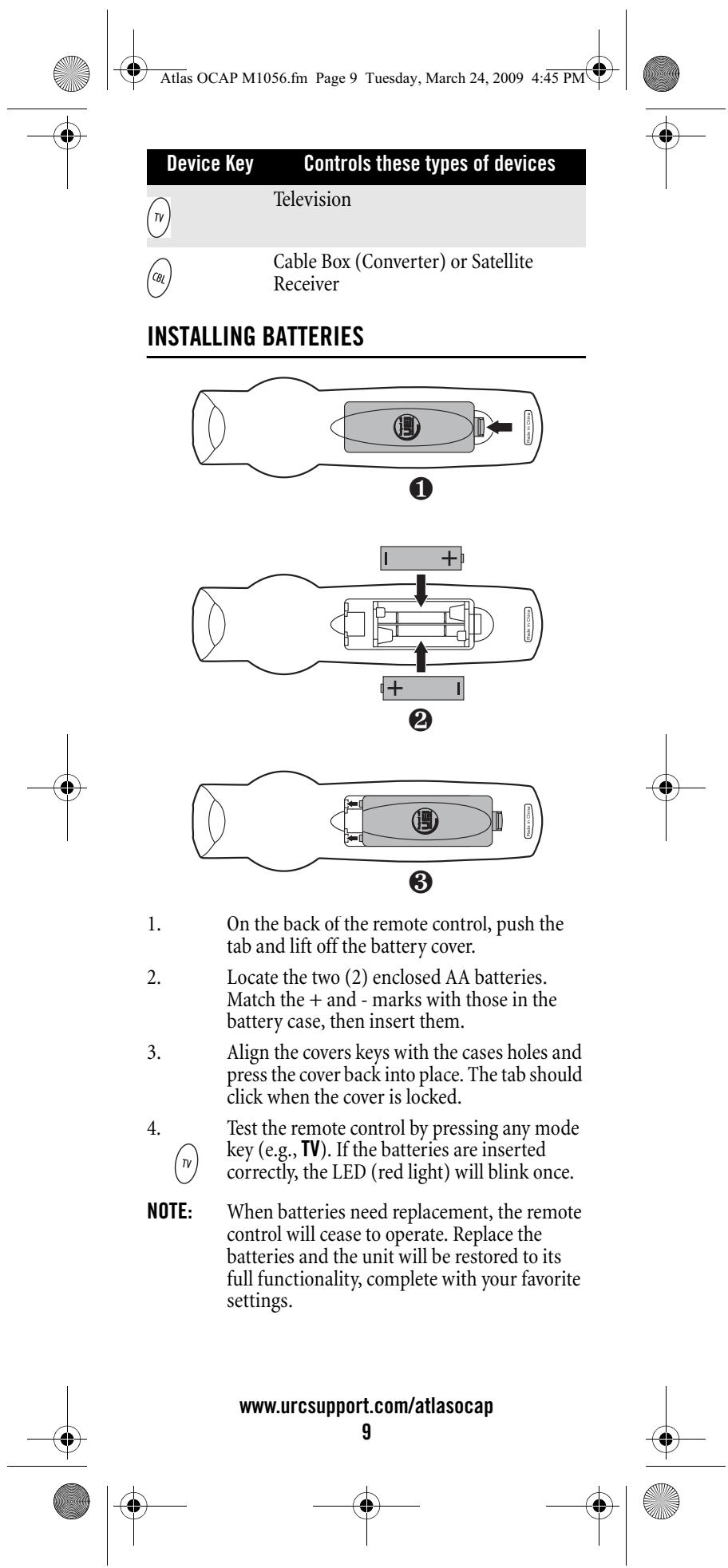


PROGRAMMING DEVICE CONTROL
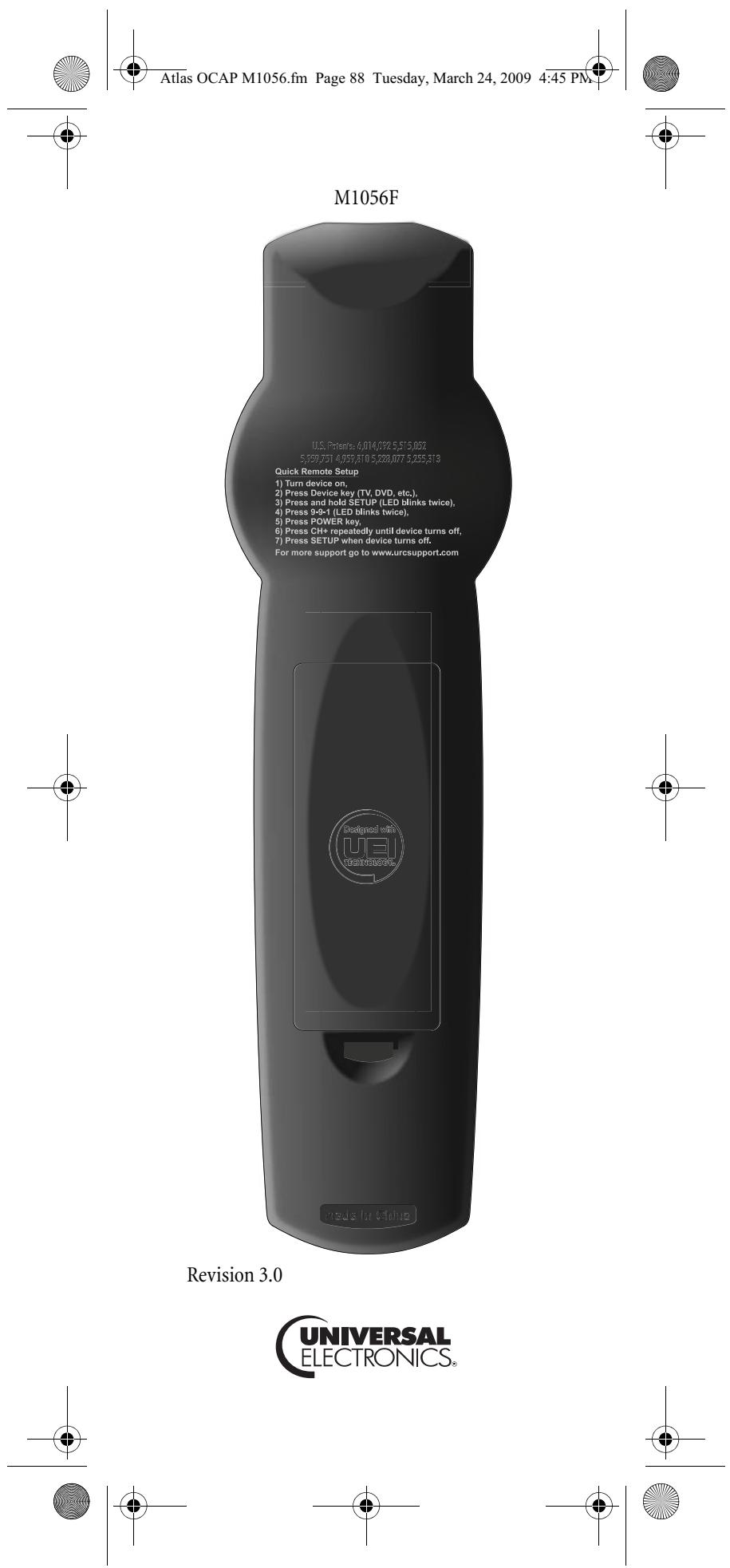
The Atlas OCAP 5-Device Remote Control is preprogrammed to operate the cable box (converter) provided by your cable system, an RCA TV, a Toshiba DVD player, an RCA VCR, and a Pioneer audio receiver. To control devices other than the default brands, perform the following steps; otherwise skip this section.
NOTES: For control of a Combo device (for example, a TV/VCR combo), skip this section and perform the instructions on "Setting Up a Combo Unit" on page 11. Also refer to "Device Table" on page 8 to find out which devices can be programmed onto each device key.
If you have another brand of cable converter or a satellite receiver you would like to control, you'll need to unlock the cable ID Lock before changing the converter code (see "Programming Cable ID Lock" on page 17).
- Turn on a device and, if applicable, insert video media, (e.g., cassette or disc).
NOTE: Please read steps 2 through 4 completely before proceeding. Highlight or write down the codes and device you wish to program before moving on to step 2. - On the remote control, press a device key once (i.e., VCR, DVD, AUD, TV, or CBL); it will blink once. Then press and hold SETUP until the selected mode key blinks twice.
- Use the "Manufacturer's Codes (Codes des manufacturiers)" starting on page 54) to locate the type of device and brand name and then enter the first four-digit code for your device. If performed correctly, the selected mode key will blink twice.
NOTE: If the selected mode key emits a long blink, the entry is invalid. Repeat steps 2 through 3 and try entering the same code again. - Aim the remote control at the device and press PWR once. The device should turn off. If it does not, repeat steps 2 through 3, trying each code for your brand until you find one that works. If it still does not respond, try searching for the code (see "Searching for Your Code" on page 12).
NOTE: If the device does not have a PWR key, press the (Play) key.
www.urcsupport.com/atlasocap 10



- Aim the remote control at the TV and press PWR once.
- Press and release the CH+ key continuously, then stop when the TV turns off.
NOTE: In the search mode, the remote control will send IR codes from its library to the selected device, starting with the most popular code first. - Press PWR. The TV should turn on, then press SETUP to lock in the code.
NOTE: If the TV does not turn on during step 6, then slowly press and release CH- to go back through the codes, then press SETUP when the TV turns on. - To search for the codes of your other devices, repeat steps 1 through 6, but substitute the appropriate key (e.g., VCR, DVD, AUD, or CBL) for the device you are searching for.
CHECKING THE CODES
If you have set up the Atlas OCAP 5-Device Remote Control by searching for your device code (on the previous page), you may need to find out which four-digit code is operating your equipment.
For example, to find out which code is operating your TV:
-
On the remote control, press TV once; it will blink once. Then press and hold SETUP until the TV key blinks twice.
-
Enter 9 9 0. The TV key will blink twice.
- To view the code for the first digit, press 1 once. Count the number of times the TV key blinks (e.g., 3 blinks = 3) and write down the number in the leftmost TV Code box on page 11.
NOTE: If a code digit is 0, the selected mode key will not blink.
www.urcsupport.com/atlasocap
13


4.
Repeat step 3 three more times for the remaining digits. Use 2 for the second digit, 3 for the third digit, and 4 for the fourth digit. Finish writing down the code in the TV Code boxes on page 11.
5.
To check for other device codes, repeat steps 1 through 4, but substitute the appropriate key (e.g., VCR, DVD, AUD, or CBL) for the device you are checking. Write down the codes in the appropriate boxes on page 11.
PROGRAMMING CHANNEL CONTROL LOCK
By default, the remote control's channel-control capabilities are locked to the cable converter. The affected keys* are 1 through O, CH+, CH-, and LAST. This will guarantee that you do not inadvertently change a channel on your TV or VCR. However, you can deactivate this feature to allow full access to these keys in the TV and VCR modes.
*NOTE: This feature does not affect the AUD mode.
Unlocking Channel Control
- On the remote control, press CBL once; it will blink once. Press and hold SETUP until the CBL key blinks twice.
2.
Enter 9 7 3. The CBL key will blink twice.
- Press CH- once. The CBL key will blink four times.
Now the remote control will provide TV and VCR channel-control capabilities while in the TV or VCR mode.
Locking Channel Control to CBL
- On the remote control, press CBL once; it will blink once. Press and hold SETUP until the CBL key blinks twice.
2.
Enter 973.The CBL key will blink twice.
www.urcsupport.com/atlasocap
14


- Press CH+ once. The CBL key will blink twice.

Now, regardless of what mode you select (except AUD), the channel keys will only change channels on your cable converter.
CHANGING VOLUME LOCK
Volume Lock allows you to control the volume through the device identified as having your primary speaker(s), regardless of which mode you are using. On the Atlas OCAP 5-Device Remote Control, Global Volume Lock is set to TV, so you can control TV volume while in the VCR, DVD, TV or CBL mode. You can perform Individual Volume Unlock on a selected device to set its volume control for independent operation.
NOTE: The audio mode's (AUD) volume controls are active regardless of Volume Lock settings. However, if you lock the volume controls to the AUD mode, you will have control of the audio device's volume in all other modes (i.e., VCR, DVD, TV, and CBL). This can be an advantage if, for example, you always listen to home entertainment devices through your receiver's speakers.
Unlocking Volume Control for a Single Device (Individual Volume Unlock)

- Assuming Global Volume Lock is active, select a mode on the remote control that you want to unlock (e.g., CBL) and press it once. Next, press and hold SETUP until the device key blinks twice.
- Enter 9 9 3. The last-selected device key will blink twice.
- Press VOL- once. The last-selected device key will blink four times.
- Repeat steps 1 through 3 for each device you want volume to be unlocked.
Now, after you select a device that has volume unlocked (e.g., CBL), pressing VOL+, VOL-, or MUTE, will control only that device's volume.
www.urcsupport.com/atlasocap
15


Unlocking All Volume Control (Global Volume Unlock)
NOTE: Performing these instructions will set independent volume control for all programmed devices.
- On the remote control, press and hold SETUP until the last-selected device key blinks twice.
- Enter 9 9 3. The last-selected device key will blink twice.

- Press V0L+ once. The last-selected device key will blink four times.
Locking Volume Control To One Mode (Global Volume Lock)
NOTE: The audio mode's volume controls are active regardless of Volume Lock settings. However, if you lock the volume controls to the AUD mode, you will control the audio device's volume in all other modes (i.e., VCR, DVD, TV, or CBL). This can be an advantage if, for example, you always listen to home entertainment devices through your receiver's speakers.
1. On the remote control, press and hold SETUP until the last-selected device key blinks twice.
2. Enter 9 9 3. The last-selected device key will blink twice.

- Select a mode (e.g., TV or AUD) which you want to use to control the volume. The selected device key will blink twice.
Now, when you press VOL+, VOL-, or MUTE, the volume of the selected device (e.g., TV) is controlled regardless of mode.
www.urcsupport.com/atlasocap
16


PROGRAMMING CABLE ID LOCK
The Atlas OCAP 5-Device Remote Control is locked at the factory to operate your cable provider's set top box. However, if you have another brand or model of cable converter or satellite service that you would like to control, then you'll need to perform the following steps to unlock the ID Lock, enter a new manufacturer's code, and lock the ID Lock again.
- Turn on the cable converter.
-
On the remote control, press CBL once; it will blink once. Then press and hold SETUP until the CBL key blinks twice.
-
Enter 9 8 2. The CBL key will blink four times, indicating ID Lock is unlocked.

- Perform the instructions under "Programming Device Control" on page 10 to program device control for the desired cable converter or satellite receiver.
When you are done, perform steps 5 and 6 on this page to again lock the cable ID Lock. -
On the remote control, press CBL once; it will blink once. Then press and hold SETUP until the CBL key blinks twice.
-
Enter 9 8 2. The CBL key will blink twice, indicating ID Lock is again locked.
6.
PROGRAMMING MACRO KEYS
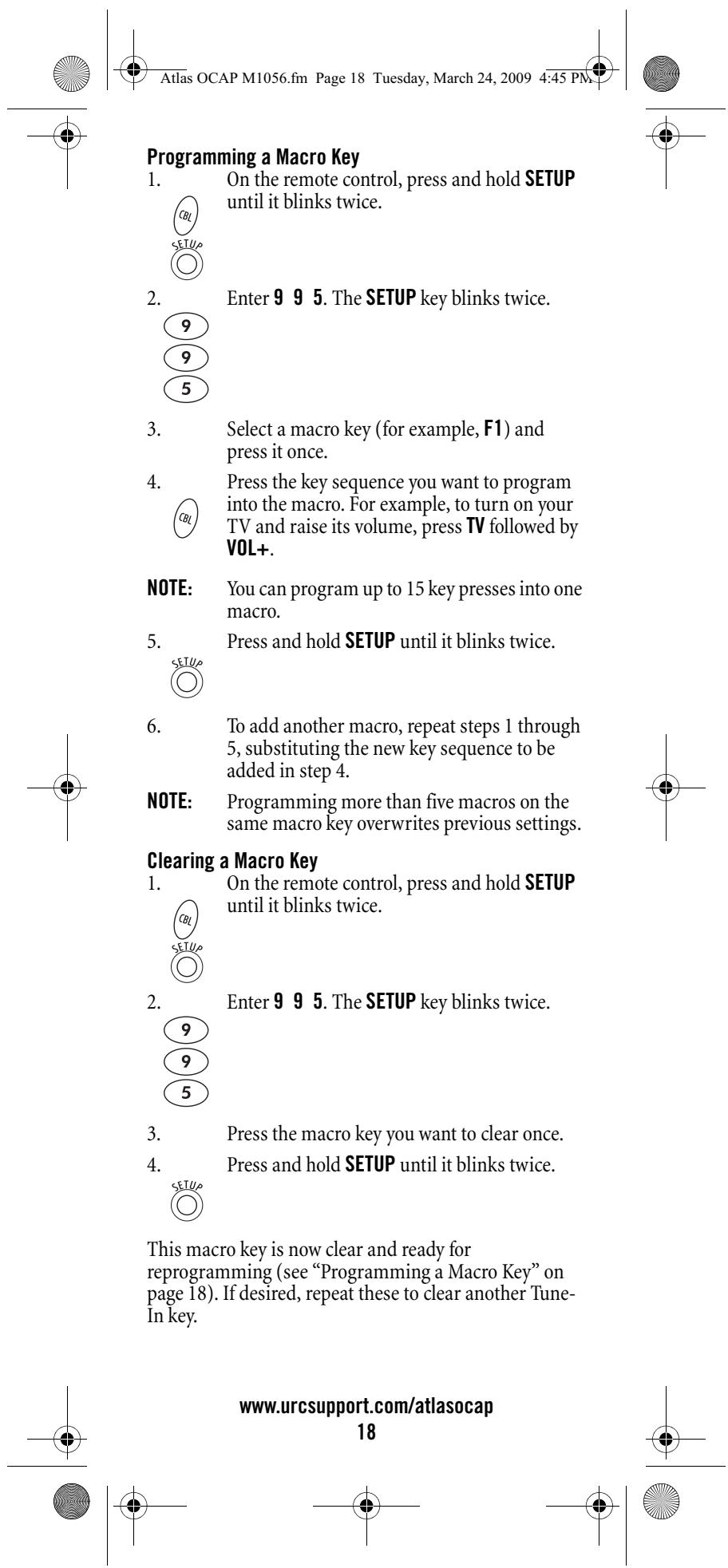
The Atlas OCAP 5-Device Remote Control includes two macro keys (located directly below the MUTE and LAST keys). Macro keys allow you to set up key macros to activate certain keys in a specific order. For example, you can set up a key macro to change the channels on your TV, raise or lower the volume, and start recording on your VCR, all with the touch of one key. If you want to change the macros stored in a previously-programmed macro key, you'll need to clear the key first (see "Clearing a Macro Key" on page 18).
www.urcsupport.com/atlasocap
17



The Atlas OCAP 5-Device Remote Control has a unique feature that allows you to sequentially turn up to five of your home entertainment devices on or off with a single key press.
NOTE:
MASTER POWER (PWR) only works in the CBL mode. If it is not programmed, only the cable converter will turn on or off. In any other mode, pressing MASTER POWER (PWR) once will turn the selected device on or off.
Programming the Master Power Key
- On the remote control, press and hold SETUP until the last-selected device key blinks twice.
2.
Enter 9 9 5. The last-selected device key blinks twice.

3.

-
For the first device you want in the power on sequence, press a device key (e.g., CBL) once. Then press PWR once. For the second device in the power sequence, press its key once (e.g., TV). Then press PWR.
-
Repeat step 4 up to four more times to add the second, third, fourth, and fifth device, as desired.
- To save the settings and exit the program: a. Press CBL once.

b. Press and hold SETUP until the CBL key blinks twice.
www.urcsupport.com/atlasocap
19


Atlas OCAP M1056.fm Page 22 Tuesday, March 24, 2009 4:45 PM

CLEARING CUSTOM PROGRAMMING
The Atlas OCAP 5-Device Remote Control contains a Custom Programming Reset program. You can use it to remove all custom programming, except your setup codes and reassigned device keys.
IMPORTANT: Executing this program will erase all custom settings for Volume Lock, Learned Keys, Tune-In Keys, and Channel Lock. However, your device programming remains.
- On the remote control, press and hold SETUP until the last-selected device key blinks twice.
- Enter 9 8 0. The last-selected device key blinks twice, pauses, and blinks twice again to confirm that all custom programming is cleared.
ACTIVATING BACKLIGHTING (OPTIONAL)
On some models of your Atlas OCAP 5-Device Remote Control, you can activate backlighting. Backlighting enables your remote's keypad to remain lit for five seconds after you press any key. To enable backlighting on a remote with that feature, perform the following step:
- Press SETUP twice within one second.
Backlighting is turned on.
To disable backlighting, perform the following step:
- Press SETUP twice within one second.
Backlighting is turned off.
www.urcsupport.com/atlasocap 22


TROUBLESHOOTING
PROBLEM: Device key does not blink when you press a key.
SOLUTION: Replace the batteries with two (2) new AA batteries (see "Installing Batteries" on page 9).
PROBLEM: Device key blinks when you press a key, but home entertainment device does not respond.
SOLUTION: Make sure you are aiming the remote control at your home entertainment device and that you are within 15 feet of the device you are trying to control.
PROBLEM: The remote control does not control home entertainment devices or commands are not performing properly.
SOLUTION: Try all listed codes for the device brand being set up. Make sure all devices can be operated with an infrared remote control.
PROBLEM: TV/VCR Combo does not respond properly.
SOLUTION: Use the VCR codes for your brand. Some combo units may require both a TV code and a VCR code for full operation (see page 11).
PROBLEM: No volume on a second TV.
SOLUTION: Follow instructions under "Changing Volume Lock" on page 15.
PROBLEM: PLAY and STOP keys do not work on a Motorola DCT-2000 cable converter.
SOLUTION: Re-program the CBL key for cable code 0476 (see "Programming Device Control" on page 10).
PROBLEM: Tried Search Method and still could not find a working code.
SOLUTION: Try the Search Method again after clearing out the device key as follows:
a. Press and hold SETUP until device key blinks twice.
b. Enter 9 9 2.
c. Press and release the device key to be cleared twice.
PROBLEM: Remote control does not turn on Sony or Sharp TV/VCR Combo.
SOLUTION: For power on, these products require programming TV codes on the remote control. For Sony, use TV code 0000 and VCR code 0032. For Sharp, use TV code 0093 and VCR code 0048.
FCC NOTICE
This equipment has been tested and found to comply with the limits for a class B digital device, pursuant to part 15 of the FCC Rules. These limits are designed to provide reasonable protection against harmful interference in a residential installation. This equipment generates, uses and can radiate radio frequency energy and if not installed and used in accordance with the instructions, may cause harmful interference to radio communications.
However, there is no guarantee that interference will not occur in a particular installation. If this equipment does cause harmful interference to radio or television reception, which can be determined by turning the equipment off and on, the user is encouraged to try to correct the interference by one or more of the following measures:
Reorient or relocate the receiving antenna.
- Increase the separation between the equipment and receiver.
- Connect the equipment into an outlet on a circuit different from that to which the receiver is connected.
- Consult the dealer or an experienced radio/TV technician for help.
This equipment has been verified to comply with the limits for a class B computing device, pursuant to FCC Rules. In order to maintain compliance with FCC regulations, shielded cables must be used with this equipment. Operation with non-approved equipment or unshielded cables is likely to result in interference to radio and TV reception. The user is cautioned that changes and modifications made to the equipment without the approval of manufacturer could void the user's authority to operate this equipment.
ADDITIONAL INFORMATION
This product does not have any user-serviceable parts. Opening the case, except for the battery cover, may cause permanent damage to your Atlas OCAP 5-Device Remote Control.
For help via the Internet, visit us at: www.urcsupport.com
Copyright 2006 by Universal Electronics Inc. No part of this publication may be reproduced, transmitted, transcribed, stored in any retrieval system, or translated to any language, in any form or by any means, electronic, mechanical, magnetic, optical, manual, or otherwise, without prior written permission of Universal Electronics Inc.
M1056F
3/09
www.urcsupport.com/atlasocap 24
TABLE DES MATIÈRES
Information Preliminaire 27
Manufacturer's Codes (Codes des manufacturiers) 54
Atlas OCAP M1056.fm Page 26 Tuesday, March 24, 2009 4:45 PM

Atlas OCAP M1056.fm Page 28 Tuesday, March 24, 2009 4:45 PM

CHARACTERISTIQUES ET FONCTIONS
Atlas OCAP M1056.fm Page 29 Tuesday, March 24, 2009 4:45 PM

Tableau des touches
Atlas OCAP M1056.fm Page 33 Tuesday, March 24, 2009 4:45 PM

Atlas OCAP M1056.fm Page 41 Tuesday, March 24, 2009 4:45 PM

Atlas OCAP M1056.fm Page 50 Tuesday, March 24, 2009 4:45 PM

ACTIVER LA FONCTION RÉTROÉCLAIRAGE (EN OPTION)
Atlas OCAP M1056.fm Page 53 Tuesday, March 24, 2009 4:45 PM

Atlas OCAP M1056.fm Page 54 Tuesday, March 24, 2009 4:45 PM

MANUFACTURER'S CODES (CODES DES MANUFACTURERS)
Setup Codes for Audio Amplifiers
Setup Codes for Audio Receivers
Atlas OCAP M1056.fm Page 55 Tuesday, March 24, 2009 4:45 PM

| Amphion Media Works | 1563, 1615 |
| AMW | 1563, 1615 |
| Anam | 1609, 1074 |
| Apex Digital | 1257, 1430, 1774 |
| Arcam | 1120 |
| Audiotronic | 1189 |
| Audiovox | 1390, 1627 |
| B & K | 0701, 0820, 0840 |
| BK | 0702 |
| Bose | 1229, 1629, 1841, 1933 |
| Cambridge Soundworks | 1370 |
| Capetronic | 0531 |
| Carver | 1189, 0189 |
| Classic | 1352 |
| Coby | 1389 |
| Curtis Mathes | 0080 |
| Daewoo | 1250 |
| Delphi | 1414 |
| Denon | 1360, 0004, 1142 |
| Fisher | 1801 |
| Gateway | 1517 |
| Go Video | 1532 |
| Harman/Kardon | 0110, 0189, 0891, 1304, 1306 |
| Hitachi | 1801 |
| Integra | 0135, 1298, 1320 |
| JBL | 0110, 1306 |
| JVC | 1374, 1495, 1811, 1871 |
| Kenwood | 1313, 1570, 1569, 0186 |
| KLH | 1390, 1412, 1428 |
| Koss | 1366, 1497 |
| Lasonic | 1798 |
| LG | 1293 |
| Linn | 0189 |
| Liquid Video | 1497 |
| Magnavox | 1189, 1269, 0189, 0391, 0531, 1514 |
| Marantz | 1189, 1269, 0189, 1289 |
| Mitsubishi | 1393 |
| Norcent | 1389 |
| Nova | 1389 |

Atlas OCAP M1056.fm Page 56 Tuesday, March 24, 2009 4:45 PM

| Onkyo | 0135, 0842, 1298, 1320, 1531 |
| Optimus | 1023, 0080, 0186, 0531, 0670, 1074 |
| Oritron | 1366, 1497 |
| Panasonic | 1308, 1518, 0309, 0367, 1288, 1316, 1548, 1633, 1763, 1764 |
| Philips | 1189, 1269, 0189, 0391, 1120, 1266 |
| Pioneer | 1023, 0014, 0080, 0150, 0244, 0531, 0630, 1384 |
| Polaroid | 1508 |
| Polk Audio | 0189, 1289, 1414 |
| Proscan | 1254 |
| RCA | 1023, 1609, 1254, 0080, 0531, 1074, 1390, 1511 |
| Rio | 1869 |
| Samsung | 1295, 1500 |
| Sansui | 0189 |
| Sanyo | 1251, 1469, 1801 |
| Sharp | 0186, 1286 |
| Sharper Image | 1556 |
| Sherwood | 1077, 1517, 1653 |
| Sirius | 1627, 1811, 1987 |
| Sonic Blue | 1532, 1869 |
| Sony | 1058, 1441, 1258, 1759, 1622, 0474, 1349, 1406, 1442, 1558, 1658, 1758, 1858 |
| Soundesign | 0670 |
| Stereophonics | 1023 |
| Sunfire | 1313 |
| Teac | 1074, 1390, 1528 |
| Technics | 1308, 1518, 0309 |
| Thorens | 1189 |
| Toshiba | 1788 |
| Venturer | 1390 |
| Wards | 0189, 0014, 0080 |
| XM | 1406, 1414 |
| Yamaha | 0176, 0186, 1176, 1276, 1331, 1375 |
| Zenith | 0857, 1293 |

Atlas OCAP M1056.fm Page 57 Tuesday, March 24, 2009 4:45 PM

Setup Codes for Audio Accessories Codes de configuration pour accessoires audio
| Accurian | 1106 |
| Altec Lansing | 0607, 1056, 1485 |
| Apple | 1115, 1644 |
| Cambridge Soundworks | 1530 |
| Creative | 0872 |
| D-Link | 1522 |
| DLO | 1155 |
| Integra | 1789 |
| iPort | 1917 |
| Marantz | 1491 |
| Motorola | 1464 |
| NaviPod | 1644 |
| Netgear | 1785 |
| Omnifi | 1605 |
| Onkyo | 1789 |
| Roku | 1828 |
| Sonance | 1917 |
| SSI | 1522 |
| Yamaha | 1809, 1810 |
Atlas OCAP M1056.fm Page 58 Tuesday, March 24, 2009 4:45 PM

| Jerrold | 0476, 0810, 0276, 0003, 0012, 0014 |
| Memorex | 0000 |
| Motorola | 1376, 0476, 0810, 0276, 1187, 1254, 1106, 1540 |
| Multitech | 0883 |
| Myrio | 1602, 1822 |
| Pace | 1376, 1877, 0237, 0008 |
| Panasonic | 1376, 1877, 0000, 0107 |
| Panther | 0637 |
| Paragon | 0000 |
| Philips | 1305, 0317 |
| Pioneer | 1877, 0877, 0144, 0533 |
| Pulsar | 0000 |
| Quasar | 0000 |
| RadioShack | 0883 |
| RCA | 1256 |
| Regal | 0279, 0273 |
| Runco | 0000 |
| Samsung | 1376, 1877, 0144 |
| Sasktel | 1737 |
| Scientific Atlanta | 1877, 0877, 0477, 0008, 0017 |
| Sejin | 1602 |
| Sony | 1006 |
| Starcom | 0003 |
| Supercable | 0276 |
| Supermax | 0883 |
| Thomson | 1256 |
| Tocom | 0012 |
| Torx | 0003 |
| Toshiba | 0000 |
| Tristar | 0883 |
| V2 | 0883 |
| Viewmaster | 0883 |
| Vision | 0883 |
| Vortex View | 0883 |
| Zenith | 0000, 0525, 0899 |

Atlas OCAP M1056.fm Page 59 Tuesday, March 24, 2009 4:45 PM

Atlas OCAP M1056.fm Page 60 Tuesday, March 24, 2009 4:45 PM

| Axion | 1071, 1072 |
| B & K | 0655, 0662 |
| BBK | 1224 |
| Bel Canto Design | 1571 |
| Blaupunkt | 0717 |
| Blue Parade | 0571 |
| Broksonic | 0695, 0868, 1419 |
| Buffalo | 1882 |
| Cary Audio Design | 1477 |
| CAVS | 1057 |
| Centrios | 1577 |
| Cinea | 0831 |
| Cinego | 1399 |
| CineVision | 0876, 0833, 0869 |
| Citizen | 1277 |
| Coby | 0778, 0852, 1086, 1107, 1165, 1177, 1351 |
| Craig | 0831 |
| Curtis Mathes | 1087 |
| CyberHome | 0816, 0874, 1023, 1024, 1117, 1129, 1502, 1537 |
| D-Link | 1881 |
| Daewoo | 0784, 0705, 0833, 0869, 1169, 1172, 1234, 1242, 1441, 1443 |
| Denon | 0490, 0634 |
| Desay | 1407, 1455 |
| Diamond Vision | 1316, 1609, 1610 |
| Disney | 0675, 1270 |
| Dual | 1068, 1085 |
| Durabrand | 1127 |
| DVD2000 | 0521 |
| Emerson | 0591, 0675, 0821, 1268 |
| Enterprise | 0591 |
| ESA | 0821, 1268, 1443 |
| Fisher | 0670, 1919 |
| Funai | 0675, 1268, 1334 |
| Gateway | 1073, 1077, 1158 |
| GE | 0522, 0815, 0717 |
www.urcsupport.com/atlasocap 60

Atlas OCAP M1056.fm Page 61 Tuesday, March 24, 2009 4:45 PM

Go Video 0744,0715,0741,0783, 0833,0869,1044,1075, 1099,1144,1158,1304, 1443,1730
Go Vision 1071, 1072
GoldStar 0741
GPX 0699, 0769
Greenhill 0717
Harman/Kardon 0582, 0702
Hitachi 0573, 0664, 1247, 1919
Hiteker 0672
iLo 1348, 1472
Initial 0717, 1472
Innovative Technology 1542
Insignia 1268
Integra 0627
Jaton 1078
JBL 0702
Jensen 1016
JSI 1423
JVC 0558,0623,0867,1164, 1275,1602,1863
jWin 1049,1051
Kawasaki 0790
Kenwood 0490,0534,0682,0737
KLH 0717,0790,1020,1149, 1261
Konka 0711,0719,0720,0721
Koss 0651,0896,1423
Kreisen 1421
Landel 0826
Lasonic 0798, 1173
Lenox 1127
LG 0591, 0741, 0801, 0869, 1526
LiteOn 1058, 1158, 1416, 1440
Loewe 0511
Magnavox 0503,0539,0646,0675, 0821,1268,1506
Malata 0782,1159
Marantz 0539
McIntosh 1273
www.urcsupport.com/atlasocap 61



Atlas OCAP M1056.fm Page 62 Tuesday, March 24, 2009 4:45 PM

| Memorex | 0695, 0831, 1270 |
| Microsoft | 0522, 1708 |
| Mintek | 0839, 0717, 1472 |
| Mitsubishi | 1521, 0521 |
| Momitsu | 1082 |
| NAD | 0741 |
| Nakamichi | 1222 |
| NEC | 0785 |
| Nesa | 0717, 1603 |
| NeuNeo | 1454 |
| Next Base | 0826 |
| NexxTech | 1402 |
| Norcent | 1003, 0872, 1107, 1265, 1457 |
| Onkyo | 0503, 0627, 0792 |
| Oppo | 1224, 1525 |
| OptoMedia Electronics | 0896 |
| Oritron | 0651 |
| Panasonic | 0490, 0632, 0703, 1362, 1462, 1490, 1762 |
| Philips | 0503, 0539, 0646, 0675, 0854, 1260, 1267, 1354 |
| Pioneer | 0525, 0571, 0631, 0632 |
| Polaroid | 1020, 1061, 1086, 1245, 1316, 1478, 1480, 1482 |
| Polk Audio | 0539 |
| Portland | 0770 |
| Presidian | 0675, 1072 |
| Prima | 1016 |
| Primare | 1467 |
| Princeton | 0674 |
| Proscan | 0522 |
| ProVision | 0778 |
| Qwestar | 0651 |
| RCA | 0522, 0571, 0717, 0790, 0822, 1022, 1132, 1193 |
| Rio | 0869 |
| RJTech | 1360 |
| Rotel | 0623, 1178 |
| Rowa | 0823 |
| Sampo | 0698, 0752, 1501 |
www.urcsupport.com/atlasocap 62


Atlas OCAP M1056.fm Page 63 Tuesday, March 24, 2009 4:45 PM

Samsung 0490,0573,0820,0899, 1044,1075
Sansui 0695
Sanyo 0670,0695,0873,1919
Sensory Science 1158
Sharp 0630, 0675, 0752, 1256
Sharper Image 1117
Sherwood 0633,0770,1043,1077 1889
Shinsonic 0533,0839
Sigma Designs 0674
Sonic Blue 0869,1099
Sony 0533,1533,0864,1033 1431,1432,1433,1548 1892
Sound Mobile 1298
Sova 1122
Sungale 1074, 1532
Superscan 0821
SVA 0860,1105
Sylvania 0675,0821,1268
Symphonic 0675,0821
TAG McLaren 0894
Teac 0790,0809
Technics 0490,0703
Technosonic 0730
Techwood 0692
Terapin 1031
Theta Digital 0571
Toshiba 0503,0695,1045,1154 1854
Tredex 0799,0800,0803,0804
Urban Concepts 0503
US Logic 0839
Valor 1298
Venturer 0790
Vialta 1509
Vizio 1064, 1226
Vocopro 1027,1360
Xbox 0522,1708
Xwave 1001



Atlas OCAP M1056.fm Page 64 Tuesday, March 24, 2009 4:45 PM

| Yamaha | 0490, 0539, 0545 |
| Zenith | 0503, 0591, 0741, 0869 |
| Zoece | 1265 |
Setup Codes for DVD Recorders
Atlas OCAP M1056.fm Page 65 Tuesday, March 24, 2009 4:45 PM

Atlas OCAP M1056.fm Page 66 Tuesday, March 24, 2009 4:45 PM

| Paysat | 0724 |
| Philips | 1142, 0749, 1749, 0724, 1076, 0722, 0099, 1442 |
| Proscan | 0392, 0566 |
| Proton | 1535 |
| RadioShack | 0869 |
| RCA | 0566, 0855, 0143, 1392 |
| Samsung | 1377, 1276, 1108, 1109, 1442, 1609 |
| Sanyo | 1219 |
| SKY | 0856 |
| Sony | 0639, 1639, 1640 |
| Star Choice | 0869 |
| Tivo | 1142, 1442, 1443, 1444 |
| Toshiba | 0749, 1749, 0790, 1285 |
| UltimateTV | 1392, 1640 |
| Ultrasat | 1806 |
| Uniden | 0724, 0722 |
| US Digital | 1535 |
| USDTV | 1535 |
| Voom | 0869 |
| Zenith | 1856, 0856 |
Setup Codes for DVR/PVR Systems
Atlas OCAP M1056.fm Page 67 Tuesday, March 24, 2009 4:45 PM

Star Choice
0869
Setup Codes for TVs
Atlas OCAP M1056.fm Page 68 Tuesday, March 24, 2009 4:45 PM

| Cadia | 1283 |
| Candle | 0030, 0046, 0056, 0186 |
| Carnivale | 0030 |
| Carver | 0054, 0170 |
| CCE | 0217, 0329 |
| Celebrity | 0000 |
| Celera | 0765 |
| Champion | 1362 |
| Changhong | 0765 |
| Cinego | 1986 |
| Citizen | 0060, 0030, 0092, 0039, 0046, 0056, 0186, 0280 |
| Clairtone | 0185 |
| Clarion | 0180 |
| Commercial Solutions | 1447, 0047 |
| Concerto | 0056 |
| Contec | 0180, 0157, 0158, 0185 |
| Craig | 0180, 0161 |
| Crosley | 0054 |
| Crown | 0180, 0039 |
| Curtis Mathes | 0047, 0054, 0154, 0451, 0093, 0060, 0702, 0030, 0145, 0166, 1347, 1147, 0747, 0466, 0056, 0039, 0016 |
| CXC | 0180 |
| CyberHome | 0794 |
| Cytron | 1326 |
| Daewoo | 0451, 0092, 1661, 0019, 0039, 0066, 0067, 0091, 0623, 0661, 0672 |
| Daytron | 0019 |
| Dell | 1080, 1178, 1264, 1403 |
| Denon | 0145, 0511 |
| Denstar | 0628 |
| Diamond Vision | 1996, 1997 |
| Dumont | 0017, 0019 |
| Durabrand | 0463, 0180, 0178, 0171, 1034, 0003 |
| Dwin | 0720, 0774 |
| Dynatech | 0049 |
| Electroband | 0000, 0185 |
| Electrograph | 1623, 1755 |



Atlas OCAP M1056.fm Page 69 Tuesday, March 24, 2009 4:45 PM

| Electrohome | 0381, 0389, 0409 |
| Emerson | 0154, 0236, 0463, 0180, 0178, 0171, 1963, 1944, 0623, 0282, 0280, 0270, 0185, 0183, 0182, 0181, 0179, 0177, 0158, 0039, 0038, 0019 |
| Emprex | 1422, 1546 |
| Envision | 0030, 0813, 1365 |
| Epson | 0833, 0840, 1290 |
| ESA | 0812, 0171, 1944, 1963 |
| Fisher | 0154, 0159 |
| FlexVision | 0710 |
| Fujitsu | 0179, 0186, 0683, 0809, 0853 |
| Funai | 0180, 0171, 0179, 1271, 1963 |
| Futuretech | 0180 |
| Gateway | 1001, 1002, 1003, 1004, 1755, 1756 |
| GE | 1447, 0047, 0051, 0451, 0178, 1347, 0747, 0282, 0279, 0251, 0174, 0138, 0135, 0055, 0029, 0027, 0021 |
| Gibraltar | 0017, 0030, 0019 |
| Go Video | 0886 |
| GoldStar | 0178, 0030, 0001, 0002, 0019, 0032, 0106, 0409 |
| Goodmans | 0360 |
| Gridente | 0392 |
| Grunpy | 0180, 0179 |
| Haier | 1034, 0768 |
| Hallmark | 0178 |
| Hannspree | 1348, 1351, 1352 |
| Hantarex | 1338 |
| Harley Davidson | 0043, 0179 |
| Harman/Kardon | 0054, 0078 |
| Harvard | 0180, 0068 |
| Havermy | 0093 |
| Helios | 0865 |
| Hello Kitty | 0451 |
| Hewlett Packard | 1088, 1089, 1101, 1494, 1502 |
| Hisense | 0748 |
www.urcsupport.com/atlasocap
69

Atlas OCAP M1056.fm Page 70 Tuesday, March 24, 2009 4:45 PM

Hitachi 1145,0145,0016,0032,0038, 0056,0095,0097,0151,0173, 0227,0279,0409,0413,0797, 1960
HP 1088, 1089, 1101, 1494, 1502
Hyundai 0849,1219,1294
iLo 1286, 1603, 1990
Infinity 0054
Initial 1603, 1990
Insignia 0171, 1204, 1326, 1517, 1963, 2002
Inteq 0017
Janeil 0046
JBL 0054
JCB 0000
Jensen 0761,0050,0815,0817,1299, 1933
JVC 0053,0036,0069,0160,0169, 0182,0731,1253
Kamp 0216
Kawasho 0158,0216,0308
Kaypani 0052
KEC 0180
Kenwood 0030,0019
KLH 0765,0767,1962
Kloss 0024,0046,0078
KMC 0106
Konka 0628,0632,0638,0703,0707
Kost 1262, 1483
KTV 0180,0030,0039,0183,0185, 0217,0280
LG 1265,0178,0442,0700,0829 0856,1178,1325,1423,1758 1993
Loewe 0136
Logik 0016
Luxman 0056
LXI 0047,0054,0154,0156,0178, 0148,0747
Magnavox 1454,0054,0030,0706,1963, 1944,1525,1254,1198,0802, 0386,0230,0187,0186,0179, 0096,0036,0028,0024,0020
Majestic 0015, 0016



Atlas OCAP M1056.fm Page 71 Tuesday, March 24, 2009 4:45 PM

| Marantz | 0054, 0030, 0444, 0704, 0854, 0855, 1154, 1398 |
| Matsushita | 0250, 0650 |
| Maxent | 0762, 1211, 1755 |
| Megapower | 0700 |
| Megatron | 0178, 0145, 0003 |
| MEI | 0185 |
| Memorex | 0154, 0463, 0150, 0178, 0016, 0106, 0179 |
| MGA | 0150, 0178, 0030, 0019, 0155 |
| Midland | 0047, 0017, 0051, 0032, 0039, 0135, 0747 |
| Mintek | 1603, 1990 |
| Minutz | 0021 |
| Mitsubishi | 0093, 1250, 0150, 0178, 0014, 0019, 0098, 0155, 0331, 0358, 0836, 0868, 1550 |
| Monivision | 0700, 0843 |
| Motorola | 0093, 0055, 0835 |
| Moxell | 0835 |
| MTC | 0060, 0030, 0019, 0049, 0056, 0091, 0185, 0216 |
| Multitech | 0180, 0049, 0217 |
| NAD | 0156, 0178, 0866 |
| NEC | 0030, 0019, 0036, 0056, 0170, 0434, 0497, 0882, 1398, 1704 |
| Neovia | 1338 |
| NetTV | 0762, 1755 |
| Nikko | 0178, 0030, 0092, 0317 |
| Noblex | 0430 |
| Norcent | 0748, 0824, 1089, 1365, 1589, 1590, 1591 |
| Norwood Micro | 1286, 1296, 1303 |
| Noshi | 0018 |
| NTC | 0092 |
| Olevia | 1144, 1240, 1331, 1610 |
| Olympus | 1342 |
| Onwa | 0180 |
| Optimus | 0154, 0250, 0166, 0650 |
| Optoma | 0887 |
| Optonica | 0093, 0165 |
| Orion | 0236, 0463, 1463, 0179 |

Atlas OCAP M1056.fm Page 72 Tuesday, March 24, 2009 4:45 PM

| Panasonic | 0250, 0051, 0055, 0162, 0226, 0338, 0375, 0650, 1291, 1410, 1941, 1946, 1947 |
| Penney | 0047, 0156, 0051, 0060, 0178, 0030, 1347, 0747, 0309, 0149, 0138, 0135, 0110, 0039, 0032, 0027, 0021, 0019, 0018, 0003, 0002 |
| Petters | 1523 |
| Philco | 0054, 0030, 0019, 0020, 0028, 0096, 0302 |
| Philips | 1454, 0054, 0690, 1154, 1483 |
| Pilot | 0030, 0019, 0039 |
| Pioneer | 0166, 0038, 0172, 0679, 0866, 1260, 1398 |
| Polaroid | 0765, 0865, 1262, 1276, 1314, 1316, 1326, 1327, 1328, 1341, 1498, 1523, 1991, 1992 |
| Portland | 0092, 0019, 0039 |
| Prima | 0761, 0783, 0815, 0817, 1933 |
| Princeton | 0700, 0717 |
| Prism | 0051 |
| Proscan | 1447, 0047, 0747, 1347 |
| Proton | 0178, 0003, 0031, 0052, 0466 |
| Protron | 1320, 1323 |
| Proview | 0835, 1401, 1498 |
| Pulsar | 0017, 0019 |
| Quasar | 0250, 0051, 0055, 0165, 0219, 0650 |
| RadioShack | 0047, 0154, 0180, 0178, 0030, 0019, 0032, 0039, 0056, 0165, 0409, 0747 |
| RCA | 1447, 0047, 2002, 1958, 1953, 1948, 1547, 1347, 1247, 1147, 1047, 0747, 0679, 0278, 0174, 0135, 0090, 0038, 0029, 0019, 0018 |
| Realistic | 0154, 0180, 0178, 0030, 0019, 0032, 0039, 0056, 0165 |
| Rhapsody | 0183, 0185, 0216 |
| Runco | 0017, 0030, 0251, 0497, 0603, 1398 |
| Sampo | 0030, 0032, 0039, 0052, 0100, 0110, 0762, 1755 |

Atlas OCAP M1056.fm Page 73 Tuesday, March 24, 2009 4:45 PM

| Samsung | 0060, 0812, 0702, 0178, 0030, 1903, 1575, 1395, 1312, 1060, 0814, 0766, 0427, 0408, 0329, 0056, 0032, 0019 |
| Samsux | 0039 |
| Sansui | 0463, 1409, 1935 |
| Sanyo | 0154, 0088, 0107, 0146, 0159, 0232, 0484, 0799, 0893, 1142 |
| Sceptre | 0878, 1217, 1360, 1599 |
| Scimitsu | 0019 |
| Scotch | 0178 |
| Scott | 0236, 0180, 0178, 0019, 0179, 0309 |
| Sears | 0047, 0054, 0154, 0156, 0178, 0171, 0015, 0056, 0146, 0148, 0149, 0159, 0168, 0179, 0281, 0747 |
| Sharp | 0093, 0039, 0153, 0157, 0165, 0220, 0281, 0386, 0398, 0491, 0688, 0689, 0818, 0851, 1602 |
| Sheng Chia | 0093 |
| Sherwood | 1399 |
| Shogun | 0019 |
| Signature | 0016 |
| Signet | 1262 |
| SIM2 Multimedia | 1297 |
| Simpson | 0186, 0187 |
| Sony | 1100, 0000, 0011, 0080, 0111, 0273, 0353, 0810, 0834, 1317 |
| Sounddesign | 0180, 0178, 0179, 0186 |
| Sova | 1320, 1952 |
| Soyo | 1520 |
| Spectricon | 0003, 0137 |
| Squareview | 0171 |
| SSS | 0180, 0019 |
| Starlite | 0180 |
| Studio Experience | 0843 |
| Superscan | 0093, 0864 |
| Supre-Macy | 0046 |
| Supreme | 0000 |
| SVA | 0748, 0587, 0768, 0865, 0870, 0871, 0872 |

Atlas OCAP M1056.fm Page 74 Tuesday, March 24, 2009 4:45 PM

| Sylvania | 0054, 0030, 0171, 0020, 0028, 0065, 0096, 0381, 1271, 1944, 1963 |
| Symphonic | 0180, 0171, 1944 |
| Syntax | 1144, 1240, 1331 |
| Tandy | 0093 |
| Tatung | 0003, 0049, 0055, 0396, 1101, 1285, 1286, 1287, 1288, 1361, 1756 |
| Technics | 0250, 0051 |
| Technol Ace | 0179 |
| Technovox | 0007 |
| Techview | 0847 |
| Techwood | 0051, 0003, 0056 |
| Teknika | 0054, 0180, 0150, 0060, 0092, 0016, 0019, 0039, 0056, 0175, 0179, 0186, 0312, 0322 |
| Telefunken | 0702, 0056, 0074 |
| Tera | 0031 |
| Thomson | 0209, 0210 |
| TMK | 0178, 0056, 0177 |
| TNCi | 0017 |
| Toshiba | 0154, 1256, 0156, 1265, 0060, 1945, 1935, 1704, 1656, 1635, 1356, 1343, 1325, 1306, 1156, 0845, 0832, 0650, 0149, 0036 |
| Tosonic | 0185 |
| Totevision | 0039 |
| Trical | 0157 |
| TVS | 0463 |
| Ultra | 0391, 1323 |
| Universal | 0027 |
| Universum | 1337 |
| US Logic | 1286, 1303 |
| Vector Research | 0030 |
| Victor | 0053 |
| Video Concepts | 0098 |
| Vidikron | 0054, 0242, 1398 |
| Vidtech | 0178, 0019, 0036 |
| Viewsonic | 0797, 0857, 0864, 0885, 1330, 1342, 1578, 1627, 1755 |
| Viking | 0046, 0312 |
| Viore | 1207 |

Atlas OCAP M1056.fm Page 75 Tuesday, March 24, 2009 4:45 PM

| Visart | 1336 |
| Vizio | 0864, 0885, 1499, 1756, 1758 |
| Wards | 0054, 0178, 0030, 1156, 0866, 0202, 0179, 0174, 0165, 0111, 0096, 0080, 0056, 0029, 0028, 0027, 0021, 0020, 0019, 0016 |
| Waycon | 0156 |
| Westinghouse | 0885, 0889, 0890, 1282, 1577 |
| White Westinghouse | 0463, 0623 |
| Wyse | 1365 |
| Yamaha | 0030, 0019, 0769, 0797, 0833, 0839 |
| Zenith | 0017, 0463, 1265, 0178, 0092, 0016 |
| Zonda | 0003 |
Setup Codes for TVs (DLP)
Setup Codes for TVs (HDTV)
Atlas OCAP M1056.fm Page 76 Tuesday, March 24, 2009 4:45 PM

Samsung 0812,0702
Sharp 0688, 0689
Toshiba 1256
Setup Codes for TVs (LCD)
Audiovox 0180,0710,0802,0846, 0875,1284,1937,1951, 1952
BenQ 1315
Byd:sign 1309,1311
Cadia 1283
CyberHome 0794
Dell 1080, 1178, 1264
Emprex 1422, 1546
Envision 0813,1365
FlexVision 0710
Funai 0171
Go Video 0886
Hannsprlee 1348,1351
Hewlett Packard 1088
HP 1088
Hyundai 0849,1219,1294
iLo 1286,1603,1990
Initial 1603, 1990
Insignia 1204, 1517, 2002
Jensen 1299
Kost 1262
LG 0856,1178,1993
Magnavox 1454,0802,1198
Marantz 0855
Maxent 0762,1211
Mintek 1603, 1990
Mitsubishi 1250
NetTV 0762
www.urcsupport.com/atlasocap
76



Atlas OCAP M1056.fm Page 77 Tuesday, March 24, 2009 4:45 PM

| Norcent | 1365, 1589, 1591 |
| Norwood Micro | 1286, 1296 |
| Olevia | 1144, 1240, 1331, 1610 |
| Panasonic | 0650, 1941 |
| Petters | 1523 |
| Philips | 1454, 1483 |
| Polaroid | 1262, 1276, 1316, 1341, 1498, 1523 |
| Protron | 1320, 1323 |
| Proview | 1401 |
| RCA | 0047, 1958 |
| Sampo | 0762 |
| Samsung | 0812, 0766, 0814, 1395, 1575 |
| Sansui | 1409 |
| Sanyo | 1142 |
| Sceptre | 0878, 1217, 1360, 1599 |
| Sharp | 0093, 0818, 1602 |
| Sherwood | 1399 |
| Signet | 1262 |
| Sony | 0810 |
| Sova | 1320 |
| Soyo | 1520 |
| Superscan | 0864 |
| SVA | 0587, 0870, 0871 |
| Sylvania | 0171, 1271 |
| Symphonic | 0171 |
| Syntax | 1144, 1240, 1331 |
| Tatung | 1286 |
| Techview | 0847 |
| Toshiba | 0845, 1343, 1635, 1656 |
| Ultra | 1323 |
| US Logic | 1286 |
| Vidikron | 1398 |
| Viewsonic | 0857, 0864, 0885, 1330, 1578, 1627 |
| Visart | 1336 |
| Vizio | 0864, 0885, 1756 |
| Westinghouse | 0885, 0889, 0890, 1282, 1577 |
| Wyse | 1365 |

Atlas OCAP M1056.fm Page 78 Tuesday, March 24, 2009 4:45 PM

Zenith
1265
Setup Codes for TV/DVD Combos
Controlled by the TV
Controlled by the DVD
Contrôle par le DVD
Advent 1016
Akai 0695
www.urcsupport.com/atlasocap
78



Atlas OCAP M1056.fm Page 79 Tuesday, March 24, 2009 4:45 PM

| Apex Digital | 0830 |
| Audiovox | 1071, 1121, 1122 |
| Axion | 1071 |
| Broksonic | 0695 |
| Cinego | 1399 |
| Diamond Vision | 1610 |
| Emerson | 0675, 1268 |
| ESA | 1268 |
| Funai | 1268 |
| Go Vision | 1071 |
| Hitachi | 1247 |
| iLo | 1472 |
| Initial | 1472 |
| Insignia | 1268 |
| Jensen | 1016 |
| KLH | 1261 |
| Konka | 0719, 0720 |
| LG | 1526 |
| Magnavox | 1268 |
| Mintek | 1472 |
| Panasonic | 1490 |
| Philips | 0854, 1260 |
| Polaroid | 1480 |
| Prima | 1016 |
| RCA | 1022, 1193 |
| Samsung | 0899 |
| Sansui | 0695 |
| Sova | 1122 |
| Sylvania | 0675, 1268 |
| Toshiba | 0695 |
Setup Codes for TV/VCR Combos
Controlled by the TV
Atlas OCAP M1056.fm Page 80 Tuesday, March 24, 2009 4:45 PM

Controlled by the VCR
Atlas OCAP M1056.fm Page 81 Tuesday, March 24, 2009 4:45 PM

| Toshiba | 0845, 1145 |
| White Westinghouse | 0637 |
| Zenith | 0000, 0479, 0637, 1479 |
Setup Codes for TV/VCR/DVD Combos
Controlled by the TV
Controlled by the DVD
Contrôle par le DVD
Akai 0899
Broksonic 0868
Diamond Vision 1609
Emerson 0821
ESA 0821
Funai 1334
Magnavox 0821
Panasonic 1362, 1462
Polaroid 1482
RCA 1132
Sharp 0630
Superscan 0821
Sylvania 0821
Symphonic 0821
Toshiba 1045
Controlled by the VCR
Atlas OCAP M1056.fm Page 82 Tuesday, March 24, 2009 4:45 PM

Setup Codes for VCRs
Atlas OCAP M1056.fm Page 83 Tuesday, March 24, 2009 4:45 PM

Electrohome 0037
Electrophonic 0037
Emerex 0032
| Emerson | 0037, 0184, 0000, 0121, |
| 0043, 0209, 0002, 0278, | |
| 1479, 1278, 0637, 1593, | |
| 0593, 0561, 0510, 0479, | |
| 0361, 0295, 0294, 0212, | |
| 0211, 0208, 0088, 0068, | |
| 0061, 0036 |
Fisher 0047,0104,0054,0066
Fuji 0035,0033
Funai 0000,0593,1593
Garrard 0000
Gateway 1972
| GE | 0060, 0035, 0240, 0065, |
| 0202, 0760, 0761, 0807, | |
| 1035, 1060 |
Go Video 0232,0279,0432,0526, 0643
GoldStar 0037,0038,0018,1237
Gradientese 0000,0408
Grundig 0195
Harley Davidson 0000
Harman/Kardon 0081,0038,0075
Harwood 0072,0068
Headquarter 0046
Hewlett Packard 1972
HI-Q 0047
Hitachi 0000,0042,0041,0065 0082,0089,0105,0166
Howard Computers 1972
HP 1972
Hughes Network Systems 0042, 0739
Humax 0739
Hush 1972
iBUYPOWER 1972
Jensen 0041
JVC 0067,0041,0008,0206, 0207,0384,1707
KEC 0037,0278
Keen 0693
Kenwood 0067,0041,0038,0384




Atlas OCAP M1056.fm Page 84 Tuesday, March 24, 2009 4:45 PM

| KLH | 0072 |
| Kodak | 0035, 0037 |
| LG | 1037 |
| Linksys | 1972 |
| Lloyd's | 0000, 0208 |
| Logik | 0072 |
| LXI | 0037 |
| Magnasonic | 0593, 1278 |
| Magnavox | 0035, 0039, 0081, 0000, 0149, 0110, 0563, 0593, 1593, 1781 |
| Magnin | 0240 |
| Marantz | 0035, 0081 |
| Marta | 0037 |
| Matsushita | 0035, 0162, 1162 |
| Media Center PC | 1972 |
| MEI | 0035 |
| Memorex | 0035, 0162, 0037, 0048, 0039, 0047, 0240, 0000, 0104, 0209, 0046, 0307, 0454, 0479, 1037, 1162, 1237, 1262 |
| MGA | 0240, 0043, 0061 |
| MGN Technology | 0240 |
| Microsoft | 1972 |
| Mind | 1972 |
| Minolta | 0042, 0105 |
| Mitsubishi | 0067, 0043, 0061, 0075, 0173, 0443, 0807 |
| Motorola | 0035, 0048 |
| MTC | 0240, 0000 |
| Multitech | 0000, 0072 |
| NAD | 0058 |
| NEC | 0104, 0067, 0041, 0038, 0040, 0050, 0082 |
| Nikko | 0037 |
| Nikon | 0034 |
| Niveus Media | 1972 |
| Noblex | 0240 |
| Northgate | 1972 |
| Olympus | 0035, 0226 |
| Onkyo | 0222 |

Atlas OCAP M1056.fm Page 85 Tuesday, March 24, 2009 4:45 PM

Optimus 1062,0162,0037,0048, 0104,0058,0432,0454, 0593,1048,1162,1262
| Optionica | 0062 |
| Orion | 0184, 0209, 0002, 0295, 0479, 1479 |
| Panasonic | 1062, 0035, 0162, 0077, 0102, 0225, 0226, 0227, 0378, 0454, 0616, 1035, 1162, 1262 |
| Penney | 0035, 0037, 0240, 0042, 0038, 0040, 0054, 1035, 1237 |
| Pentax | 0042, 0065, 0105 |
| Philco | 0035 |
| Philips | 0035, 0081, 0062, 0110, 0618, 0739, 1081, 1181 |
| Pilot | 0037 |
| Pioneer | 0067, 0058 |
| Polk Audio | 0081 |
| Portland | 0020 |
| Presidian | 1593 |
| Profitronic | 0240 |
| Proscan | 0060, 0202, 0760, 0761, 1060 |
| Protec | 0072 |
| Pulsar | 0039, 0051 |
| Quarter | 0046 |
| Quartz | 0046 |
| Quasar | 0035, 0162, 0077, 0454, 1035, 1162 |
| RadioShack | 0000, 1037 |
| Radix | 0037 |
| Randex | 0037 |
| RCA | 0060, 0240, 0042, 0149, 0058, 0065, 0077, 0105, 0106, 0202, 0760, 0761, 0807, 0880, 1035, 1060 |
| Realistic | 0035, 0037, 0048, 0047, 0000, 0104, 0046, 0062, 0066 |
| ReplayTV | 0614, 0616 |
| Ricavision | 1972 |
| Ricoh | 0034 |


Atlas OCAP M1056.fm Page 86 Tuesday, March 24, 2009 4:45 PM

Runco 0039
Salora 0075
Samsung 0240,0045,0051,0053, 0739,1014
Samtron 0643
Sanky 0048,0039
Sansui 0000,0067,0209,0041, 0082,0271,0479,1479
Sanyo 0047,0240,0104,0046, 0159
Scott 0184,0045,0121,0043, 0210,0211,0212
Sears 0035,0037,0047,0000, 0042,0104,0046,0054, 0066,0105,1237
Sharp 0048,0062,0807,0848
Shintom 0072
Shogun 0240,0051
Singer 0072
Sonic Blue 0614, 0616
Sony 0035,0032,0033,0000, 0011,0034,0636,1032, 1232,1972
Stack 9 1972
STS 0042
Sylvania 0035,0081,0000,0043, 0110,0593,1593,1781
Symphonic 0000,0593,1593
Systemax 1972
Tagar Systems 1972
Tatung 0041
Teac 0000,0041
Technics 0035,0162
Teknika 0035,0037,0000,0052
Thomas 0000
Tivo 0618,0636,0739,1996
TMK 0240,0036,0208
Toshiba 0045,0043,0066,0210, 0212,0366,0845,1008, 1145,1972,1996
Tostevision 0037,0240
Touch 1972
Unitech 0240



Atlas OCAP M1056.fm Page 87 Tuesday, March 24, 2009 4:45 PM

| Vector | 0045 |
| Vector Research | 0038, 0040 |
| Video Concepts | 0045, 0040, 0061 |
| Videomagic | 0037 |
| Videosonic | 0240 |
| Viewsonic | 1972 |
| Villain | 0000 |
| Voodoo | 1972 |
| Wards | 0060, 0035, 0048, 0047, 0081, 0240, 0000, 0042, 0072, 0149, 0062, 0212, 0760 |
| White Westinghouse | 0209, 0072, 0637 |
| XR-1000 | 0035, 0000, 0072 |
| Yamaha | 0038 |
| Zenith | 0039, 0033, 0000, 0209, 0034, 0479, 0637, 1139, 1479 |
| ZT Group | 1972 |
www.urcsupport.com/atlasocap
87