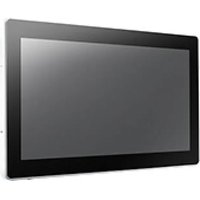
UTC-318F - Touchscreen Computer Advantech - Free user manual and instructions
Find the device manual for free UTC-318F Advantech in PDF.


Pick your language and provide your email: we'll send you a specifically translated version.
| Type of Product | Industrial Panel PC |
| Brand | Advantech |
| Model | UTC-318F |
| Display Size | 15.6 inches |
| Resolution | 1920 x 1080 (Full HD) |
| Touch Technology | Projected Capacitive |
| Processor | Intel Core i5-8365UE (8th Gen) |
| RAM | 8 GB DDR4 (Expandable up to 16 GB) |
| Storage | 128 GB M.2 SSD |
| Operating System | Windows 10 IoT Enterprise (Optional) |
| Power Input | 12-24 VDC |
| Power Consumption | 60 W (Typical) |
| Operating Temperature | 0°C to 50°C |
| IP Rating (Front) | IP65 |
| Dimensions (W x H x D) | 400 x 250 x 55 mm |
| Weight | Approx. 4.5 kg |
| Mounting | VESA 100 x 100 mm, Panel Mount |
| Ports | USB 2.0 (x2), USB 3.0 (x2), LAN (x2), COM (x2) |
| Wireless Connectivity | Wi-Fi 802.11ac, Bluetooth 4.2 (Optional) |
| Expansion Slots | 1 x Full-size mini-PCIe, 1 x M.2 |
| Certifications | CE, FCC |
| In the Box | UTC-318F, Power Adapter, Mounting Kit, Manual |
| Cleaning Instructions | Use a soft, dry cloth. Disconnect power before cleaning. |
| Safety Notes | Do not expose to extreme temperatures or moisture. Use only the supplied power adapter. |
| Spare Parts & Repairability | Contact Advantech for authorized spare parts and repair services. |
Frequently Asked Questions - UTC-318F Advantech
What operating system is supported on the UTC-318F?
The UTC-318F supports Windows 10 IoT Enterprise and Ubuntu 18.04 LTS. Pre-installed options vary by configuration.
How do I mount the UTC-318F?
The panel PC supports VESA 100x100 mm mounting or panel mounting using the provided brackets. Ensure the surface is sturdy and follow the instructions in the manual.
Can I replace the hard drive?
Yes, the UTC-318F has a replaceable M.2 SSD. Access the SSD compartment by removing the back cover. Use an M.2 2280 form factor drive.
How do I calibrate the touchscreen?
In Windows, go to the Control Panel > Tablet PC Settings > Calibrate. Follow the on-screen instructions. For other OS, use the manufacturer's calibration tool.
What is the power consumption of the UTC-318F?
Typical power consumption is 60W. The device accepts 12-24 VDC input via the included power adapter.
Can it be used outdoors?
The front panel is IP65-rated, making it dust-tight and splash-resistant. However, it is designed for indoor operation within 0°C to 50°C. Avoid direct sunlight and use in shaded areas.
How to connect the UTC-318F to a network?
Use the two Ethernet LAN ports for wired connectivity. For wireless, install an optional Wi-Fi/Bluetooth module in the mini-PCIe slot. Configure network settings via the OS.
What is the maximum supported RAM?
The UTC-318F supports up to 16 GB DDR4 RAM. It comes standard with 8 GB, with one SODIMM slot available for upgrade.
How do I update the BIOS?
Download the latest BIOS from the Advantech support website. Copy the BIOS file to a USB drive, boot the device, and enter the BIOS setup using the F2 key. Use the EZ Flash utility to update.
Does the device support dual monitors?
The UTC-318F has one HDMI output and can support a second display via the optional USB-C or DisplayPort (depending on configuration). Check your model's specifications.
User questions about UTC-318F Advantech
0 question about this device. Answer the ones you know or ask your own.
Ask a new question about this device
No questions yet. Be the first to ask one.
Download the instructions for your Touchscreen Computer in PDF format for free! Find your manual UTC-318F - Advantech and take your electronic device back in hand. On this page are published all the documents necessary for the use of your device. UTC-318F by Advantech.
USER MANUAL UTC-318F Advantech


Manual assistant
Powered by Anthropic
Waiting for your message
Product information
Brand : Advantech
Model : UTC-318F
Category : Touchscreen Computer