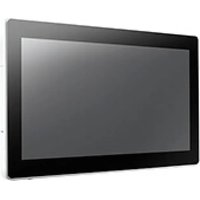
UTC-318D - Touchscreen Computer Advantech - Free user manual and instructions
Find the device manual for free UTC-318D Advantech in PDF.


Pick your language and provide your email: we'll send you a specifically translated version.
| Product Type | Industrial Touch Panel Computer |
| Model | UTC-318D |
| Brand | Advantech |
| Display Size | 15.6 inches |
| Resolution | 1366 x 768 (typical) |
| Touch Technology | Projected Capacitive 10-point multi-touch |
| Processor | Intel Celeron J1900 or equivalent |
| Memory | 4 GB DDR3L (max 8 GB) |
| Storage | 64 GB mSATA SSD (optional) |
| Operating System | Windows 10 IoT, Linux (optional) |
| Dimensions (W x H x D) | 400 x 250 x 50 mm (estimate) |
| Weight | Approx. 4 kg |
| Power Input | 12-24 V DC (typical) |
| Power Consumption | Max 30 W |
| IP Rating (Front) | IP65 (dust and water jet resistant) |
| Operating Temperature | 0°C to 50°C |
| Interfaces | 2 x LAN, 2 x USB, 1 x COM, Audio |
| Expansion Slots | 1 x Mini-PCIe |
| Mounting | Panel mount or VESA 75/100 |
| Maintenance | Clean with a soft, dry cloth; avoid solvents |
| Safety | Install with proper grounding; use supplied power adapter |
| Spare Parts & Repairability | Contact Advantech for authorized service and replacement parts |
| General Information | Fanless design, suitable for industrial automation and HMI applications |
Frequently Asked Questions - UTC-318D Advantech
What operating system does the UTC-318D support?
The UTC-318D typically supports Windows 10 IoT Enterprise and Linux (such as Ubuntu or Yocto) depending on the configuration.
How do I install the UTC-318D?
The device can be panel-mounted using the provided clips or VESA-mounted (75x75 or 100x100 mm). Ensure the mounting surface is sturdy and allows proper ventilation.
How do I calibrate the touch screen?
On Windows, go to Control Panel > Hardware and Sound > Tablet PC Settings and follow the calibration wizard. On Linux, use the xinput_calibrator tool or the manufacturer's utility.
What is the power requirement for the UTC-318D?
The device accepts 12-24 V DC input. Use the supplied power adapter or a regulated DC power source with the correct polarity (center positive).
Can the UTC-318D be used outdoors?
The front panel is IP65-rated, meaning it is protected against dust and water jets. However, for outdoor use, you must protect it from direct sunlight and extreme temperatures beyond the rated 0-50°C.
How do I clean the UTC-318D touch screen?
Use a soft, lint-free cloth slightly dampened with water or a mild glass cleaner. Do not use abrasive cleaners or spray directly onto the screen.
What are the available I/O ports?
The UTC-318D typically includes 2 Gigabit LAN, 2 USB 2.0/3.0, 1 COM port (RS-232), audio line out, and a power jack.
Is the UTC-318D fanless?
Yes, it features a fanless design for silent operation and reliability in dusty environments.
How can I update the BIOS or drivers?
Visit Advantech's support website (advantech.com) and search for UTC-318D. Download the latest BIOS and driver packages under the 'Download' section.
What should I do if the UTC-318D does not turn on?
Check the power cable and adapter, ensure the voltage is correct (12-24V DC). Try a different power outlet. If the issue persists, contact Advantech support for further assistance.
User questions about UTC-318D Advantech
0 question about this device. Answer the ones you know or ask your own.
Ask a new question about this device
No questions yet. Be the first to ask one.
Download the instructions for your Touchscreen Computer in PDF format for free! Find your manual UTC-318D - Advantech and take your electronic device back in hand. On this page are published all the documents necessary for the use of your device. UTC-318D by Advantech.
USER MANUAL UTC-318D Advantech


Manual assistant
Powered by Anthropic
Waiting for your message
Product information
Brand : Advantech
Model : UTC-318D
Category : Touchscreen Computer