
CED232 - Car radio PHILIPS - Free user manual and instructions
Find the device manual for free CED232 PHILIPS in PDF.


Pick your language and provide your email: we'll send you a specifically translated version.
| Product Type | Car Stereo |
| Brand | Philips |
| Model | CED232 |
| Dimensions (W x H x D) | 180 mm x 50 mm x 160 mm (1 DIN) |
| Weight | Approx. 1.5 kg |
| Power Supply | 12 V DC (negative ground) |
| Maximum Output Power | 4 x 45 W (max) |
| Radio Bands | FM, AM (MW/LW) |
| Media Playback | CD, CD-R/RW, MP3-compatible |
| Auxiliary Input | Front AUX 3.5 mm jack |
| RDS Function | Yes (Radio Data System) |
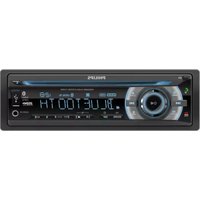
| Display Type | LCD with backlight |
| Number of Preset Stations | 30 (FM) + 15 (AM) |
| Equalizer Presets | 5 presets (Rock, Pop, Classic, Jazz, Speech) |
| Detachable Faceplate | Yes, for anti-theft |
| Remote Control | Not included (optional) |
| Maintenance | Clean with a soft, dry cloth. Avoid liquids. |
| Safety | Disconnect battery negative terminal before installation. Use only specified fuses. |
| Spare Parts & Repairability | Contact authorized Philips service center for parts and repairs. |
| General Information | Designed for 12V vehicles. Conforms to relevant EU directives. |
Frequently Asked Questions - CED232 PHILIPS
How do I set the clock on the Philips CED232?
Press and hold the CLK button until the hour flashes. Use the volume knob or preset buttons to adjust hours and minutes. Press CLK again to confirm.
How can I connect my phone to the car stereo via AUX?
Use a 3.5 mm audio cable to connect your phone to the AUX IN jack on the front panel. Press SRC repeatedly until AUX appears on the display.
What should I do if the stereo does not turn on?
Check the car fuse (usually 10A) and the wiring connection. Ensure the ignition is on if required. If still not working, consult a professional.
How do I remove the detachable faceplate?
Press the RELEASE button on the front panel and pull the faceplate towards you. Store it in the supplied case to prevent damage.
Why is there no sound from the speakers?
Check the volume level, mute setting, and speaker wiring. Also ensure the source is playing and the fader/balance settings are correct.
Can I play MP3 CDs on this stereo?
Yes, the CED232 supports MP3 files burned on CD-R or CD-RW discs. Keep the disc format as ISO 9660/Joliet and do not exceed 8 folders depth.
How do I manually tune radio stations?
Press BAND to select FM or AM. Then press and hold the SEEK button (up/down) to auto-search, or tap briefly for manual tuning.
What is the RDS function and how to use it?
RDS shows station information like station name or song title on the display. It works automatically for FM stations that broadcast RDS data.
How do I reset the stereo to factory settings?
Press and hold the DISP button for 5 seconds until the display resets. Alternatively, use a paper clip to press the RESET hole on the front panel.
Where can I find the user manual for this model?
The manual is available for free download on notice-facile.com in PDF format. Search for 'Philips CED232 manual'.
User questions about CED232 PHILIPS
0 question about this device. Answer the ones you know or ask your own.
Ask a new question about this device
No questions yet. Be the first to ask one.
Download the instructions for your Car radio in PDF format for free! Find your manual CED232 - PHILIPS and take your electronic device back in hand. On this page are published all the documents necessary for the use of your device. CED232 by PHILIPS.
USER MANUAL CED232 PHILIPS


Manual assistant
Powered by Anthropic
Waiting for your message
Product information
Brand : PHILIPS
Model : CED232
Category : Car radio