55 LED - Detector Safescan - Free user manual and instructions
Find the device manual for free 55 LED Safescan in PDF.


Pick your language and provide your email: we'll send you a specifically translated version.
| Product Type | Counterfeit Detector |
| Brand | Safescan |
| Model | 55 LED |
| Detection Methods | UV (Ultraviolet), Magnetic, Watermark, Microprinting |
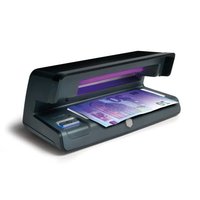
| Light Source | 55 UV LEDs |
| Power Supply | AC adapter (100-240V, 50/60Hz) |
| Power Consumption | 5 W (max) |
| Dimensions (W x D x H) | 180 x 80 x 80 mm |
| Weight | 0.5 kg |
| Warm-Up Time | Instant |
| Auto Shut-Off | After 3 minutes of inactivity |
| Detection Speed | Instant |
| Application | Banknotes, IDs, Credit Cards |
| Operating Temperature | 0°C to 40°C |
| Humidity | 20% to 80% (non-condensing) |
| Warranty | 2 years |
| Package Contents | Detector, AC adapter, User manual |
| Maintenance | Clean UV LEDs with dry cloth; avoid liquids |
| Safety | CE, RoHS compliant |
| Spare Parts | UV LEDs not replaceable; contact support for repairs |
| Repairability | Not user-serviceable; contact Safescan service center |
Frequently Asked Questions - 55 LED Safescan
How do I turn on the Safescan 55 LED detector?
To turn on, plug the AC adapter into the detector and a power outlet. Press the power button. The UV LEDs will illuminate immediately.
What currencies can the Safescan 55 LED detect?
The Safescan 55 LED is designed to detect counterfeit notes from multiple currencies, including USD, EUR, GBP, and many others. It checks UV, magnetic ink, watermark, and microprinting.
How do I clean the UV LEDs?
Use a soft, dry cloth to gently wipe the UV LEDs. Avoid using liquids or abrasive materials, as they may damage the LEDs.
Can I use batteries?
No, the Safescan 55 LED is powered only via the included AC adapter. Do not attempt to use batteries.
What does the auto shut-off feature do?
The detector automatically turns off after 3 minutes of inactivity to save power and extend LED life.
How do I know if a note is counterfeit?
Place the note under the UV light. Authentic notes have specific fluorescent features. Also check magnetic ink with the sensor (if applicable). Compare with a known genuine note.
Is the Safescan 55 LED suitable for checking IDs?
Yes, it can be used to check UV features on IDs and credit cards, though it is primarily designed for banknotes.
What should I do if the UV light is dim?
First, clean the LEDs with a dry cloth. If still dim, the LEDs may be nearing end of life. Contact Safescan support for replacement options.
Can I repair the detector myself?
The device is not user-serviceable. Opening it may void the warranty. Please contact Safescan authorized service center for repairs.
Where can I download the full user manual?
The manual is available for free download on the Safescan website or on manual websites like notice-facile.com in PDF format.
User questions about 55 LED Safescan
0 question about this device. Answer the ones you know or ask your own.
Ask a new question about this device
No questions yet. Be the first to ask one.
Download the instructions for your Detector in PDF format for free! Find your manual 55 LED - Safescan and take your electronic device back in hand. On this page are published all the documents necessary for the use of your device. 55 LED by Safescan.
USER MANUAL 55 LED Safescan
Manual assistant
Powered by Anthropic
Waiting for your message
Product information
Brand : Safescan
Model : 55 LED
Category : Detector