
IGX-2072 - Switch LEVELONE - Free user manual and instructions
Find the device manual for free IGX-2072 LEVELONE in PDF.


| Product Type | Industrial Gigabit PoE+ Switch |
| Brand | LevelOne |
| Model | IGX-2072 |
| Number of Ports | 8 ports 10/100/1000Base-TX with PoE+ (802.3af/at), 2 Gigabit SFP ports |
| Total PoE Budget | 240 W |
| Dimensions (W x D x H) | 150 x 100 x 45 mm |
| Weight | 0.8 kg |
| Power Supply | 48-56 VDC (redundant input) |
| Operating Temperature | -40 °C to 75 °C |
| Mounting | DIN Rail |
| Main Functions | VLAN, QoS, IGMP Snooping, SNMP, Web management, RSTP/STP redundancy |
| Maintenance and Cleaning | Clean with a soft, dry cloth. Do not use chemicals. |
| Safety | Disconnect power before any intervention. Do not open the casing. Keep out of reach of children. |
| Spare Parts and Repairability | Contact LevelOne technical support. Repairs must be carried out by a qualified professional. |
| General Information | Compliant with CE and RoHS standards. 2-year warranty. |
Frequently Asked Questions - IGX-2072 LEVELONE
User questions about IGX-2072 LEVELONE
0 question about this device. Answer the ones you know or ask your own.
Ask a new question about this device
Download the instructions for your Switch in PDF format for free! Find your manual IGX-2072 - LEVELONE and take your electronic device back in hand. On this page are published all the documents necessary for the use of your device. IGX-2072 by LEVELONE.
USER MANUAL IGX-2072 LEVELONE
Quick Installation Guide
(Industrial Managed Switches )
Content
English 3
Deutsch....7
Français ....11
Español....15
Italiano ....19
Português ....23
This Quick Installation Guide only describes the most basic situations and settings. All detailed information is described in the user manual.
Digital Data Communications GmbH
Im Defdahl 10 F, 44141 Dortmund, Germany
Email : support@level1.com

English
Power connecting procedure
Requirement: For operation, a DC Industrial Power Supply is needed (sold separately)
STEP 1 – Pull out Power Terminal Block.
STEP 2 –Connect wire to PWR1+, PWR1-, or PWR2+, PWR2-, and Ground the neutral wire to the ground screw.
STEP 3 – Plug back Power Terminal Block to its place.
Note: The Industrial switch is an indoor device. If you need to use it to connect outdoor devices such as outdoor IP cameras or outdoor WiFi Aps with cable, then you need to install an arrester on the cable between outdoor device and the switch.
Perform Initial Configuration
- Connect PC to the switch console port using console cable.
- Configure the PC's serial port: 115200 bps, 8 characters, no parity, one stop bit, 8 data bits, and no flow control.
- Log in to the CLI using default settings: Username "admin" and password "admin."
Note: For further information on switch configuration, refer to the CLI Reference Guide and Web Management Guide.
Logging on to the equipment
- Connect the RJ-45 interface cable of a Industrial switch with a computer using a network cable.
- Set the TCP/IP properties of the computer.
■ Windows
- Click Start—> Control Panel—> Network and Internet—> Network and Sharing Center—> Change adapter settings, right click Local connection and select Properties.
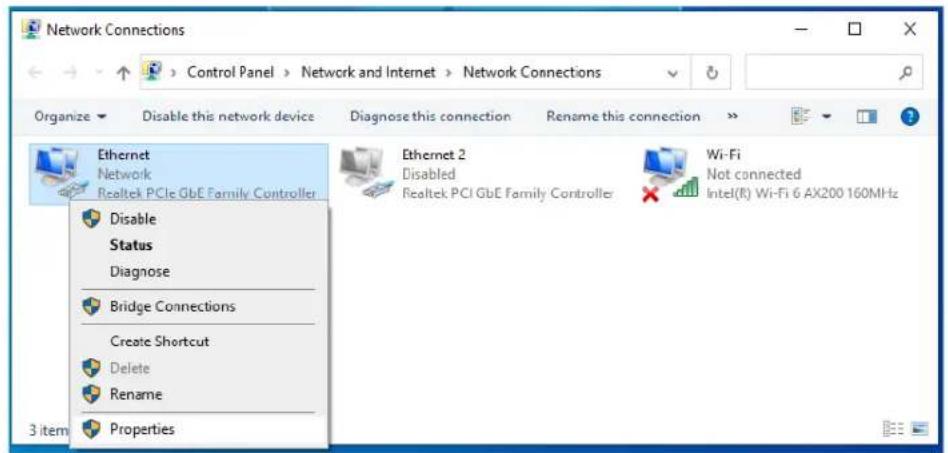
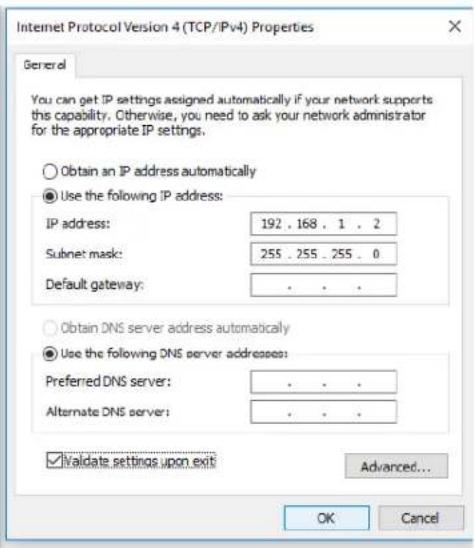
- Double-click Internet Protocol 4 (TCP/IPv4)
- Set the computer's IP address: The computer's IP address should be any one of the following free IP addresses 192.168.1.2 \~ 192.168.1.253, and then click OK, to return to the previous page, click OK.

- Logging on to the equipment: Open a browser and type 192.168.1.1 in the address bar, and then press Enter; in the pop-up login interface, enter the factory logon username "admin", password "admin" and click OK.

■ macOS
- Click the Apple icon, from the Apple drop-down list, select System Preferences.
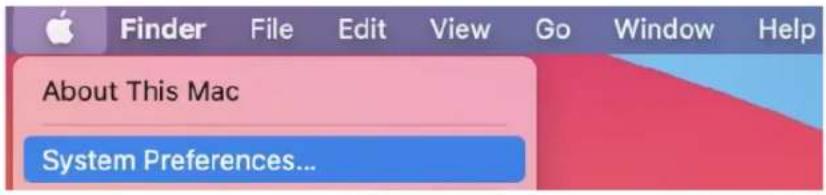
- Click the Network icon.
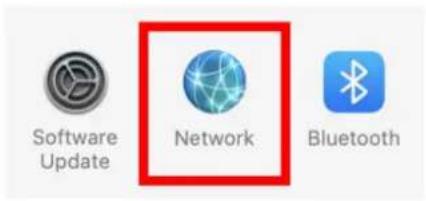
- Select the Ethernet (for wired connection), from the Configure IPv4 drop-down list, select Manually.

- Set the computer's IP address: The computer's IP address should be any one of the following free IP addresses 192.168.1.2 \~ 192.168.1.253, Subnet Mask 255.255.255.0, and then click Apply.
- Logging on to the equipment: Open a browser and type 192.168.1.1 in the address bar, and then press Enter; in the pop-up login interface, enter the factory logon username "admin", password "admin" and click OK.


Explanation of symbols
The symbol with the exclamation mark in the triangle is used to indicate important information in these operating instructions. Always read this information carefully.

Disposal
WEEE: Dispose the product at a recycling point. Do not dispose together with household waste. Incorrect storage/disposal can harm the environment and/or cause injury.

Safety instructions
Read the operating instructions carefully and especially observe the safety information. If you do not follow the safety instructions and information on proper handling in this manual, we assume no liability for any resulting personal injury or damage to property. Such cases will invalidate the warranty/guarantee.
a) General information
- The device is not a toy. Keep it out of the reach of children and pets.
- Do not leave the packaging material lying around carelessly. This may become dangerous playing material for children.
- Protect the appliance from extreme temperatures, direct sunlight, strong jolts, high humidity, moisture, flammable gases, steam, and solvents.
- Do not place the product under any mechanical stress.
- If it is no longer possible to operate the product safely, take it out of operation and protect it from any accidental use. Safe operation can no longer be guaranteed if the product:
- is visibly damaged,
- is no longer working properly,
- has been stored for extended periods in poor ambient conditions or
- has been subjected to any serious transport-related stress.
- Please handle the product carefully. Jolts, impacts, or a fall, even from a low height, can cause damage to the product.
- Consult an expert when in doubt about the operation, safety, or connection of the appliance.
- Maintenance, modifications, and repairs must only be completed by a technician or an authorized repair center.
- If you have questions that remain unanswered by these operating instructions, contact our technical support service or other technical personnel.
b) People and product
- Never use the product immediately after it has been brought from a cold room into a warm one. This can cause condensation to form, which may lead to irreparable damage. Allow the product to reach room temperature before connecting it and putting it to use. This may take several hours.
Care and cleaning
- Disconnect the product from the mains before cleaning.
- Do not use any aggressive cleaning agents, rubbing alcohol, or other chemical solutions as they can cause damage to the housing and functioning of the product.
- Clean the product with a dry, fiber-free cloth.
Deutsch
- Clique no ícone Rede.

- Seleccione Ethernet (para conexão com fio), na lista suspensa Configurar IPv4, selecione Manualmente.



Brand : LEVELONE
Model : IGX-2072
Category : Switch