
Live Streamer MIC AM133 - Microphone AVERMEDIA - Free user manual and instructions
Find the device manual for free Live Streamer MIC AM133 AVERMEDIA in PDF.


Pick your language and provide your email: we'll send you a specifically translated version.
| Product Type | USB Condenser Microphone |
| Brand | AVerMedia |
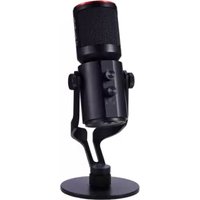
| Model | Live Streamer MIC AM133 |
| Category | Microphone |
| Connectivity | USB 2.0 (Type-C to Type-A) |
| Polar Pattern | Cardioid |
| Sampling Rate | 48 kHz |
| Bit Depth | 16-bit |
| Frequency Response | 50 Hz – 20 kHz |
| Sensitivity | -37 dB (1V/Pa at 1 kHz) |
| Dimensions (Microphone only) | 160 mm (height) x 60 mm (diameter) |
| Dimensions (With Stand) | 260 mm x 110 mm x 110 mm |
| Weight | Approx. 500 g |
| Power Source | USB bus-powered (5V) |
| Compatibility | Windows 10/11, macOS, PS4/PS5, Nintendo Switch |
| Key Features | Plug-and-play, mute button, volume control, LED indicator, headphone monitoring |
| LED Indicator | RGB ring (customizable via software) |
| Mute Button | Capacitive touch or push-button |
| Gain Control | Knob on front panel |
| Headphone Output | 3.5 mm TRS (with volume knob) |
| Mounting | Desktop stand with shock mount, 3/8" thread for boom arm |
| Cable Length | 1.5 m USB Type-C to Type-A |
| Color | Matte black |
| Package Contents | Microphone, desktop stand, USB cable, quick start guide |
| Warranty | 1 year (check local terms) |
| Maintenance | Wipe with dry cloth; avoid moisture and dust |
| Safety | Use with proper USB power; keep away from liquids |
| Spare Parts & Repairability | Replacement cables and stands available; user-serviceable parts not recommended |
Frequently Asked Questions - Live Streamer MIC AM133 AVERMEDIA
How do I set up the AVerMedia Live Streamer MIC AM133?
Simply connect the microphone to your computer via USB. It is plug-and-play, so no drivers are required for Windows and macOS. Position the mic with the AVerMedia logo facing your sound source.
Is the microphone compatible with PlayStation or Xbox?
Yes, it works with PS4, PS5, and Nintendo Switch. For Xbox, it may require a USB audio adapter.
Can I use the microphone with streaming software like OBS?
Yes, it appears as a standard USB audio device. Select it as the audio input in OBS, Streamlabs, or other streaming software.
How do I mute the microphone?
Tap the mute button on the front of the microphone. The LED ring will change color or turn red to indicate mute mode.
What is the polar pattern and how does it affect recording?
The polar pattern is cardioid, meaning it picks up sound primarily from the front while rejecting noise from the sides and rear. This makes it ideal for solo streaming, podcasting, or voice recording.
Does the microphone have a headphone output for monitoring?
Yes, there is a 3.5 mm headphone jack on the back. The volume knob controls both the speaker/monitor volume and headphone level. Use the AM133's own monitoring to eliminate audio delay.
How do I clean and maintain the microphone?
Wipe the exterior with a soft, dry cloth. Avoid using liquids. Keep the microphone away from dust and moisture. The built-in pop filter is mesh and can be gently cleaned with a brush.
Can I mount the microphone on a boom arm?
Yes, you can replace the included desktop stand with a boom arm. The microphone has a standard 3/8-inch thread. You may need a 5/8-inch adapter for some arms.
What should I do if I encounter audio dropouts or static noise?
Try plugging the mic into a different USB port. Avoid USB hubs if possible. Ensure your computer's USB driver is up to date. If the issue persists, restart your computer or try the mic on another device to isolate the problem.
Is there software to customize the microphone settings?
AVerMedia offers the AM133 Utility software (available for Windows) for adjusting equalizer, LED lighting, and monitoring volume. The microphone works without it, but the software provides additional control.
User questions about Live Streamer MIC AM133 AVERMEDIA
0 question about this device. Answer the ones you know or ask your own.
Ask a new question about this device
No questions yet. Be the first to ask one.
Download the instructions for your Microphone in PDF format for free! Find your manual Live Streamer MIC AM133 - AVERMEDIA and take your electronic device back in hand. On this page are published all the documents necessary for the use of your device. Live Streamer MIC AM133 by AVERMEDIA.
USER MANUAL Live Streamer MIC AM133 AVERMEDIA


Manual assistant
Powered by Anthropic
Waiting for your message
Product information
Brand : AVERMEDIA
Model : Live Streamer MIC AM133
Category : Microphone