关闭风扇。
on: When the fan is on, the power is 100 watts
OFF: When the fan is off, the power drops to 40 watts.

7. Multi-light arrangement settings.
Enter arrangement mode: press and hold the button to enter.
Exit arrangement mode: when the screen displays , press the button to exit.
To use arrangement mode, please download the APP for operation.

8. Use of the mobile APP and remote control.
- Press the button, rotate the right knob to select the Bluetooth icon, press the right knob to turn on Bluetooth; then open the mobile APP to automatically connect to the camera light for wireless control. 2. The 2.4G wireless control mode can be selected to be on or off.
- The APP can be downloaded from the Yongnuo official website or by scanning the QR code on the color box to download.
The functions in this manual are based on our company's test conditions. Design and specifications are subject to change without notice.
Manufacturer: Shenzhen Yongnuo Electrical Co., Ltd.
Address: 2-5F, Building A2, Block A, 209A, No. 14 Ruixiu East Road, Xiuxin Community, Kengzi Street, Pingshan District, Shenzhen
Tel: (86)0755-3300 1023
After-sales service hotline: 400-001-3888
Website: www.hkyongnuo.com
Implementation Standard: Q/YNDQ001
Introduction
Thank you for using YONGNUO products!
Please read this manual carefully before using the product and keep it properly for future reference.
Precautions
- Please keep the product away from children, and do not place it in the children's activity area.
- Please use this product under supervision, and power it off when unsupervised.
- Before use, please check whether the power voltage matches the voltage marked on the product.
- It is recommended to use the original cables or accessories provided or sold by YONGNUO.
- When the power cord is connected, please place it properly to avoid tripping people or causing a blackout, and do not place it on a hot or damp surface.
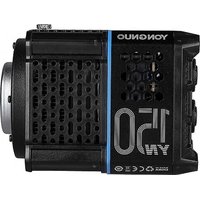
- When the product is running, do not cover the dissipation hole to avoid product damage due to poor dissipation performance.
- When the product is running, do not look directly at the lamp beads to avoid eye discomfort due to strong lights.
- When the product is running, the lamp beads are in a heating state; do not touch them to avoid burns.
- When high-temperature warning occurs, please check whether the fan is faulty.
- Use this product in dry environment. This product is not waterproof or fireproof. Do not use it in hot, rainy, damp or dusty environment. 11.Do not use this product near chemicals, flammable gases, inflammables and explosives.
- Before storing the product, please turn off the power, unplug the power cord, wait for the product to cool down completely, and store it in a portable bag or a dry environment.
- Please do not use the damaged power cord or the cracked product caused by falling off.
- This product is not fall-proof, please use it carefully to avoid falling down or getting heavy hit.
- Before cleaning the product, please ensure that the power is turned off, and please use a dry soft cloth for cleaning.
- Please do not disassemble the product by yourself. In case of failure, problems shall be handled by the company or authorized maintenance personnel.
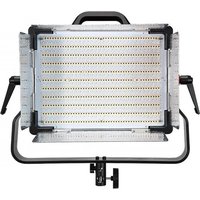
Product specification Single color temperature version
| Light Source | 528pcs white lamp beads |
| Color temperature | 5600K | APP Bluetooth control | <50m |
| Output power | Constant power 100W (Color temperature changes with power unchanged) |
| external power supply 1 | DC 19V=6.31A, Interface size, φ 5.5*2.1mm | 2.4G wireless control | <100m |
| external power supply 2 | TYPE-C Interface, In accordance with PD agreement | Luminance Angle | 55° |
| external battery 1 | 4pcs NP-F series batteries | Product Net Size | 4.5*6.6*40.5cm |
| external battery 2 | V mount battery | Average Service Life | <1000h |
Bi-color temperature version
| Light Source | 528pcs white lamp beads, 528pcs warm lamp beads |
| Color temperature | 2700K-8500K | APP Bluetooth control | €50m |
| Output power | Constant power 100W (Color temperature changes with power unchanged) |
| external power supply1 | DC 19V=6.31A, interface size, φ5.5*2.1mm Θ-Φ-⊕ | 2.4G wireless control | €100m |
| external power supply2 | TYPE-C interface, in accordance with PD agreement | Luminance Angle | 55° |
| external battery 1 | 4pcs NP-F series batteries | Product Net Size | 4.5*6.6*40.5cm |
| external battery 2 | V mount battery | Average Service Life | €0000h |
Photometrics Single color temperature version
| Single color temperature version | Illumination Distance | Single light |
| 5600K | 1m | 4210lux |
| 2m | 1200lux |
| 3m | 669lux |
Bi-color temperature version
| Bi color temperature version | Illumination distance | Single light |
| 2700K | 1m | 3480lux |
| 2m | 1170lux |
| 3m | 559lux |
| Bi color temperature version | Illumination Distance | Single light |
| 5500K | 1m | 4160lux |
| 2m | 1380lux |
| 3m | 654lux |
| Bi-color temperature version | ilumination Distance | Single light |
| 6500K | 1m | 4140lux |
| 2m | 1370lux |
| 3m | 651lux |
| Bi color temperature version | Illumination Distance | Single light |
| 8500K | 1m | 401lux |
| 2m | 1320lux |
| 3m | 630lux |
English
Full color RGB version
| Light Source | 528pcs white lamp beads, 528pcs warm lamp beads, 528pcs RGB lamp beads |
| Color temperature | 2000K-10000K+G/M | Full color RGB | APP Bluetooth control | ≤50m |
| Output power | Constant power 100W (Color temperature changes with power unchanged) |
| external power supply 1 | DC 19V=6.31A, Interface size, φ 5.5*2.1mm=○-○ | 2.4G wireless control | ≤100m |
| external power supply 2 | TYPE C interface, in accordance with PD agreement | Luminance Angle | 55° |
| external battery 1 | 4pcs NP-F series batteries | Product Net Size | 43.5*6.6*40.5cm |
| external battery 2 | V mount battery | Average Service Life | 50000h |
Check list
Single light version
Package Dimensions: 51.5*45.5*12.5CM.
Contents: Video light (1), power cord of D-TAP plug to DC plug (1), User Manual (1).
Kit version
Package Dimensions: 53.5*16.5*49.5CM.
Contents: Video light (1), Power adapter (1), power line (1)
power cord of D-TAP plug to DC plug (1), softbox (1), Soft light cloth (1), Grate (1),
Portable case (1), User Manual (1).
Note: Please contact your dealer if anything missing.
Full color RGB version
| Bi-color temperature | Illumination Distance | Single light | R | Illumination Distance | Single light |
| 2700K | 1m | 3270lux | 1m | 1760lux |
| 2m | 1020lux | 2m | 565lux |
| 3m | 530lux | 3m | 310lux |
| Bi-color temperature | Illumination Distance | Single light | G | Illumination Distance | Single light |
| 5600K | 1m | 8970lux | 1m | 2990lux |
| 2m | 1200lux | 2m | 759lux |
| 3m | 645lux | 3m | 416lux |
| Bi color temperature | Illumination Distance | Single light | B | Illumination Distance | Single light |
| 10500K | 1m | 3750lux | 1m | 790lux |
| 2m | 1120lux | 2m | 225lux |
| 3m | 601lux | 3m | 120lux |
* This is an averaged result, the number might be slightly different on each light.


2. Power source
- Powered by power adapter.
AC100V-240V
DC Power Adapter: Voltage 12V (≥5A) - 18V (≥4A), power is 60W;
Voltage ≥ 19V (≥5.26A), power is 100W.

- Use TYPE-C for power supply.
The Type-C charger is not suitable for long-time with full power output. To protect the
Type-C charger, the product will limit its maximum power output
For example: using a 100 watts TYPE-C charger, the maximum power supply is 70 watts (70%).
![graph LR A["AC 100V-240V"] --> B["Device"] B --> C["Switch"] C --> D["Output"] style A fill:#f9f,stroke:#333 style D fill:#bbf,stroke:#333](/content/2026/07/1453401/images/039afe36d29445ed834cff4ac869d0e2c1dfac89ca1c8ce5d1f9709e6be5013f.jpg)
- Use V mount battery for power supply.
- Align the V mount battery buckle with the V mount battery holder, place downwards to lock it with a 'click'.
- Need to use conversion power cord of D-TAP plug to DC plug, insert DC power interface to connect V mount battery for power supply.
Removing the battery: Press the V mount battery lock, and pull upwards the battery.
V Mount Battery: Voltage 14.8V, power is 60W;
Voltage ≥ 26V, power is 100W.
![graph TD A["Switch"] --> B["V mount battery lock"] B --> C["DC Input"] D["Device ①"] --> B E["Device ②"] --> B F["Device ③"] --> B G["Device ④"] --> B](/content/2026/07/1453401/images/7bff23f1b0d34059a2f411c9da5b147058346bd5b8fa1bd5a6f88a33fc6a1bca.jpg)
4. Use NP-F battery for power supply.
Installation: Install the NP-F series battery in the direction of the arrow.
Remove: Press and hold the battery lock and reverse the arrow to remove the battery.

NP-F series batteries: 4pcs NP-F batteries, power is 80W.
Note: when the light is powered by 4pcs batteries, if any one
of the battery runs out, the light will stop working, please
use 4pcs batteries in the same battery level.
Note: Priority level of power supply interface: DC > TYPE-C > NP-F batteries. When multiple power sources are used simultaneously, the camera light automatically selects according to the priority level of the power supply method and does not charge the battery.
2. Tone Setting.
In [CCT] Mode, press key to enter [HUE] mode.
Left knob: press the knob to switch hue and saturation, rotate the knob to adjust the parameter.
Right knob: press the knob to switch coarse tuning (20% per gear) and fine tuning (0.1% per
gear), rotate the knob to adjust the brightness.

3. Effects Setting.
Press to enter [FN] mode, when the screen shows [FN] mode interface,
press and choose to play or pause the effect.
Left knob: Press the knob to switch effects and frequency, rotate the knob to adjust the parameter.
Right knob: press the knob to switch coarse tuning (20% per gear) and fine tuning (0.1% per
gear), rotate the knob to adjust the brightness.

5. Power ON or OFF.

3. Functions
1 Color Temperature Setting.
Press , enter the color temperature mode.
Left knob: press the knob to switch color temperature and red green offset, rotate the knob to adjust the parameter.
Right knob: press the knob to switch coarse tuning(20% per gear) and fine tuning (0.1% per gear), rotate the knob to adjust the brightness.

- Channel Display.
- Power (NP-F Series Battery Display).
- Fan(Turn on fan Display)
- LED temperature display
- 2.4G(Turn on 2.4G Display)
- Bluetooth (Connection Display).
- Color Temperature Display.
- Brightness Display.
- Red-green offset D
- Red-green offset display
Single color temperature version: Effects Scene 0~8
Bi-color temperature version: Effects Scene 0~11

Simulated lightning

Film screen reflection

Paparazzi

Strobe

SOS

White breathing light

The explosion

Fireworks

The bad light bulb

Sunrise

Yellow breathing light

Temperature cycle
Full color RGB version: Effects Scene 0~30

Simulated lightning

Film screen reflection

Candlelight

Sunrise

Fireworks

Rainbow
Seven-color
Cycle

RGB color gamut fast loop

Police car

Ambulance

Fire truck

Paparazzi

Strobe

SOS

Alpine emergency signal

Party

Festival Atmosphere

Fire scene

Red light

Green light flash

Blue light flash

Yellow light flash

Purple light flash

Cyan light flash

Explosion simulation

Electric soldering simulation

Bad light bulb effect

Double flash

Car light approaching

Pool simulation

Light flash alternately

Color temperature cycle
-31--32-
English
4.4 Kinds of professional-grade dimming curve model settings.
Press