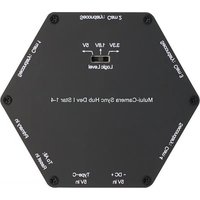
Multi-Camera Sync Hub Pro - 3D Printer Orbbec - Free user manual and instructions
Find the device manual for free Multi-Camera Sync Hub Pro Orbbec in PDF.


Pick your language and provide your email: we'll send you a specifically translated version.
| Product Type | Multi-Camera Sync Hub |
| Brand | Orbbec |
| Model | Multi-Camera Sync Hub Pro |
| Dimensions (Approx.) | 10 x 10 x 2 cm (3.9 x 3.9 x 0.8 in) |
| Weight (Approx.) | 200 g (7 oz) |
| Power Input | USB Type-C, 5V DC, 2A |
| Number of Camera Ports | 4 (supports daisy-chaining) |
| Supported Cameras | Orbbec Astra, Femto, Dabai series |
| Synchronization Method | Hardware trigger via GPIO / USB |
| LED Indicators | Power, Sync Status, Camera Link |
| Firmware Update | Via USB using Orbbec SDK |
| Data Interface | USB 3.0 (backward compatible with USB 2.0) |
| Operating Temperature | 0°C to 40°C (32°F to 104°F) |
| Storage Temperature | -20°C to 60°C (-4°F to 140°F) |
| Humidity | 10% to 80% non-condensing |
| Housing Material | Aluminum alloy with plastic casing |
| Compliance | CE, FCC, RoHS |
| Included Accessories | USB-C cable, quick start guide |
| Cleaning Instructions | Wipe with a soft dry cloth; avoid liquids |
| Safety Precautions | Use only specified power supply; keep away from water |
| Spare Parts Availability | Not applicable; no user-serviceable parts |
| Warranty | 1 year limited warranty |
Frequently Asked Questions - Multi-Camera Sync Hub Pro Orbbec
Which Orbbec cameras are compatible with the Multi-Camera Sync Hub Pro?
The hub supports Orbbec Astra, Femto, and Dabai series cameras. Check the Orbbec SDK for specific model compatibility.
How many cameras can I connect to one hub?
You can connect up to 4 cameras directly to the hub. For more cameras, daisy-chain multiple hubs using the sync-out port.
How do I set up the hub for multi-camera synchronization?
Connect the hub to your computer via USB, then plug each camera into the hub ports. Use Orbbec SDK to configure the master/slave sync mode. Ensure all cameras are powered.
What are the power requirements?
The hub requires a 5V DC, 2A USB-C power supply. It can be powered from a computer USB port, but for multiple cameras, an external power adapter is recommended.
What do the LED indicators mean?
The Power LED lights solid when powered. The Sync LED blinks during synchronization and stays solid when locked. Camera Link LEDs turn on for each connected camera.
How do I update the firmware on the hub?
Download the latest firmware from Orbbec support. Connect the hub via USB and run the firmware update tool from the Orbbec SDK. Do not disconnect during update.
What type of USB connection does the hub use?
The hub features a USB 3.0 Type-C port for data and power. It is backward compatible with USB 2.0, but USB 3.0 is recommended for high-speed data.
What are the physical dimensions of the hub?
The hub measures approximately 10 x 10 x 2 cm (3.9 x 3.9 x 0.8 in) and weighs about 200 g (7 oz).
Does the hub come with a warranty?
Yes, the Orbbec Multi-Camera Sync Hub Pro includes a 1-year limited warranty covering manufacturing defects.
What should I do if the hub is not recognized by my computer?
First, ensure the USB cable is properly connected and the hub is powered. Try a different USB port. Install the latest Orbbec SDK and drivers. If the issue persists, contact Orbbec support.
User questions about Multi-Camera Sync Hub Pro Orbbec
0 question about this device. Answer the ones you know or ask your own.
Ask a new question about this device
No questions yet. Be the first to ask one.
Download the instructions for your 3D Printer in PDF format for free! Find your manual Multi-Camera Sync Hub Pro - Orbbec and take your electronic device back in hand. On this page are published all the documents necessary for the use of your device. Multi-Camera Sync Hub Pro by Orbbec.
USER MANUAL Multi-Camera Sync Hub Pro Orbbec

Manual assistant
Powered by Anthropic
Waiting for your message
Product information
Brand : Orbbec
Model : Multi-Camera Sync Hub Pro
Category : 3D Printer